Universal Reinstallation Solution for Linux System Boot Issues

Universal Reinstallation Solution for Linux System Boot Issues

Universal Reinstallation Solution for Linux System Boot Issues Author: Wang Xu, with over 10 years of experience in database management. Proficient in mainstream database systems, with extensive practical experience in enterprise database management, performance optimization, architecture design, and high availability solutions. Currently holds certifications such as ORACLE ACE, MYSQL OCP, PG ACE, PGCA, PGCE, PGCM. … Read more

How to Mount a Newly Added Hard Drive in LINUX System

How to Mount a Newly Added Hard Drive in LINUX System

This article takes the addition of an 8GB hard drive as an example: (This article is merely a record and communication of daily work)The mounting steps are as follows:1. Check if the hard drive has been recognized by the system# lsblk2. Create a partition on the newly added hard drive# sudo fdisk /dev/sdb (Note: sdb … Read more

In-Depth Understanding of Linux Disk Partitioning: Enterprise-Level Partitioning Practices

In-Depth Understanding of Linux Disk Partitioning: Enterprise-Level Partitioning Practices

In Linux systems, disk partitioning is the foundation for building a stable and efficient storage environment. A reasonable partitioning scheme not only affects system performance but also relates to data security and operational efficiency. This article will delve into the disk partitioning technology in the Linux environment, providing a comprehensive and detailed analysis from the … Read more

Expanding Disk Partitions on Linux System Servers: Adding New Disks, Partitioning, and Extending Logical Volumes

In practical projects, Linux system servers often encounter situations where disk space is insufficient, necessitating disk expansion. There are two scenarios for disk expansion: one is to mount a new disk block to the server and then perform logical partitioning on the newly mounted disk block; the other is to expand existing disk partitions, meaning … Read more

Getting Started in 30 Minutes: Practical Disk Management on Linux Servers (Including Partitioning, Formatting, and Mounting Tutorials)

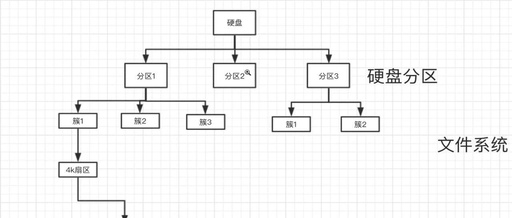
Question 0: Disk Structure Hard disks are divided into sectors (each sector is 512b or 4kb). The first sector records: the starting sector number of the partition, the ending sector number of the partition, the type of partition (linux/swap), and the status of the partition (whether it is bootable). Question 1: How are disks partitioned … Read more

Understanding SWAP Partitions in Linux Systems

Recently, after adjusting my hard disk partitions, I found that my Ubuntu often froze, with the mouse pointer not responding promptly. After using free, I discovered that there was no SWAP information. It turned out that the partition modification caused the SWAP partition to become ineffective (my 2GB DDR struggled while downloading the Android source … Read more

Summary of Linux Storage Expansion

Core Concepts 1. Disk: Underlying Storage Hardware A disk is a general term for physical storage devices, forming the basis of all storage management, corresponding to actual hardware (such as mechanical hard drives HDD, solid-state drives SSD) or virtual disks in a virtualization environment (such as VMware’s VMDK, KVM’s QCOW2, cloud server’s cloud disk). Device … Read more

Getting Started in 30 Minutes: Practical Disk Management on Linux Servers (Including Partitioning, Formatting, and Mounting Tutorials)

Question 0: Disk Structure The hard disk is divided into sectors (each sector is 512b or 4kb). The first sector records: the starting sector number of the partition, the ending sector number of the partition, the type of partition (linux/swap), and the status of the partition (whether it is bootable). Question 1: How are disks … Read more

A Comprehensive Guide to Disk and Partition Management in Linux Systems, Covering Core Operations like Viewing, Managing, and Optimizing

A Comprehensive Guide to Disk and Partition Management in Linux Systems, Covering Core Operations like Viewing, Managing, and Optimizing

1. Viewing Basic Disk Information 1. List All Disk Devices lsblk # Tree view of disks and partitions lsblk -o NAME,SIZE,FSTYPE,MOUNTPOINT # Custom columns sudo fdisk -l # Detailed partition table information (requires root) Example Output: NAME SIZE FSTYPE MOUNTPOINT sda 100G ├─sda1 512M vfat /boot └─sda2 99.5G ext4 / nvme0n1 500G ├─nvme0n1p1 100G ext4 … Read more

Expanding and Migrating a Linux System

Expanding and Migrating a Linux System

Problem Environment: System: Linux-Debian, Boot Method: BIOS MBR. Initially, only 50GB was selected as the system disk during installation. After six months, storage is insufficient, and the system needs to be expanded to 100GB. Root Terminal Command Line Operations Execute the <span>fdisk -l</span> command to view the disk partition information in the system. root@Debian:~# fdisk … Read more