Recently, Crab has been learning about AI Agents, reading some books and purchasing online courses. However, most of them are conceptual or no-code AI Agents, while Crab needs a coded AI Agent, not one that simply configures settings using low-code platforms.
What is an AI Agent?
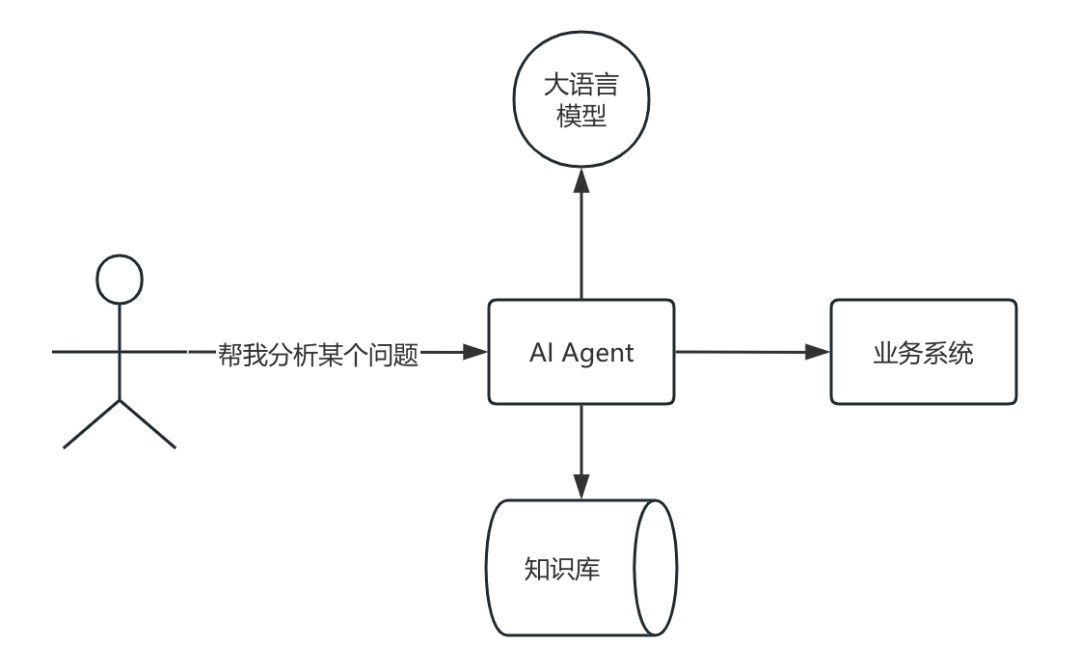
The image above illustrates the relationship of AI Agents within a system.
Let’s take the example of making scrambled eggs with tomatoes:
Traditional Method:
You need to specify clear steps: how many steps there are, what to do first, what to do next. The traditional method is characterized by detailed instructions that must be followed strictly.
1. Prepare the ingredients
2. Wash the pan and add oil
3. Add tomatoes and eggs, stir-fry
4. Add seasonings
5. Plate the dish
AI Agent Method:
1. State the requirement: Help me make scrambled eggs with tomatoes, without telling it how to do it step by step.
2. Provide ingredient information: Tomatoes and eggs are in the fridge, seasonings are in the cupboard.
Then wait a moment, and the dish will be ready. Unlike the traditional method, it does not require you to detail the instructions; you only need to provide some relevant information, and it will think for itself.
The information provided in step 2 is considered private information (knowledge not possessed by large models) that needs to be communicated to the AI for it to utilize this information.
What is MCP?
Retrieving ingredients from the fridge and seasonings from the cupboard requires interaction with the brain. To interact efficiently and simply with different objects in the external world, a communication protocol needs to be defined, as shown in the diagram below:
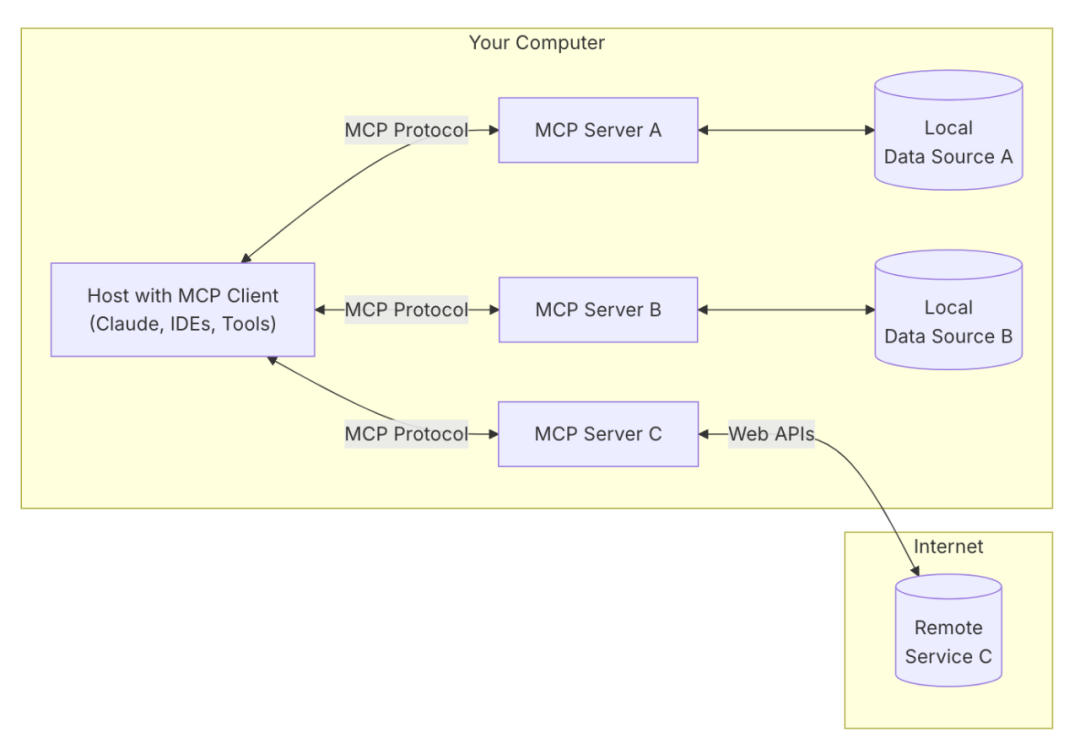
This is MCP, which stands for Model Context Protocol. It defines the interaction protocol between large language models and external systems.
What is the workflow of an AI Agent?
The user poses a question, and the system provides an answer. The complete flowchart is as follows:
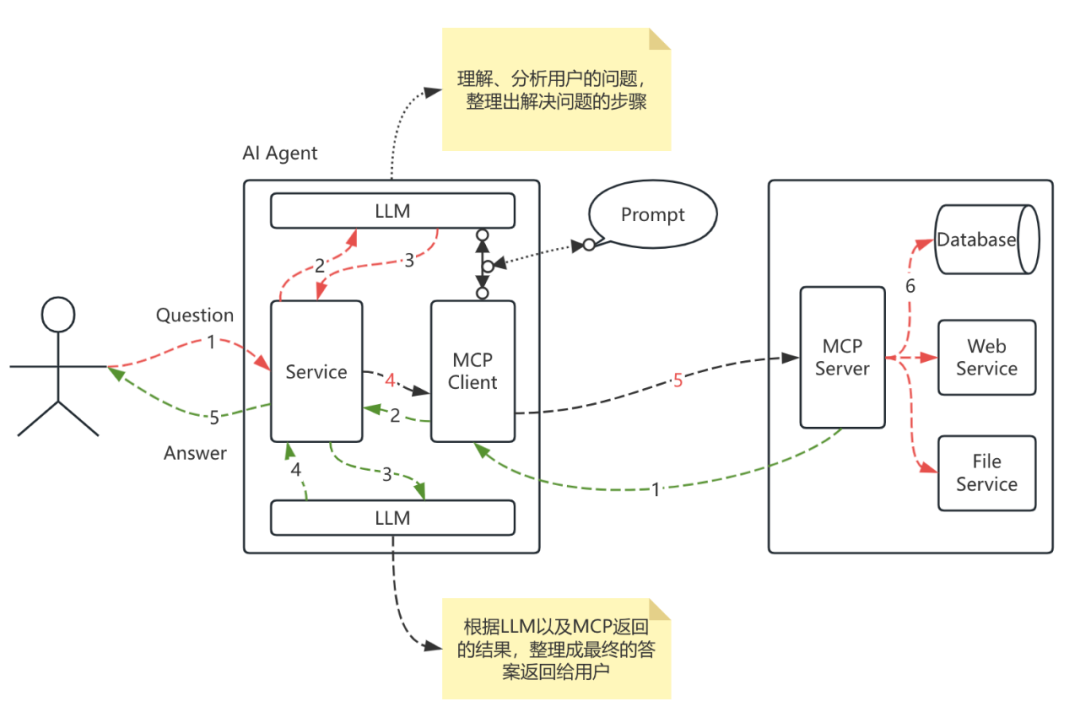
- Red dashed line: Direction of question transmission
- Green dashed line: Direction of answer transmission
MCP Streamable-HTTP Protocol
On May 9th, fastmcp supported the latest streamable-http protocol.
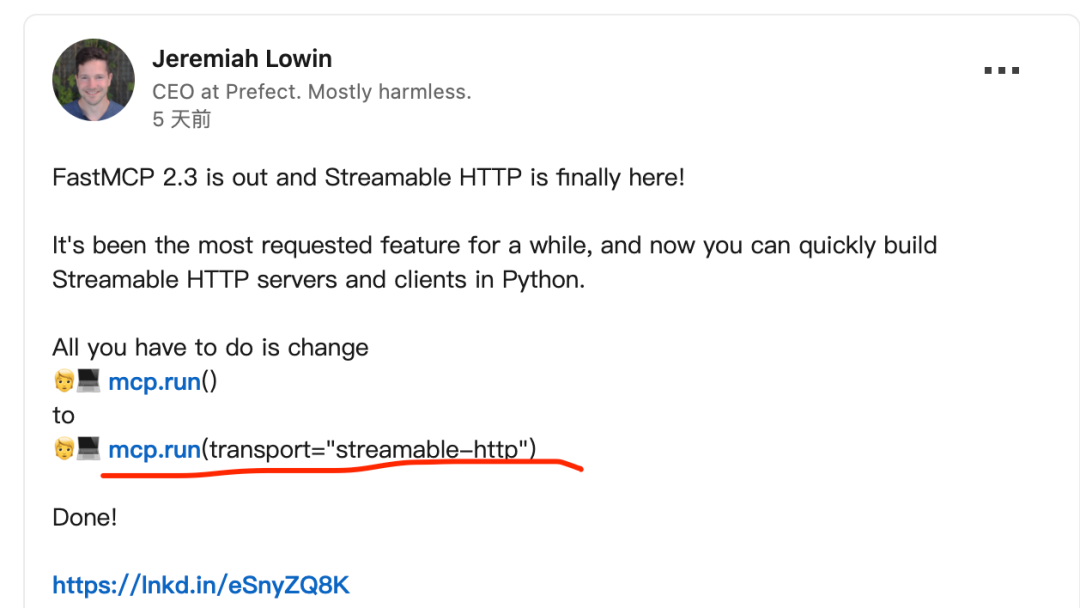
Crab is eager to give it a try.
Previously, fastmcp only supported two protocols: stdio and sse.
The former’s services cannot be accessed via the web.
Although the latter can be accessed via the web, it has many issues.
Rather than talking too much, it’s better to try it out:
According to the documentation, we will write a multiplication function as a tool for MCP.
Server
from fastmcp import FastMCP

mcp = FastMCP(name="MyAssistantServer")

mcp_with_instructions = FastMCP(
    name="HelpfulAssistant",
    instructions="""
        This server provides data analysis tools.
        Call get_average() to analyze numerical data.
        """
)

@mcp.tool()
def multiply(a: float, b: float) -> float:
    """Multiplies two numbers together."""
    return a * b

if __name__ == "__main__":
    mcp.run(transport="streamable-http", host="host.docker.internal", port=9001)
As we can see, the MCP server demo is quite simple. If additional functionalities are needed in practice, such as accessing business systems, they can be implemented as required.
Next, let’s write the client, paying attention to several key aspects.
1. A prompt needs to be written for the LLM, which tells the LLM what tools are available for use.
You are an AI assistant, primarily helping users solve problems, including but not limited to programming, researching, etc.

====

Tool Usage

You have a set of tools available with user authorization. For each question, you can use one tool at a time, responding to the user's question based on the tool's returned results.

# Tools

Usage:
<use_mcp_tool>
<server_name>server name here</server_name>
<tool_name>tool name here</tool_name>
<arguments>
{
  "param1": "value1",
  "param2": "value2"
}
</arguments>
</use_mcp_tool>

# Tool Call Example
## Example 1: Query Travel Planning

<use_mcp_tool>
<server_name>weather-server</server_name>
<tool_name>get_forecast</tool_name>
<arguments>
{
  "city": "Beijing",
  "days": 3
}
</arguments>
</use_mcp_tool>

===

# Connecting to MCP Service

Once the MCP service is successfully connected, you can use the tools provided in the service: use_mcp_tool
<$MCP_INFO$>

===

Capabilities
- You can use additional tools and resources provided by the MCP service to solve problems
====

Rules
- MCP operations use one tool per question

====

Goals

For the given task, break it down into clear steps and complete them in an orderly manner.
1. Analyze the user's task and set clear, achievable goals to complete it. Prioritize these goals logically.
2. Complete these goals in order, using one available tool at a time if necessary. Each goal should correspond to a different step in your problem-solving process.
2. The LLM has two interactions:
One is to understand the user’s question and analyze the solution steps;
The other is to organize the data returned from each step and finally return the result to the user.
The complete code is as follows:
Client
from fastmcp import Client
import asyncio
import configparser
from openai import OpenAI
import json
import re
from lxml import etree

# The Client automatically uses StreamableHttpTransport for HTTP URLs
client = Client("http://host.docker.internal:9001/mcp")
config = configparser.ConfigParser()
config.read('config.ini')

deepseek_api_key = config.get('deepseek', 'deepseek_api_key')
deepseek_base_url = config.get('deepseek', 'deepseek_base_url')
deepseek_model = config.get('deepseek', 'deepseek_model')

def parse_tool_string(tool_string: str) -> tuple[str, str, dict]:
    tool_string = re.findall("(<use_mcp_tool>.*?</use_mcp_tool>)", tool_string, re.S)[0]
    root = etree.fromstring(tool_string)
    server_name = root.find('server_name').text
    tool_name = root.find('tool_name').text
    try:
        tool_args = json.loads(root.find('arguments').text)
    except json.JSONDecodeError:
        raise ValueError("Invalid tool arguments")
    return server_name, tool_name, tool_args

async def main():

    API_KEY = deepseek_api_key
    BASE_URL = deepseek_base_url
    MODEL = deepseek_model
    mcp_name="math-http"
    openai_client = OpenAI(api_key=API_KEY, base_url=BASE_URL)
    messages = []
    with open("./MCP_Prompt.txt", "r", encoding="utf-8") as file:
         system_prompt = file.read()
    async with client:
        response = await client.list_tools()
        available_tools = ['##' + mcp_name + '\n### Available Tools\n- ' + tool.name + "\n" + tool.description + "\n" + json.dumps(tool.inputSchema) for tool in response]
        system_prompt = system_prompt.replace("<$MCP_INFO$>", "\n".join(available_tools)+"\n<$MCP_INFO$>\n")
    messages.append(
        {
            "role": "system",
            "content": system_prompt
        }
    )
    messages.append(
        {
            "role": "user",
            "content": "What is 5 multiplied by 3?"
        }
    )

    response = openai_client.chat.completions.create(
        model=MODEL,
        max_tokens=1024,
        messages=messages
    )

    # Process response and handle tool calls
    final_text = []
    content = response.choices[0].message.content
    if '<use_mcp_tool>' not in content:
        final_text.append("!mcp" + content)
    else:
        server_name, tool_name, tool_args = parse_tool_string(content)

        async with client:
            result = await client.call_tool(tool_name, tool_args)
            content = result[0].text

            messages.append({
                "role": "assistant",
                "content": content
            })
            messages.append({
                "role": "user",
                "content": f"[Tool {tool_name} \n returned: {result}]"
            })

            response = openai_client.chat.completions.create(
                model=MODEL,
                max_tokens=1024,
                messages=messages
            )
            final_text.append(response.choices[0].message.content)
    print(final_text)

asyncio.run(main())
Running the client yields the correct result:
5 multiplied by 3 equals 15
Next StepsCrab has been focusing on observable domains and plans to experiment with root cause automatic analysis in distributed systems. The initial idea is to provide the request chain data and metrics from different observables to the LLM through MCP tools to assist in root cause analysis.
References
The code implemented in this article references the following articles:
Goodbye SSE, Hello Streamable HTTP – The Transmission Mechanism Innovation of MCP Protocol
https://modelcontextprotocol.io/introduction
https://gofastmcp.com/clients/transports
/ END /
【We welcome everyone to leave comments in the comment section】
Follow our public account to understand the current situation of those who have been drifting in Beijing for over 20 years 👇  Every time you “like or view” is motivation for Crab👇