A practical guide for engineers: from touch screens to industrial control, from C++ to Qt, Electron, and touch protocols, this article clarifies the core technology selection behind HMI.
1. What is HMI? It’s More Than Just “Touching the Screen”.
HMI, short for Human-Machine Interface, can be simply understood as:
A device “frontend” that is understandable and operable by humans.
From industrial touch screens and in-vehicle central controls to medical instruments and smart home control panels, almost all products involving “human + machine” require an HMI interface.
📦 Here are a few HMI application scenarios you might be familiar with:
- Touch screen operation panels on factory automation production lines
- LCD control interfaces on smart air conditioners / refrigerators / water heaters
- Control consoles for smart elevators and robotic arms
- In-vehicle central control systems and charging station operation screens
- Parameter settings and chart displays on medical devices
Whether you are engaged in embedded development, upper computer applications, or AIoT products, HMI is the most critical interaction bridge between devices and users..
2. Classification of HMI Development Technologies: It’s Not Just Qt and PLC
HMI development is not a “single technology” but a combination of technologies including UI frameworks, communication protocols, operating platforms, and deployment methods. Generally, we can understand it in two ways:
2.1 By Platform: Embedded vs Upper Computer
| Type | Operating Environment | Development Language | Typical Scenarios |
|---|---|---|---|
| Embedded HMI | Linux/RTOS/Bare Metal + MCU/ARM | C / C++ / Qt / Micropython | PLC panels, IoT control screens |
| Upper Computer HMI | Windows / Linux PC | C# / WPF / Electron / PyQt | Industrial PCs, remote control consoles |
2.2 By Architecture: Local Rendering vs Web Remote
| Architecture | Description | Technology Stack |
|---|---|---|
| Local HMI | Application and display run on the same device | Qt, LVGL, WPF, TGUI |
| Web HMI | The interface runs in a browser and communicates with devices over the network | HTML5 + Vue/React + WebSocket/MQTT |
📌 Tip:
Modern HMIs are increasingly leaning towards “separation of UI and logic“, with concepts like “micro-frontend HMI” and “containerized deployable UI” emerging, focusing on improving scalability and maintenance efficiency.
2.3 Overview of Common HMI Development Technologies
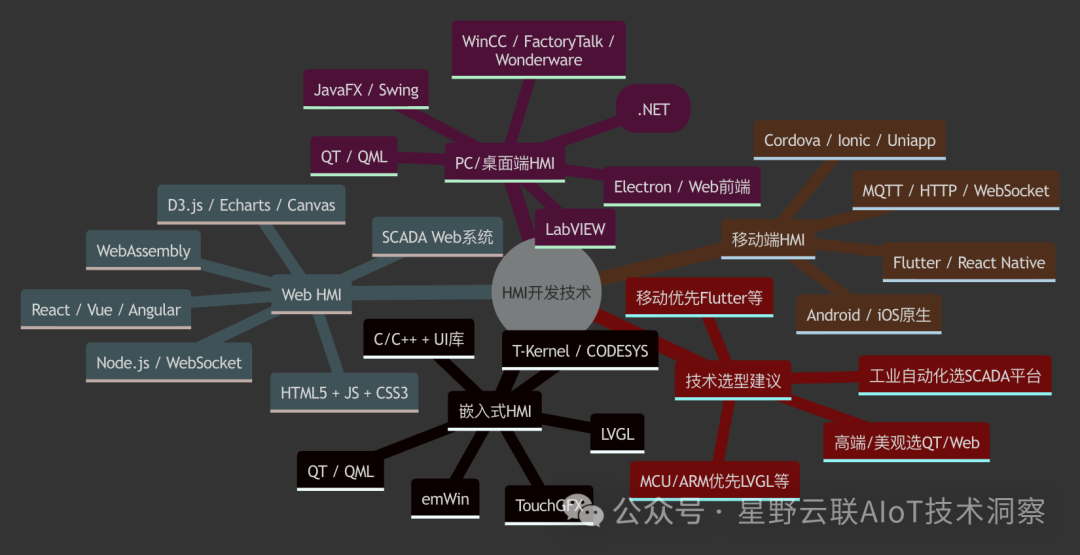
Mind map of HMI development technology routes
3. Mainstream HMI Development Technology Selection Guide
Although “drawing an interface” sounds simple, in actual engineering, every choice directly relates to your product’s cost, launch cycle, and maintenance costs. Let’s discuss the real technical advantages and disadvantages of several mainstream solutions.
3.1 Embedded Touch Screen Development Technologies
Applicable to: Industrial equipment, PLC panels, main control of charging piles, medical instrument control interfaces, etc.
✅ Qt for Embedded Linux
- Features: Strong graphics capabilities, cross-platform, dual licensing (open source/commercial)
- Advantages: Rich controls, smooth animations, compatible with mainstream ARM platforms
- Disadvantages: Relatively high resource consumption, embedded porting requires Yocto/OpenEmbedded
- Recommended scenarios: High-resolution capacitive screens + Linux systems
📌 Toolchain: Qt Creator + QML + C++
✅ LVGL (Light and Versatile Graphics Library)
- Features: Ultra-lightweight GUI library, suitable for MCUs and RTOS
- Advantages: Low resource usage (tens of KB), supports animations, Chinese fonts, touch events
- Disadvantages: Does not come with an operating system, developers need to integrate task scheduling themselves
- Recommended scenarios: Low-cost single-chip solutions (STM32, ESP32, etc.)
📌 Toolchain: SquareLine Studio (WYSIWYG)
✅ Dedicated Module Development (Nextion, DWIN, etc.)
- Features: Built-in controller and touch UI engine
- Advantages: Integrated screen, driver, and tools; communicates with the main control via serial
- Disadvantages: Weak customizability, limited interface effects
- Recommended scenarios: Simple interaction needs, such as switch control and status viewing
📌 Toolchain: Nextion Editor / DWIN Smart Editor
3.2 Upper Computer Development Technologies (Industrial/Desktop Side)
Applicable to: Industrial PCs on Windows platform, operation and maintenance tools, factory management systems, etc.
✅ C# + WPF
- Advantages: High development efficiency, rich community, binds Windows API
- Disadvantages: Weak cross-platform capability
- Suitable for: Internal industrial software, MES terminals, factory monitoring
📌 Toolchain: Visual Studio + XAML + .NET Framework
✅ Electron (Node.js + Web)
- Advantages: Cross-platform, beautiful UI, web technology stack
- Disadvantages: High memory usage, not suitable for resource-constrained scenarios
- Recommended: Needs to be deployed on Win/Linux desktops, high interaction requirements for B2B clients
📌 Framework suggestion: Electron + Vue3 + WebSocket
✅ PyQt / PySide6
- Advantages: Suitable for scientific research/automation script tools with GUI
- Disadvantages: Poor maintainability for large projects
- Recommended: Device debugging tools, engineer assistant software
3.3 Web Remote HMI: The Browser is the Interface
Applicable to: Remote industrial control, IoT platforms, SaaS systems embedded control consoles
- Core technologies: Vue3 / React + WebSocket/MQTT
- Features:
- Frontend deployed in the browser, backend communicates with devices via MQTT or HTTP
- Suitable for multi-terminal access (PC + mobile + tablet)
- Advantages:
- Low deployment and maintenance costs, quick upgrades
- Decoupled UI and control, more flexible security policies
- Typical scenarios:
- Smart energy monitoring platform
- Remote gateway configuration interface
- Industrial IoT portal
3.4 Visual Development Platforms (Low-Code/No-Code HMI)
Suitable for users with low development capabilities to quickly complete interface construction and data integration.
| Tool | Features | Entry Barrier | Open Source |
|---|---|---|---|
| Codesys HMI | Good PLC integration, strong industrial protocol support | Requires PLC integration | ❌ |
| DashIO | Visual data HMI similar to Node-RED | Medium | ✅ |
| Crank Storyboard | Strong animations, supports MCU | Commercial | ❌ |
| Wecon LeviStudioU | Widely used touch screen design tool in China | Low | ❌ |
| TAURI + Svelte | Emerging web desktop framework (lighter than Electron) | High | ✅ |
4. HMI Technology Selection Recommendations for Typical Scenarios
Let’s recommend suitable HMI technology solutions based on actual business needs corresponding to different scenarios:
| Scenario | Recommended Solution | Technical Description |
|---|---|---|
| 🌡 Industrial Touch Screen Panel | Qt Embedded + Yocto | Strong graphics, good adaptability, suitable for ARM SoC |
| 📟 Small Size MCU Touch | LVGL / Nextion | Low memory usage, high development efficiency |
| 🖥 Workshop Upper Computer Control | C# + WPF or PyQt | Fast development, supports charts and Modbus control |
| 🌐 Smart Factory Large Screen | Electron + Vue3 | Cross-platform + Web UI, beautiful and easy to update |
| 📲 Remote Operation and Maintenance Console | Web HMI (Vue/MQTT) | Can be embedded in IoT platforms, easier for remote maintenance |
| 🧪 Engineering Debugging Assistant | PyQt + Serial Communication | Suitable for R&D use, simple and direct logic |
| 🧰 Lightweight SaaS Console | Tauri + Svelte / Vue | Lightweight performance, suitable for desktop apps with embedded web interfaces |
5. Choosing the Right Technology Stack for Smoother Interactions
Overview of technology selection:
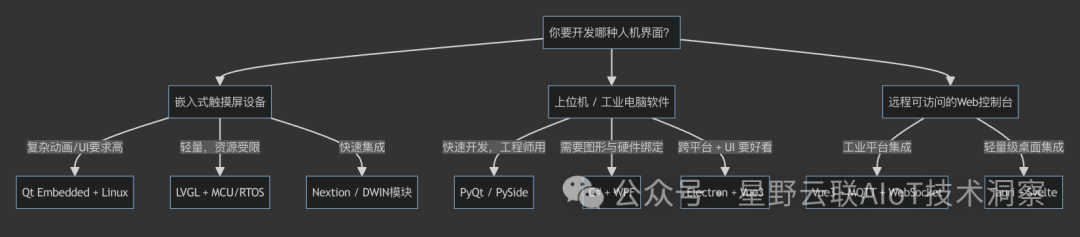
Illustration of the HMI development technology selection process
HMI development is far more than just “dragging a few buttons and writing a few events”; it is theexperience engine that connects people and machines, determining whether the system is “usable, user-friendly, and worth using”.
📌 Quick decision-making suggestions:
- High performance + rich interaction → Qt Embedded
- Extreme resources + cost-sensitive → LVGL
- Debugging tools or quick delivery → PyQt / Electron
- Large screen dashboards + SaaS platform → Web + MQTT
- One-person project or product MVP → Tauri + Vue/Svelte
You are not just choosing technology; you are choosing a foundational system that can be iterated in the future.