 Tianjin Science Popularization takes you on an exciting science journey!
Currently, there are more and more devices on the market that support 4K displays, and prices are starting to fluctuate. A 50-inch 4K TV from domestic brands is around 5K; the price difference increases with larger sizes. 4K monitors from Dell, ASUS, and Samsung have also introduced budget models, with the cheapest being around 4K. It is certain that with humanity’s endless “appetite,” the demand for 4K will only grow until it becomes fully popularized.

So, how much do you know about 4K? Is it 4096×2160 resolution, which is four times that of 1080P? Brighter colors? Sharper and more detailed images? Higher prices… I believe many people’s understanding stops here. Of course, for most consumers, knowing this is enough. However, if you are someone who likes to dig deeper, a tech enthusiast wanting to learn more, then this is just scratching the surface.
In fact, 4K is not just a significant upgrade in resolution; its impact far exceeds the upgrade from 1680×1050 to 1920×1080, posing more severe challenges in terms of application experience, UI optimization, and performance.

What Exactly Is 4K?
To understand 4K products, we must first start with the relevant standards of 4K images.
The size of an image can be expressed in pixel resolution. For example, a resolution of 1920*1080 means that the image consists of 1920 pixels horizontally per row and 1080 pixels vertically per column. For convenience in communication, the industry often refers to the image size by the horizontal pixel value, and to simplify the process, “K” is generally used to describe pixel values, where 1K equals 1024 pixels, and several K refers to the horizontal pixel value of the image reaching or approaching several multiples of 1024.

Thus, a 4K image refers to an image with a horizontal pixel value reaching or approaching 4096 pixels, most commonly specifically referring to the 4096*2160 resolution. Depending on the usage, there are various derivative resolutions for 4K images, such as Full Aperture 4K at 4096*3112, Academy 4K at 3656*2664, and UHDTV standard at 3840*2160, all of which fall under the category of 4K resolution.
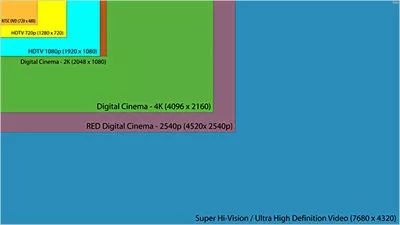
The most common 4K resolutions today are 4096*2160 and 3840*2160. The former is mainly used in the digital cinema field, while the latter is more commonly used in 4K TVs or 4K monitors. TVs or monitors using 3840*2160 resolution are also referred to as UHDTV standard products.
The UHDTV standard, established by the International Telecommunication Union (ITU), stands for Ultra High Definition Television, which is what you often hear in the stores as Ultra HD Television. Compared to the previous generation of 1920*1080 Full High Definition Television (FHDTV), UHDTV has a resolution that is exactly four times that of FHDTV, allowing for more detailed images to be displayed on the same screen size. Moreover, since the aspect ratio is also 16:9, UHDTV standard products can also well accommodate FHDTV images, making them easier for consumers to accept.

16 times that of 1080P’s 7680*4320 8K output image
However, strictly speaking, 4K TVs and UHDTV ultra HD TVs cannot be equated. The latter, in addition to the 3840*2160 resolution, also includes the 7680*4320 resolution, which is referred to as “8K.” Therefore, technically, 4K TVs belong to UHDTV, but UHDTV is not limited to 4K TVs.
How High Should the Refresh Rate Be for 4K?
For 4K resolution, it only has two attributes: horizontal pixel value and vertical pixel value. However, for 4K TVs and 4K monitor products, in addition to meeting the resolution requirements, the refresh rate is also crucial.
The refresh rate refers to the rate at which the screen image is updated. Previously, CRT monitors displayed images by exciting the phosphor on the screen with electrons. However, since only one pixel point can be lit at a time, the monitor must re-excite the phosphor before the afterglow of the phosphor fades to display a complete image.
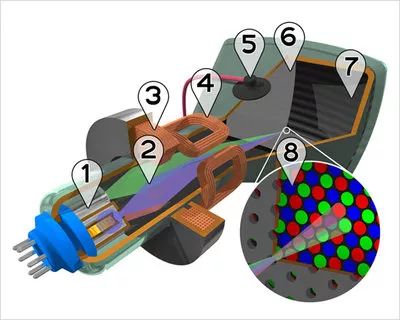
However, the afterglow of the CRT monitor’s phosphor actually lasts a very short time, so electrons must re-excite the phosphor in a very short time to maintain image stability, and this excitation frequency is what we now commonly refer to as the refresh rate. If the refresh rate is insufficient, the CRT monitor’s image will flicker, which is very uncomfortable to look at. Generally speaking, the higher the refresh rate of a CRT monitor, the better, and it should be at least above 85Hz for the human eye not to perceive noticeable flicker.
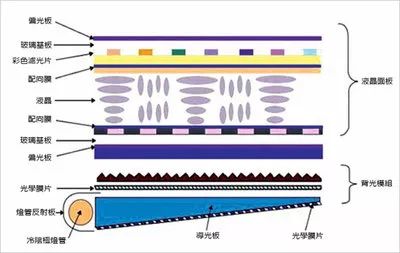
Now, televisions and monitors have entered the LCD era, and the working principle of LCD is completely different from that of CRT; it is more like a slide show, just using LCD to replace the film.
The pixels of an LCD can be seen as individual switches, requiring only one refresh action to display a stable image, which can be done only when the image changes. Currently, LCD screens still refresh images at a constant frequency, even for static images, mainly for product compatibility and also to facilitate the rapid transition of dynamic images. Of course, compared to CRT screens, which require “the higher the refresh rate, the better,” the requirements for refresh rates on LCD screens are undoubtedly much lower, generally not lower than 24Hz to ensure smooth images.
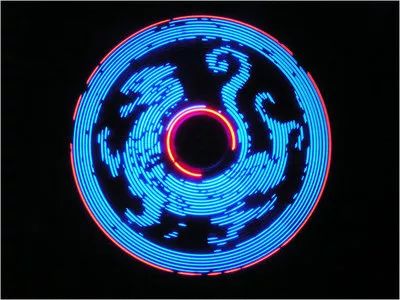 Because of the visual residual effect of the human eye, we can create such patterns with rotating LED lights
So why do LCD screens need a refresh rate above 24Hz? In fact, this is determined by the visual residual time of the human eye or the response time of the optic nerve, which is about 1/24 of a second. In other words, when the speed of image changes reaches 24 frames per second, due to the visual residual effect, the human eye sees the image not as separate frames but as a continuous animation, which is the principle of movies and the reason why most video frame rates are 24FPS. Since LCD screens need to refresh the screen when the image changes, when playing a video at 24FPS, the screen must refresh at least 24 times per second to ensure that each frame of the video appears on the screen, allowing the human eye to see a coherent image. This is why the refresh rate requirement for LCD screens is not less than 24Hz.
Having said all this, what does it have to do with 4K? In fact, similarly, LCD screens are so widely used that they are present in various sizes in our lives, including 4K products. Therefore, to output smooth dynamic images at 4K resolution, the screen refresh rate cannot be lower than 24Hz. Thus, for the two mainstream 4K resolutions of 3840*2160 and 4096*2160, they have different refresh rate specifications such as 24/25/30/50/60Hz, with the more common ones being 24Hz, 30Hz, and 60Hz. A refresh rate of 60Hz is basically found in 4K monitors or flagship TVs.
Which Video Interfaces Can Output 4K?
Currently, the interfaces that can output 4K resolution are only HDMI and DisplayPort. HDMI must use products that support HDMI 1.4a or higher standards, with the highest output specifications for 4K resolution being 4096*2160 & 24 Hz or 3840*2160 & 30Hz; DisplayPort needs to support DP 1.2 standard, but can output up to 60Hz for both 4096*2160 and 3840*2160 resolutions.
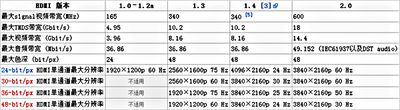
The reason for such a distinction ultimately comes down to the different data bandwidths corresponding to the two interfaces. The data bandwidth of the HDMI 1.4a interface is 10.2Gbps, while the DP 1.2 interface has a data bandwidth of up to 21.6Gbps, which is more than double that of the former. For HDMI to output 4K resolution at 60Hz, it will have to wait until the HDMI 2.0 interface officially arrives, which has a data bandwidth of 18Gbps and can fully meet the output requirements for 4K resolution at 60Hz.
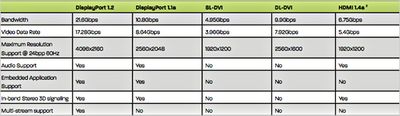
It is worth mentioning that currently, whether a product can output 60Hz refresh rate at 4K resolution is the most intuitive distinction between HDMI and DP interfaces. Products configured only with HDMI interfaces definitely cannot output 4K images at 60Hz, and only devices equipped with DP interfaces have this possibility. Most mainstream 4K TV screen specifications currently only reach 3840*2160 & 30Hz, so they mostly only come with HDMI interfaces, while only a few flagship products will be equipped with DP interfaces. This is also the reason we mentioned earlier that only flagship 4K TVs can support 60Hz refresh rates.
(Source: Pacific Computer Network)