Click Jicheng Training to the top, pushing you at 7:30 every day
Today, I am sharing a practical article to help you understand what a perfect PLC program looks like, as well as the programming standards and suggestions for PLC in actual work.
Design Requirements for a Perfect PLC Program
A complete PLC program is not just about getting the system to run; it also requires complete comments, excellent architecture, good scalability, a comprehensive alarm protection system, and a simulation system before operation.
1. Simplicity
Keep the PLC program as simple as possible. Simplicity means using standardized program frameworks and simple instructions whenever possible.
To achieve simplicity, focus on optimizing the program structure and simplifying the program with flow control instructions. Additionally, replace single-function instructions with more powerful ones and pay attention to the order of instructions.
2. Readability
The designed program must be readable. This not only aids the programmer’s understanding and debugging but also helps others comprehend your program, making it easier for users to maintain. When necessary, it can also facilitate program promotion.
To enhance readability, the designed program should be as clear as possible. Pay attention to hierarchy and implement modularization, even using object-oriented design methods. Utilize standard designs as much as possible.
In special cases, when using language programming, it is mostly advisable to use ladder diagram programming for easier reading.
Moreover, I/O allocation should follow a regular pattern for better memorization and understanding. When necessary, some comments should be made. The use of internal devices should also follow patterns and not be used arbitrarily.
Readability should be considered from the beginning of program design. This is not easy to achieve completely. During debugging, the addition or removal of instructions and changes in the use of internal devices may make an originally clear program somewhat messy. Therefore, leave some room for adjustments during design and tidy up the program after debugging for higher quality.
Program comments should at least include the following aspects:
A. System comments: Copyright company of the entire program and its purpose.
B. Program block comments: Main purpose of this program block and the author.
C. Segment comments: Purpose of this segment of code.
D. Variable comments: Importance is self-evident, including I/O comments and intermediate variable comments.
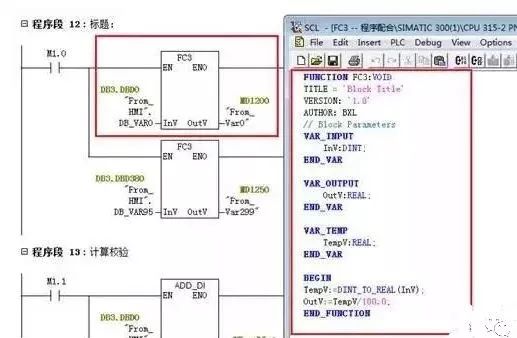
As for confidentiality considerations, I believe it should be addressed through encryption algorithms or block encryption, rather than by reducing comments.
3. Correctness
The PLC program must be correct and verified through actual work to prove that it can operate correctly. This is the most fundamental requirement for a PLC program; if this cannot be achieved, nothing else matters.
To ensure correctness, instructions must be used accurately, and internal devices must be used correctly. Accurate use of instructions is related to a clear understanding of their meanings and conditions of use. If necessary, small programs can be written to test unclear instructions.
Some instructions may differ in details due to different manufacturing batches or series models of PLCs, so refer carefully to the programming manual.
Correct use of internal devices is also crucial. For example, some PLCs have power-off protection, while others do not. Ensure that power-off protection devices are used where required, and vice versa.
In summary, accurate use of instructions and correct use of internal devices are essential for ensuring that the programmed program works correctly, which is the most fundamental requirement for PLC programs.
For instance, Siemens’ rising edge and falling edge require using variables with memory functions as intermediate variables, such as M points or DB points; using FC’s temp variable will cause issues.
4. Reliability
The program must not only be correct but also reliable. Reliability reflects the stability of the PLC program, which is also a basic requirement for PLC programs.
Some PLC programs may work correctly under normal working conditions or legitimate operations but fail under abnormal conditions (such as temporary power outages) or illegal operations (such as pressing buttons out of order or pressing several buttons simultaneously). Such programs are not very reliable or stable, indicating poor program quality.
A good PLC program can recognize abnormal working conditions and integrate them with normal conditions, allowing the program to adapt to various situations. A good PLC program can reject illegal operations without leaving any “traces” and only accepts legitimate operations.
Interlocking is a common method to reject illegal operations, which is frequently used in relay circuits and can also be inherited by PLCs.
5. Modifiability
The program should be easy to modify, meaning it should be convenient to change.
One of the characteristics of PLCs is convenience, allowing them to be flexibly applied to various situations. This is achieved through modifications or redesigning the program.
Redesigning the program is necessary when changing the PLC process requirements, which involves not only recompiling the program but also reallocating I/O. In most cases, modifications are sufficient without needing to recompile the program, which requires the program to be flexible and easy to modify.
Easy modification means elasticity, requiring only minimal changes to achieve the goal of altering parameters or modifying actions.
6. Scalability
Many programs may be written before arriving on-site, but additional programs may need to be added on-site. To avoid disrupting the overall system structure, it is essential to reserve some space in each functional area for future use.
Leave sufficient margins in hardware, and when writing software, consider manual, automatic, and semi-automatic operations, leaving appropriate positions.
7. Comprehensive Alarm System
PLC systems are often used in industrial environments, and every accident can cause varying degrees of loss. To minimize losses during accidents, it is crucial to prioritize PLC alarms and protections, making them an important component of the system.
8. Program Simulation
To ensure the debugging progress on-site or to demonstrate to clients, it is often necessary to conduct full automatic simulations of the program before arriving on-site. This requires adding simulation program parts to the program, which should be disconnected after normal on-site operation. To enable the program to have simulation functions, the following tasks need to be completed:
(1) Convert the actual PLC I/O points into intermediate variables or data block variables;
(2) Write simulation programs for each device based on process requirements.
During the design process of the PLC program, meeting the above requirements qualifies it as a good program.
PLC Program Design Specifications
1. Choose the appropriate PLC model and I/O point count; select special function modules when there are special functional requirements.
2. Familiarize yourself with the selected PLC programming instructions and compilation software.
3. Plan soft components, including internal relays, holding relays, data registers, timers, counters, etc.
4. Plan the program, generally in the order of fault extraction, fault handling, manual handling, automatic handling, and output handling. For larger projects or equipment, process them in functional units, such as an automated production line with elevators, transfers, and lifting rotation devices, programming them by unit segmentation.
5. Add brief segment comments before the programs written in segments or blocks to explain the functionality of that segment; if necessary, indicate the corresponding process flow. The positioning order of segmented or block programs in the overall program should generally follow the order of the process flow for better readability.
6. Before designing the program, abstract the equipment and extract shared factors such as stop, emergency stop, overload, limits, timeout, safety light curtain, collision stop, door switches, etc., and place them in the start loop or main control and interlock loop as the overarching premise for the entire program structure. On this basis, divide the program into automatic and manual functional areas.
7. Extract shared factors in the manual functional area of the program structure, such as manual, and factors that endanger equipment and personnel safety, and place them in the manual main control and interlock loop to protect, shield, and alarm manual control.
8. Extract shared factors in the automatic functional area of the program structure, such as automatic, limits, and timeout factors, and place them in the automatic main control and interlock loop to protect, shield, and alarm equipment under automatic control. A general principle is to strictly limit equipment entry while allowing more lenient exit under safety assurance.
9. The program design should include a total reset function to allow users to quickly restore normal operation in the event of equipment failure. The total reset should fully consider the safety of equipment and personnel during the reset process.
10. When switching from automatic mode to manual mode, the program should clear outputs and intermediate states from the automatic mode. Especially when using the SET instruction in automatic mode, it must be cleared with the RESET instruction in manual mode.
11. It is strictly forbidden to use dual outputs in program compilation, meaning the same output statement or output coil should not appear more than once in the program. For output usage under different mode conditions, use intermediate relays to transfer, and finally consolidate them to the output point.
12. When using touch screens, do not program other functional aspects in the control and status areas shared by the touch screen and PLC.
13. For special PLC modules, check whether their control and status areas occupy working words before use. If occupied, do not program these working words for other aspects.
14. Add Chinese comments to PLC inputs, outputs, intermediate relays, timers, counters, data registers, etc. Inputs and outputs should also have component name positions. Generally, the corresponding input points assume that the peripheral switch is connected to NO contacts, and those requiring NC contacts must be indicated in the comments. All comments should be clear and unambiguous, minimizing vague references.
15. After project debugging is complete, the final software program must be retained, and the saved file name should include project number/author/date information/version number, etc.
16. Regarding program encryption: the passwords for encrypted programs must be stored in a dedicated file, indicating the corresponding username + password + permissions, distributed to at least two people to prevent loss of access to the program.
Programming Suggestions
1. When PLC and upper computer (or touch screen) form a monitoring system, the screen often requires control modes such as “manual” and “automatic” (generally only one can be active at a time). In the program, you can use the “MOV” instruction. For example: when selecting “manual,” move constant 1 into register VB10; when selecting “automatic,” move 2 into the same register VB10. By checking the data in the register, you can determine the control mode of the system. This approach is easy to understand and avoids complicated interlocking programs.
2. When controlling analog quantities in the program, if the read analog quantity has minimal error, you can use time filtering with a delay. If the read data has significant errors, other filtering methods, such as averaging, are needed. Relevant materials can be consulted.
3. During program debugging (especially when modifying equipment, adding your program to the original device program), if a condition is met in the program statement but the output coil does not activate, check whether this segment of the program is between such statements as JUMP go to, etc. Another possibility is that after the interrupt program, conditions are met but there is no output activation; usually, this segment of the program is not scanned.
4. In sequential control programs, where one action completes before moving to the next, I find using the +10+10 control mode very convenient. The idea is to preset a register initialized to 0; when the system starts, add +10 to it. At this point, the register is 10, allowing the first action to be performed. After the first action is completed, add +10 again; now the register is 20, enabling the second action. After completing the second action, add +10 again, making the register 30. By checking the register’s data, you can determine which action to complete. When a jump action is needed, you can skip adding +10 and add +20+30… depending on actual needs.
Why add 10 instead of 1? Because after adding 10, if you need to insert an action, you can freely choose any position within those 10 gaps.
5. When designing a program, if a process fault occurs (not controlled by the control system), it is best to keep the fault phenomenon and provide visual and auditory alarms until the operator resets, to make them aware of the system’s fault. Otherwise, if the system stops, others may believe it is a problem with your program. This is generally important to consider when designing a new system.
6. Frequently called subprograms can be made into sub-modules for frequent invocation.
7. Since the movements of production machinery during work cycles require a certain amount of time, and these times have limits, you can use these times as a reference. Start a timer simultaneously with the start of the action being detected; set the timer’s preset value to be 20% to 30% longer than the normal duration of that action. The timer’s output signal can be used for alarms or automatic shutdown. If the duration of a certain action exceeds the specified time and has not transitioned to the next action when the timer reaches its preset time, the timer will issue a fault signal, stopping the normal working cycle and starting the alarm or shutdown program; this is commonly referred to as over-cycle protection.
8. Some safety detection switches (such as emergency stop buttons, safety light curtains, limit switches, etc.) should use normally closed (NC) inputs.
9. For safety and energy-saving considerations, try to design outputs to operate only when necessary, stopping output once in position, rather than having them continuously output and only disconnecting when required.
10. The action principle of executing components should be to prefer not to move rather than move erratically!
11. For single-device control: a single device must have soft manual/automatic switching, and during soft manual operation, it should have start/stop functionality. When switching from automatic to soft manual, the device should not stop; when switching from soft manual to automatic, the device’s start/stop depends on the automatic program.
12. Single devices (pumps, fans, and other large equipment) that run for 24 hours must alternate operation, and cumulative running time must be recorded unless the start/stop sequence is set by the upper computer, in which case the operator sets it themselves. Source: Internet, Author Unknown, Please Delete if Infringed
Share with your friends, let’s learn PLC programming together!
 Long press to scan the code to learn about the course
Jicheng Training Network
Jicheng Training Network is dedicated to remote education in the manufacturing industry.Focusing for 12 years, professional courses cover foundational electrical work, PLC, frequency converters, servos, human-machine interfaces, mechanical drawing, CNC, robotics, and other high-quality courses, aiming to create a high-end interactive online learning and communication platform for the manufacturing industry; with over 2 million students

 Click here if you like
 Free PLC and Electric Courses, click to read the original text