During the process of Python development, have you encountered issues with code redundancy and maintainability? Have you ever thought about how to elegantly reuse code and make the program structure clearer? Inheritance, as one of the three main features of object-oriented programming, is a powerful tool to solve these problems.
This article will take you from a beginner level to a deep understanding of all aspects of Python inheritance. Whether you are a novice just starting with Python or an advanced developer looking to understand the inheritance mechanism in depth, this article will provide you with a complete learning path. We will use practical code examples to help you thoroughly understand the essence of inheritance and master the application techniques in real projects.
🔍 What is Inheritance? Why Use Inheritance?
Problem Analysis
In daily development, we often encounter scenarios like this:
# Code without inheritance - contains a lot of duplication
class Dog:
    def __init__(self, name, age):
        self.name = name
        self.age = age

    def eat(self):
        print(f"{self.name} is eating")

    def sleep(self):
        print(f"{self.name} is sleeping")

    def bark(self):
        print(f"{self.name} is barking")

class Cat:
    def __init__(self, name, age):
        self.name = name
        self.age = age

    def eat(self):
        print(f"{self.name} is eating")

    def sleep(self):
        print(f"{self.name} is sleeping")

    def meow(self):
        print(f"{self.name} is meowing")
As we can see, there is a lot of duplicated code in the <span>Dog</span> and <span>Cat</span> classes, which violates the DRY principle (Don’t Repeat Yourself).
Solution
The inheritance mechanism allows us to create a base class (parent class) that contains common properties and methods, and then let the subclasses inherit these features while adding their own unique functionalities:
# Optimized code using inheritance
class Animal:  # Parent class/Base class
    def __init__(self, name, age):
        self.name = name
        self.age = age

    def eat(self):
        print(f"{self.name} is eating")

    def sleep(self):
        print(f"{self.name} is sleeping")

    def introduce(self):
        print(f"I am {self.name}, {self.age} years old")

class Dog(Animal):  # Subclass inherits Animal
    def bark(self):
        print(f"{self.name} is barking")

class Cat(Animal):  # Subclass inherits Animal
    def meow(self):
        print(f"{self.name} is meowing")
Code Practice
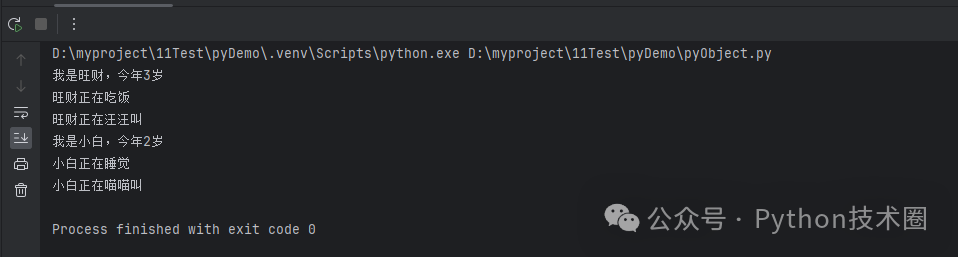
Let’s test the effect of inheritance:
# Create instances and test
 dog = Dog("Wangcai", 3)
 cat = Cat("Xiaobai", 2)

# Use methods inherited from the parent class
dog.introduce()
dog.eat()
dog.bark()

cat.introduce()
cat.sleep()
cat.meow()
Core Advantages:
- ✅ Code Reuse: Common code only needs to be written once
- ✅ Easy Maintenance: Modifying the parent class affects all subclasses
- ✅ Clear Logic: Reflects the “is a” relationship
🏗️ Core Syntax and Mechanism of Inheritance
1️⃣ Basic Inheritance Syntax
class ParentClass:
    # Parent class definition
    pass

class ChildClass(ParentClass):
    # Child class definition
    pass
2️⃣ The Magic of `super()` Function
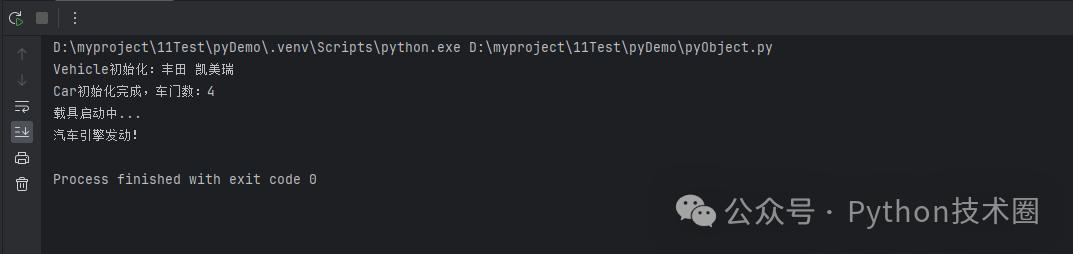
<span>super()</span> is the most important built-in function in Python inheritance, allowing us to call methods from the parent class:
class Vehicle:
    def __init__(self, brand, model):
        self.brand = brand
        self.model = model
        print(f"Vehicle initialized: {brand} {model}")

    def start(self):
        print("Vehicle starting...")

class Car(Vehicle):
    def __init__(self, brand, model, doors):
        super().__init__(brand, model)  # Call parent class's __init__
        self.doors = doors
        print(f"Car initialization complete, number of doors: {doors}")

    def start(self):
        super().start()  # Call parent class's start method
        print("Car engine started!")

# Test code
car = Car("Toyota", "Camry", 4)

car.start()
3️⃣ Method Overriding
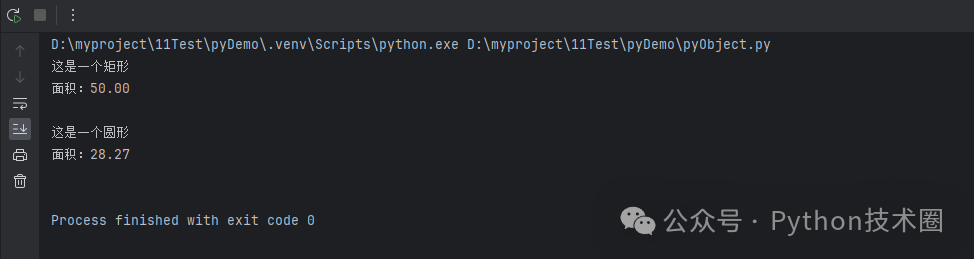
Subclasses can override methods from the parent class to provide their own implementation:
class Shape:
    def __init__(self, name):
        self.name = name

    def area(self):
        return 0  # Base class provides default implementation

    def describe(self):
        print(f"This is a {self.name}")

class Rectangle(Shape):
    def __init__(self, width, height):
        super().__init__("Rectangle")
        self.width = width
        self.height = height

    def area(self):  # Override parent method
        return self.width * self.height

class Circle(Shape):
    def __init__(self, radius):
        super().__init__("Circle")
        self.radius = radius

    def area(self):  # Override parent method
        return 3.14159 * self.radius ** 2

# Practical test
shapes = [
    Rectangle(5, 10),
    Circle(3)
]

for shape in shapes:
    shape.describe()
    print(f"Area: {shape.area():.2f}\n")
🚀 Advanced Inheritance Techniques
1️⃣ Multiple Inheritance
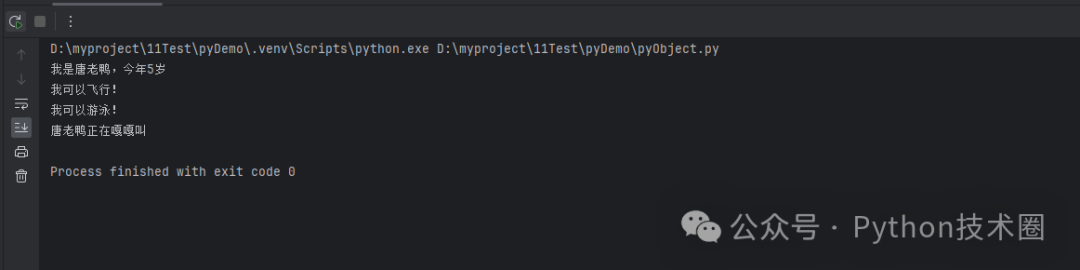
Python supports multiple inheritance, allowing a class to inherit from multiple parent classes:
# Optimized code using inheritance
class Animal:  # Parent class/Base class
    def __init__(self, name, age):
        self.name = name
        self.age = age

    def eat(self):
        print(f"{self.name} is eating")

    def sleep(self):
        print(f"{self.name} is sleeping")

    def introduce(self):
        print(f"I am {self.name}, {self.age} years old")

class Dog(Animal):  # Subclass inherits Animal
    def bark(self):
        print(f"{self.name} is barking")

class Cat(Animal):  # Subclass inherits Animal
    def meow(self):
        print(f"{self.name} is meowing")

class Flyable:
    def fly(self):
        print("I can fly!")

class Swimmable:
    def swim(self):
        print("I can swim!")

class Duck(Animal, Flyable, Swimmable):  # Multiple inheritance
    def __init__(self, name, age):
        super().__init__(name, age)

    def quack(self):
        print(f"{self.name} is quacking")

# Test multiple inheritance
duck = Duck("Donald Duck", 5)
duck.introduce()
duck.fly()
duck.swim()
duck.quack()
2️⃣ Method Resolution Order (MRO)
Use the <span>__mro__</span> attribute or <span>mro()</span> method to view the method resolution order:
print(Duck.__mro__)
# Output: (<class '__main__.Duck'>, <class '__main__.Animal'>,
#       <class '__main__.Flyable'>, <class '__main__.Swimmable'>,
#       <class 'object'>)
3️⃣ Abstract Base Classes
Use the <span>abc</span> module to create abstract base classes that enforce subclasses to implement specific methods:
from abc import ABC, abstractmethod

class DatabaseConnection(ABC):
    @abstractmethod
    def connect(self):
        """Must be implemented by subclasses"""
        pass

    @abstractmethod
    def execute_query(self, query):
        """Must be implemented by subclasses"""
        pass

    def close(self):
        """Common close method"""
        print("Database connection closed")

class MySQLConnection(DatabaseConnection):
    def connect(self):
        print("Connected to MySQL database")

    def execute_query(self, query):
        print(f"Executing in MySQL: {query}")

class PostgreSQLConnection(DatabaseConnection):
    def connect(self):
        print("Connected to PostgreSQL database")

    def execute_query(self, query):
        print(f"Executing in PostgreSQL: {query}")

# Usage example
def use_database(db: DatabaseConnection):
    db.connect()
    db.execute_query("SELECT * FROM users")
    db.close()

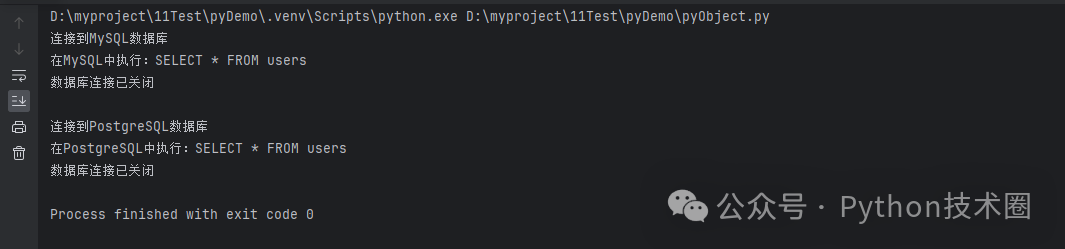
# Test
mysql_db = MySQLConnection()
postgres_db = PostgreSQLConnection()

use_database(mysql_db)
print()
use_database(postgres_db)
💼 Real Project Application Case
Case Study: Building a GUI Application Framework
Let’s demonstrate the powerful capabilities of inheritance through a practical Windows application development case:
import tkinter as tk
from tkinter import messagebox

class BaseWindow:
    """Base window class"""
    def __init__(self, title="Application", width=800, height=600):
        self.root = tk.Tk()
        self.root.title(title)
        self.root.geometry(f"{width}x{height}")
        self.setup_menu()

    def setup_menu(self):
        """Set up the base menu"""
        menubar = tk.Menu(self.root)
        self.root.config(menu=menubar)

        file_menu = tk.Menu(menubar, tearoff=0)
        menubar.add_cascade(label="File", menu=file_menu)
        file_menu.add_command(label="Exit", command=self.quit_app)

    def quit_app(self):
        """Exit the application"""
        if messagebox.askokcancel("Exit", "Are you sure you want to exit?"):
            self.root.quit()

    def run(self):
        """Run the application"""
        self.root.mainloop()

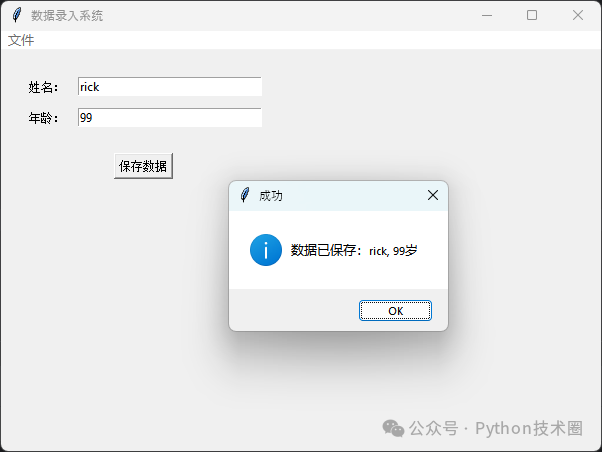
class DataEntryWindow(BaseWindow):
    """Data entry window"""
    def __init__(self):
        super().__init__("Data Entry System", 600, 400)
        self.setup_ui()

    def setup_ui(self):
        """Set up the data entry interface"""
        # Create input frame
        frame = tk.Frame(self.root, padx=20, pady=20)
        frame.pack(fill="both", expand=True)

        # Name input
        tk.Label(frame, text="Name:").grid(row=0, column=0, sticky="e", padx=5, pady=5)
        self.name_entry = tk.Entry(frame, width=30)
        self.name_entry.grid(row=0, column=1, padx=5, pady=5)

        # Age input
        tk.Label(frame, text="Age:").grid(row=1, column=0, sticky="e", padx=5, pady=5)
        self.age_entry = tk.Entry(frame, width=30)
        self.age_entry.grid(row=1, column=1, padx=5, pady=5)

        # Save button
        save_btn = tk.Button(frame, text="Save Data", command=self.save_data)
        save_btn.grid(row=2, column=0, columnspan=2, pady=20)

    def save_data(self):
        """Save data"""
        name = self.name_entry.get()
        age = self.age_entry.get()

        if name and age:
            messagebox.showinfo("Success", f"Data saved: {name}, {age} years old")
            self.clear_entries()
        else:
            messagebox.showerror("Error", "Please fill in all fields")

    def clear_entries(self):
        """Clear input fields"""
        self.name_entry.delete(0, tk.END)
        self.age_entry.delete(0, tk.END)

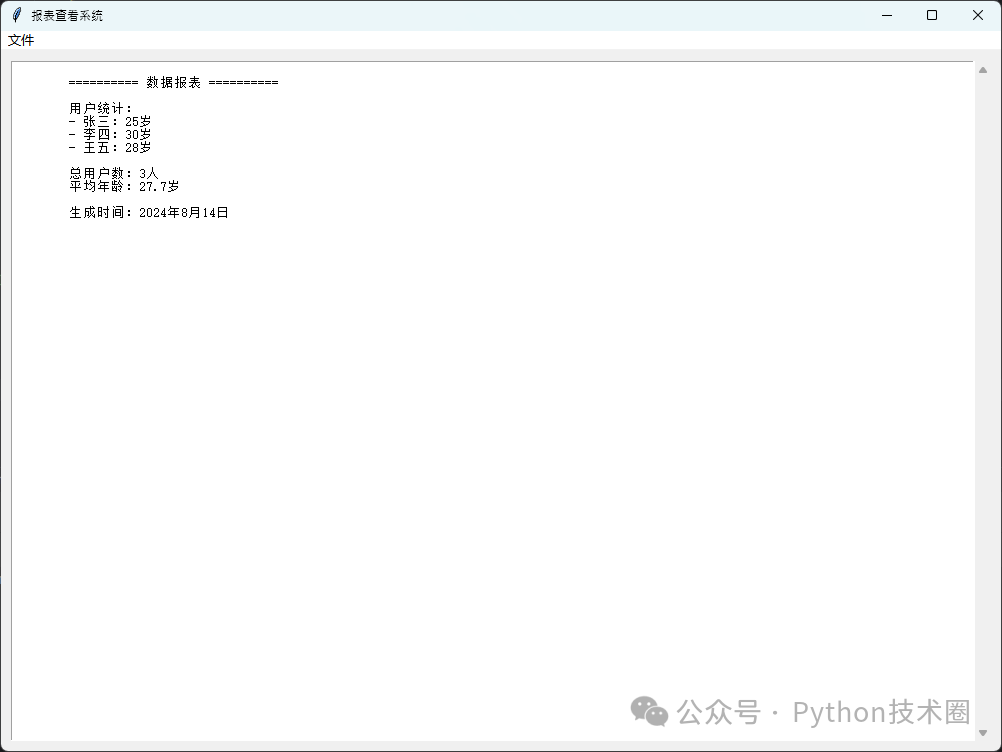
class ReportWindow(BaseWindow):
    """Report viewing window"""
    def __init__(self):
        super().__init__("Report Viewer System", 1000, 700)
        self.setup_ui()

    def setup_ui(self):
        """Set up the report interface"""
        # Create text display area
        frame = tk.Frame(self.root, padx=10, pady=10)
        frame.pack(fill="both", expand=True)

        self.text_area = tk.Text(frame, wrap="word")
        scrollbar = tk.Scrollbar(frame, orient="vertical", command=self.text_area.yview)
        self.text_area.configure(yscrollcommand=scrollbar.set)

        self.text_area.pack(side="left", fill="both", expand=True)
        scrollbar.pack(side="right", fill="y")

        # Load sample report data
        self.load_sample_data()

    def load_sample_data(self):
        """Load sample data"""
        sample_data = """
        ========== Data Report ==========

        User Statistics:
        - Zhang San: 25 years old
        - Li Si: 30 years old
        - Wang Wu: 28 years old

        Total Users: 3
        Average Age: 27.7 years

        Generation Time: August 14, 2024
        """
        self.text_area.insert("1.0", sample_data)

# Application launcher
class AppLauncher:
    @staticmethod
    def launch_data_entry():
        app = DataEntryWindow()
        app.run()

    @staticmethod
    def launch_report_viewer():
        app = ReportWindow()
        app.run()

# Usage example
if __name__ == "__main__":
    # Launch data entry application
    AppLauncher.launch_data_entry()

    # Or launch report viewer application
    # AppLauncher.launch_report_viewer()
🎯 Case Analysis
This example demonstrates the powerful role of inheritance in actual development:
- Code Reuse
<span>BaseWindow</span>provides common functionalities for window creation, menu setup, etc. - Easy Expansion New window types only need to inherit from
<span>BaseWindow</span>and implement specific functionalities - Strong Maintainability Modifying base functionalities only requires changing the parent class
🛡️ Best Practices and Common Pitfalls of Inheritance
✅ Best Practices
Follow the “is a” relationship
# ✅ Correct: A dog is an animal
class Dog(Animal):
    pass

# ❌ Incorrect: A dog is not an engine
class Dog(Engine):
    pass
Prefer Composition Over Inheritance
# ✅ Good design: Use composition
class Car:
    def __init__(self):
        self.engine = Engine()  # Composition relationship
        self.wheels = [Wheel() for _ in range(4)]

# ❌ Over-inheritance
class Car(Engine, Wheel, Seat, Door):
    pass
Keep Inheritance Hierarchy Simple
# ✅ Simple inheritance hierarchy
class Animal:
    pass

class Mammal(Animal):
    pass

class Dog(Mammal):
    pass
⚠️ Common Pitfalls
The Diamond Problem
class A:
    def method(self):
        print("A")

class B(A):
    def method(self):
        print("B")

class C(A):
    def method(self):
        print("C")

class D(B, C):  # Multiple inheritance can lead to confusion
    pass

# Solution: Explicitly use super()
class D(B, C):
    def method(self):
        super().method()  # Call according to MRO order
Overusing Inheritance
# ❌ Example of over-inheritance
class Animal:
    pass

class WarmBloodedAnimal(Animal):
    pass

class FurryAnimal(WarmBloodedAnimal):
    pass

class DomesticAnimal(FurryAnimal):
    pass

class PetAnimal(DomesticAnimal):
    pass

class SmallPetAnimal(PetAnimal):
    pass

class Dog(SmallPetAnimal):  # Inheritance hierarchy too deep
    pass
🎯 Summary and Outlook
Through this in-depth study, you should now fully grasp the core points of Python inheritance:
🔥 Three Core Points
- The Essence of Inheritance Subclasses automatically inherit properties and methods from the parent class, achieving code reuse and logical abstraction
- The Importance of super() Correctly using the super() function is key to mastering inheritance, ensuring the correct order of method calls
- Practical Application Value In GUI application development, framework design, etc., inheritance can significantly enhance code maintainability and extensibility
🚀 Advanced Learning Suggestions
- Deepen Understanding of Multiple Inheritance Learn how MRO (Method Resolution Order) works
- Master Design Patterns Template Method Pattern, Strategy Pattern, etc., heavily utilize inheritance
- Explore Metaclasses Python’s metaclass mechanism is an advanced application of inheritance
Inheritance is not just a syntactic feature, but a reflection of object-oriented thinking. In actual Python development and upper computer development projects, properly applying inheritance can make your code more elegant and maintainable. Remember: Good inheritance design stems from a deep understanding of business logic, not from technical showmanship.
Continue practicing and boldly apply these techniques in your projects, and you will discover the endless charm of Python programming!
If this article has been helpful to you, feel free to share it with more Python enthusiasts. Let’s improve our skills together on the path of programming and create more possibilities!