In the era of cloud computing, computing resources, as Xiao Ma Ge once said, have become as essential as water and electricity on the internet.

We can accomplish various services such as virtual hosts, web servers, databases, object storage, etc., through a variety of cloud platforms.
Behind the thriving cloud computing, there is an important contributor: virtualization technology. It can be said without exaggeration that without virtualization technology, cloud computing would be unthinkable.
When we mention virtualization, what comes to mind? From the common trio of virtual machines, VMware, VirtualPC, and VirtualBox, to the currently popular KVM and container technology Docker?
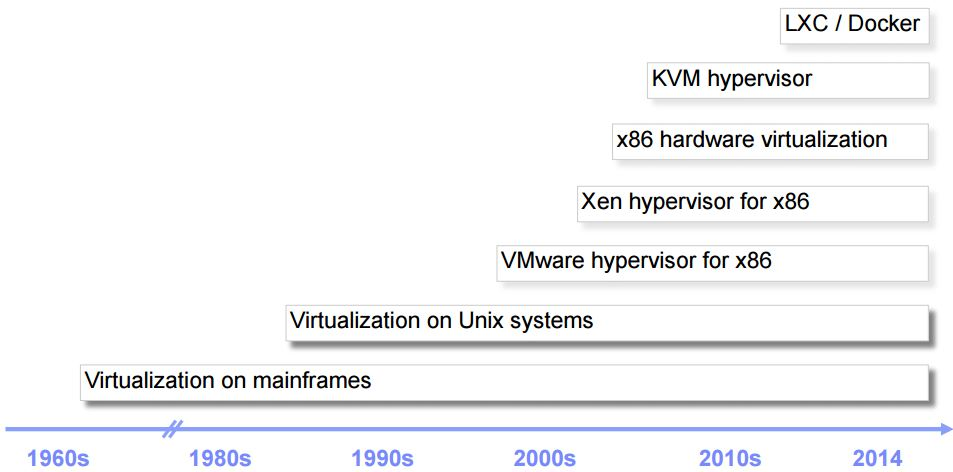
What are the relationships between these technologies, what are the underlying technical principles, what are the differences, and what are their respective application scenarios?
After reading this article, I believe everyone will be able to answer the above questions.
Historical Background
What is virtualization technology?
The explanation in Wikipedia is as follows:
Virtualization (technology) is a resource management technology that abstracts and transforms various physical resources of a computer (CPU, memory, disk space, network adapters, etc.) to present them for partitioning and combining into one or more computer configuration environments.
For a computer, we can simply divide it into three layers: from bottom to top, they are the physical hardware layer, the operating system layer, and the application layer.
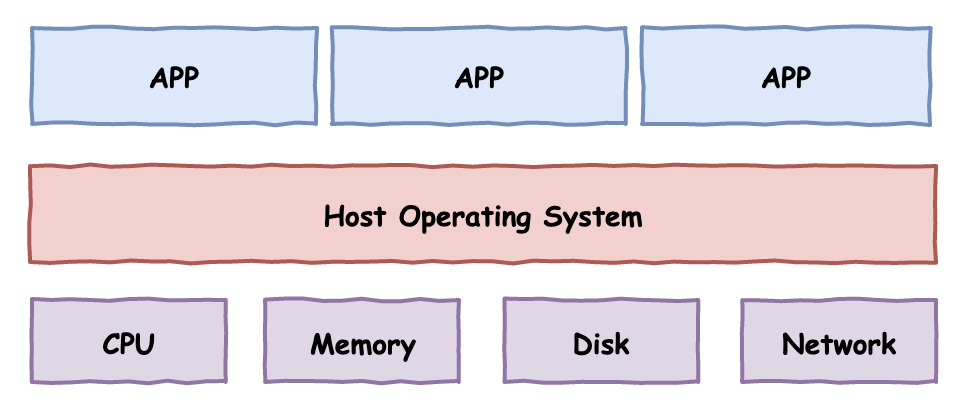
In 1974, two computer scientists, Gerald Popek and Robert Goldberg, published an important paper titled The Formal Requirements of Virtualization for the Third Generation Architecture, in which they proposed three basic conditions for virtualization:
-
Equivalence: Programs should exhibit the same results when executed on the local computer and in the virtual machine (excluding differences in execution time). -
Security: Virtual machines must be isolated from each other and from the host computer. -
Performance: In most cases, code instructions in the virtual machine should execute directly on the physical CPU, with a few special instructions being handled by the VMM.
So how do we achieve virtualization of the underlying physical resources of the computer? In the history of computer technology development, two famous schemes have emerged: Type I virtualization and Type II virtualization.
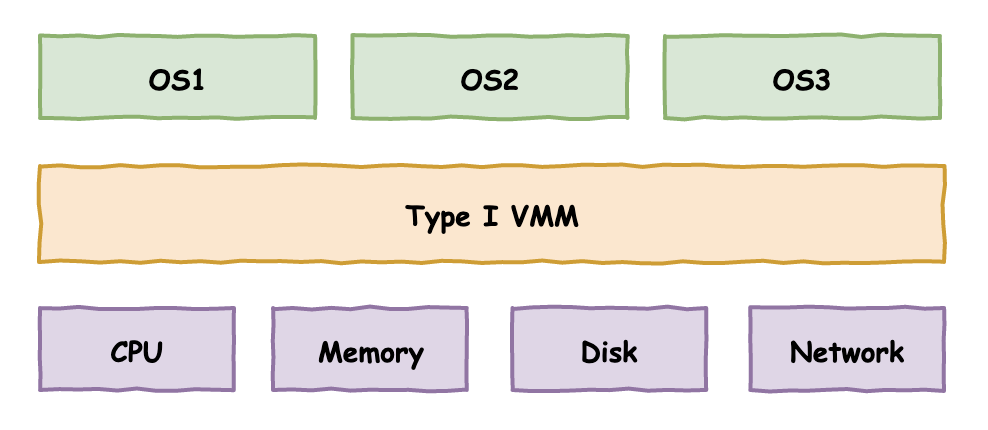
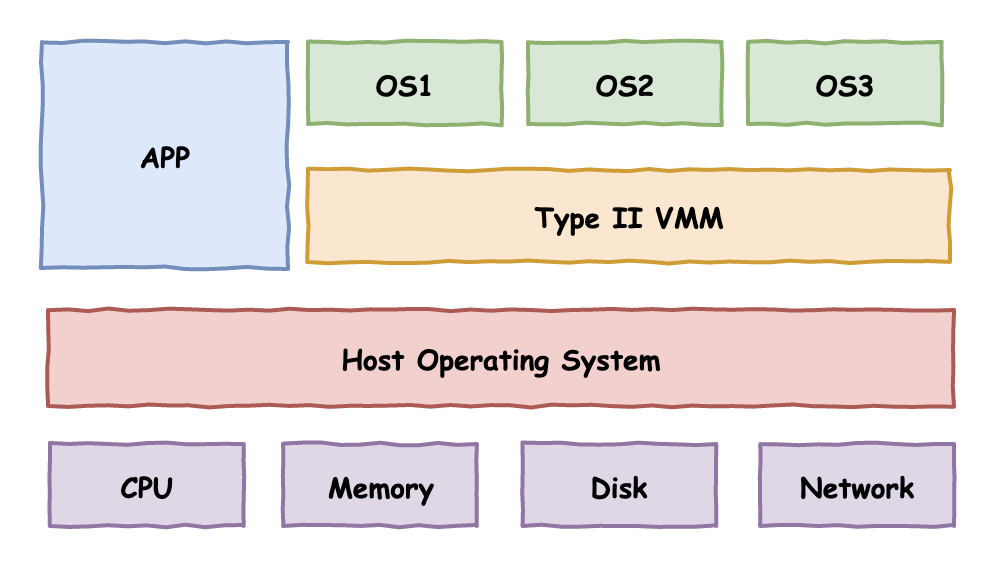
The VMM in the figure stands for Virtual Machine Monitor, or in another more professional term: HyperVisor.
From the figure, we can clearly see the differences between the two virtualization schemes:
Type I: Directly sits on top of the hardware, creating multiple isolated operating system environments.
Type II: Relies on the host operating system to create multiple isolated operating system environments.
The well-known VMware actually has two product lines: one is VMware ESXi, which is installed directly on bare metal without needing an additional operating system, belonging to the first type of virtualization. The other is VMware WorkStation, which ordinary users are more familiar with, belonging to the second type of virtualization.
How to implement the aforementioned virtualization schemes?
A typical approach is the trap & emulate technology.
What does this mean? In simple terms, it means that normally, the code instructions in the virtual machine are executed directly on the physical CPU. However, when sensitive instructions are executed, an exception is triggered, and the control flow is handed over to the VMM, which handles the corresponding processing to create a virtual computing environment.
However, this classic virtualization scheme encountered problems on the Intel x86 architecture.
Full Virtualization: VMware Binary Translation Technology
Unlike the 16-bit real address working mode of the 8086 era, the x86 architecture entered the 32-bit era, introducing a series of new technologies such as protected mode and virtual memory. At the same time, to ensure security, application code and operating system code are isolated, with the implementation relying on the working state of the x86 processor.
This is the well-known four “rings” of the x86 processor, Ring0-Ring3.
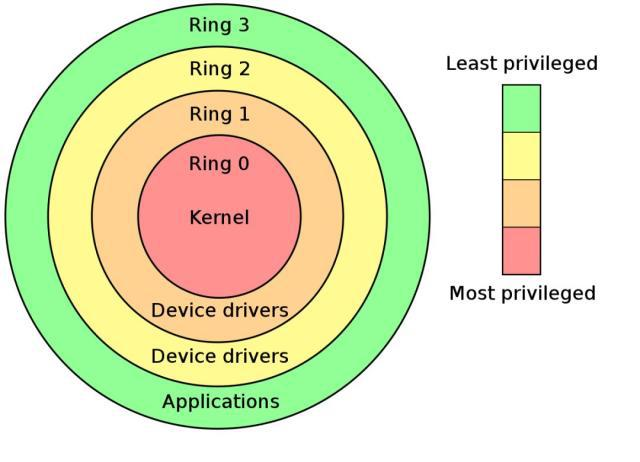
The operating system kernel code runs in the highest privilege Ring0 state, while application programs operate in the outermost, lowest privilege Ring3 state, with the remaining Rings 1 and 2 largely unused by mainstream operating systems.
The privileges mentioned here have two levels of constraints:
-
The accessible memory space -
The executable privileged instructions
Let’s focus on the second point, privileged instructions.
There are some special instructions in the CPU instruction set used for hardware I/O communication, memory management, interrupt management, etc. These instructions can only be executed in Ring0 state and are called privileged instructions. These operations cannot be executed freely by application programs. If an application running in Ring3 attempts to execute these instructions, the CPU will automatically detect this and throw an exception.
Returning to our topic of virtualization technology, as previously defined, virtualization is the logical or physical division of computing resources to create independent execution environments.
According to our earlier mentioned trap & emulate method, we can allow programs, including the operating system in the virtual machine, to run uniformly in the low privilege Ring3 state. When the operating system in the virtual machine performs memory management, I/O communication, interrupts, etc., and executes privileged instructions, an exception is triggered, and the physical machine will dispatch the exception to the VMM, which will perform the corresponding emulation execution.
This was originally an ideal model for achieving virtualization, but the x86 architecture CPU encountered an insurmountable hurdle here.
What is the problem?
Looking back at the ideal model described earlier, the premise for this model to be realized is that executing sensitive instructions must trigger exceptions to allow the VMM to intervene and simulate a virtual environment.
However, the reality is that there are some instructions in the x86 architecture CPU instruction set that are not privileged instructions and can be executed in Ring3 state, but these instructions are sensitive for the virtual machine and cannot be executed directly. Once executed, they cannot trigger exceptions, and the VMM cannot intervene, leading to the virtual machine being exposed!
This result can cause unpredictable errors in the code instructions within the virtual machine, and more seriously, it can affect the operation of the real physical machine, making the virtualization’s so-called security isolation and equivalence impossible.
How can we solve this problem and enable the x86 architecture CPU to support virtualization?
VMware and QEMU have taken two different paths.
VMware creatively proposed a binary translation technology. The VMM acts as a bridge between the virtual machine operating system and the host computer, translating the instructions to be executed in the virtual machine into appropriate instructions to execute on the host physical computer, thus simulating the execution of programs in the virtual machine. You can simply understand this as the process of a Java virtual machine executing Java bytecode, except that the Java virtual machine executes bytecode while the VMM simulates CPU instructions.
Additionally, it is worth mentioning that to improve performance, not all instructions are simulated; VMware has made several optimizations here, allowing some “safe” instructions to execute directly without any issues. Therefore, VMware’s binary translation technology also incorporates some direct execution.
For the operating system in the virtual machine, the VMM needs to fully simulate the underlying hardware devices, including the processor, memory, clock, I/O devices, interrupts, etc. In other words, the VMM “simulates” a computer purely in software for the operating system in the virtual machine to use.
This complete simulation of a computer technology is also known as full virtualization. The benefits of this approach are obvious: the operating system in the virtual machine is unaware that it is running in a virtual machine, and the code requires no modifications for installation. However, the downsides are also apparent: complete software simulation and translation execution can result in performance concerns!
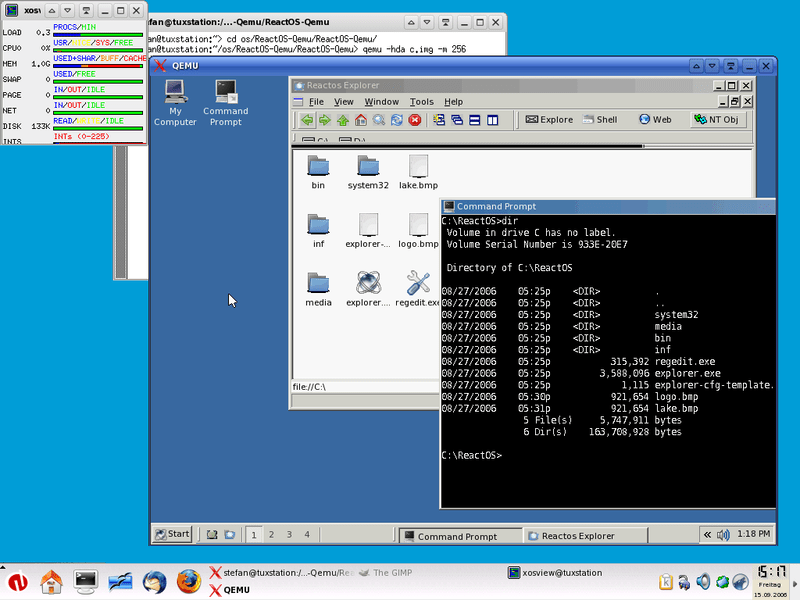
On the other hand, QEMU is a completely software-level “simulation”. At first glance, it seems similar to VMware, but in essence, it is fundamentally different. VMware translates the original CPU instruction sequence into processed CPU instruction sequences for execution, while QEMU fully simulates the entire CPU instruction set, more like “interpreted execution”; the performance of the two cannot be compared.
Half Virtualization: Xen Kernel Customization
Since there is full virtualization, there is also half virtualization. As mentioned earlier, due to sensitive instructions, the VMM of full virtualization needs to capture these instructions and completely simulate the execution process, achieving a balance between meeting the needs of the virtual machine operating system and not affecting the physical computer.
However, saying it is simple, this simulation process is quite complex, involving a large number of underlying technologies, and such simulation is time-consuming and labor-intensive.
Now, imagine if we could modify all places in the operating system that execute sensitive instructions to become an interface call (HyperCall), with the VMM providing the corresponding processing, eliminating the need to capture and simulate hardware processes, resulting in a significant performance boost.
This is half virtualization, represented by Xen, an open-source project that originated in 2003.
The biggest problem with this technology is that it requires modifications to the operating system source code for adaptation. This is acceptable for open-source software like Linux, as it merely adds some workload. However, for closed-source commercial operating systems like Windows, modifying its code is akin to a pipe dream.
Hardware-Assisted Virtualization VT / AMD-v
After various efforts, it all stems from the fact that the x86 architecture CPU naturally does not support classic virtualization modes, forcing software vendors to come up with various methods to achieve virtualization on x86.
What if the CPU itself were to add support for virtualization? How would that change the situation?
Shortly after software vendors made great efforts to achieve virtualization on the x86 platform, various processor manufacturers also recognized the vast market for virtualization technology and began to introduce hardware-level virtualization support, which formally promoted the rapid development of virtualization technology.
Intel’s VT series technology and AMD’s AMD-v series technology are representative of this.
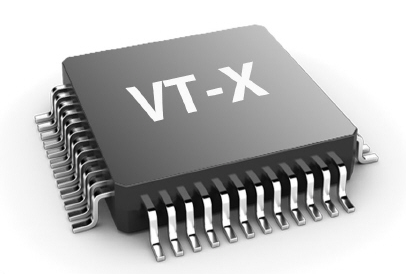
The details of hardware-assisted virtualization are quite complex. In simple terms, the new generation of CPUs introduces a concept called operating mode under the original Ring0-Ring3 working states, with VMX root operation and VMX non-root operation modes, each having complete Ring0-Ring3 working states. The former is the mode in which the VMM operates, while the latter is the mode in which the OS in the virtual machine runs.
The level at which the VMM operates is sometimes referred to as Ring -1, where the VMM can configure which instructions to intercept and capture through the programming interface provided by the CPU, thus gaining control over the virtual machine operating system.
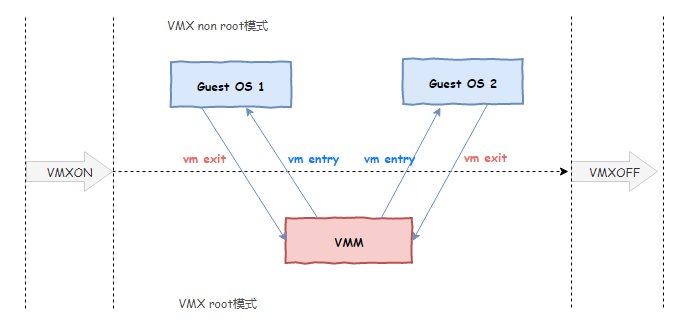
In other words, the original VMM had to use an “intermediary” to translate and execute the code in order to gain control over the virtual machine. The new CPU tells the VMM: you don’t have to go through all that trouble; just tell me which instructions and events you are interested in, and I will notify you when those instructions are executed or those events occur, allowing you to maintain control. This is fully supported at the hardware level, resulting in significantly improved performance.
The above is just a simple understanding of hardware-assisted virtualization technology. In fact, it includes more elements, providing more conveniences to the VMM, including memory virtualization, I/O virtualization, etc., greatly simplifying the design and development work of the VMM. The VMM no longer needs to incur expensive simulation execution costs, and the overall virtualization performance has significantly improved.
VMware introduced support for hardware-assisted virtualization starting from version 5.5, and then formally supported it in version 8.0 in 2011. Thus, when we create virtual machines, we can choose which virtualization engine technology to use: the original binary translation execution or the new hardware-assisted virtualization technology.
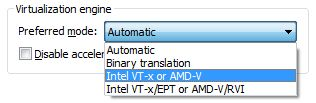
At the same time, XEN also added support for hardware-assisted virtualization starting from version 3.0, allowing Windows systems to run in XEN-based virtual machines.
KVM-QEMU
With the support of hardware-assisted virtualization, virtualization technology began to explode. Technologies like VirtualBox, Hyper-V, and KVM emerged one after another. Among them, the open-source KVM technology has become particularly prominent in the field of cloud computing.
KVM stands for Kernel-based Virtual Machine.
In terms of underlying virtualization technology, KVM, like the later versions of VMware, is based on hardware-assisted virtualization. The difference is that VMware, as an independent third-party software, can be installed on various operating systems such as Linux, Windows, and MacOS, while KVM, as a virtualization technology, is integrated into the Linux kernel itself, meaning that the Linux kernel itself acts as a HyperVisor. This is also the meaning of KVM, so this technology can only be used on Linux servers.
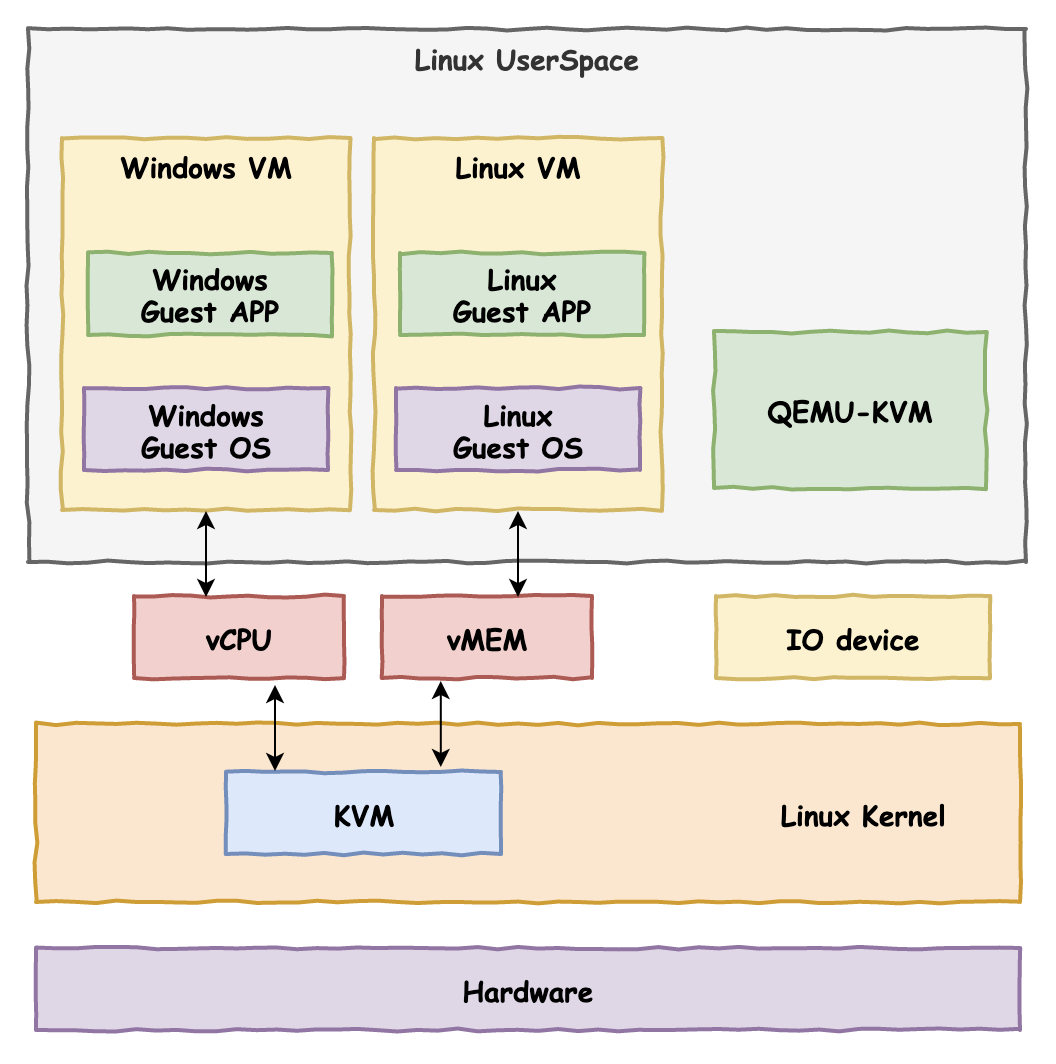
KVM technology is often used in conjunction with QEMU, referred to as the KVM-QEMU architecture. As mentioned earlier, before the advent of hardware-assisted virtualization technology on x86 architecture CPUs, QEMU had already implemented virtualization using a complete software simulation approach, but the execution performance under this scheme was very low.
KVM itself is based on hardware-assisted virtualization, achieving virtualization of CPU and memory only. However, a computer does not only have CPU and memory but also various I/O devices, which KVM does not handle. At this point, QEMU comes into play, and the modified QEMU is responsible for external device virtualization, while KVM handles the underlying execution engine and memory virtualization. The two complement each other and have become the favored solution in the new generation of cloud computing virtualization schemes.
Container Technology – LXC & Docker
The previously mentioned full virtualization technology based on translation and emulation, half virtualization technology, and the full virtualization technology with CPU hardware support all aim to create a complete computer with underlying physical hardware, operating system, and a complete environment for application execution.
To achieve an effect where programs in the virtual machine run “almost” like on a real physical machine, the underlying HyperVisor does a lot of work and incurs a “heavy” cost.
Even though the HyperVisor does so much, have you ever asked the programs in the virtual machine if that is what they want? Perhaps the HyperVisor is doing too much, while the target program might say: you actually don’t need to work so hard.
There are indeed situations where the program in the virtual machine says: I just want a separate execution environment; you don’t need to go to such great lengths to virtualize a complete computer.
What are the benefits of this approach?
Is the cost of virtualizing a complete computer higher or the cost of just virtualizing an isolated program execution environment? The answer is clear: the former. A physical machine might start to feel strained when virtualizing 10 virtual machines, but it can easily handle virtualizing 100 isolated execution environments, which has enormous benefits for resource utilization.
The container technology that has become popular in recent years was born under this guiding philosophy.
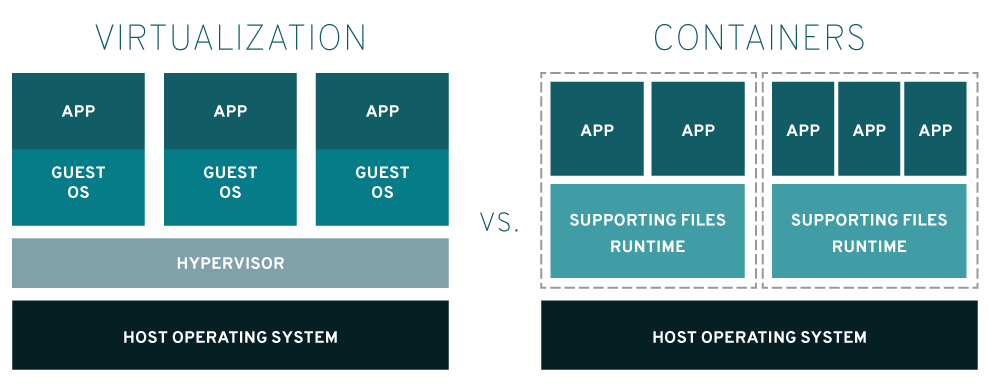
Unlike virtualization technology, which requires complete virtualization of a computer, container technology is more like operating system-level virtualization; it only needs to virtualize an operating system environment.
LXC technology is a typical representative of this solution, which stands for LinuX Container. Through the support of Linux kernel’s Cgroups technology and namespace technology, it isolates operating system files, networks, and other resources, creating a separate space on the native operating system for running applications. This space resembles a container that houses the application, hence the name container technology.
To give a somewhat inappropriate analogy, a three-bedroom apartment has been converted by a sub-landlord into three one-bedroom suites, each equipped with a bathroom and kitchen. For the people living inside, it is a complete home.
The underlying principles of the popular Docker technology among major companies are not fundamentally different from LXC; in fact, early Docker was directly based on LXC for higher-level encapsulation. Docker further builds on LXC by packaging and encapsulating various components and dependencies in the execution environment into independent objects, making them easier to port and deploy.
The advantages of container technology are its lightweight nature; all code instructions in the isolated spaces can be executed directly on the CPU without translation or conversion. They all share the same underlying operating system, and through software-level logical isolation, form individual spaces.
The downside of container technology is that its security is not as high as that of virtualization technology; after all, software-level isolation is inherently weaker than hardware-level isolation. The isolated environment shares the same operating system kernel with the host, and once an attack exploits a kernel vulnerability, the program can escape the container limits, endangering the host computer, and security is thus compromised.
Ultra-Lightweight Virtualization: Firecracker
While complete virtualization offers good isolation but is too heavy, simple container technology is too lightweight and relies solely on software isolation, which is not secure. Is there a compromise that combines the advantages of both to achieve something lightweight yet secure?
In recent years, a concept of ultra-lightweight virtualization has started to gain popularity, with Amazon’s Firecracker being a typical representative.
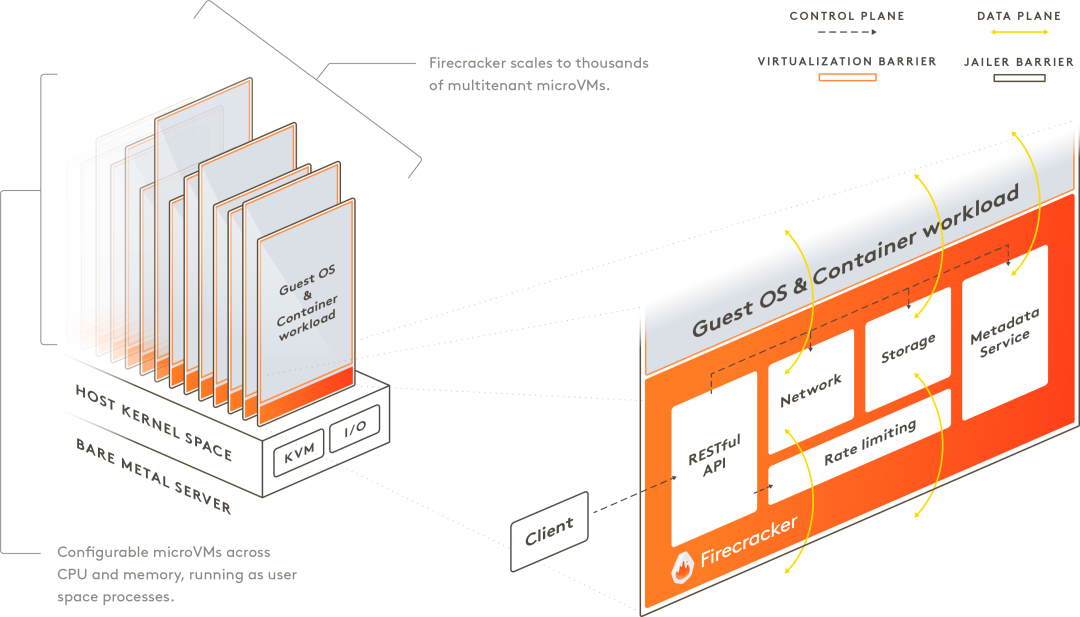
Firecracker merges the strong isolation of virtualization technology with the lightweight nature of container technology, introducing the concept of microVM. It achieves strong isolation of each microVM through KVM virtualization technology, while the isolated virtual machines run a slimmed-down version of a micro operating system, cutting out a lot of unnecessary features, designed specifically for containers.
Ultra-lightweight virtualization has now become a new trend. In addition to AWS’s Firecracker, Google’s gVisor and Intel-led NEMU are also beginning to make strides in this field.
Conclusion
This article briefly introduces the basic concepts and requirements of virtualization technology. It then discusses how, due to the early x86 architecture not supporting classic virtualization schemes, software vendors had to implement virtualization through software simulation, represented by early VMware WorkStation and Xen.
However, relying purely on software has performance bottlenecks. Fortunately, Intel and AMD timely introduced hardware-level virtualization support for CPUs, and software vendors quickly followed up with adaptations, greatly improving the virtualization performance experience. Representatives of this period include the new versions of VMware WorkStation, Hyper-V, and KVM.
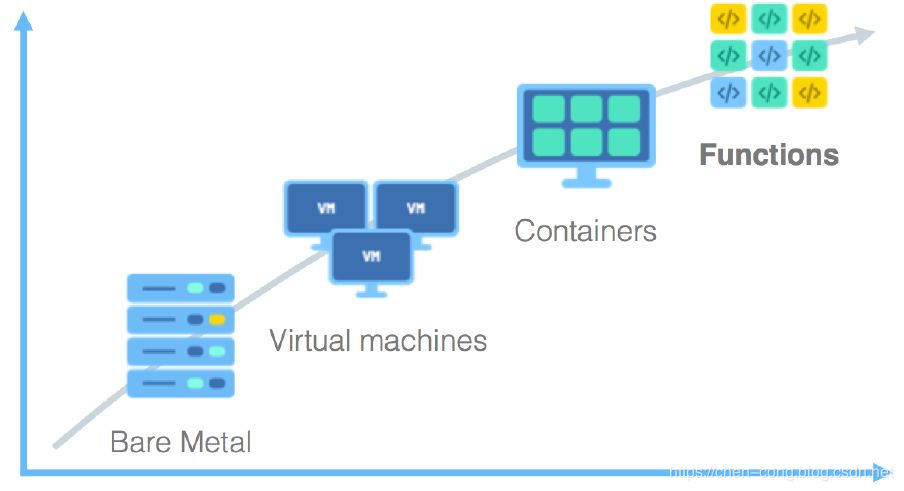
In recent years, with the deepening development of cloud computing and microservices, the granularity of virtualization technology has gradually shifted from coarse to fine. From the early virtualization of a complete computer to later virtualizing just an operating system, and finally to virtualizing only the environment needed for a microservice, container technology represented by Docker has shone brightly during this period.
Technology evolves alongside market demands, and the future of virtualization is uncertain. What are your thoughts? Feel free to leave comments for discussion.
Highly recommend sharing quality content on architecture + algorithms. If you haven't followed yet, please long-press to follow:
Long press to subscribe for more exciting content ▼
If you found this helpful, please give a thumbs up, sincerely thank you.