Source: Wireless Deep Sea
Author: Mayfly Cai Cai
Small phone, great potential.
This communication tool, which was once used only for making phone calls, has now become all-powerful, serving as the primary window for people to connect with the entire world.
And the smartphone screen, which is responsible for the display function and touch operations, is even more crucial as the “window of the window.”
In this article, we will discuss the secrets behind smartphone screens. After reading, you will be able to answer the following questions:
1. What types of smartphone screens are there?
2. How do we measure the size of smartphone screens?
3. What do the concepts of resolution, PPI, and refresh rate mean?
4. What types of smartphone screens exist, and what are the underlying technical principles?
1. Types of Smartphone Screens
Since smartphones have taken over the mainstream market, as centers for entertainment and information during fragmented time, screens have become larger. Meanwhile, traditional phones had a “forehead” for placing the earpiece and front camera, as well as a “chin” for the Home button, which made the phone size too large and the screen-to-body ratio hard to improve.
Later, Apple came up with a solution by concentrating a series of components in the center of the phone’s forehead while extending the screen upwards, resembling a “notch,” hence this type of screen is called a “notch screen.”
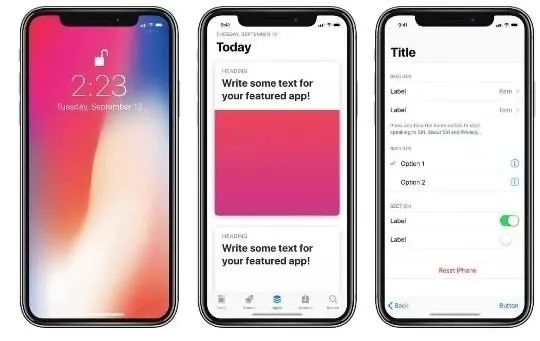
iPhone’s iconic “notch screen”
The “notch screen” fired the first shot in the war for smartphone screen-to-body ratio. Following this, various Android phones rushed to imitate, but soon found it ugly and dull, leading to the emergence of various designs with even higher screen-to-body ratios.
Waterdrop Screen: The top of the screen avoids the front camera, and the black background of the camera connects with the upper frame, resembling a droplet hanging precariously, hence the name “waterdrop screen.”
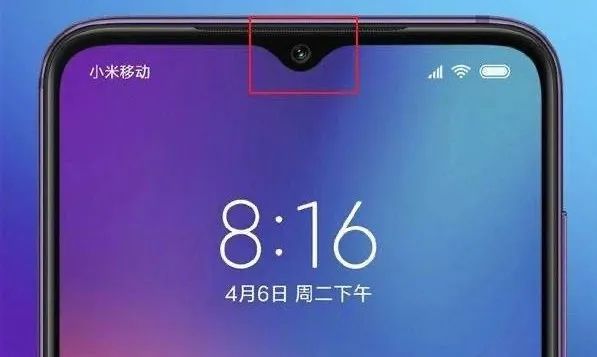
Android phone’s “waterdrop screen”
Pearl Screen: This is essentially a waterdrop screen, but Huawei feels that the camera’s occupied area resembles a full and round pearl, hence it is called a “pearl screen” to highlight its extraordinary quality.
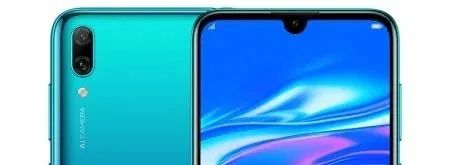
Huawei phone’s “pearl screen”
Punch-hole Screen: From the previous types, it can be seen that the handling of the front camera determines the screen’s shape. If a hole is punched in the screen and the camera is embedded, it becomes a “punch-hole screen.”
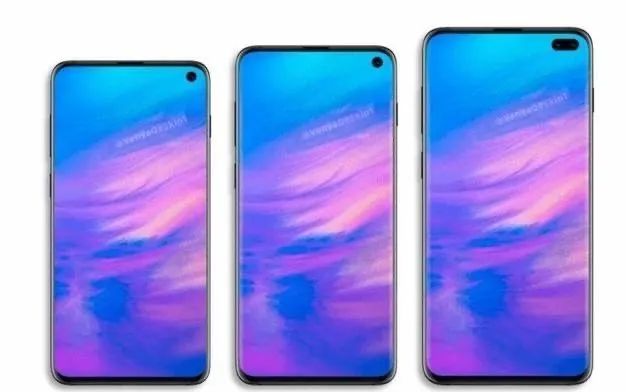
Android phone’s “punch-hole screen”
Waterfall Screen: The previous notch, waterdrop, and punch-hole screens all stubbornly contend with the camera at the top of the phone, but the sides of the phone still have borders, making it less impressive. Therefore, someone thought, why not create a curve on both sides and bend the screen down a bit, so that the borders are not visible from the front? This type of screen has sides that resemble a waterfall, hence the name “waterfall screen.”
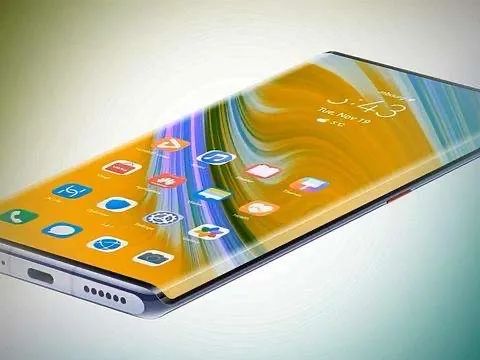
Android phone’s “waterfall screen”
Full-screen: The front of the phone is a complete screen with no notch, no waterdrop, no pearl, and no punch-hole. The full-screen looks perfect, but it is achieved through a series of compromises: the front camera retracts into the body when not in use and pops up from the top when needed. This structure must be precise and durable, so it adds unnecessary complexity for a perfect appearance. True full-screen can also be combined with waterfall screens.
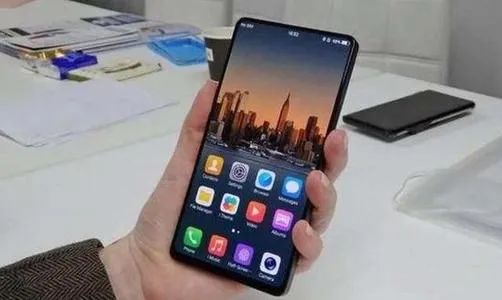
Android phone’s true “full-screen”
2. Main Parameters of Smartphone Screens
Smartphone screens are measured in inches, where one inch equals 2.54 cm. When we say a smartphone screen is a certain number of inches, we are actually referring to the length of the diagonal of the screen, not the length of the sides.
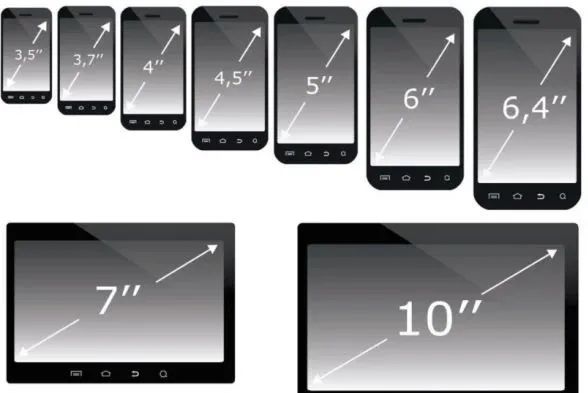
The size of the screen is measured by the length of the diagonal, in inches
As smartphones evolved from feature phones to smart devices, screens have also become larger. Once, Jobs claimed that the golden size for smartphone screens was 3.5 inches, but now most flagship devices maintain a screen size of over 6 inches, with many manufacturers expanding screens to 7 inches.
Speaking of larger screen sizes, does that mean the image display will be clearer? This introduces the concepts of pixels and resolution.
Pixel: The principle of screen display is essentially dividing the effective area into many small grids, each grid displaying only one color, making it the smallest element of imaging, hence called a “pixel.”

Pixels are small squares on the screen, each displaying one color
Resolution: The number of pixels in the length and width directions on the screen is called the resolution, usually expressed as AxB. The higher the resolution, the smaller the area of each pixel, resulting in a smoother and more refined display effect.
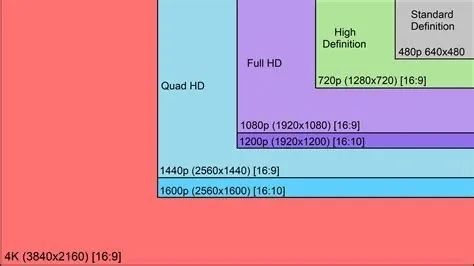
Common definitions of display screen resolutions
For example, the iPhone X has a screen size of 5.8 inches and a resolution of 1125×2436, meaning that this phone has 1125 pixels in width and 2436 pixels in length.
PPI: Different smartphone screens have different sizes, and naturally, the resolutions vary as well. So how can we visually represent the pixel density of smartphone screens, or clarity?
The answer is simple: regardless of how large your screen area is, I will convert it to the number of pixels per unit area, allowing for standardized comparisons!
In fact, since screen size is expressed in inches, the industry standard is to calculate the number of pixels per inch of the screen, known as PPI (Pixels Per Inch), which can also be referred to as pixel density.
The calculation for PPI is as follows: using the Pythagorean theorem, calculate the number of pixels along the diagonal direction based on the horizontal and vertical pixel counts from the resolution, and then divide by the diagonal length (the size of the phone’s screen in inches).
The following example uses the iPhone 5, from which we can derive its PPI to be 326. Of course, checking the product specifications for the PPI value is simpler and more convenient.
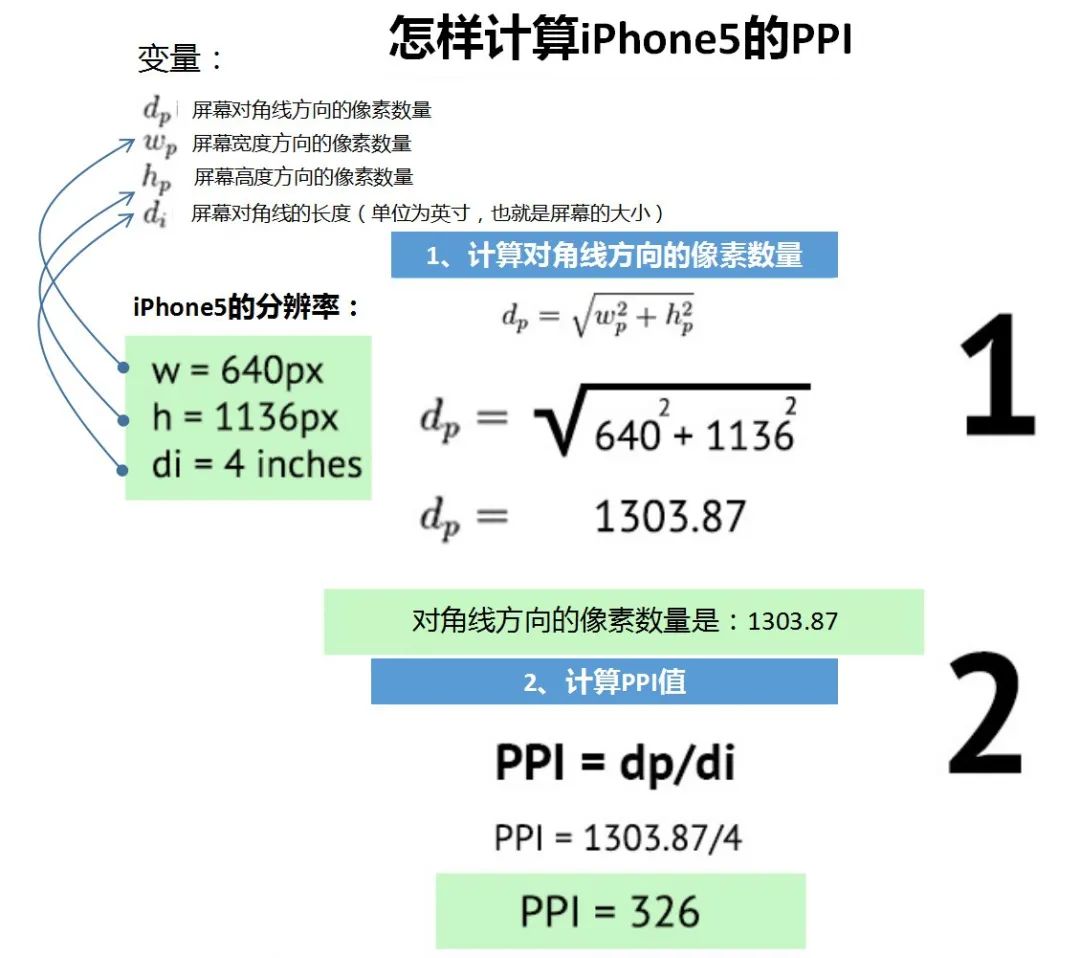
PPI calculation example (iPhone 5)
With a measurement method established, what PPI should smartphone screens have? Our expectation is, of course, that the images we see are clear and smooth, with no visible pixels.
Ten years ago, at the iPhone 4 launch event, Jobs stated: “When you hold something 10-12 inches (about 25-30 cm) away, if its resolution reaches above 300 PPI, this ‘magic number,’ your retina will not be able to distinguish pixel points.”
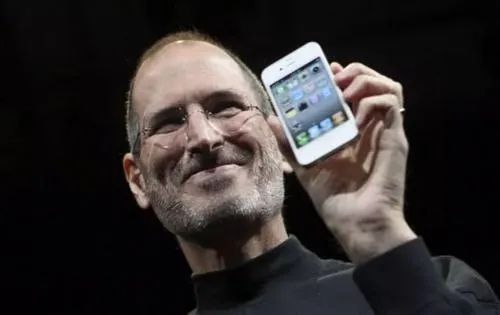
Jobs holding the iPhone 4
This is Apple’s initial definition of a “Retina Display,” with the pixel density of the iPhone 4 reaching 326 PPI.
In reality, Jobs’ definition assumed the viewer’s eyesight was 1.0, but many people’s eyesight is actually better than 1.0; and the viewing distance needs to be 25 to 30 cm, but many people may hold the screen closer. Therefore, the 300 PPI value is not absolute.
The industry has not been confined to this value, continuously pushing it higher. Currently, mainstream smartphones have PPI values ranging from 300 to 500, with Samsung’s flagships exceeding 500, and even Apple’s own iPhone X and 11 reaching 458 PPI.
Next, let’s discuss another parameter that has recently gained a lot of attention: refresh rate.
Refresh Rate: This refers to the number of times the smartphone screen refreshes its display in one second. For example, the common 60Hz refresh rate means that the content displayed on the screen refreshes 60 times per second.
Why does the content on the screen need to refresh quickly?
When an object moves quickly, the human eye retains the image for about 0.1-0.4 seconds after the visible image disappears, a phenomenon known as visual persistence.
Due to the visual persistence effect, if a person sees multiple rapidly changing images, the content of the previous image still lingers in their vision while the next image quickly comes into view, creating a sense of continuous animation, which is the principle of video.

The principle of video or animation
Thus, video playback has a concept of “frame rate (FPS: Frame per second),” which indicates how many continuous images are played per second.
When the frame rate is 16 FPS, the human eye perceives the images as continuous. A higher frame rate leads to smoother and more realistic animations. Generally, 25 to 30 FPS is acceptable, but increasing the frame rate to 60 FPS can significantly enhance interactivity and realism.
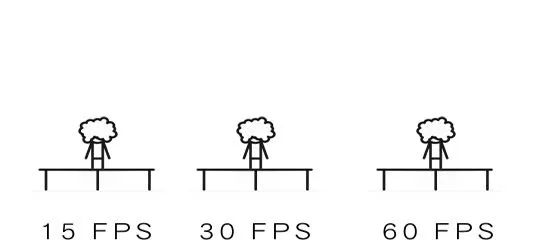
Animated images at different frame rates
Therefore, the screen’s refresh rate must be greater than the video’s frame rate. Otherwise, if the video has moved to the next frame while the screen is still displaying the previous frame, the user experience is naturally poor.
Currently, the vast majority of video frame rates are below 60 FPS, so smartphone screens should not have a refresh rate lower than 60Hz. Theoretically, the higher the refresh rate, the more delicate and smooth the screen display and operation, which is why many flagship devices now use refresh rates of 90Hz or even 120Hz.
3. The Technology Behind Smartphone Screens
If we look at the promotional posters for smartphones, we can find a dazzling array of terms regarding screen materials and technologies: there are TFT LCD, TFT, IPS, LTPS, OLED, AMOLED, etc., which can be overwhelming.
What are the differences between these technologies, and what are their advantages and disadvantages?
In fact, the mainstream smartphone screens can be broadly categorized into two major technologies: LCD and OLED.
LCD: The full English name is Liquid Crystal Display, which is the well-known liquid crystal display.
OLED: The full English name is Organic Light-Emitting Diode, which translates to organic light-emitting diode, also known as organic electroluminescent display.
The three primary colors of light are red, green, and blue. By mixing these three colors in different proportions, we can obtain almost all colors in nature. Therefore, every pixel on a smartphone screen is also made up of these three colors mixed together.
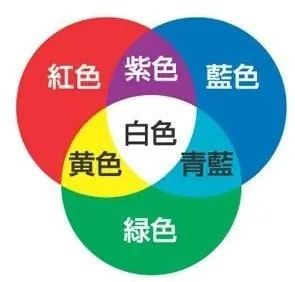
The three primary colors of light and mixed colors
The following image shows a cross-section of each pixel under LCD and OLED technology, illustrating how these pixels emit light.
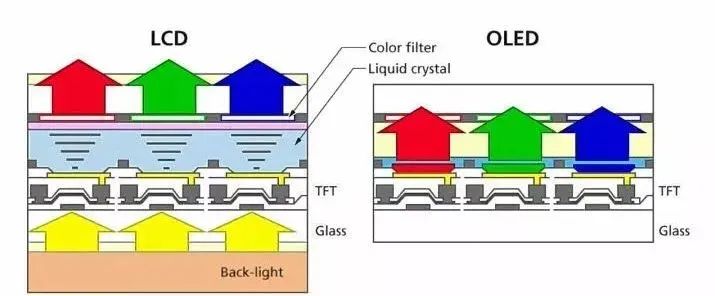
Structure of LCD and OLED screens
In LCD technology, while the term “liquid crystal” (which is the Liquid Crystal on the left side of the image) is very prominent, liquid crystals cannot emit light by themselves; they require a back panel made of LEDs (light-emitting diodes) to provide a white light source, also known as “backlight” (shown as Back-light in the image).
Each pixel, on the basis of backlight, adds a layer of thin film with red, green, and blue colors. When white light passes through these films, it transforms into colored light of red, green, and blue.
However, if the intensity of these three lights is the same, they will mix back into white or gray light, so it is necessary to flexibly control the intensity of each light to mix out various colors.
This is where liquid crystals come into play. Liquid crystals have a characteristic that under the influence of an electric field, their molecular arrangement changes, affecting their transparency to light. By adjusting the voltage, the amount of light passing through can be controlled.
For LCD screens, the liquid crystal layer sandwiched between the backlight and the thin films adjusts the brightness that can pass through by varying the input voltage. After passing through the colored films, different intensities of the three primary colors of light can be obtained, resulting in a wide variety of colors.
So, how do we adjust the input voltage for each pixel?
The so-called TFT (Thin Film Transistor) refers to an array of thin-film transistors on the glass substrate of the liquid crystal panel, allowing each pixel of the LCD to have its own semiconductor switch, enabling “point-to-point” independent and precise control.
Therefore, mainstream LCD screens are also referred to as TFT-LCD. IPS and LTPS are actually different technological implementations under TFT-LCD, which will not be elaborated on here.
Having discussed LCD, it’s now OLED’s turn.
OLED screens are structurally much simpler than LCD; they do not require backlighting, nor do they have liquid crystals or color filters. The internal organic material coating acts like colored small bulbs, emitting light when powered.
AMOLED: Now that we know about OLED, the “AM” in front refers to the driving method of OLED, which stands for Active Matrix. It usually uses TFT as a switch to control the current flowing through the organic material for different color displays. Currently, all OLEDs used in smartphones are AMOLED, so they can be considered the same thing.
Super AMOLED: This is an improvement of AMOLED by Samsung, which eliminates the touch sensing panel in the middle, placing the AMOLED sensing layer on top of the screen, resulting in more sensitive controls, thinner designs, and higher brightness, improving performance under sunlight.
Dynamic AMOLED: Another improvement technology of AMOLED launched by Samsung, mainly used in high-end devices. This technology alters the organic materials in OLED, claiming to achieve a wider dynamic range, allowing for more dark detail in images with high contrast.
Essentially, Super AMOLED and Dynamic AMOLED are mostly marketing gimmicks; they both belong to AMOLED, which is the OLED technology used in smartphones.
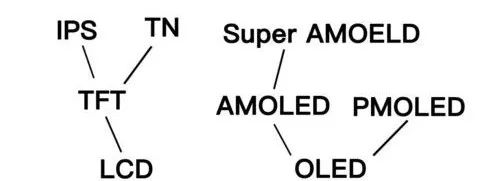
Various sub-screen technologies under LCD and OLED
Compared to OLED screens, LCD screens have several disadvantages.
1. Cannot display black: Due to the liquid crystal layer’s inability to completely close, some backlight will always leak through, so LCDs cannot display pure black, only deep gray. In contrast, OLED can achieve pure black display by controlling each pixel’s switch.
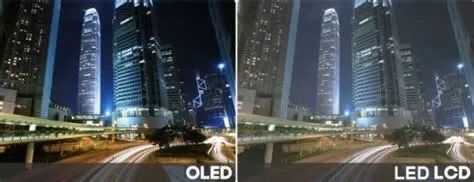
OLED screen (left) shows a noticeably deeper night sky
2. Prone to light leakage: The backlight of LCD screens can easily leak from the screen and phone’s edges, creating a light leakage phenomenon, which was common in poorly made phones but is now rare.
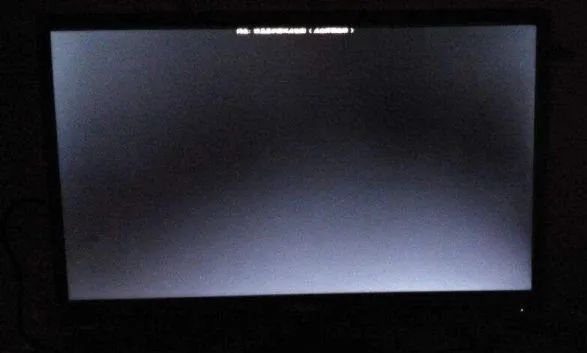
LCD screen light leakage
3. Greater screen thickness: Due to the complexity of the technology, LCDs are thicker because of the backlight layer and liquid crystal layer. While this thickness is negligible in televisions, in smartphones where thinness is pursued and internal space is limited, a thinner screen allows for more components to be fitted for improved performance in other areas.
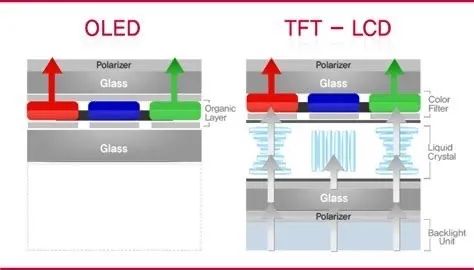
LCD screens are significantly thicker than OLED screens
4. Difficult to achieve curved screens: LCDs cannot be bent significantly, while OLEDs can. Therefore, for devices like curved screen phones, only OLED screens can be used.
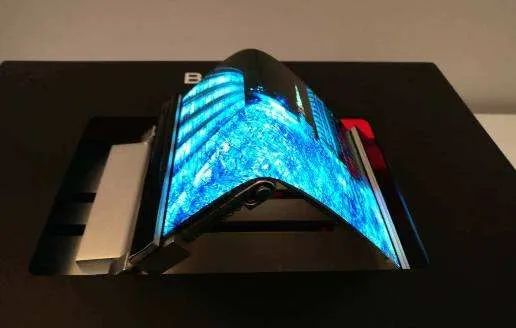
OLED is very suitable for achieving curved screens
5. Higher power consumption: Since LCD screens have backlighting, they must illuminate the entire screen when in use, while OLEDs can control each pixel’s switch individually. Thus, LCD screens consume significantly more power than OLEDs. In the illustration, both the Nut R1 and Xiaomi Mix 2S use LCD screens and show a clear disadvantage in battery life during prolonged video playback.
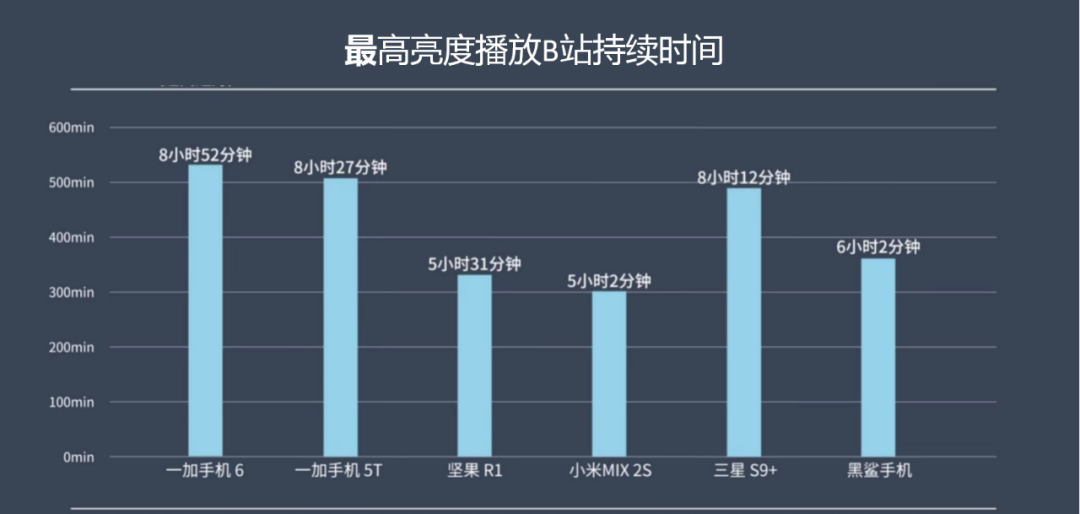
LCD screens have high energy consumption, resulting in poorer battery life
6. Longer response time: LCD screens have longer response times, which can cause motion blur during fast-moving images. OLEDs respond quickly without any motion blur.
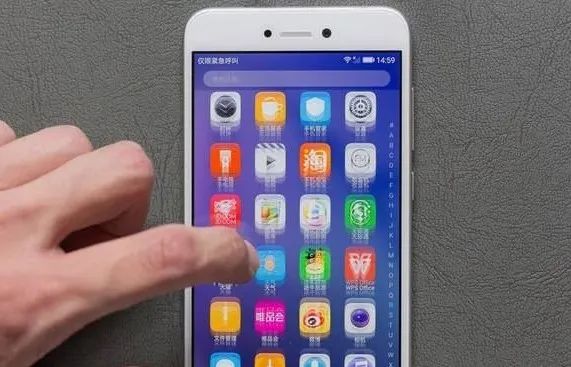
Motion blur phenomenon on LCD screens
Having discussed so many disadvantages of LCD, does that mean OLED is flawless? Certainly not; OLED primarily suffers from burn-in and flickering issues.
1. Burn-in: Due to the organic materials used in OLED aging relatively quickly, if some pixels are under heavy load while others are relatively idle, there will be a discrepancy in aging across the screen, leading to color display deviations in different areas. This phenomenon is called burn-in.
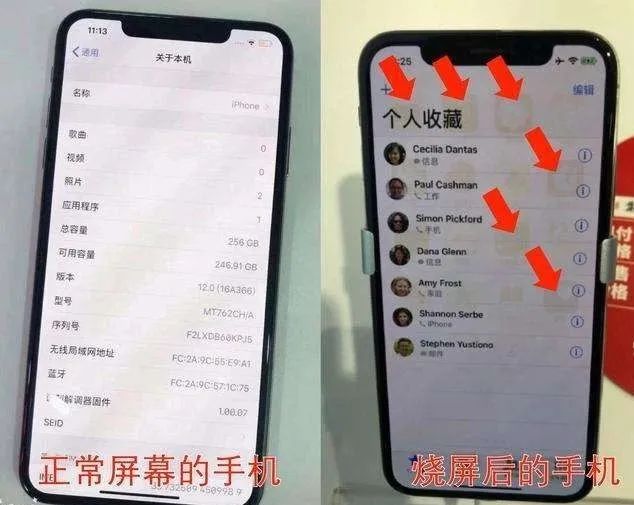
Burn-in phenomenon on OLED screens
However, under normal usage, burn-in is a slow process, and by the time it becomes noticeable, three years may have passed, and most people will have changed their phones.
Burn-in is a disadvantage of OLED, while for LCD, since the backlight illuminates the entire screen, and the aging time of liquid crystals is longer, burn-in issues are virtually non-existent.
2. Flickering: For LCDs, to control screen brightness, the backlight brightness can be directly adjusted. But OLEDs are more complicated; they need to achieve dimming by rapidly switching the screen on and off. To brighten, the screen is turned on more frequently, and to dim, it is turned off more often.
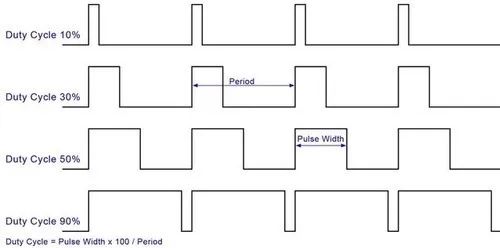
OLED screen dimming: The raised part indicates when the screen is on
Due to the very short duration of each on-off cycle, while the human eye may not perceive each flicker, it can feel the average brightness over time, achieving the dimming effect.
For example, to achieve 50% brightness, the screen must be on for half the time and off for the other half. At lower brightness levels, the off time is longer, causing the screen to flicker visibly, which can be uncomfortable for the eyes.
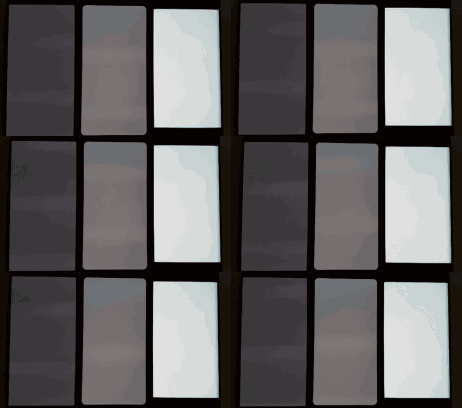
Flickering at low brightness on OLED screens
This phenomenon of flickering is known as flicker, hence the term “eye-straining screen.” In contrast, LCD screens proudly call themselves “eye-friendly screens.”
Despite these drawbacks, OLED screens have become mainstream, gradually squeezing out LCD screens, particularly evident in high-end devices.
We can glimpse this trend through Apple’s configurations.
|
Release Year |
iPhone Model |
Screen Type |
|
2017 |
iPhone 8/8 Plus |
LCD |
|
iPhone X |
OLED |
|
|
2018 |
iPhone XR |
LCD |
|
iPhone Xs/Xs Max |
OLED |
|
|
2019 |
iPhone 11 |
LCD |
|
iPhone 11 Pro/Pro Max |
OLED |
From the table, it can be seen that starting from the notch screen X series, higher-end products use OLED screens, while lower-priced ones use LCD.
That’s all for this issue. I believe everyone now has a better understanding of the main parameters and technologies of smartphone screens, which will hopefully assist you in future smartphone purchases.
—END—

Editor: Summer Solstice