Situation 1: Slave Loses Synchronization
Causes:
1. The EtherCAT task may be experiencing excessive jitter;
2. There may be issues with the network cable, such as using unshielded cables or poor connections; individual slaves may also have problems.
Exclusion of Possible Causes:
① Check the logs; if the following log entries are present, it indicates that frames have indeed been lost.
“Fieldbus lost synchronicity” indicates the bus has lost synchronization.
“Drive=25:1E motion generating FB wasn’t called for at least one cycle” indicates that it was not called for at least one cycle.
Solutions:
1. Use the source program to monitor bus jitter.

Note that after running, you need to manually reset the monitoring data of the master station. Data from when issues occur, such as startup and other modified data, do not need to be reset; only the data needs to be reset to start monitoring. The jitter of the EtherCAT_Task bus task generally focuses onthe minimum/maximum jitter time (µs). The absolute values of these two extremes should generally not exceed 200 microseconds.
Themaximum cycle time of the EtherCAT_Task must not exceed the cycle time set for the bus. If it does, it indicates that the CPU cannot handle the processing within that cycle time, requiring an increase in the cycle period or optimization of the program. Logic that does not require real-time performance should be placed in other tasks with lower priority settings.
2. If the monitoring of bus jitter tasks is normal, then consider external factors such as the network cable, cable connection status, or whether the slave is damaged, etc. At least useCategory 5e cables, which should have metal connectors and a shielding layer.
Situation 2: Incorrect Network Cable ConnectionsCauses:1. The network cables for devices such as drives are incorrectly connected; normally, the output of the previous slave should connect to the input of the next slave, but they may be incorrectly connected, such as IN to IN or OUT to the next OUT.2. The actual order of the slaves may be incorrect; for example, if one is connected to a coupler module but the configuration is set for a drive, it will lead to communication failure.Inspection Measures:1. Use the program to monitor the master station online; the scanned configuration will show the current actual connection order of the slaves. If it does not match the configured order, the cables are incorrectly connected.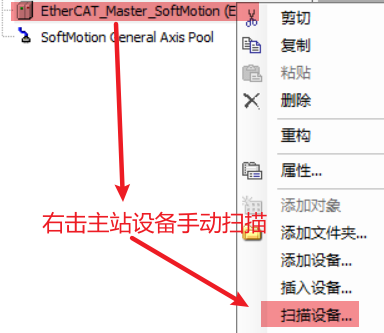 2. Check the indicator lights on the master station or PLC’s network port or the slave’s network port. If the lights are not flashing, it indicates that communication is not connected. If the slave’s light is not flashing, it indicates where communication has failed and needs to be addressed.