Word count: 1171, reading time approximately 6 minutes
🚀 Spent a whole day setting up your Python environment? Try uv, it’s fast enough to make you question life!
Brothers and sisters, for those of us who write Python, who hasn’t stumbled whilesetting up environments?
“It runs perfectly on my computer!”
“Dependency conflict? I just installed Pandas, why do I have to uninstall my NumPy?”
“<span>Pipenv locking...</span> is still spinning, I’ve already finished two cups of coffee.”
Python is an elegant language, but its package management history is nothing short of atragic tale from chaos to redemption.
Today, let’s not talk about the abstract; instead, let’s review this “painful” development history and recommend a recently explosivetool called <span>uv</span>.
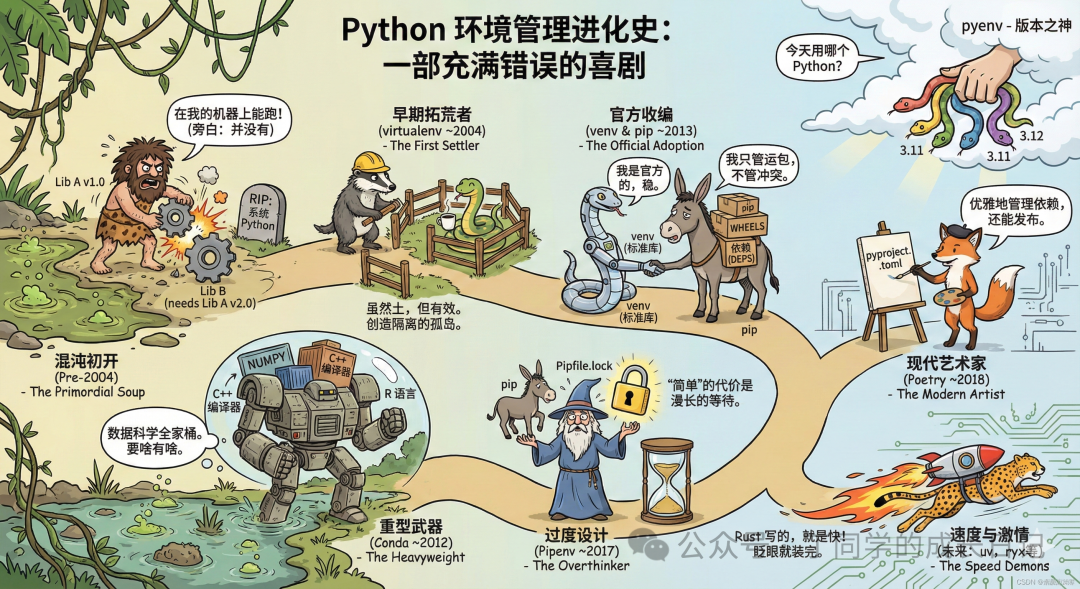
⏳ Part One: The “Bitter Evolution” of Python Package Management
1. Ancient Times: Stone Tools <span>pip</span> + <span>venv</span>
- • Style: Primitive and crude.
- • Operation: Manually create
<span>virtualenv</span>, frantically type<span>pip install</span>, and finally export<span>requirements.txt</span>with tears. - • Issues:
<span>requirements.txt</span><span> contains only one layer of dependencies. A depends on B, and if B is upgraded, it breaks A, and you have no idea who did it. This is the legendary **"dependency hell"**.</span>
2. First Attempt: Seeking Elegance with <span>Pipenv</span>
- • Style: The ideal is rich, but reality is thin.
- • Operation: Introduced
<span>Pipfile</span>and<span>Lock</span>files, attempting to mimic Node.js’s npm. - • Issues:Slow! Too slow! The locking process feels like it’s mining in the background. It often freezes inexplicably, not only failing to alleviate dependency anxiety but also increasing “waiting anxiety”.
3. Modern Standard: The Elegant Gentleman <span>Poetry</span> 🎩
- • Style: Refined and standardized.
- • Operation: Embraces the
<span>pyproject.toml</span>standard, with clear dependency resolution and a streamlined packaging process. - • Status: Currently the mainstream choice, very stable and powerful.
- • Regret: Still written in Python, and while it’s faster than Pipenv, it still feels a bit “lukewarm” in the face of large projects.
4. Mechanical Ascension: The Rust Champion <span>uv</span> ⚡️
- • Style:In the world of martial arts, only speed is invincible.
- • Background: Developed by the team that boosted Linter speed by 100 times, Ruff, using Rust for the entire backend.
- • Declaration: “I’m not here to join this family; I’m here to break you apart (just kidding)… I’m here to replace pip, poetry, pyenv, and virtualenv!”
🤯 Part Two: How Powerful is uv?
How fast is uv, you ask?
While you’re still typing pip install and waiting for the progress bar, uv has already downloaded the packages, set up the environment, and even installed the Python version for you.
It truly aims to replace the original toolchain in one go:
- • ❌ No need to install
<span>pyenv</span><span>, </span>uv manages your Python versions for you. - • ❌ No need to manually
<span>source venv/bin/activate</span>,<span>uv</span>automatically recognizes it. - • ❌ No need to wait for
<span>pip</span><span> to resolve dependencies, </span>uv does it in milliseconds.
🛠 Part Three: Quick Start Guide for uv (Recommended to Bookmark)
No more nonsense, let’s get straight to the code. Open your terminal and feel what it means to have apush-back sensation.
1. Installation (One Command)
Mac/Linux users:
Bash
curl -LsSf https://astral.sh/uv/install.sh | sh(Windows users can use PowerShell, check the official website for details; it’s too long for me to paste here)
2. Initialize Project
Forget about <span>mkdir</span><span>, let's do something advanced:</span>
Bash
uv init my-awesome-project
cd my-awesome-project
✨ It even automatically created <span>pyproject.toml</span><span> and </span><code><span>.python-version</span><span>!</span>
3. Manage Python Versions (Killer Feature)
You don’t need to pre-install Python on your computer; <span>uv</span> will download it for you (and it’s isolated, so it won’t pollute your system):
Bash
# Force the project to use Python 3.12
uv python pin 3.12
4. Install Packages (Fast as a Blur)
Bash
# As natural as npm
uv add requests pandas

# Add libraries for development (like testing tools)
uv add --dev pytest
Did you just glance at the screen, and it’s already done?
5. Run Code
Forget about <span>source .venv/bin/activate</span><span> and other inhumane operations:</span>
Bash
# Just run it directly in the project
uv run main.py

# Or run tools
uv run pytest
6. Black Technology: Single File Script Execution 🌶️
Sometimes I just want to write a script and run it without creating a project, what should I do?
Create a script.py and add the following magical code at the top:
Python
# /// script
# requires-python = ">=3.11"
# dependencies = [
#     "requests",
#     "rich",
# ]
# ///

import requests
from rich import print
print(requests.get("https://httpbin.org/json").json())
Then run it directly:
Bash
uv run script.pyExplosive Moment:<span>uv</span> will detect this comment, automatically create a temporary environment, install requests and rich, run the script, and then disappear without a trace.
📝 Summary
If <span>Pip</span> is a hand-pushed cart, <span>Poetry</span> is a family sedan, then <span>uv</span> is a Tesla with a rocket booster.
- • If you’re tired of slowness: Switch to
<span>uv</span>. - • If you’re tired of environment conflicts: Switch to
<span>uv</span>. - • If you want to experience the dimensionality reduction impact Rust brings to the Python ecosystem: You must try
<span>uv</span>.
In this era where time is money, isn’t it nice to save time and spend it fishing?🐟