0. Introduction Throughout the development of Linux, all components have evolved from simple yet inefficient early solutions to complex and highly optimized modern systems, and daemon management is no exception. This article will introduce the architecture, implementation mechanisms, and usage of SysV init and Systemd, illustrating the driving forces behind architectural evolution (the problems being solved) and the insights for our design.1. SysV init SysV init (System V init) is the early initialization system of Linux, based on a hierarchical and sequential design concept, usingserial, script-driven methods to manage daemons. Next, we will introduce it from four aspects: its core processes and external interaction structure, workflow, usage, and a summary of issues.1.1 Overall Structure The overall structure can be divided into four parts, with the core process, namely init, at the center. Its core responsibilities include reading configuration files, setting run levels, and starting tasks; on the left is the configuration file, mainly located in the init directory under /etc; on the right are service scripts provided by the services to be started; below are some other processes in the system, all started directly or indirectly by init.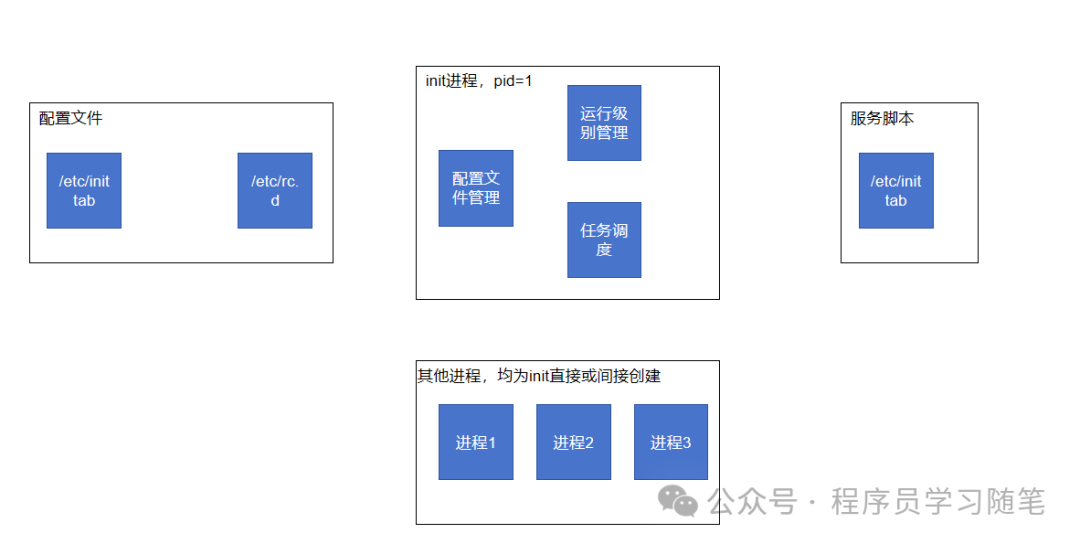 1.2 Workflow Let’s look at the execution flow during startup and shutdown:1) Startup Process
init process → read /etc/inittab → determine run level X → execute /etc/rcX.d/S*.sh scripts → start service processes 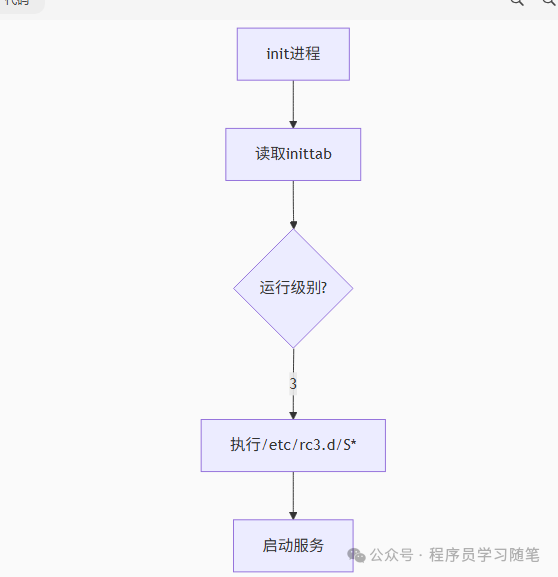 2) Shutdown Process
init 0 → execute /etc/rc0.d/K*.sh scripts → stop service processes → shut down the system1.3 Usage We will look at usage from two aspects: configuration files and modifications during runtime.1.3.1 Configuration Files1)/etc/inittab: The core configuration file in the SysV init system, with entry format as follows:
id:runlevels:action:process1. Field Descriptions
| Field | Meaning | Example |
|---|---|---|
<span>id</span> |
Unique identifier for the entry (1-4 characters) | <span>1</span>, <span>si</span>, <span>tty1</span> |
<span>runlevels</span> |
Applicable run levels (numeric combinations, empty means all levels) | <span>235</span>, <span>3</span>, “ |
<span>action</span> |
Type of action to be executed | <span>respawn</span>, <span>initdefault</span> |
<span>process</span> |
Command or process to be executed | <span>/sbin/getty</span> |
2. Key Action Types
| Action | Function | Typical Application Scenario |
|---|---|---|
<span>initdefault</span> |
Set the default run level | <span>id:3:initdefault:</span> |
<span>sysinit</span> |
Executed during system initialization | Mount file systems |
<span>respawn</span> |
Automatically restart after process termination | Terminal login (getty) |
<span>wait</span> |
Execute once and wait for completion | Network service initialization |
<span>ctrlaltdel</span> |
Respond to Ctrl+Alt+Del key combination | Safe shutdown |
<span>once</span> |
Execute once without waiting | Startup tasks |
3. Typical Configuration Example
# Set default run level to 3 (multi-user text mode)id:3:initdefault:# System initialization scriptsi::sysinit:/etc/rc.d/rc.sysinit# Start services for run levels 2/3/5l0:0:wait:/etc/rc.d/rc 0l3:3:wait:/etc/rc.d/rc 3# Terminal configuration (auto-restart)1:2345:respawn:/sbin/getty 38400 tty12:2345:respawn:/sbin/getty 38400 tty2# Ctrl+Alt+Del handlingca::ctrlaltdel:/sbin/shutdown -t3 -r now4. Run Level Descriptions
| Level | Mode | Description |
|---|---|---|
| 0 | Halt | Shutdown |
| 1 | Single user mode | Maintenance mode |
| 2 | Multi-user (no NFS) | Basic multi-user |
| 3 | Full multi-user | Standard server mode |
| 4 | Unused | Custom |
| 5 | X11 | Graphical interface mode |
| 6 | Reboot | Restart |
2)/etc/rc.d/rc: The main control script responsible for running the scripts in the <span><span>rcX.d/</span></span> directory corresponding to the specified run level.
<span><span>3)/etc/rc.d/rcX.d/</span></span>: Contains symbolic links for specific run levels (X=0-6), pointing to the actual scripts in <span><span>/etc/init.d/</span></span>.
4)<span><span>/etc/init.d/:</span></span> Contains startup, stop, and management scripts for all system services. Each service corresponds to an independent Shell script.
1.3.2 Modifications During Runtime Common operations for modifications during runtime are as follows:
## Switch run levelsinit [0-6] # Directly switch to the specified run level, e.g.: init 3 # Switch to multi-user text modeinit 5 # Switch to graphical interface modeinit 6 # Restart the system# Start services/etc/init.d/network start # Start network service/etc/init.d/ssh restart # Restart SSH service/etc/init.d/httpd status # Check HTTP service status## Set services to start at specified levelschkconfig --level 35 network on # Start network service at run levels 3 and 5chkconfig --level 24 sshd off # Turn off SSH service at run levels 2 and 41.4 Summary of Issues From the analysis of SysV init above, it can be seen that it provides simple and lightweight service management functions, but the issues are quite obvious:1) Performance Bottleneck: Executing all scripts sequentially does not effectively utilize multi-core advantages.2) Complex Configuration: Numerous and complex configuration files lack unified management; strict script specifications lead to high writing costs.3) Weak Service Management Capability: The execution order of services depends on the script name order (e.g., <span><span>/etc/rcX.d/S50nginx</span></span> in <span><span>50), which can easily lead to circular dependencies or order errors; moreover, it cannot automatically detect changes in service running status.</span></span><span><span>2. Systemd</span></span><span> <span>Systemd is a replacement for SysV init, which, compared to init, is not a single process but provides many services. We will explore it from three aspects: its architecture, design philosophy, and usage.</span></span><span><span>2.1 Architecture</span></span><span><span> Systemd is layered, with various tools at the top level, such as the main system management tool systemctl; the lower layer consists of various background processes, libraries, and kernel support, providing Systemd with a rich set of functionalities.</span></span>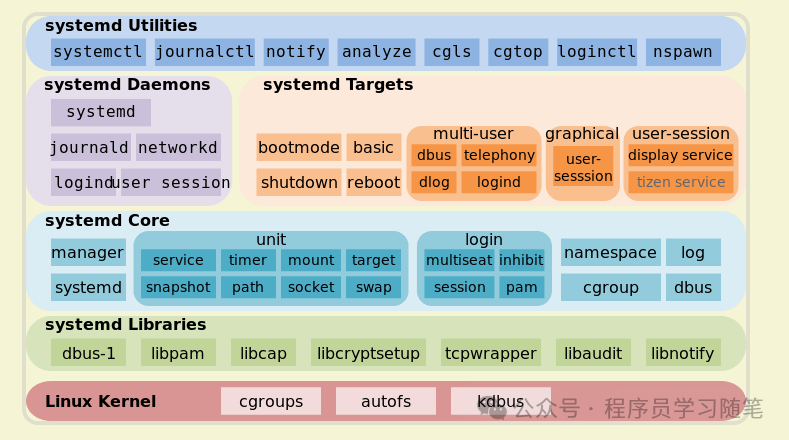
<span><span>2.2 Design Philosophy</span></span><span> <span>In the design philosophy section, we mainly look at how it addresses the issues of SysV init.</span></span><span><span>2.2.1 Implementation of Parallel Startup</span></span><span><span> The parallel startup of systemd is achieved through two core technologies: dependency graph analysis and asynchronous execution:</span></span><span><span>1) Dependency Graph:</span></span><code><span><span>By constructing a directed acyclic graph based on the dependencies in the configuration files before startup, where each node represents a unit and edges represent dependencies.</span></span><code><span><span>2) Asynchronous Execution: Using a multi-threaded asynchronous architecture, when a unit's dependency conditions are met, it is immediately placed into the work queue for asynchronous execution.</span></span><code><span><span>2.2.2 Standardized Management of Configuration Files</span></span><code><span><span> The configuration file system of systemd simplifies configuration file management through a unified abstract model, declarative syntax, and modular design.</span></span><code><span><span>1) Hierarchical Division: Instead of being scattered across various directories, it is divided into three layers:</span></span>
System default: /usr/lib/systemd/system/ (maintained by package manager)User-defined: /etc/systemd/system/ (overrides system defaults)Runtime configuration: /run/systemd/system/ (dynamically generated)<code><span><span>2) Unified Syntax: Uses uniformly styled Unit files instead of scattered shell scripts.</span></span><code><span><span>3) Resolving Naming Constraints: No longer relies on name order for startup but analyzes the dependency graph itself.</span></span><code><span><span>2.2.3 Refined Service Management</span></span><code><span><span>1) Full Lifecycle Management: Uses cgroups as control groups, where child processes inherit the parent process's cgroup, allowing for starting and stopping all related processes of a service.</span></span><code><span><span>2) Service Monitoring and Resource Control:</span></span><code><code><span><span>Automatically monitors services through cgroups, attempting to restart and impose resource limits based on configuration files.</span></span><code><span><span>2.3 Usage</span></span><code><span><span> From the above introduction, we know the concept of dependency graphs, which originates from the unified Unit concept. The Unit concept is divided into the following types:</span></span>
Service unit: System serviceTarget unit: A group composed of multiple UnitsDevice Unit: Hardware deviceMount Unit: Mount point of the file systemAutomount Unit: Automatic mount pointPath Unit: File or pathScope Unit: External processes not started by SystemdSlice Unit: Process groupSnapshot Unit: Systemd snapshot, can revert to a certain snapshotSocket Unit: Inter-process communication socketSwap Unit: Swap fileTimer Unit: Timer<code><span> To define a Unit configuration file, we will look at an example of sshd. You can view it using the following command.</span>
systemctl cat sshd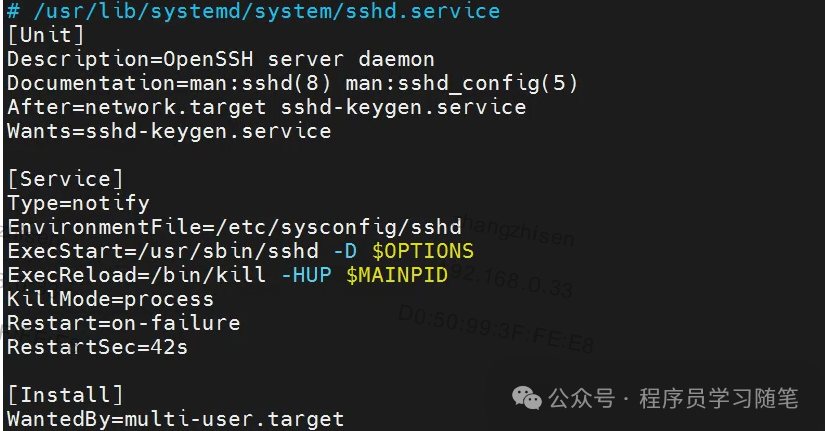 It is divided into three parts:1) Unit Area: Metadata part, where the order relationship with other Units is configured.2) Service Area: Only service-type units have this, defining some commands and states during startup.3) Install Area: Defines how and when to start.Official Documentation:
https://www.freedesktop.org/software/systemd/man/latest/systemd.unit.html3. Conclusion We have learned about the early design of SysV Init, which provided simple and lightweight services for daemon management. However, the issues it brought have become increasingly significant with the advancement of time, leading to the emergence of systemd, which addresses these problems through various settings. But does systemd have issues? From its architecture diagram, it can be seen that it is very heavyweight and relies on the Linux kernel, violating the“keep simple, keep stupid” Unix philosophy. Therefore, it is difficult to have a perfect design; all designs are a trade-off for current problems, and the significance of evolution lies in this, looking back at past designs with current perspectives and finding the best solutions through improvement.