Samba Service Configuration
Introduction to Samba
Samba is a file and print sharing service based on the SMB/CIFS protocol, commonly used for sharing files between Linux and Windows. In our development environment, Samba can be used to:
-
Share directories from the Ubuntu virtual machine;
-
Directly access, copy, and modify files generated by the cross-compiler on the Windows host;
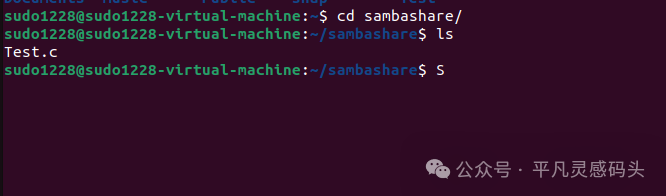
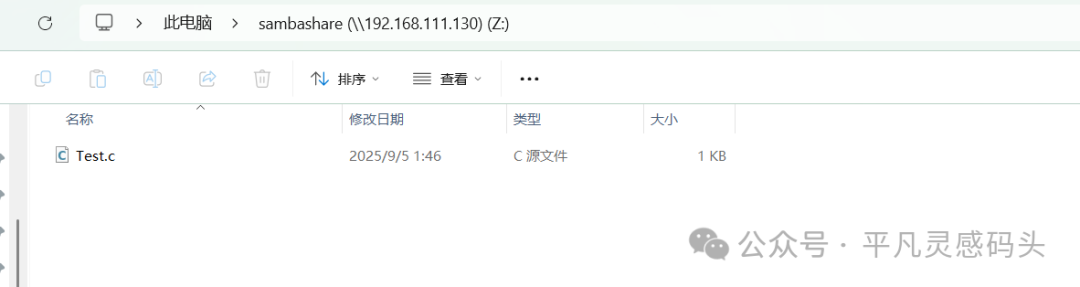
The sambashare folder here is my shared folder
Installing Samba
Execute the following on the Ubuntu virtual machine:
sudo apt update
sudo apt install samba
Configuring the Shared Directory
-
Edit the Samba configuration file:
sudo vi /etc/samba/smb.conf
Add the following content at the end of the file:
[sambashare]
path = /home/user name/sambashare/
readonly = no
browseable = yes
Replace user name with your actual username
Adding a Samba User
The Samba user must match a Linux user, for example, we use <span>robin</span>:
sudo smbpasswd -a robin
After entering the password twice, this user can log in to Samba.
Starting and Verifying the Service
-
Restart the Samba service:
sudo service smbd restart
Check the service status:
sudo systemctl status smbd
Access the shared directory from the Windows host: Enter the following in the Explorer address bar:
\\VirtualMachineIP\sambashare\
After entering the username <span>robin</span> and the corresponding password, you can access the shared directory.
Cross-Compiler Toolchain Installation
(This content is similar to the previous one, I will briefly reorganize it)
Revised article
HS, WeChat Official Account: Ordinary Inspiration Dock Detailed Explanation of Cross-Compilers: The Unsung Heroes of Embedded Development
Downloading the aarch64-linux-gnu Compiler
Go to the Linaro toolchain page: 👉 https://releases.linaro.org/components/toolchain/binaries/
Select the <span>aarch64-linux-gnu</span> version, for example: Download link for version 7.3-2018.05
Download <span>gcc-linaro-7.3.1-2018.05-x86_64_aarch64-linux-gnu.tar.xz</span>.
Installing the Compiler
-
Create the installation directory:
-
sudo mkdir /opt
sudo chmod 777 /opt -R
Copy and extract the toolchain to <span>/opt</span>:
-
sudo cp ~/Downloads/gcc-linaro-7.3.1-2018.05-x86_64_aarch64-linux-gnu.tar.xz /opt
cd /opt
tar -xvf gcc-linaro-7.3.1-2018.05-x86_64_aarch64-linux-gnu.tar.xz
Configure environment variables (edit <span>~/.bashrc</span>):
-
export PATH=/opt/gcc-linaro-7.3.1-2018.05-x86_64_aarch64-linux-gnu/bin:$PATH
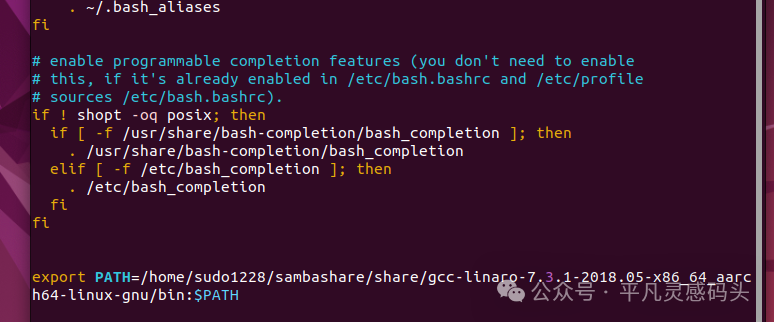
After saving, execute:
source ~/.bashrc
Verification:
aarch64-linux-gnu-gcc -v
If the version information is displayed, the configuration is successful.