
Click on the blue text above to follow us



The Linux chmod command (full English: change mode) is used to control user permissions for files.
The file access permissions in Linux/Unix are divided into three levels: file owner (Owner), user group (Group), and other users (Other Users).
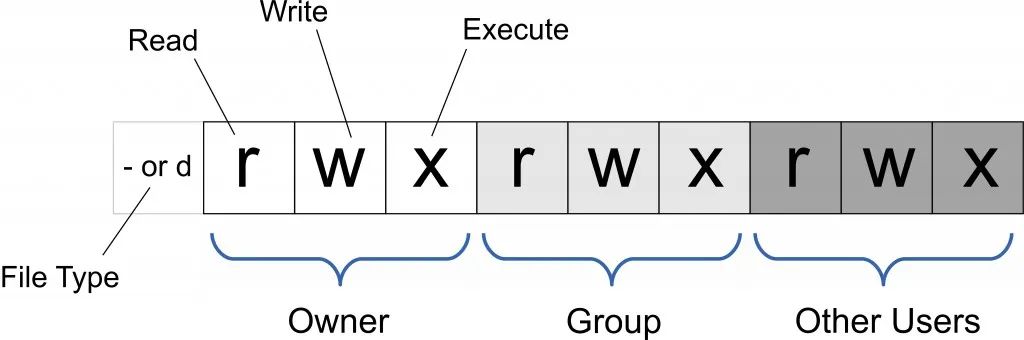
Only the file owner and superuser can modify the permissions of files or directories. You can use absolute mode (octal number mode) or symbolic mode to specify file permissions.
Usage Permissions:All users
Syntax
chmod [-cfvR][--help][--version] mode file...Parameter Description
mode:Permission setting string, formatted as follows:
[ugoa...][[+-=][rwxX]...][,...]Where:
-
u represents the file owner, g represents users in the same group as the file owner, o represents others, a represents all three.
-
+ means to add permissions, – means to remove permissions, = means to set permissions exclusively.
-
r means readable, w means writable, x means executable, X means only set as executable if the file is a directory or has already been set as executable.
Other parameter descriptions:
-
-c : Only display changes if the file permissions have indeed changed
-
-f : Do not display error messages if the file permissions cannot be changed
-
-v : Display detailed information about permission changes
-
-R : Recursively change permissions for all files and subdirectories in the current directory
-
–help : Display help information
-
–version : Display version
Symbolic Mode
Using symbolic mode can set multiple items: who (user type), operator (operator), and permission (permission), with each item separated by commas. The chmod command modifies the access permissions of the file for the user types specified in who, which are indicated by one or more letters in the who position, as shown in the symbolic mode table for who:
| who | User Type | Description |
|---|---|---|
| u | user | file owner |
| g | group | the group of the file owner |
| o | others | all other users |
| a | all | all users, equivalent to ugo |
The operator symbolic mode table:
| Operator | Description |
|---|---|
| + | Add permissions for the specified user type |
| - | Remove permissions for the specified user type |
| = | Set the specified user permissions, resetting all permissions for that user type |
The permission symbolic mode table:
| Mode | Name | Description |
|---|---|---|
| r | read | set to readable permission |
| w | write | set to writable permission |
| x | execute | set to executable permission |
| X | special execute permission | set to executable only if the file is a directory or other types of users have execute permission |
| s | setuid/gid | set the setuid or setgid permission for the file based on the user type specified by the who parameter when the file is executed |
| t | sticky bit | set the sticky bit, which can only be set by the superuser, and only the file owner can use it |
Octal Syntax
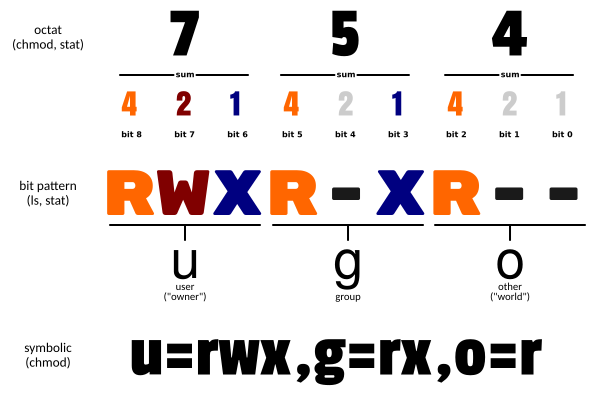
The chmod command can use octal numbers to specify permissions. The permission bits for files or directories are controlled by 9 permission bits, grouped in threes: the read, write, and execute permissions for the file owner (User), the read, write, and execute permissions for the user group (Group), and the read, write, and execute permissions for other users (Other). Historically, file permissions were placed in a bitmask, where bits specified in the mask are set to 1 to indicate that a class has the corresponding priority.
| # | Permission | rwx | Binary |
|---|---|---|---|
| 7 | read + write + execute | rwx | 111 |
| 6 | read + write | rw- | 110 |
| 5 | read + execute | r-x | 101 |
| 4 | read only | r– | 100 |
| 3 | write + execute | -wx | 011 |
| 2 | write only | -w- | 010 |
| 1 | execute only | –x | 001 |
| 0 | none | — | 000 |
For example, 765 would be interpreted as follows:
-
The owner’s permissions expressed numerically: the sum of the three permission bits for the owner. For rwx, that is 4+2+1, which equals 7.
-
The user group’s permissions expressed numerically: the sum of the permission bits for the group. For rw-, that is 4+2+0, which equals 6.
-
The permissions for other users expressed numerically: the sum of the permission bits for others. For r-x, that is 4+0+1, which equals 5.
Examples
Set file file1.txt to be readable by everyone:
chmod ugo+r file1.txtSet file file1.txt to be readable by everyone:
chmod a+r file1.txtSet files file1.txt and file2.txt to be writable by the file owner and users in the same group, but not writable by others:
chmod ug+w,o-w file1.txt file2.txtSet ex1.py to be executable only by the file owner:
chmod u+x ex1.pySet all files and subdirectories in the current directory to be readable by anyone:
chmod -R a+r *Additionally, chmod can also use numbers to represent permissions such as:
chmod 777 fileThe syntax is:
chmod abc fileWhere a, b, and c are each a number representing the permissions for User, Group, and Other respectively.
r=4, w=2, x=1
-
If you want rwx attributes, then 4+2+1=7;
-
If you want rw- attributes, then 4+2=6;
-
If you want r-x attributes, then 4+1=5.
chmod a=rwx fileAnd
chmod 777 fileHave the same effect
chmod ug=rwx,o=x fileAnd
chmod 771 fileHave the same effect
If using chmod 4755 filename will give this program root permissions.
More Information
| Command | Description |
|---|---|
| chmod a+r file | Add read permission for all users on file |
| chmod a-x file | Remove execute permission for all users on file |
| chmod a+rw file | Add read and write permissions for all users on file |
| chmod +rwx file | Add read, write, and execute permissions for all users on file |
| chmod u=rw,go= file | Set read and write permissions for the file owner, clearing all permissions for the user group and other users on file (space represents no permissions) |
| chmod -R u+r,go-r docs | Add read permissions for the user on all files in the docs directory and its subdirectory structure, while removing read permissions for the user group and other users |
| chmod 664 file | Set read and write permissions for the file owner and user group, and read permissions for other users on file |
| chmod 0755 file | Equivalent tou=rwx (4+2+1),go=rx (4+1 & 4+1),0 has no special mode |
| chmod 4755 file | 4 sets the set user ID bit, the rest equivalent to u=rwx (4+2+1),go=rx (4+1 & 4+1) |
| find path/ -type d -exec chmod a-x {} \; | Remove execute permissions for all users on path/ and all directories (excluding files) |
| find path/ -type d -exec chmod a+x {} \; | Allow all users to browse or traverse the directory path/ |

If you want to know more or need more information,
you can scan the code to participate
Original Price398 Yuan,Now only 1 Yuan!
Linux Operations Practical Training Camp!
2 days from theory to practice
Get the interview points most liked by the original factory interviewers,
Official instructors lead you hands-on
Zero-based advancement to operations expert!




Scan to add the teacher
Get exclusive benefits for beginners