Follow and star our public account for exciting content

Source | Online Materials
1. Introduction to log.c
log.c is a minimalistic C language logging library developed and maintained by akstuki. The project aims to provide a lightweight and easy-to-integrate solution that allows developers to quickly add logging functionality to their C applications.
Despite its small size, consisting of only one .c file and one .h file totaling less than 200 lines of code, log.c still possesses sufficient flexibility to meet basic logging needs, including different log levels, the ability to output to files, and thread safety.
Application Scenarios
As an independent component, log.c is suitable for numerous C language projects, especially in embedded systems and small service applications. Although there is no direct list of “ecosystem projects,” its versatility allows it to be integrated with any C project that requires logging functionality.
For example, it can be integrated into firmware for IoT devices, server backend management tools, or any form of client-server architecture applications.
Users can customize and extend it based on their specific application scenarios, such as implementing remote logging to log collection services through simple modifications or by adding adapters.
With the above introduction and guidance, you should now understand how to quickly incorporate log.c into your C project and effectively utilize it for log management. Remember to configure and optimize it appropriately based on your specific needs in actual applications.
Source Code Download
Since log.c is composed of pure C code, integrating it into a project typically does not require complex steps. You can start using it by directly downloading or cloning the repository via Git:
git clone https://github.com/akstuki/log.c.git
2. Function Introduction
Structures
static struct {
  void *udata;
  log_LockFn lock;
  FILE *fp;
  int level;
  int quiet;
} L;
| Member | Function |
|---|---|
| void *udata | Private information for the custom lock callback function |
| log_LockFn lock | Custom lock callback function for mutually exclusive access to files; different platforms have different locking mechanisms |
| FILE *fp | File handle for storing log information |
| int level | Log information level for display and storage; logs below this level will not be displayed or saved. Set a higher log level (e.g., ERROR or WARNING) in production environments, while enabling more detailed logs (DEBUG or TRACE) during development and testing. |
| int quiet | Whether log information is printed to the screen |
- Macro switch LOG_USE_COLOR
Whether printed information displays color
Library Function Descriptions
| Function Name | Function Description |
|---|---|
| log_set_fp() | Set the file handle for storing log information |
| log_set_lock() | Set the custom lock callback functionFunction prototype: **typedef void (log_LockFn)(void udata, int lock); |
| log_set_udata() | Set private information for the custom lock callback function |
| log_set_quiet() | Set whether log information is printed to the screen; 1: do not print, 0: print |
| log_set_level() | Set the log information level for display and storage |
3. Example Explanation
Include the log.h header file in your C project and link log.c in your build process.
This example creates a main program file main.c
peng@ubuntu:~/work/log/src$ ls
clog.cpp  clog.h  log.c  log.h  main.c
If in a C++ environment, use the clog.cpp file
1. Example Code
/*
 * main.c
 * Copyright 2024 -yikoupeng <[email protected]>
 * This program is under a GPLv3+ license.
 * log demo
 *          Follow our public account: One Bite Linux
 */

#include <stdio.h>
#include <pthread.h>
#include "log.h"

#define LOG_FILE_NAME "peng.log"

pthread_mutex_t log_mutex;

void log_mutex_fn(void *udata, int lock)
{
if(lock==1)
 {
 //lock
  pthread_mutex_lock(&log_mutex);
 }elseif(lock==0){
//unlock
  pthread_mutex_unlock(&log_mutex);
 }
return;
}

void my_log_lock_init(char *info)
{
 pthread_mutex_init(&log_mutex,NULL);
 log_set_lock(&log_mutex_fn);
    log_set_udata(info);
}
void my_fp_init(char *filename)
{
 FILE * fp = fopen(filename,"w+");
if(fp == NULL)
 {
printf("%s open fail\n",filename);
 }
 log_set_fp(fp);
}
int main(int argc, char **argv)
{
//Set lock callback function
 my_log_lock_init("peng");

//Set log file handle
 my_fp_init(LOG_FILE_NAME);

//Log information printed to screen
 log_set_quiet(0);

//Set log level to LOG_TRACE
    printf("Setting log level to LOG_TRACE.\n");
    log_set_level(LOG_TRACE);

    // Perform some operations...
 log_trace("One Bite Linux.");
 log_debug("One Bite Linux.");
 log_info("One Bite Linux.");
 log_warn("One Bite Linux.");
 log_error("One Bite Linux.");
 log_fatal("One Bite Linux.");

//Set log level to LOG_ERROR
    printf("Setting log level to LOG_ERROR.\n");
    log_set_level(LOG_ERROR);

    // Perform some operations...
 log_trace("One Bite Linux.");
 log_debug("One Bite Linux.");
 log_info("One Bite Linux.");
 log_warn("One Bite Linux.");
 log_error("One Bite Linux.");
 log_fatal("One Bite Linux.");

return0;
}
2. Compilation
Ensure to compile the log.c file together during compilation, or if in a Makefile, ensure it is correctly linked.
peng@ubuntu:~/work/log/src$ gcc main.c log.c -o run
3. Execution
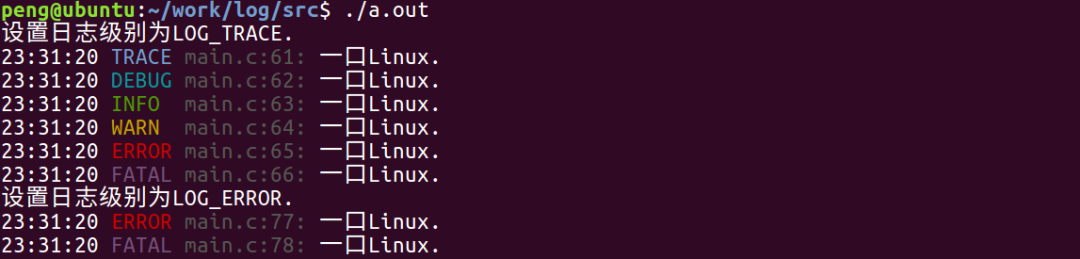
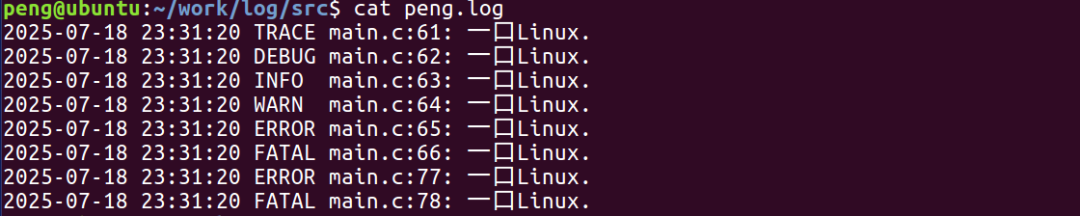
4. Viewing Log File Information
‧‧‧‧‧‧‧‧‧‧‧‧‧‧‧‧  END  ‧‧‧‧‧‧‧‧‧‧‧‧‧‧‧


Follow my public account and reply "planet" to join the knowledge community, where all questions are answered.


Click "Read the original" to view details about the knowledge community. Feel free to share, bookmark, like, and view.