Introduction
In embedded development, redirecting printf to the UART serial port is an important means of debugging and logging output. In the Keil environment, the printf function does not directly support UART output for STM32. This article will introduce how to redirect stdout (standard output) to the serial port in the Keil MCU environment, allowing it to output debugging information through the STM32 serial port.
Basic Knowledge and Principles
1. The printf function is a formatted output function in the C standard library, used for console output of debugging information.
2. Redirection target: Modify the underlying fputc or write function that printf relies on, so that its data is sent through the serial port.
-
• Semihosting Mode: Keil simulates communication with the main program through software rather than physical connections (i.e., not using serial or USB). This mode reduces the overhead of hardware connections and is suitable for quickly locating issues during the debugging phase.
-
• Select Disable Semihosting: Change the Semihosting macro definition in the config.c file (0/1): This can avoid Keil’s default debugging output mechanism, reduce resource consumption (CPU, memory), and improve debugging efficiency, suitable for scenarios requiring real-time monitoring of hardware status.
3. The basic syntax of the fputc function requires including the header file #include <string.h>
int fputc(char c, FILE *file);Parameters: c: The character to write (char type). file: A file descriptor pointing to the target file (FILE *). Return value:
Returns EOF (-1) on success, 0 on failure.
5. Serial communication: full-duplex, point-to-point, with a very short communication distance.
Implementation Method
1 Redefine the fputc function to send characters via the serial port.
(Using STM32CubeMX + MDK5 + STM32G431RX as an example)
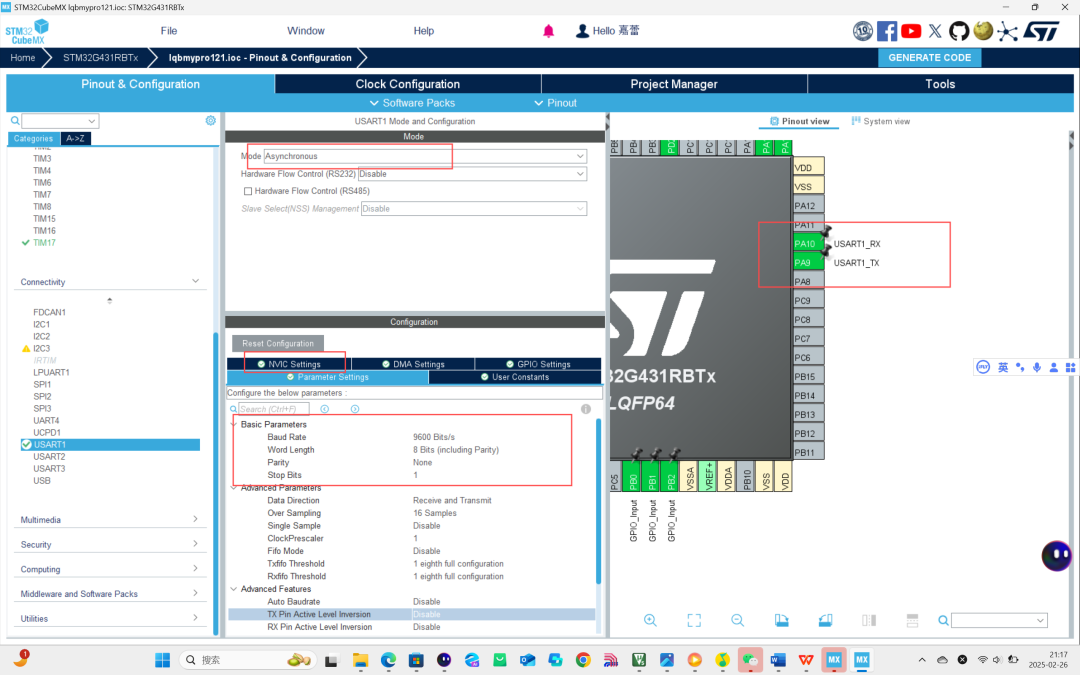
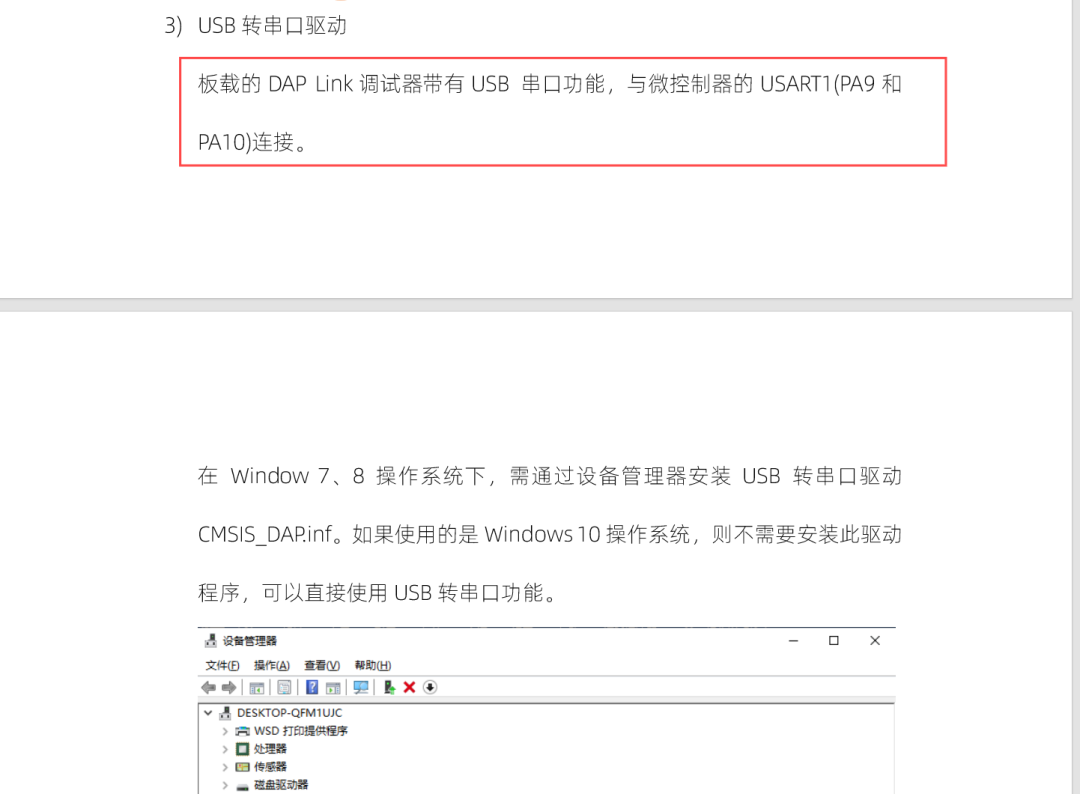
MX configuration for serial GPIO: PA9 — TX, PA10 — RX (if directly configuring Serial 1, then default PC4, PC5). Serial configuration: Use USART1, as shown, NVIC interrupts must be enabled.
(2) Redirect the fputc function
The function originally prints the character ch to the file stream pointed to by f; now we print to Serial 1 instead of the file stream.
#include <stdio.h>

struct __FILE
{
  int handle;
  /* Whatever you require here. If the only file you are using is */
  /* standard output using printf() for debugging, no file handling */
  /* is required. */
};

/* FILE is typedef’d in stdio.h. */
FILE __stdout;

int fputc(int ch, FILE *f)
{
// Transmit character to the serial port, serial communication transmits one character at a time, size is 1 byte, timeout is 50 milliseconds.
    HAL_UART_Transmit(&huart1,(u8 *)&ch,1,50);
  /* Your implementation of fputc(). */
  return ch;
}
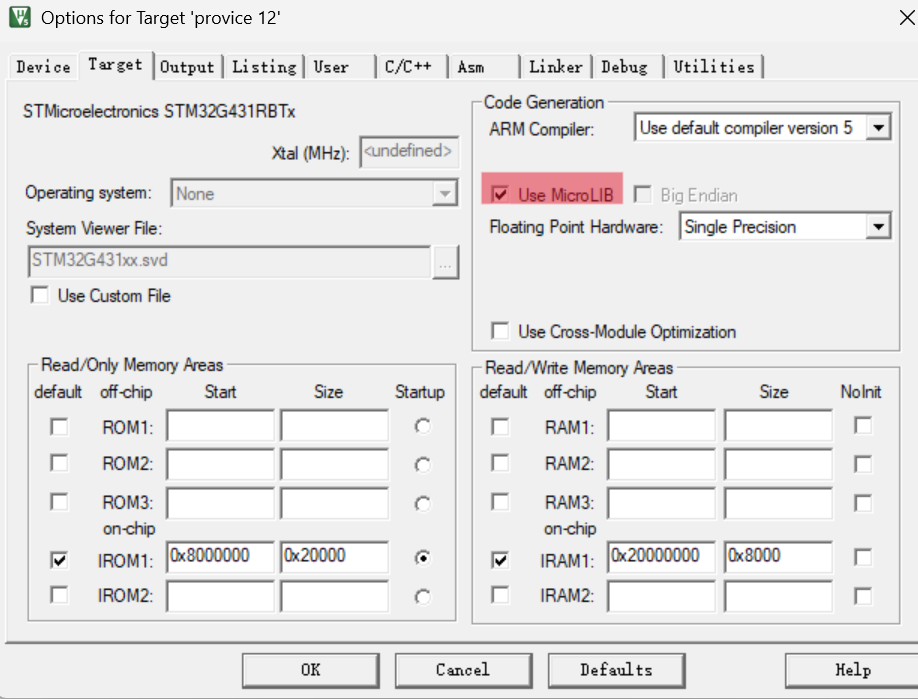
(3) Enable MicroLibThe function: Keil’s optimized lightweight library for embedded systems, supports redirection.Setting method: Options for Target → Target → Check Use MicroLIB. // Checking MicroLib will automatically disable semihosting, but you can also choose not to use MicroLib and modify the semihosting macro definition in the config.c file, then redirect.
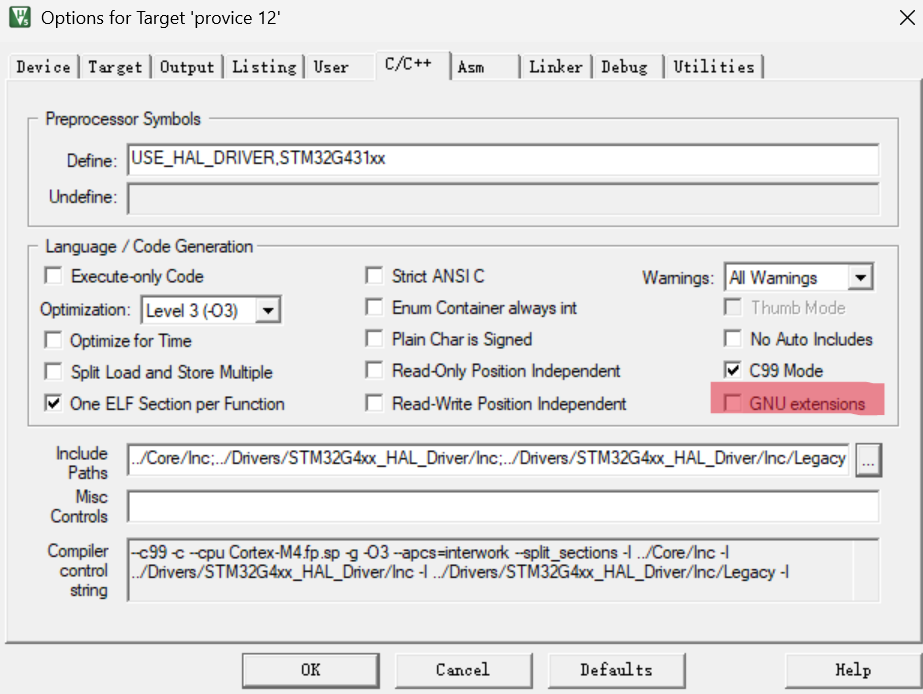
Note: Do not check GNU.
Now you can use printf in the source file, and during runtime, information can be displayed on the serial assistant’s receiver.
2) Redirect the write function (when not using MicroLib) under GCC compiler
#include <sys/unistd.h>

int _write(int fd, char *ptr, int len) {
    for (int i = 0; i < len; i++) {
        USART_SendChar(USART1, ptr[i]);
    }
    return len;
}
Note that semihosting must be disabled.
Necessity: If MicroLib is not used and redirection is not performed, printf will trigger semihosting errors. Solution:
void _sys_exit(int x) { while(1); } // Avoid linking errors///////////////////////////////////////////////////////////// The following is what I found about semihosting mode related to:1. Essence of Semihosting: What is Semihosting? Semihosting is a special debugging mechanism in ARM development that allows target devices to interact with the host (PC) through a debugging interface (such as JTAG/SWD). When code calls standard library functions like printf, scanf, etc., the actual operations (like outputting text, reading input) are forwarded to the host via the debugger, rather than executed locally on the target device.
2. Default Dependencies of the Standard Library: When MicroLib is not used, the standard C library (like newlib) defaults to relying on the semihosting mechanism for I/O operations. This means that:
If the system call functions like _write are not explicitly redirected, the library functions will automatically attempt to communicate with the host via semihosting. If the target device is not connected to a debugger or semihosting support is not enabled, this will trigger semihosting-related exceptions (like HardFault).
3. Trigger Logic of Semihosting Errors:
-
1. Dependency injection at the linking stage: When printf is called in the code, the standard library implicitly links to the semihosting-related low-level functions (like _write). If these functions are not rewritten, the linker will automatically use the default semihosting implementation from the library. For example:
// Default implementation of _write in the standard library (pseudocode)
int _write(int fd, char *ptr, int len) {
    // Request the debugger to output data via semihosting
    __semihosting_call(SYS_WRITE, fd, ptr, len);
}-
2. Low-level mechanism of semihosting calls:
- ARM processors trigger semihosting operations through the SVC (Supervisor Call) instruction:
In Thumb mode: Execute SVC 0xAB or SVC 0x123456 instruction.
In ARM mode: Execute SVC 0x123456 instruction. If the target device is not running in a debugging environment (such as not connected to a J-Link/ST-Link debugger), these instructions will cause the following problems:
Hardware exceptions: The processor cannot handle undefined SVC instructions, triggering HardFault. Infinite loop: Some library implementations will enter a semihosting infinite loop waiting for a response from the host.
3. Application Scenarios:
(1) In ESP32 projects, semihosting can be used to deploy web pages to the host PC, automatically updating web content each time HTML, JS, or CSS files are refreshed.
(2) In semihosting mode, embedded devices can communicate with the host via the debugger, outputting debugging information to the host’s console or terminal. For example, the output of the printf function can be redirected to the host’s console, allowing developers to view the program’s running status and debugging information during development.