1. Introduction
(First, let’s set the stage) Why emphasize free large models in the title? Aren’t most large models free to use? Not at all; free usage is limited to mobile apps and official websites, and the API services they provide are all paid.
Alright, let’s get to the main content.
In the previous article, we detailed how to use Python to call the DeepSeek API to process tabular data (Practical Python | Using Python to Call the DeepSeek API for Tabular Data Processing (with Detailed Code)), fulfilling research data needs that previously required manual processing. To help everyone solve more problems, this article will introduce more practical AI large model APIs and provide detailed code for calling them in Python.
2. Review of Useful Large Model APIs
(1) DeepSeek – Industry Benchmark
Since the release of the self-inference model R1, DeepSeek has quickly become an industry-recognized AI giant within just one quarter, with unprecedented influence. This has led to a high level of user trust in DeepSeek AI, making it the go-to choice for solving common problems from the perspective of correctness and authority.
The DeepSeek API is roughly divided into two categories: the renowned inference model R1 and the general model V3. The differences between the two mainly lie in inference capability and calling costs; however, in terms of model performance, the gap is not significant, especially after the upgrade of the V3 model, which has narrowed the difference even further. However, during regular periods, the calling price is indeed significantly higher, so for solving simple problems, I recommend using the general model DeepSeek V3. For specific details, please refer to the previous two articles:
❝
AI World | What is the difference between inference models and general models?
Practical Python | Using Python to Call the DeepSeek API for Tabular Data Processing (with Detailed Code)
The steps and code for calling the model are as follows.
1. [Registration – Real-name Authentication – Create API Key – Recharge] This is a necessary step before calling most large model APIs. DeepSeek offers a balance upon registration, but the gifted balance has a “shelf life”; I still don’t know how much was given, but it has already been cleared.
2. Environment Configuration. The Python environment goes without saying, but the third-party libraries required to call the API still need to be installed, which can be done according to the official API documentation. To call DeepSeek, you need to install the third-party library openai.
pip install openai
3. Calling Code. You can refer to the DeepSeek API documentation; my calling example is as follows.
# Import openai
from openai import OpenAI
# Create DeepSeek client
client = OpenAI(api_key='*********************************',
                base_url="https://api.deepseek.com")

# API request
response = client.chat.completions.create(
    # The value of the model parameter is deepseek-chat, indicating that the DeepSeek-V3 model is being called
    # If using the inference model R1, replace the parameter with "deepseek-reasoner"
    model="deepseek-chat",
    # messages contains two entries, the first role is system, which is a system command, used to define the AI role
    # The second command's role is user, which is the core command; the system will respond based on the role defined by the system command
    # If no system command is needed, only keep the user command in messages
    messages=[
        {"role": "system", "content": "You are a math expert who can answer my math questions."},
        {"role": "user", "content": "Which is larger, 9.11 or 9.8?"},
    ],
    stream=False    # Whether to return in streaming mode
)
# Output answer (AI's reply)
print(response.choices[0].message.content)
AI Response
Comparing 9.11 and 9.8:

1. Comparing the integer parts:
   - Both numbers have the integer part of 9, which is equal.

2. Comparing the decimal parts:
   - The decimal part of 9.11 is 0.11
   - 9.8 can be viewed as 9.80, with the decimal part of 0.80
   - 0.80 > 0.11

Therefore, 9.8 is greater than 9.11.

Final answer: {9.8}
(2) Kimi (Moonshot) – More Features
Kimi AI debuted slightly earlier than DeepSeek; although it is less well-known than its later counterpart, the capabilities of the Kimi API are not lagging behind and may even be richer in features. For example, the AI large model provided by Kimi includes a visual model, which, according to official descriptions, can understand image content, including text, colors, and shapes. So what can we do with it? More diverse applications may await development, but it is certainly feasible to use it for OCR text and table recognition.
❝
It should be noted that DeepSeek also has image recognition capabilities, even able to recognize tables in images and upload various formats of attachments, but those are limited to mobile apps and official websites. Such functions cannot be achieved when calling the API. Kimi’s model can accept encoded images as attachments and can recognize text and tables in images.
The steps to call Kimi’s visual model are as follows (the Kimi general model is similar to DeepSeek, so it will not be elaborated here).
1. [Registration – Create API Key] This step is simpler because Kimi supports WeChat login, skipping real-name authentication, and new users will automatically receive a balance of 15 yuan, which is enough to do a lot of things.
2. Environment Configuration.
# Can be ignored if already installed
pip install openai
3. Calling Code (taking table recognition in images as an example).
Since the object of OCR may not necessarily be an image, meaning the file the user wants to recognize may not be an image, if it is a PDF file, then the model does not support directly uploading PDF files for recognition and conversion. Therefore, it is necessary to first split each page of the PDF into images and then recognize them one by one. The code to convert PDF pages to images using Python can be referenced here:
# Environment preparation, install the third-party library PyMuPDF, imported as fitz
pip install PyMuPDF
import fitz
pdf_file = fitz.open(pdfpath)
# Create a list of paths for the obtained images for easy input into the API
pics = []
# start is the starting page displayed in WPS -1, end is the ending page displayed in WPS, get the pages in the range, one page is one image
for pagenum in range(start,end):
    pdfpage = pdf_file[pagenum]
    # Define zoom factor: the larger, the higher the image quality
    zoom_x, zoom_y = 4,4
    # Create transformation matrix, set rotation angle to 0 degrees
    mat = fitz.Matrix(zoom_x, zoom_y).prerotate(0)
    # Generate pixel map (image object) # matrix: apply the previously created scaling and rotation transformation
    # alpha: whether to include the alpha channel (transparency), set to False means not included
    pix = pdfpage.get_pixmap(matrix=mat, alpha=False)
    # Create pics folder for storage
    # Name the image with the PDF file name and page number, and save the path
    pdf_name = os.path.basename(pdfpath)
    # Storage path
    PNG_path = f'./pics/{pdf_name}_page_{pagenum+1}.png'
    pics.append(PNG_path)
    # Write the image object to local image
    pix.save(PNG_path)
After saving as images, you can call Kimi’s visual model for OCR. Here, another detail comes into play: since mainstream large models currently do not support directly returning Excel files, they can only return text in a user-specified format (default Markdown format). Therefore, after calling, it is necessary to convert it to a pandas table before saving. The detailed code is as follows.
import os,base64
from openai import OpenAI

client = OpenAI(
    # Replace MOONSHOT_API_KEY with the API Key you applied for from Kimi's open platform
    api_key = "sk-********************************",
    base_url = "https://api.moonshot.cn/v1",
)
# Path of the image
png_path = 'D:/OCR/1.png'
with open(png_path, "rb") as f:
    image_data = f.read()

# We use the standard library base64.b64encode function to encode the image into base64 format image_url
image_url = f"data:image/{os.path.splitext(png_path)[1]};base64,{base64.b64encode(image_data).decode('utf-8')}"

completion = client.chat.completions.create(
    model="moonshot-v1-8k-vision-preview",# Fill in the model you want to use, you can check the official documentation for specific models
    messages=[
        {"role": "system", "content": "You are a professional image table extraction tool that can extract tables from images, ignoring non-table content"},
        {
            "role": "user",
            # Note here, content has changed from str type to a list, this list contains multiple parts, the image (image_url) is one part,
            # text is another part
            "content": [
                {
                    "type": "image_url", # <-- Use image_url type to upload images, content is the base64 encoded image content
                    "image_url": {
                        "url": image_url,
                    },
                },
                {
                    "type": "text",
                    # Prompt input
                    "text": "Please extract the table data completely, only extract table data, use '|' to separate, ignore other content, do not output any extra text", # <-- Use text type to provide text instructions, such as "describe the image content"
                },
            ],
        },
    ],
)

res = completion.choices[0].message.content
print(res)
The original image passed in and the returned text content are shown in the following images.
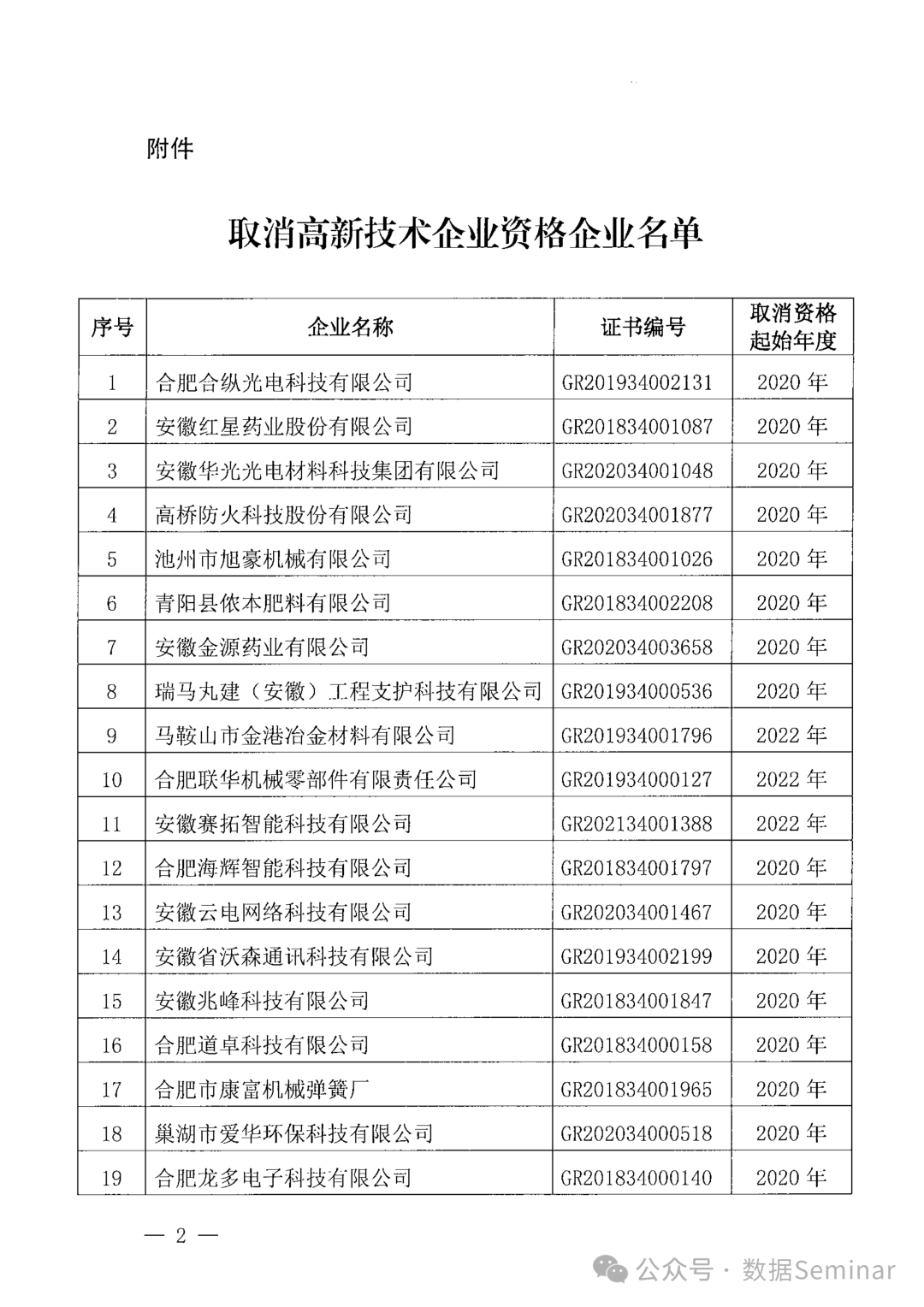
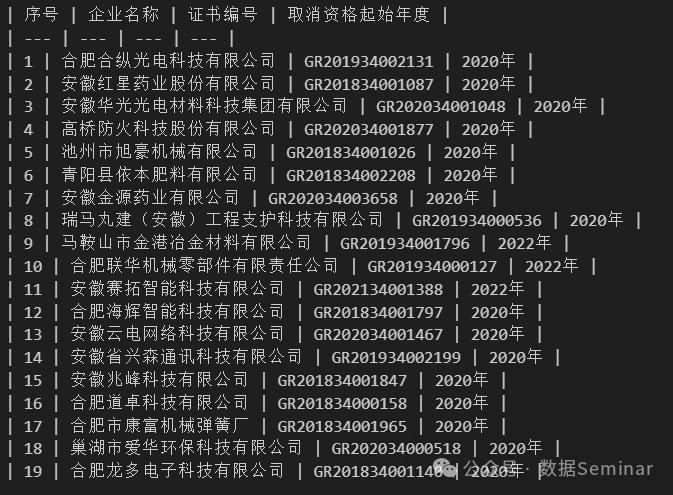
Finally, use Python to convert the recognition results into an Excel table.
import pandas as pd
# Split by \n
lines = res.strip().split('\n')
# Get the first line, which is the header information, split cells by |
headers = [h.strip() for h in lines[0].strip('|').split('|')]
# Read each line, split cells by |
rows = []
for line in lines[2:]:
    row = [cell.strip() for cell in line.strip('|').split('|')]
    rows.append(row)
# Convert to DataFrame
result = pd.DataFrame(rows, columns=headers)
# Save as Excel table
result.to_excel('1.xlsx', index=False)
❝
In our historical sharing, we have mentioned table recognition work several times, some directly reading tables from PDFs, and some calling third-party libraries for OCR table recognition.
Data Governance | Understand how to read and process tables in PDFs using Python in one article
Practical Python | Extracting (incomplete) tables from PDFs
If the PDF table to be recognized is well-formatted and supports reading, with complete borders, then using a third-party library for direct reading is fast and accurate, and there is no need to spend money calling large model APIs. However, if the file to be recognized is not so perfect and you do not want to search for tools and slowly adjust parameters, then you can confidently use Kimi to achieve it, simply for peace of mind!
(3) SiliconFlow – The Ultimate Free Option!
SiliconFlow is a model cloud service platform that includes various AI large models for calling, among which are some platforms providing generally performing free large models. So strictly speaking, it is not that SiliconFlow’s large model APIs are free, but that it aggregates various large models, including some free models, onto its platform.
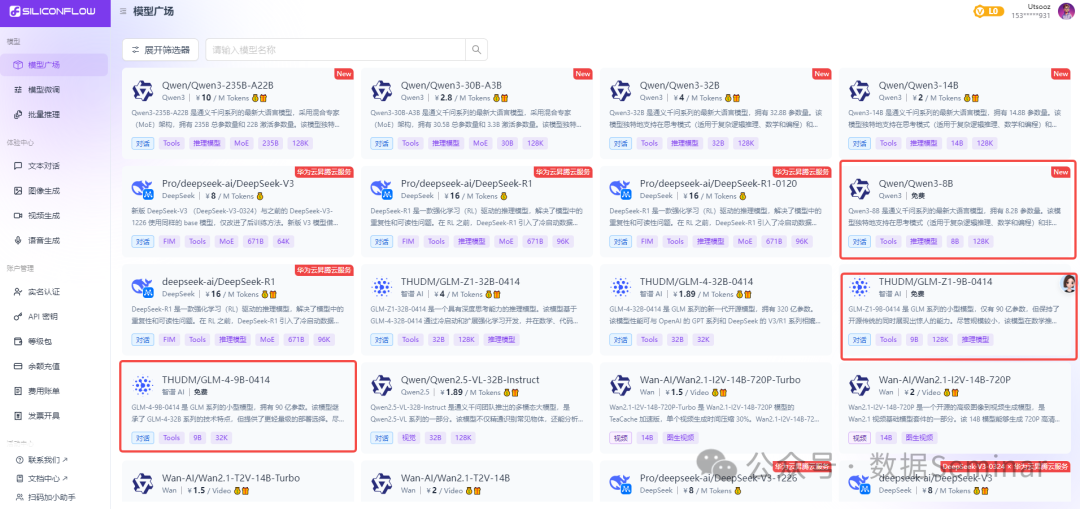
SiliconFlow not only provides free low-parameter large models, but also offers a balance of 14 yuan upon registration, which can be used to call other paid large models. Without further ado, here are the steps to call SiliconFlow’s free models.
1. [Registration – Real-name Authentication – Create API Key]
2. No environment preparation is needed; Python can be called directly.
3. Python calling code.
import requests

url = "https://api.siliconflow.cn/v1/chat/completions"
key = 'sk-*****************************'
model = "Qwen/Qwen3-8B"

payload = {
    "model": model,
    "messages": [
        {
            "role": "user",
            "content": "Which is larger, 9.11 or 9.8?"
        }
    ],
    "max_tokens": 500,
    "response_format": {"type": "text"},
}
haders = {
    "Authorization": "Bearer " + key,
    "Content-Type": "application/json"
}
# Initiate the call request
response = requests.post(url, json=payload, headers=headers)
# Output the request result, type is string, need to convert with eval() or parse with json to extract the answer
print(response.text)
The response from the above example is as follows (including the response and thought process):
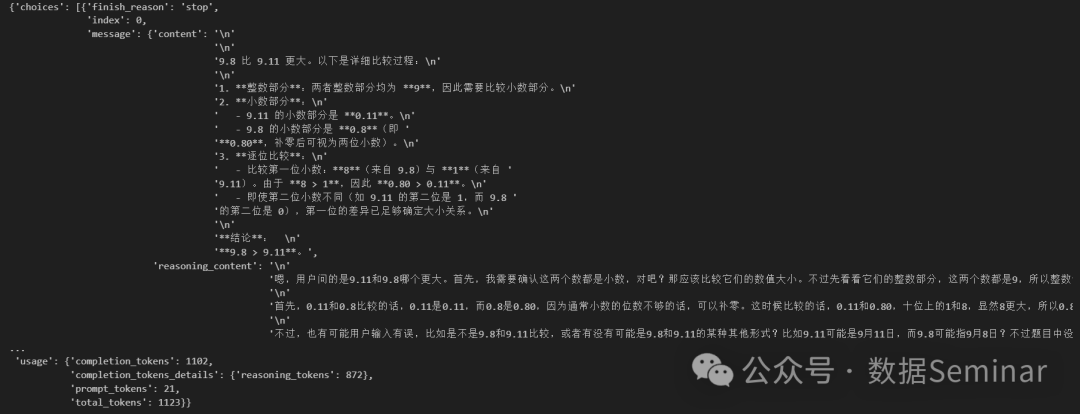
Next, use Python to convert and parse the API’s response.
response_dict = eval(response.text)
result = response_dict['choices'][0]['message']['content']
print(result)
"""
9.8 is greater than 9.11. Here is the detailed comparison process:

1. **Integer Part**: Both have an integer part of **9**, so we need to compare the decimal parts.
2. **Decimal Part**:
   - The decimal part of 9.11 is **0.11**.
   - The decimal part of 9.8 is **0.8** (i.e., **0.80**, which can be viewed as two decimal places).
3. **Comparing Digit by Digit**:
   - Compare the first decimal digit: **8** (from 9.8) and **1** (from 9.11). Since **8 > 1**, therefore **0.80 > 0.11**.
   - Even if the second decimal digits differ (for example, the second digit of 9.11 is 1, while that of 9.8 is 0), the difference in the first digit is sufficient to determine the size relationship.

**Conclusion**:
**9.8 > 9.11**.
"""
3. Conclusion
If using the above large models, especially the generally performing free models, is just for conversation, then it is unnecessary because mainstream paid large models are basically also available for free on mobile apps and official websites. Ultimately, our goal is to use Python to continuously call these models to solve our problems, especially in handling tabular issues, as currently, the vast majority of large model APIs still do not support uploading table attachments for processing. For using large models to handle tabular data in such cases, please refer to our previous article: Practical Python | Using Python to Call the DeepSeek API for Tabular Data Processing (with Detailed Code).
4. Related Recommendations
AI World
AI Jargon Guide (Part 1) | A Comprehensive Analysis of Core Terms in AI Large Models: From LLM to AGI’s Technical Evolution
AI Jargon Guide (Part 2) | From Laboratory to Industry: Unlocking the “Jargon Map” of AI Implementation
AI World | What is the difference between inference models and general models?
Python Tutorials
 Swipe to View
Python Tutorial | The First Step in Learning Python – Environment Installation and Configuration
Python Tutorial | Basic Data Types in Python
Python Tutorial | String Operations in Python (Part 1)
Python Tutorial | String Operations in Python (Part 2)
Python Tutorial | Variables and Basic Operations in Python
Python Tutorial | Composite Data Types – Lists
Python Tutorial | Composite Data Types – Sets (with Examples)
Python Tutorial | Composite Data Types – Dictionaries & Tuples
Python Tutorial | Branching Structures in Python (Conditional Statements)
Python Tutorial | Loop Structures in Python (Part 1)
Python Tutorial | Loop Structures in Python (Part 2)
Python Tutorial | Defining and Calling Functions in Python
Python Tutorial | Built-in Functions in Python
Python Tutorial | List Comprehensions & Dictionary Comprehensions
Python Tutorial | Understanding Classes and Instances in Object-Oriented Programming
Python Tutorial | One of the Most Common Standard Libraries – os
Python Tutorial | Overview of Common Standard Libraries for Data Processing
Python Tutorial | User-Friendly Regular Expressions (Part 1)
Python Tutorial | User-Friendly Regular Expressions (Part 2)
Python Tutorial | User-Friendly Regular Expressions (Part 3)
Python Tutorial | Essential Tools for Data Processing – Pandas (Basic Edition)
Python Tutorial | Essential Tools for Data Processing – Pandas (Reading and Exporting Data)
Python Tutorial | Pandas Data Indexing and Selection
Python Tutorial | Amazing Conditional Data Filtering in Pandas
Python Tutorial | Handling Missing and Duplicate Values in Pandas
Python Tutorial | Transforming Rows and Columns in Pandas
Python Tutorial | Detailed Explanation of Pandas Field Types (including Type Conversion)
Python Tutorial | Merging Data in Pandas (including Directory File Merge Case)
Python Tutorial | Data Matching in Pandas (including Practical Case)
Python Tutorial | Function Applications in Pandas (apply/map) [Part 1]
Python Tutorial | Function Applications in Pandas (apply/map) [Part 2]
Python Tutorial | Grouping and Aggregating Data in Pandas
Python Tutorial | Time Data Processing Methods in Pandas
Python Tutorial | Data Analysis Essentials – Pivot Tables
Python Tutorial | Python Learning Path + Experience Sharing, A Must-Read for Beginners!
Python Tutorial | Overview of Common Standard Libraries for Data Processing (Part 2)
Practical Python
Swipe to View
Practical Python | How to Use Python to Call APIs
Practical Python | Using Regular Expressions to Extract Indicators from Text
Big Data Analysis | Text Word Frequency Analysis with Python
Data Governance | Learning Python Text Similarity Calculation from “What to Eat for Lunch Today”
Data Governance | Save a Billion! Understand how to read and process tables in PDFs using Python (with the PDF file used in this article)
Data Governance | Still manually recognizing tables? Python calls Baidu OCR API for fast and accurate results
Data Governance | How to Batch Compress/Decompress Files with Python
Case Sharing: Using Python to Batch Process Statistical Yearbook Data (Part 1)
Case Sharing: Using Python to Batch Process Statistical Yearbook Data (Part 2)
Practical Python | ChatGPT + Python for Fully Automated Data Processing/Visualization
ChatGPT at Your Fingertips: open-interpreter for Local Data Collection and Processing
Practical Python | Text Analysis for Keyword Extraction
Practical Python | Text Analysis Tool HanLP Introduction
Practical Python | Advanced Chinese Word Segmentation with HanLP Dictionary Segmentation (Part 1)
Practical Python | Advanced Chinese Word Segmentation with HanLP Dictionary Segmentation (Part 2)
Practical Python | Python Solutions for Text File Encoding Issues
Practical Python | Extracting (incomplete) tables from PDFs using Python
Practical Python | Using Python for Length and Width Panel Conversion (with Data & Code)
Practical Python | Splitting, Merging, Converting… Please Check This PDF Operation Manual
Practical Python | Using Python to Clean HTML Code from Text Fields
Practical Python | Python Automatically Recognizing Names, Places, Company Names in Text…
Practical Python | Removing Stop Words in Text Analysis (Free Stop Words Library Included)
Practical Python | Similar Field Names in Massive Statistical Yearbooks? Try Using Text Clustering for Classification (with Data & Code)
Big Data Applications | Efficiency Improvement Techniques for Processing Large Datasets with Python (Part 1)
Big Data Applications | Efficiency Improvement Techniques for Processing Large Datasets with Python (Part 2)
Big Data Applications | Using Python for Coordinate System Conversion
Data Visualization
Data Visualization | It’s Important! Making Word Clouds with Python is Quite Involved
Data Visualization | Address Data Visualization – How to Draw Geographical Scatter Plots and Heat Maps
Data Visualization | So Cool! Drawing 3D Geographical Distribution Maps with Python
Data Visualization | Making Dynamic Bar Charts with Python
Data Visualization | Drawing Multi-Dimensional Bar Charts with Python: A Single Chart Showing Population Changes in Western Provinces (with Data and Code)
Data Visualization | Understanding What Correlation Analysis Heat Maps Are
Q&A
Data Governance | CSV Total Garbled? Teach You Three Tricks, Learn One and You’re Good!
Q&A | How Cloud Desktop Users Use Python to Connect to Databases for Reading, Writing, and Processing Data
Q&A | CSV Data Field Misalignment? Error During Importing into Stata? How to Solve It…

END

Scan to Contact Customer ServiceJoin the Data Seminar – Python Communication and Learning Group
Theme Collection Activity is Here 🙌
Have you encountered any difficulties in learning Python?Or do you want to delve into some other techniques?Feel free to leave a message in the comments or the public account backend to let us knowWe will select some themes based on everyone’s replies to publish articlesLet’s progress together on the journey of learning Python Star Mark⭐We Won’t Get Lost!To receive articles in a timely manner, don’t forget to click “Looking” at the end!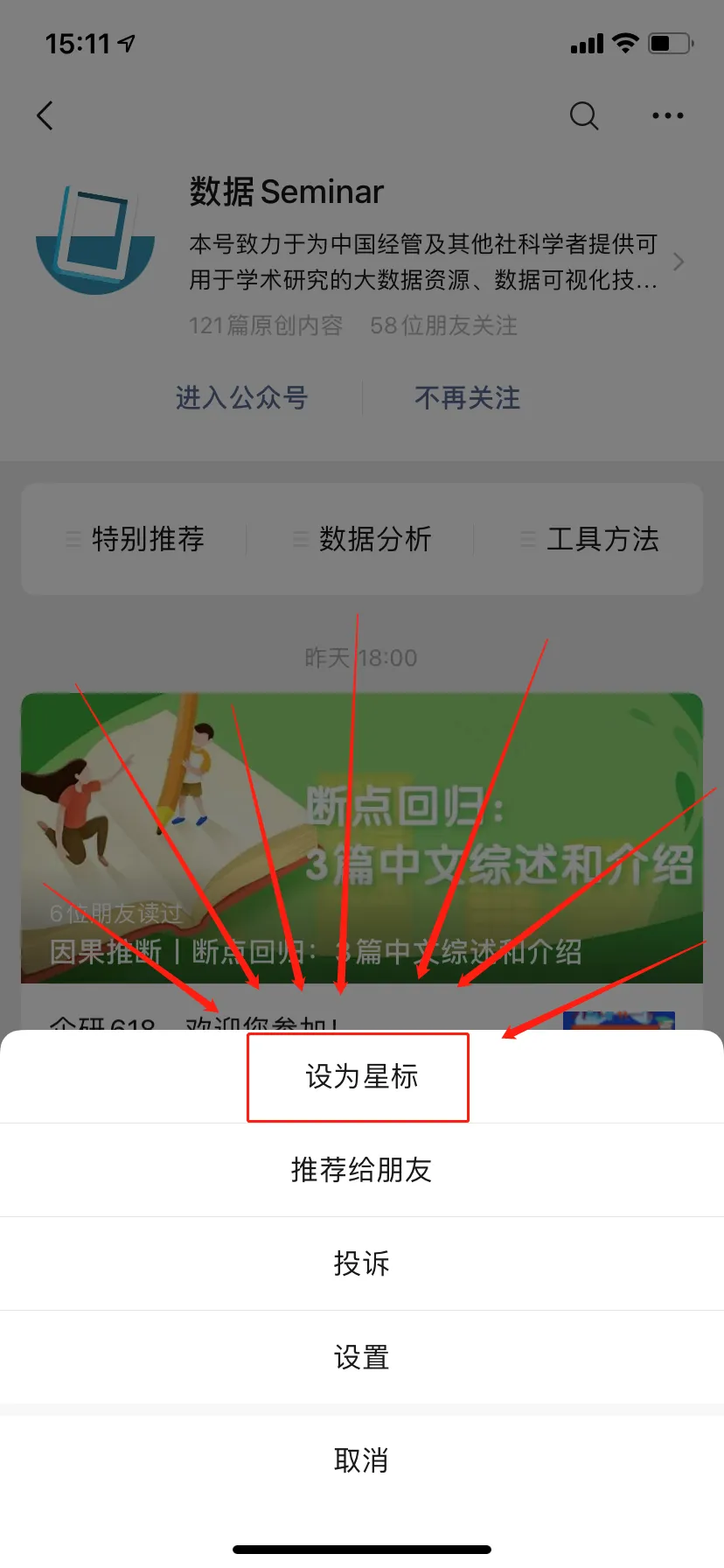
Data Seminar
This is the intersection of big data, analytical technology, and academic research
Welcome to scan the QR code below to follow