<span>Shell</span> scripts are indeed prone to errors during development, especially for beginners who may feel overwhelmed. In previous articles, I introduced some debugging techniques and tools, and today I will introduce a <span>static code analysis tool</span> for Shell: <span>ShellCheck</span>, an open-source project with 38.5k[1] stars on Github[1].
As an open-source static code analysis tool, ShellCheck is specifically designed to check for <span>common errors</span>, <span>non-standard practices</span>, <span>potential pitfalls</span>, and <span>syntax issues</span> in Shell scripts such as <span>Bash/Dash/Sh</span>.
It can be thought of as a <span>syntax and style checker</span> for Shell scripts, similar to <span>pylint</span> for Python, <span>ESLint</span> for JavaScript, or <span>lint</span> for C.
Undoubtedly, it helps us catch errors in our scripts early on.
1. Online Analysis with ShellCheck
You can use ShellCheck online[2], or you can install and use the VS Code shellcheck[3] plugin.
Let’s use this script:
#!/usr/bin/env bash
radius=2.5
result=$(awk -v r=${radius} 'BEGIN {printf "%.3f", 3.14159 * r * r}')
echo "area: $result"
Change <span>radius=2.5</span> to <span>radius = 2.5</span>, and the online analysis result is as follows:
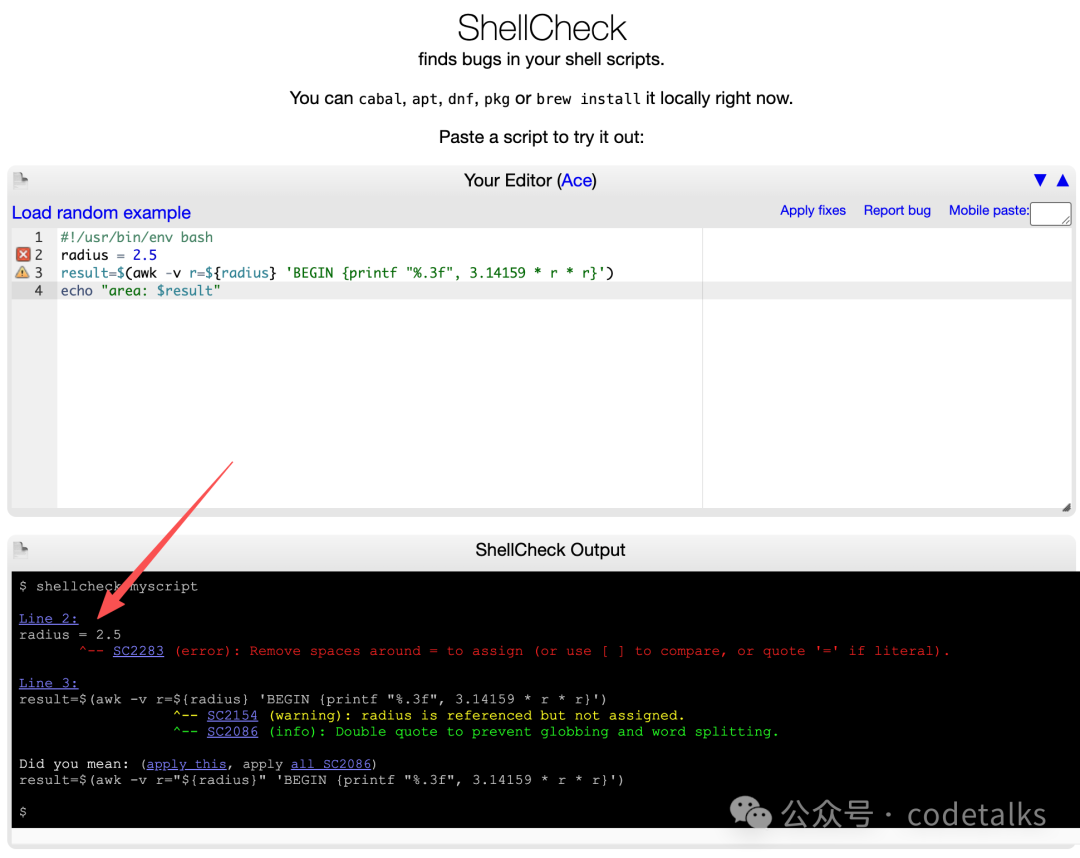
Unfortunately, due to my location and internet speed, accessing this website is a bit slow, so I still recommend using the <span>VS Code</span> plugin.
2. Using the <span>ShellCheck</span> Plugin in VS Code
Install the <span>VS Code</span> plugin <span>ShellCheck</span>:
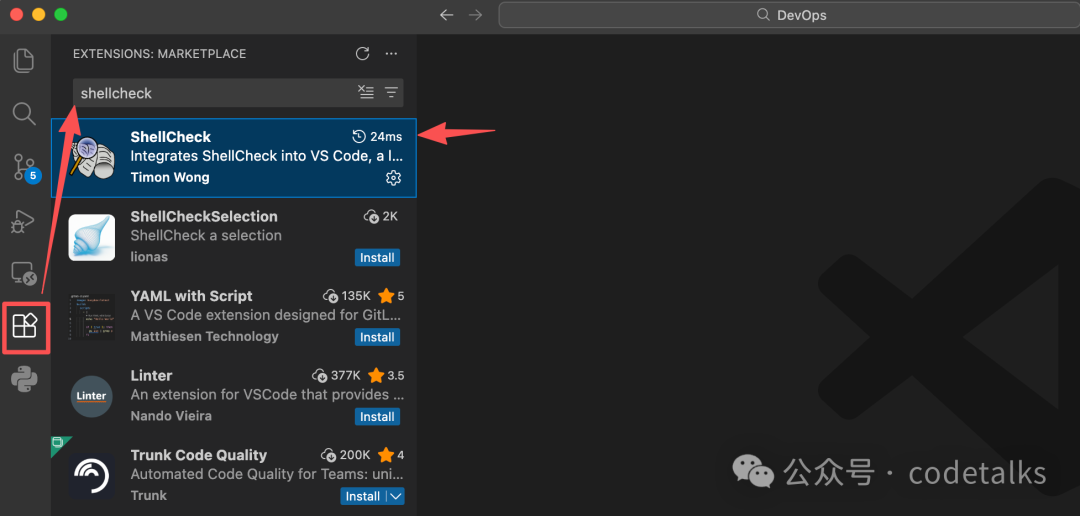
After installation, I did not make any configurations and directly tested it.
Using that same code, note that <span>=</span> now has spaces around it:
#!/usr/bin/env bash
radius = 2.5
result=$(awk -v r=${radius} 'BEGIN {printf "%.3f", 3.14159 * r * r}')
echo "area: $result"
<span>Result:</span>
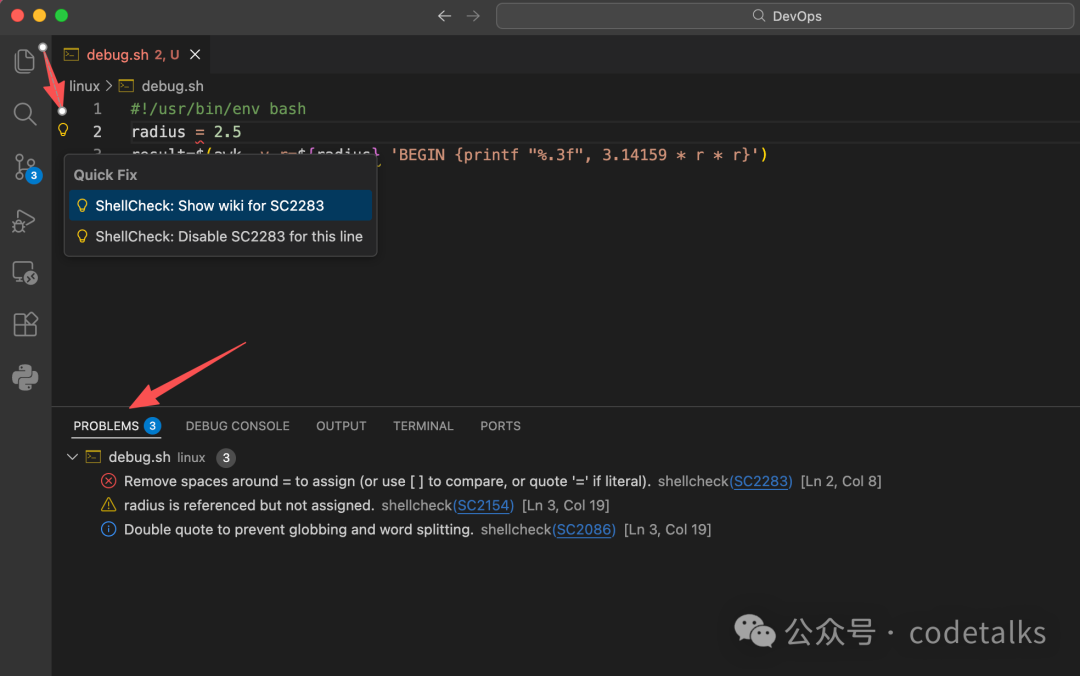
I must say it is quite convenient, and when paired with the <span>bashdb</span> VS Code plugin, a simple Shell script <span>IDE</span> is set up. Of course, it still lacks a script <span>code formatting</span> plugin, and I recommend <span>shell-format</span>.
3. What Issues Can ShellCheck Detect?
The official website lists the following <span>bad code smells</span>.
<span>Quotation Usage</span>
ShellCheck can identify various incorrect usages of quotes:
echo $1                           # Variable without quotes
find . -name *.ogg                # Unquoted find/grep pattern
rm "~/my file.txt"                # Tilde expansion in quotes
v='--verbose="true"'; cmd $v      # Literal quotes in variable
for f in "*.ogg"                  # Incorrect quoting in 'for' loop
touch $@                          # Unquoted $@
echo 'Don't forget to restart!'   # Single quote closed with apostrophe
echo 'Don\'t try this at home'    # Trying to escape ' in single quotes
echo 'Path is $PATH'              # Variable in single quotes
trap "echo Took \\${SECONDS}s" 0    # Early expansion of trap
unset var[i]                      # Array index treated as a wildcard
<span>Conditional Tests</span>
ShellCheck can identify many incorrect test statements:
[[ n != 0 ]]                      # Constant test expression
[[ -e *.mpg ]]                    # Existence check with wildcard
[[ $foo==0 ]]                     # Always true due to missing space
[[ -n "$foo " ]]                  # Always true due to literal
[[ $foo =~ "fo+" ]]               # Using quoted regex in =~
[ foo =~ re ]                     # Unsupported [ ] operator
[ $1 -eq "shellcheck" ]           # String numeric comparison
[ $n && $m ]                      # Using && in [ .. ]
[ grep -q foo file ]              # Command without $(..)
[[ "$$file" == *.jpg ]]           # Impossible comparison
(( 1 -lt 2 ))                     # Using test operator in ((..))
[ x ] & [ y ] | [ z ]             # Unexpected background execution and pipeline
<span>Commonly Misused Commands</span>
ShellCheck can identify cases where commands are misused:
grep '*foo*' file                 # Using wildcard in regex context
find . -exec foo {} && bar {} \;  # Premature termination of find -exec
sudo echo 'Var=42' > /etc/profile # Redirecting sudo output
time --format=%s sleep 10         # Passing time(1) flags to time built-in
while read h; do ssh "$h" uptime  # Consuming command input from while loop
alias archive='mv $1 /backup'     # Using parameters to define alias
tr -cd '[a-zA-Z0-9]'              # tr range expression outside []
exec foo; echo "Done!"            # Misuse of 'exec'
find -name \*.bak -o -name \*~ -delete  # Implicit precedence in find
# find . -exec foo > bar \;       # Redirection in find
f() { whoami; }; sudo f           # External use of internal function
<span>Common Beginner Mistakes</span>
ShellCheck can identify many common syntax errors made by beginners:
var = 42                          # Space around = in assignment
$foo=42                           # $ in assignment statement
for $var in *; do ...             # $ in for loop variable
var$n="Hello"                     # Incorrect indirect assignment
echo \\${var$n}                     # Incorrect indirect reference
var=(1, 2, 3)                     # Comma-separated array
array=( [index] = value )         # Incorrect index initialization
echo $var[14]                     # Missing {} in array reference
echo "Argument 10 is $10"         # Incorrect reference of positional parameter
if $(myfunction); then ..; fi     # Wrapping command in $()
else if othercondition; then ..   # Using 'else if'
f; f() { echo "hello world; }     # Using function before definition
[ false ]                         # 'false' evaluated as true
if ( -f file )                    # Using (..) instead of test
<span>Code Style</span>
ShellCheck can suggest improvements to style:
[[ -z $(find /tmp | grep mpg) ]]  # Should use grep -q
a >> log; b >> log; c >> log      # Should use redirect block
echo "The time is `date`"         # Should use $()
cd dir; process *; cd ..;         # Should use subshell
echo $[1+2]                       # Should use standard $((..)) instead of old $[]
echo $(($RANDOM % 6))             # Don't add $ before variable in $((..))
echo "$(date)"                    # Useless echo usage
cat file | grep foo               # Useless cat usage
<span>Data and Type Errors</span>
ShellCheck can identify issues related to data and types:
args="$@"                         # Assigning array to string
files=(foo bar); echo "$files"    # Referencing array as string
declare -A arr=(foo bar)          # Associative array without index
printf "%s\n" "Arguments: $@."    # Concatenating string and array
[[ $# > 2 ]]                      # Comparing number as string
var=World; echo "Hello " var      # Unused lowercase variable
echo "Hello $name"                # Unassigned lowercase variable
cmd | read bar; echo $bar         # Assigning in subshell
cat foo | cp bar                  # Passing to command that doesn't read data
printf '%s: %s\n' foo             # Mismatched number of printf arguments
eval "{array[@]}"                # Missing word boundaries in array eval
for i in "{x[@]}"; do {x[$i]}   # Using array values as keys
<span>Robustness</span>
ShellCheck can suggest improvements to script robustness:
rm -rf "$STEAMROOT/"*            # Catastrophic rm command
touch ./-l; ls *                 # Wildcard that could become an option
find . -exec sh -c 'a &&& b {}' \; # Shell injection risk in find -exec
printf "Hello $name"             # Variable in printf format
for f in $(ls *.txt); do         # Iterating over ls output
export MYVAR=$(cmd)              # Masked exit code
case $version in 2.*) :;; 2.6.*) # Masked case branch
<span>Portability</span>
ShellCheck will warn when features used are not supported by the shebang. For example, if you set the shebang to <span>#!/bin/sh</span>, ShellCheck will warn about portability issues like <span>checkbashisms</span>:
echo {1..$n}                     # Valid in ksh, but not in bash/dash/sh
echo {1..10}                     # Valid in ksh and bash, but not in dash/sh
echo -n 42                       # Valid in ksh, bash, and dash, undefined in sh
expr match str regex             # `expr str : regex` is non-portable alias
trap 'exit 42' sigint            # Non-portable signal specification
cmd &> file                      # Non-portable redirection operator
read foo < /dev/tcp/host/22      # Non-portable intercept file
foo-bar() { ..; }                # Undefined/unsupported function name
[ $UID = 0 ]                     # Undefined variable in dash/sh
local var=value                  # local undefined in sh
time sleep 1 | sleep 5           # Undefined use of 'time'
<span>Miscellaneous</span>
ShellCheck can identify a variety of other issues:
PS1='\e[0;32m\$\e[0m '            # PS1 color not placed in \[..\]
PATH="$PATH:~/bin"                # Literal tilde in PATH
rm “file”                         # Unicode quotes
echo "Hello world"                # Carriage return / DOS line endings
echo hello \                      # Trailing space after backslash
var=42 echo $var                  # Inline environment variable expansion
!# bin/bash -x -e                 # Common shebang error
echo $((n/180 * 100))               # Unnecessary precision loss
ls *[:digit:].txt                 # Incorrect character class wildcard
sed 's/foo/bar/' file > file      # Redirecting to input file
var2=$var2                        # Variable self-assignment
[ x$var = xval ]                  # Outdated x-comparison method
ls() { ls -l "$@"; }              # Infinite recursive wrapper function
alias ls='ls -l'; ls foo          # Using before alias takes effect
for x; do for x; do               # Nested loops using same variable
while getopts "a" f; do case $f in "b") # Unhandled getopts flag
Finally, you can now set up <span>VS Code</span> as a simple Shell script <span>IDE</span>.
- ShellCheck[4]: Static code analysis
- shell-format[5]: Code formatting
- Bash Debug[6]: bashdb code debugger
References
[1]
Github: https://github.com/koalaman/shellcheck
[2]
ShellCheck online: https://www.shellcheck.net/
[3]
VS Code shellcheck: https://marketplace.visualstudio.com/items?itemName=timonwong.shellcheck
[4]
ShellCheck: https://marketplace.visualstudio.com/items?itemName=timonwong.shellcheck
[5]
shell-format: https://marketplace.visualstudio.com/items?itemName=foxundermoon.shell-format
[6]
Bash Debug: https://marketplace.visualstudio.com/items?itemName=rogalmic.bash-debug