Previously, we discussed stateless lambda expressions, where the lambda capture [] is empty. Now, we will talk about how to fill in different strings in [] to implement capture clauses, allowing the body of the lambda expression to access variables in its defining scope.
1. Capture by Value
By including = in [], the body of the lambda expression can access all variables in its defining scope by value. Let’s illustrate this with an example; the code and output are shown below:
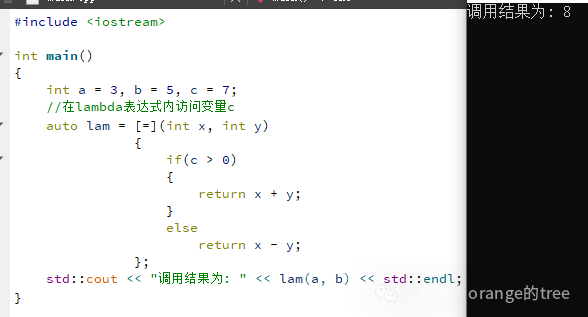
As shown in the code above, when the lambda expression is defined with [=], it can access the external variable c. Since it is captured by value, this variable cannot be modified, but it is different from passing by value in functions. For example, if we try to modify this variable’s value internally, it will result in an error indicating that it is a read-only variable, as shown below:
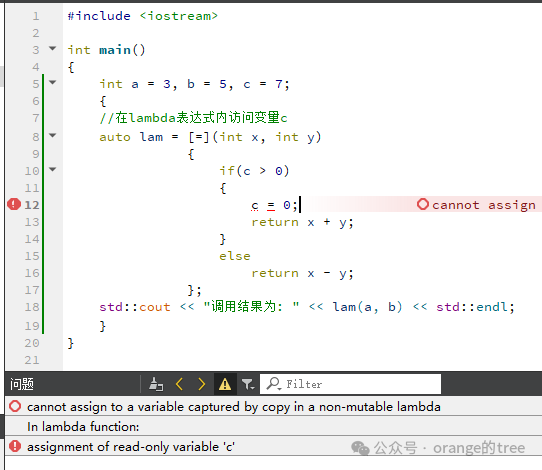
According to the error message, if we really want to modify this variable within the lambda expression, we can add the mutable keyword, but in reality, it only modifies the copy, and the external variable’s value remains unchanged. As shown below:
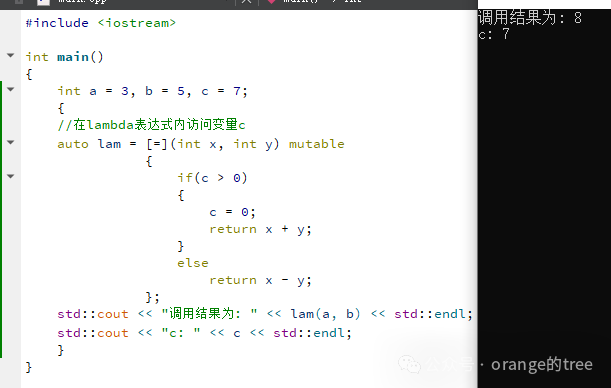
Why does this happen? We previously mentioned that the compiler generates a function object class for the lambda expression, so we can look at the definition of this class. Due to various inline optimizations by the compiler, I couldn’t find the complete class definition in the intermediate files generated by my actual compiler. Therefore, let’s use cppinsights to see what the compiler-generated code looks like. Its core function is to show the expanded form of C++ code within the compiler, helping us understand C++ language features and compilation behavior more deeply. We can directly access the website https://cppinsights.io/, and then paste the code to see. We will paste both the code without the mutable keyword and the one with it to see the transformations. As shown below:
Without the mutable keyword:
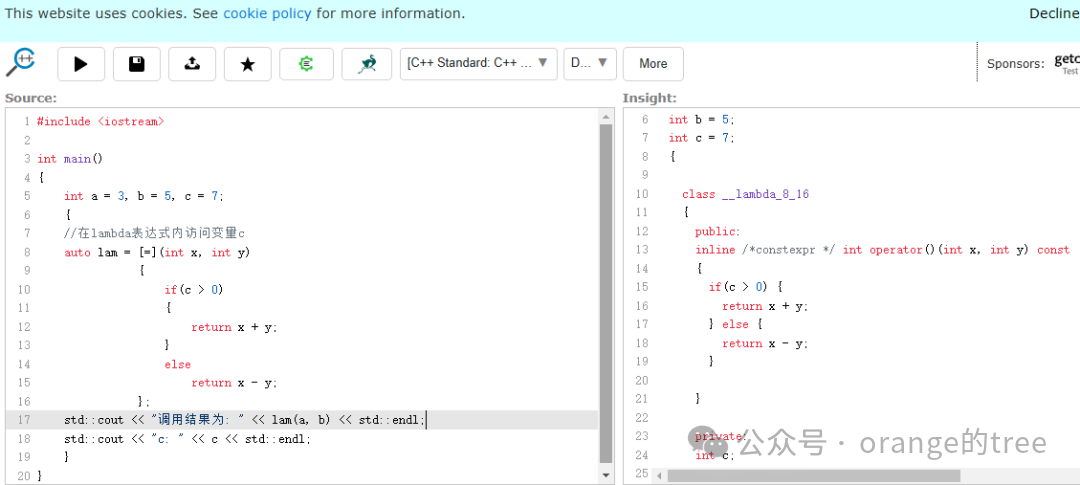
The complete transformed code is as follows:
#include <iostream>

int main()
{
  int a = 3;
  int b = 5;
  int c = 7;
  {

    class __lambda_8_16
    {
      public:
      inline /*constexpr */int operator()(int x, int y) const
      {
        if(c > 0) {
          return x + y;
        } else {
          return x - y;
        }

      }

      private:
      int c;

      public:
      __lambda_8_16(int & _c)
      : c{_c}
      {}

    };

    __lambda_8_16 lam = __lambda_8_16{c};
    std::operator<<(std::cout, "\350\260\203\347\224\250\347\273\223\346\236\234\344\270\272: ").operator<<(lam.operator()(a, b)).operator<<(std::endl);
  };
  return 0;
}
With the mutable keyword:
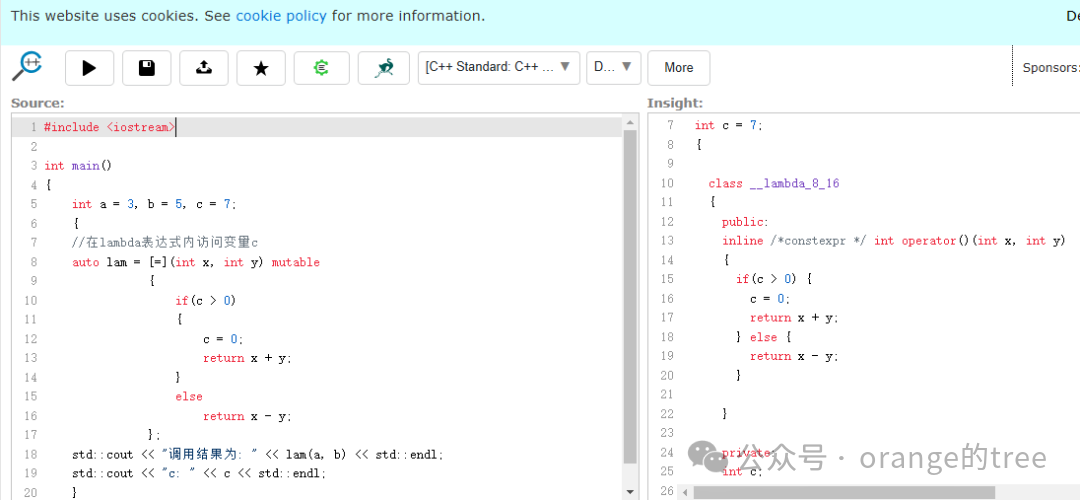
The complete transformed code is as follows:
#include <iostream>

int main()
{
  int a = 3;
  int b = 5;
  int c = 7;
  {

    class __lambda_8_16
    {
      public:
      inline /*constexpr */int operator()(int x, int y)
      {
        if(c > 0) {
          c = 0;
          return x + y;
        } else {
          return x - y;
        }

      }

      private:
      int c;

      public:
      __lambda_8_16(int & _c)
      : c{_c}
      {}

    };

    __lambda_8_16 lam = __lambda_8_16{c};
    std::operator<<(std::cout, "\350\260\203\347\224\250\347\273\223\346\236\234\344\270\272: ").operator<<(lam.operator()(a, b)).operator<<(std::endl);
  };
  return 0;
}
By comparing the transformed code of the two cases, we can see that the captured variable has become a member variable of the generated class. The main difference is that in the case without the mutable keyword, the function call operator of the generated class is const, so it cannot modify the member variable; attempting to do so will result in an error.
We also notice that neither of the generated classes includes a conversion operation to the same type function pointer. Earlier, in the article introducing stateless lambda expressions, we mentioned that because the generated class contains conversion operations, it supports implicit conversion to the same type function pointer. This stateful lambda does not support implicit conversion because the captured data cannot be passed through function pointers, as function pointers cannot retain the state information of objects. Finally, let’s look at the transformed code of the stateless lambda expression, as shown below:
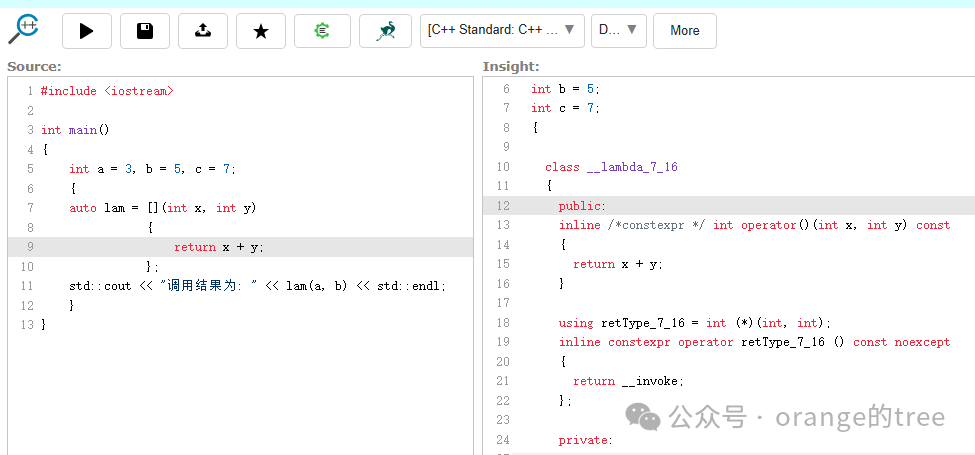
The complete transformed code is as follows:
#include <iostream>

int main()
{
  int a = 3;
  int b = 5;
  int c = 7;
  {

    class __lambda_7_16
    {
      public:
      inline /*constexpr */int operator()(int x, int y) const
      {
        return x + y;
      }

      using retType_7_16 = int (*)(int, int);
      inline constexpr operator retType_7_16 () const noexcept
      {
        return __invoke;
      };

      private:
      static inline /*constexpr */ int __invoke(int x, int y)
      {
        return __lambda_7_16{}.operator()(x, y);
      }

      public:
      // /*constexpr */ __lambda_7_16() = default;

    };

    __lambda_7_16 lam = __lambda_7_16{};
    std::operator<<(std::cout, "\350\260\203\347\224\250\347\273\223\346\236\234\344\270\272: ").operator<<(lam.operator()(a, b)).operator<<(std::endl);
  };
  return 0;
}
From the code, we can see that the generated function object class includes a conversion operation to the same type function pointer.
2. Capture by Reference
By including & in [], we can access all variables in the scope by reference, allowing us to modify their values within the lambda expression. The code and output are shown below:
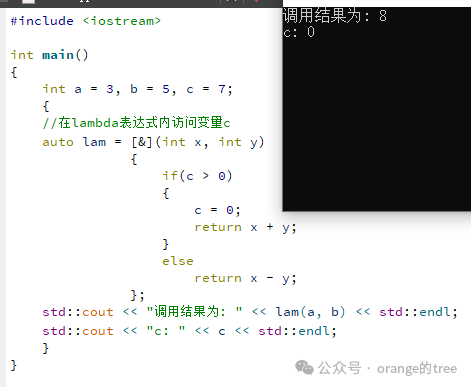
As shown in the image, after modifying the value of variable c within the expression, the value of the external variable also changed. However, capturing all variables by reference is not a good practice, as it can lead to unintended modifications. Therefore, we have the following method to capture specific variables, capturing only those that are needed.
3. Capture Specific Variables
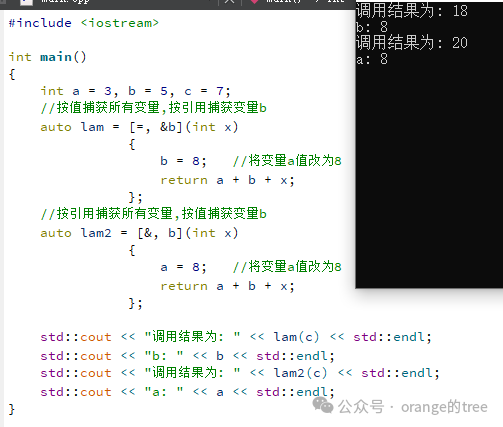
The previous = and & capture all variables by default, but in reality, the lambda expression may not need all variables, so we should capture only what is necessary. To capture a specific variable, simply list the variable names in [], separated by commas. Capturing specific variables can also be done by value or by reference; for reference capture, add & before the variable name, and for value capture, just use the variable name itself without adding =. The example is shown below:
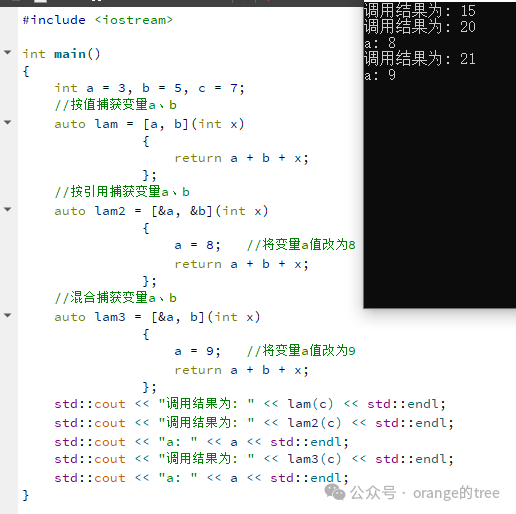
This not only limits the variables but also follows the same principles as previously discussed for capturing by value and by reference, so I won’t elaborate further. Additionally, you can use = to capture all variables by value and then capture specific variables by reference, or use & to capture all variables by reference and then capture specific variables by value. However, = and & must be placed in the first position, and you cannot use = to capture all variables by value and then capture specific variables by value, nor can you use & to capture all variables by reference and then capture specific variables by reference. This should be understandable; capturing all variables in some way and then capturing a specific variable in the same way would be redundant. The correct usage example is shown below:
4. Capture the this Pointer
Consider the following code, where the lambda expression is within a member function of a class and needs to capture the class’s member variables.
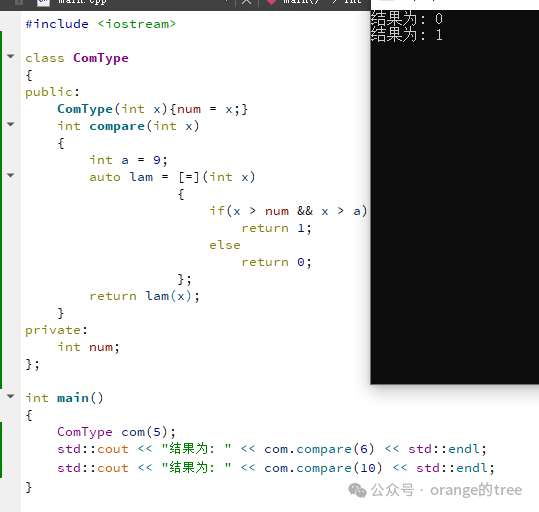
From the output, we can see that using = to capture by value captures the local variable a and the class member variable num. If we want to modify the member variable’s value, the reference capture code is shown below:
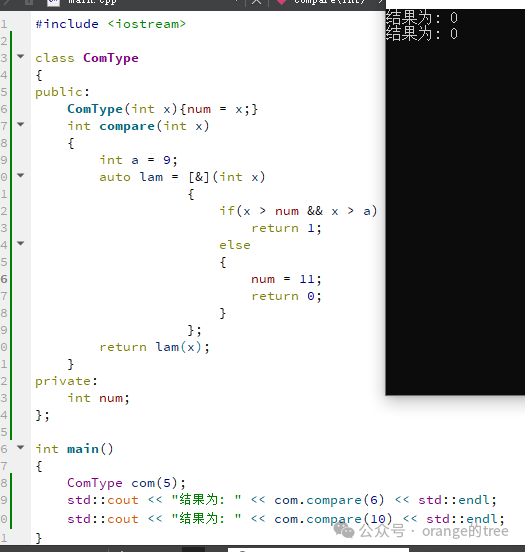
There are no issues here. But what if we want to capture specific member variables like we did before?

It seems that this is not possible; using the variable name to capture the member variable results in an error. C++ provides a way to access member variables by capturing the this pointer.
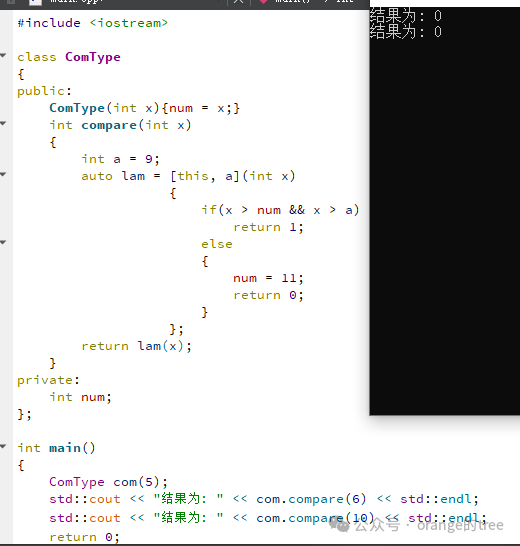
As shown in the image, capturing the this pointer allows access to member variables and even modification of their values. The this pointer can be used with =, &, or specific variable names, and as before, = and & must be placed in the first position, while the order of variable names and this can be arbitrary. Moreover, this can access not only variables but also methods. As shown below:
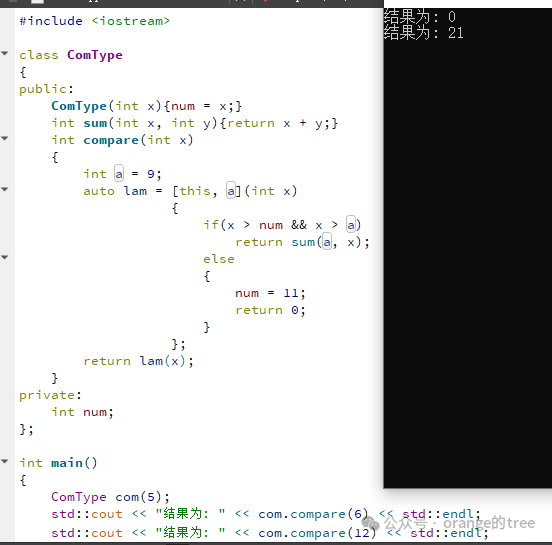
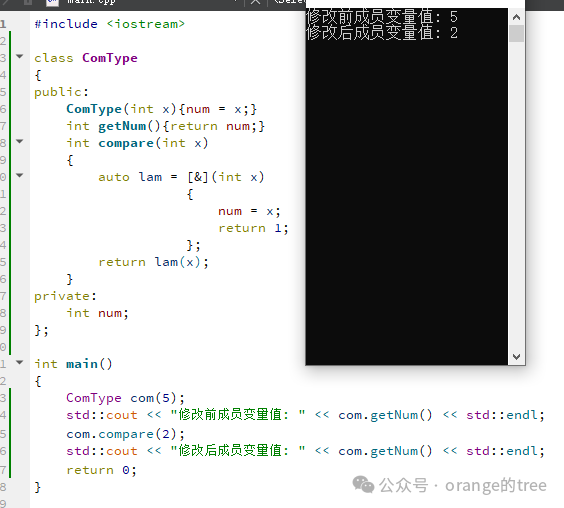
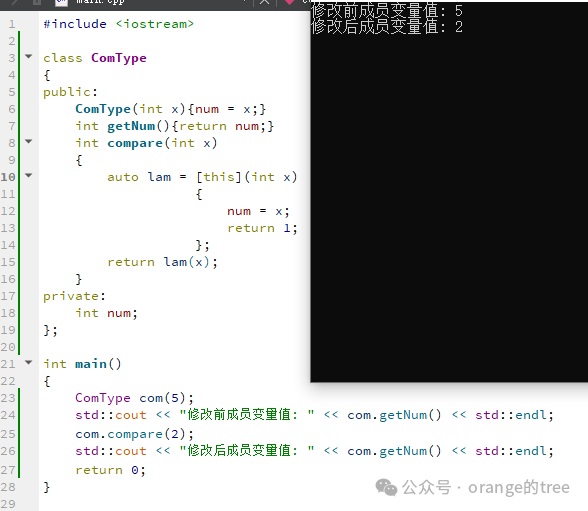
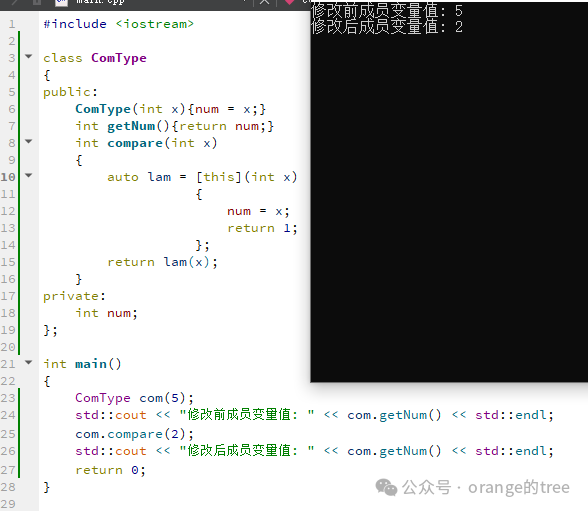
In summary, when using lambda expressions in class member methods, this only captures the this pointer, = captures local variables by value and implicitly captures the this pointer, while & captures local variables by reference and implicitly captures the this pointer. Therefore, all three methods can access and modify class member variables, as shown below:
Using & to capture and modify member variables:
Using = to capture and modify member variables:
Using this to capture and modify member variables:
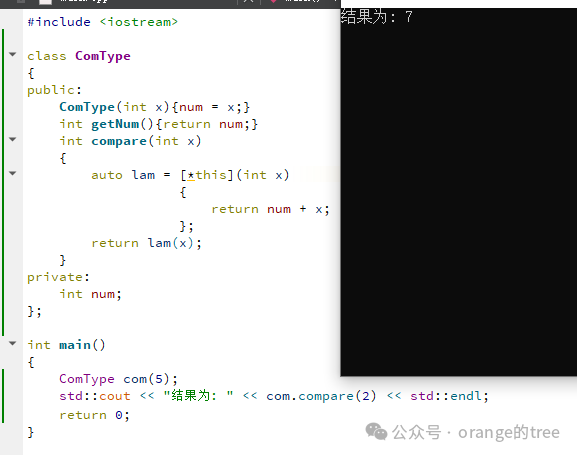
Finally, if you do not want to modify the member variable’s value, you can use *this to capture, which creates a copy of the object. Thus, if you modify the member variable, it will result in an error. Even with the mutable keyword, it behaves like capturing by value, only modifying the copy’s value without changing the original data. The example code and output are shown below:
Thus, we have covered the basics of lambda expressions. More details can only be experienced through daily usage.
Finally, if you are interested, feel free to follow along, and let’s learn and improve together.