Introduction
Virtualization in computers is a vast topic with a long history, and here we will introduce some concepts.
01
Definition of Virtualization
Virtualization is the process of creating a software-based or virtual representation of something, essentially creating a virtual version of something, such as virtual applications, servers, storage, and networks. Computing components run on a virtual basis rather than a physical basis, transforming physical resources into logically manageable resources.
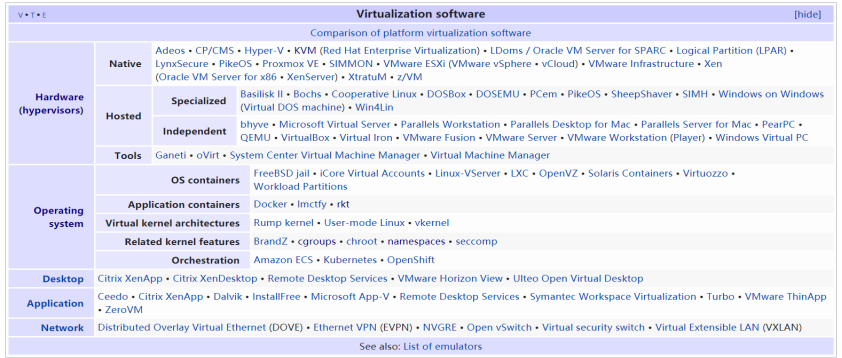
Virtualization is generally divided into hardware-level virtualization and operating system-level virtualization. Hardware-level virtualization runs on (virtual) hardware and requires a hypervisor or VMM to manage it, simulating a complete operating system. Technologies like Hyper-V, VMware, Xen, KVM, VirtualBox, Amazon AWS, and Alibaba Cloud use this technology. Operating system-level virtualization runs on top of the operating system, simulating multiple different processes running on the operating system and encapsulating them in a closed container, also known as containerization technology.
02
History of Virtualization
2.1 History of Hardware-Level Virtualization:
1960s-1970s: The first generation of virtualization systems appeared in the United States, developed by IBM, including the CP-40 Mainframes system, System/360 (which inspired the book “Mythical Man-Month”), and System/370/390. At that time, virtualization systems were primarily developed by General, Bell Labs, and IBM, mainly as a method to logically partition system resources provided by mainframes among different applications. Major achievements included virtual disks, virtual memory, and time-sharing systems for multiple users to simultaneously use a single host.
1987: Insignia Solutions demonstrated a software emulator called SoftPC, which allowed users to run DOS applications on Unix Workstations. At that time, a personal computer capable of running MS DOS cost $1,500, while using SoftPC reduced the cost to $500. The demand at that time was to run Microsoft’s DOS on large workstations. By 1989, Insignia Solutions released a Mac version of SoftPC, allowing Apple users to run not only DOS but also Windows operating systems.
1997: With the success of SoftPC, other virtualization companies emerged rapidly. Apple developed Virtual PC, which was later sold to Connectix.
1998: VMware emerged, starting to sell VMware Workstation in 1999, and in 2001, VMware released ESX and GSX, which were the predecessors of ESXi.
2003: Microsoft acquired Connectix and launched Microsoft Virtual PC, and there was no further news after that. In the same year, VMware was acquired by EMC, becoming EMC’s most successful acquisition to date. That year, an open-source virtualization project called Xen was launched and was acquired by Citrix in 2007.
In October 2006, the Israeli organization Qumranet developed a new virtualization scheme (KVM) and contributed it to the open-source world. In February 2007, KVM was first included in Linux Kernel-2.6.20. In September 2008, Red Hat acquired Qumranet, and in early 2011, IBM approached Red Hat, indicating that KVM was worth investing in. In May, IBM and Red Hat, along with HP and Intel, established the Open Virtualization Alliance to accelerate KVM’s market entry, thus preventing VMware from monopolizing the market.
2.2 History of Operating System Virtualization
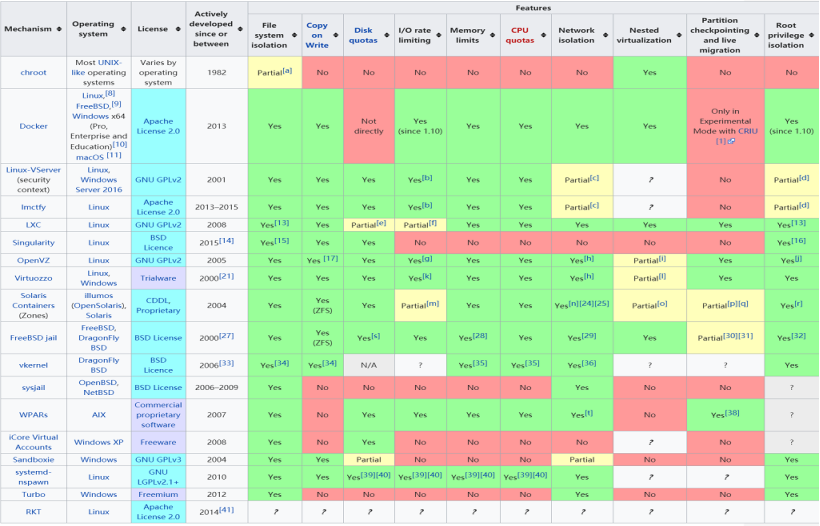
1982: The first operating system-level virtualization technology, chroot, was introduced. This system call changes the working directory of the running process and can only operate within that directory. This operation is essentially a form of filesystem-level isolation.
2000: FreeBSD jail, the first fully functional operating system-level virtualization technology in a true sense.
2005: OpenVZ, a containerization technology implementation on the Linux platform, also serves as the core implementation of LXC, which was initially used by Docker.
2008: LXC was released, which was the specific kernel functionality used by Docker initially.
2013: Docker was released, which itself used LXC while encapsulating other functionalities.
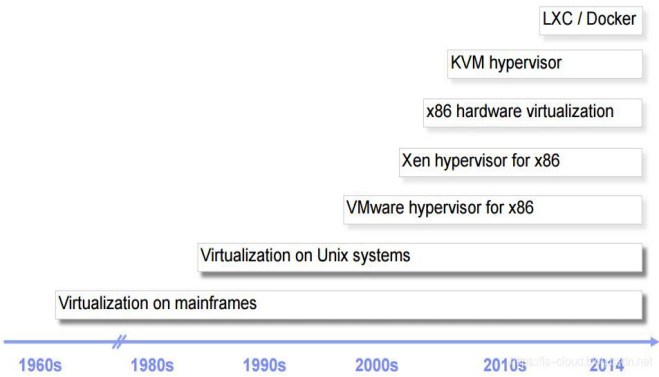
The development process of virtualization (just a chronological order, not a replacement relationship) can be roughly outlined as:
“Hardware Partitioning” (Time-Sharing System) -> “Virtual Machines” (Hardware-Level) -> “Paravirtualization” (Hardware-Level) -> “Virtual Operating Systems” (System-Level, Containerization).
Hardware-level virtualization has evolved from full software virtualization to hardware-assisted virtualization (Intel VT-x, AMD-v).
03
Benefits of Virtualization
Virtualization technology can expand hardware capacity and simplify the software reconfiguration process. It can simulate multiple CPUs with a single CPU, allowing a platform to run multiple (types of) operating systems simultaneously, with applications running in mutually independent spaces without interference. The entire development of virtualization revolves around how to use resources more effectively (improving virtual performance, refining resource management granularity, and reducing the total cost of ownership (TCO)).
The most direct benefits are:
Control independence, high elasticity, and better availability
Reduced downtime, better business continuity, and disaster recovery
Increased IT productivity, efficiency, agility, and responsiveness
Reduced IT expenses, lower capital and operational costs
04
Applications of Virtualization
The main industrial application of virtualization today is various cloud computing; without virtualization, cloud computing would just be a forward-looking concept. Additionally, there are DevOps, Serverless, and Microservices (Docker, Kubernetes, etc.). Consumer applications mainly involve virtualizing multiple different types of operating systems on a single physical machine.
05
Principles of Virtualization
5.1 Hardware-Level Virtualization
1) Terminology Explanation
VM: A virtual machine is a representation or simulation of a physical computer. It is usually referred to as a guest, while the physical machine it runs on is called the host.
Hypervisor (VMM): A virtual machine monitor that logically separates virtual machines from each other, allocating their underlying computing power, memory, and storage, preventing interference between virtual machines.
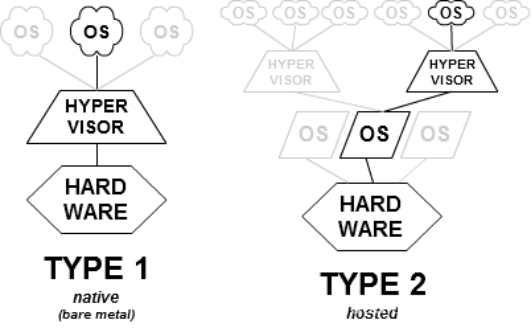
Type 1: The hypervisor runs directly on the physical hardware of the underlying computer, interacting directly with its CPU, memory, and physical storage. It is also known as a bare-metal hypervisor.
Type 2: The hypervisor does not run directly on the underlying hardware. It runs as an application within the operating system. Type 2 hypervisors are rarely found in server-based environments and are suitable for personal computer users who need to run multiple operating systems, such as engineers, security experts analyzing malware, and business users who only need to access applications on other software platforms.
Full Virtualization: Almost completely simulates actual hardware to allow software environments to run unmodified.
Para-Virtualization: Paravirtualization is a technique that modifies the guest OS to access privileged state code to interact directly with the VMM. In paravirtualized virtual machines, part of the hardware interface is provided in software form to the guest OS, which can significantly improve performance by avoiding the need to generate additional exceptions and simulate parts of the hardware execution process.
Hardware-Assisted Virtualization: Hardware-assisted virtualization is a method to improve the overall efficiency of virtualization. It involves providing CPU support for hardware virtualization and other hardware components that help improve the performance of the guest environment.
2) Basic Principles
In 1974, Gerald J. Popek and Robert P. Goldberg proposed the classic virtualization model in their collaborative paper “Formal Requirements for Virtualizable Third Generation Architectures,” categorizing instructions that need to be executed in privileged mode into two types:
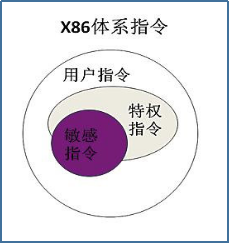
Sensitive Instructions: Instructions that operate on privileged resources, including modifying the running mode of the virtual machine or the state of the underlying physical machine; reading and writing registers such as clocks and interrupts; accessing storage protection systems, address relocation systems, and all I/O instructions.
Privileged Instructions: Some instructions in the system that operate and manage critical system resources can only run correctly at the highest privilege level. If executed at a non-highest privilege level, privileged instructions will trigger an exception, causing the processor to trap to the highest privilege level for system software handling.
Requirements for building a VMM: Sensitive instructions are a subset of privileged instructions. The essence of virtualization under this model is privilege deprivileging/trap-and-emulation.
In virtualization scenarios, the privilege of the Guest OS kernel needs to be reduced from the original level 0 to level 1 or 3. When privileged instructions occur in the Guest OS, they will generate a trap, which is captured by the VMM and handled by it.
X86 Full Virtualization: In reality, the x86 architecture does not fully comply with the classical virtualization model, so full virtualization on x86 mainly adopts priority compression technology (Ring Compression) and binary translation technology. Priority compression allows the VMM and Guest to run at different privilege levels (classical model), while instructions that are difficult to virtualize need to be converted into virtualizable instructions through binary translation technology.
Hardware-Assisted Virtualization: With the introduction of new operation modes in the CPU, the execution of the VMM and Guest OS is automatically isolated by hardware. Any critical event can automatically transfer system control to the VMM, allowing traditional full virtualization VMM to control all system resources. The Guest OS can also run at its expected highest privilege level. Hardware-assisted virtualization greatly improves the performance and compatibility of virtual machines. Currently, major hardware-level virtualization technologies all utilize hardware-assisted virtualization.
Paravirtualization: omitted.
5.2 System-Level Virtualization
Operating system-level virtualization is a paradigm that allows multiple independent user space instances to exist on the same kernel. Such user space instances are referred to as containers (LXC, Solaris Containers, Docker), zones (Solaris Containers), virtual private servers (OpenVZ), partitions, virtual environments (VEs), virtual kernels (DragonFly BSD), or jails (FreeBSD jail or chroot jail).
In the case of the Linux kernel, they all utilize kernel features such as namespaces and cgroups. Namespaces partition kernel resources, working by ensuring that a related group of resources and processes share the same namespace, while different namespaces are isolated from one another. Cgroups can limit and record the physical resources used by a group of tasks. Essentially, cgroups are a series of hooks attached to the kernel that trigger corresponding hooks for resource tracking and limiting based on resource scheduling during program execution.
06
VM vs. Containers: Which is Better?
They have different application scenarios and should complement each other, with various metrics to consider for specific applications.
Virtual machines need to build a complete guest OS, whereas containers do not; however, containers can only virtualize the host operating system, meaning it is not possible to virtualize Windows using containers on Linux. Containers outperform virtual machines in performance, especially as the number of virtual machines that need to be built on a single machine increases, this advantage becomes more apparent. Besides performance, another important point is migration; currently, virtual machines have excellent support for migration, while LXC and OpenVZ support migration and Docker has experimental support. Containers support microservices architecture, allowing application components to be deployed and scaled more finely.
Related Notes
1. This article mainly refers to server virtualization; there is also storage, network, desktop, data, application, data center, CPU, GPU, etc., virtualization.
2. There is a very famous “99-1 Principle” regarding the resource utilization of physical devices, which states that 90% of physical devices have only 10% resource utilization during 90% of online time. However, we cannot remove these 90% of physical devices, as there are peak times when resource utilization can exceed 90%.
3. Redhat has tested the efficiency of some application services running on virtual machines. A portion of the report is as follows:

4. Gerald J. Popek and Robert P. Goldberg proposed a set of sufficient conditions known as virtualization criteria in their paper, providing guidelines for designing virtualizable computer architectures:
Resource Control: The control program must be able to manage all system resources.
Equivalence: Programs (including operating systems) running under the management of the control program should behave identically to when they are running without the control program, except for timing and resource availability, and pre-written privileged instructions can be executed freely.
Efficiency: The vast majority of guest instructions should be executed directly by the host hardware without the involvement of the control program.
5. For specific details on cgroups, please refer to other sources.
6. Virtualization Software
7. Implementation of System-Level Virtualization
Scan to Follow Us
WeChat ID | Dalian Feichuang