

13.6.5 MQTT Testing Program Lab Experiment
Place mqtt_test and paho.mqtt.c.tar.bz2 in the same directory on Ubuntu.
1. Compile the Paho Library
Execute the following commands in Ubuntu:
Swipe left or right to view the full content
$ tar xjf paho.mqtt.c.tar.bz2
$ cd paho.mqtt.c
Edit CMakeLists.txt and add the following content at the top:
Swipe left or right to view the full content
set(CMAKE_SYSTEM_NAME Linux)
set(CMAKE_SYSTEM_PROCESSOR arm)
SET(CMAKE_C_COMPILER aarch64-poky-linux-gcc)
SET(CMAKE_CXX_COMPILER aarch64-poky-linux-g++)
set(CMAKE_SYSROOT /opt/remi-sdk/sysroots/aarch64-poky-linux)
set(CMAKE_FIND_ROOT_PATH_MODE_PROGRAM NEVER)
set(CMAKE_FIND_ROOT_PATH_MODE_LIBRARY ONLY)
set(CMAKE_FIND_ROOT_PATH_MODE_INCLUDE ONLY)
set(CMAKE_FIND_ROOT_PATH_MODE_PACKAGE ONLY)
Then execute the following commands to compile:
Swipe left or right to view the full content
$ source /opt/remi-sdk/environment-setup-aarch64-poky-linux
$ mkdir build
$ cd build
$ cmake ../ -DCMAKE_INSTALL_PREFIX=output
$ make
$ make install
If everything goes well, an output directory will be generated in the build directory (some error messages may indicate permission issues, which are not critical), containing many library files. The content is as follows:
$ ls output/bin include lib shareCopy the header files and library files to the toolchain:
Swipe left or right to view the full content
$ sudo cp -rf output/include/* /opt/remi-sdk/sysroots/aarch64-poky-linux/usr/include/
$ sudo cp -rfd output/lib/* /opt/remi-sdk/sysroots/aarch64-poky-linux/usr/lib64/
Compress the output directory and upload it to the development board:
Swipe left or right to view the full content
$ tar cjf output.tar.bz2 output/
$ scp output.tar.bz2 [email protected]:/mnt
On the development board, decompress the output.tar.bz2 file and copy the library files to /usr/lib64, using the following commands:
Swipe left or right to view the full content
# cd /mnt
# tar xjf output.tar.bz2
# cd output/lib
# cp -d libpaho* /usr/lib64/
2. Compile the Test Program
Execute the following commands in Ubuntu:
Swipe left or right to view the full content
$ source /opt/remi-sdk/environment-setup-aarch64-poky-linux
$ cd mqtt_test
$ make
$ scp mqtt_test [email protected]:/mnt
3. Testing
According to 13.6.3 Using PC MQTT Tools, first start the MQTT service software, then start MQTTX with the following configuration and connection:
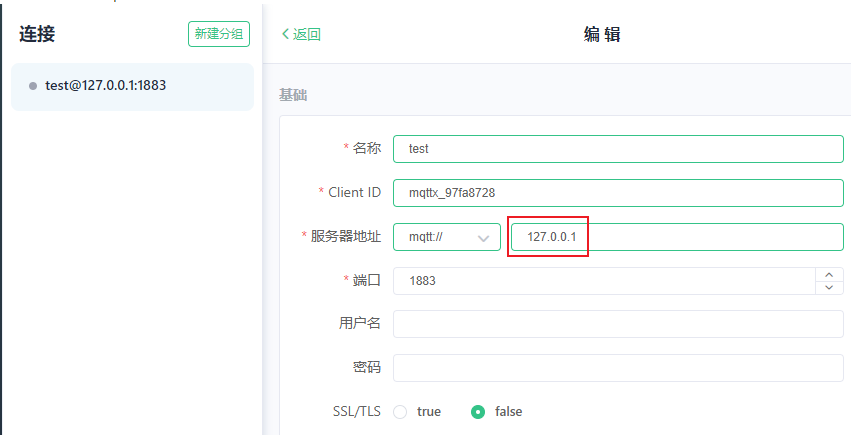
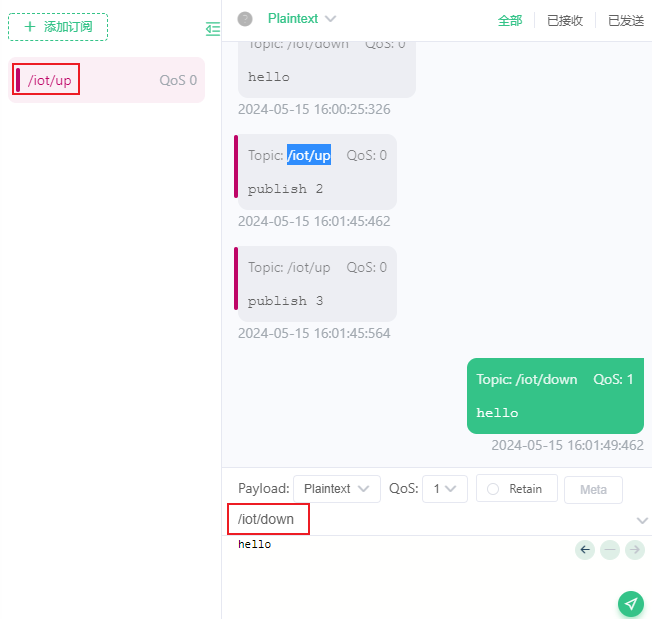
In MQTTX, subscribe to messages with the topic /iot/up and send messages with the topic /iot/down, as shown in the figure below:
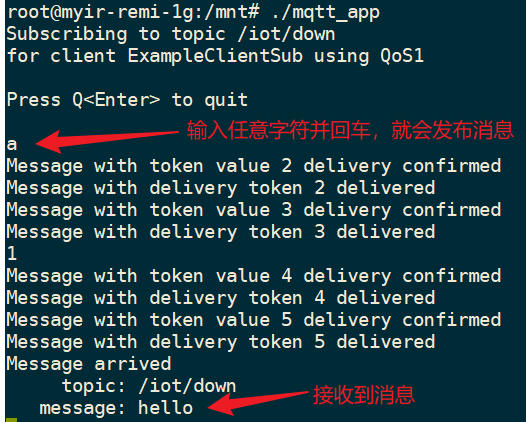
Finally, execute the mqtt_test program on the development board, as shown below:
13.7 MQTT Program Development
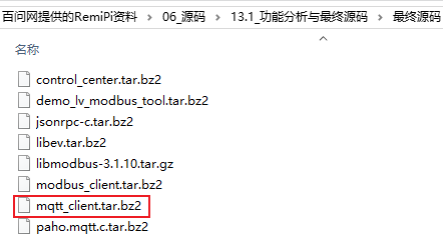
The source code is:
13.7.1 Program Flow
The program mainly has two major functions:
① Periodically read