I have been in contact with Linux for quite a long time, starting around 2010. Most of my work has been based on Linux, from Linux-based set-top boxes and smart speakers, chip Linux BSP SDKs, to applications on the Android side, and currently cloud-based services. I have never really left the world of Linux.
The learning based on work is essentially a rather utilitarian form of learning, always focusing on mastering the most necessary aspects in the workplace, especially in the vast world of Linux. Back then, I could recite the Linux system boot process, was quite familiar with trimming the BusyBox file system, had a general understanding of kernel compilation based on Kconfig, and was adept at loading driver applications based on init.d. From the outside, I seemed quite familiar with Linux. However, when I wanted to delve into this topic over the weekend, I found that I had no idea how to approach it or how to break down such a massive system. My previous habit was to search Baidu (now AI) for tools or libraries I needed, to understand how to compile frameworks into the system or how to implement them based on the vendor’s provided system, but I had never taken the time to sort out how the Linux system is composed, what subsystems exist, what toolsets are available, and what roles they play.
Therefore, with this point in mind, I organized the root file systems of the kernel and user space according to my understanding and various materials, creating the following diagram. Of course, this diagram is not yet complete, and I will gradually supplement it with descriptions of each subsystem later, but at least it can provide a relatively complete view to understand this system.
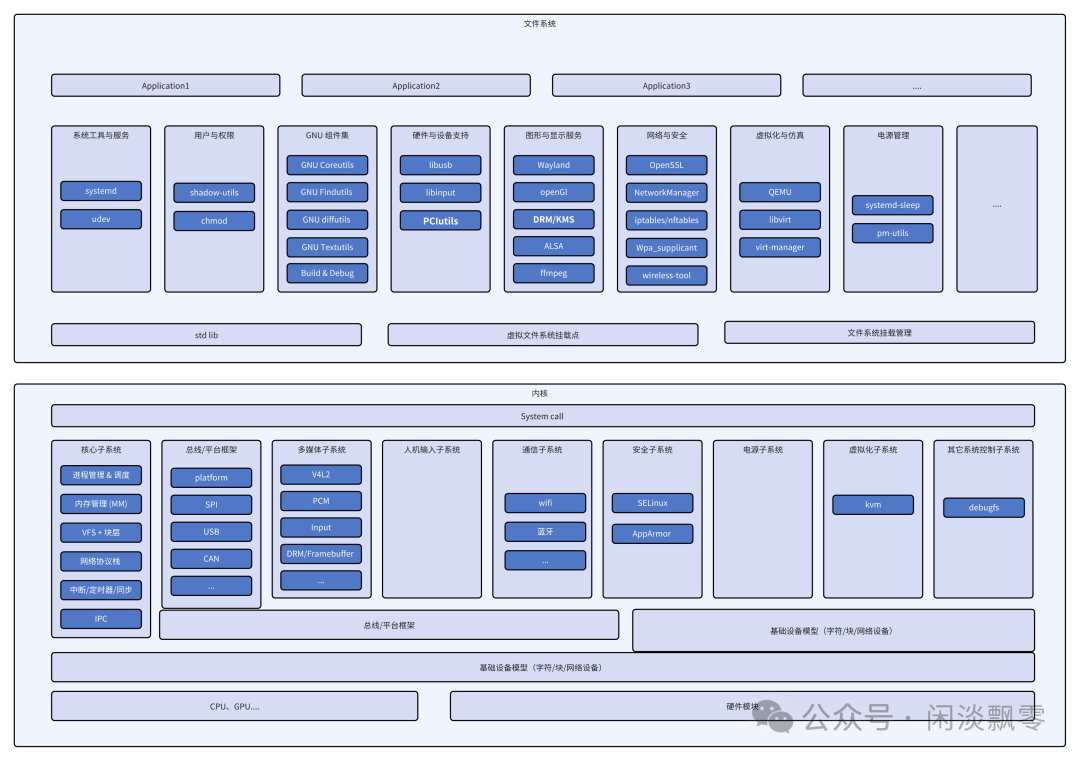
1. User Space (File System Layer) Business Components
Centered around application support and tool services, including the following functional categories:
- 1. System Tools and Services
- • Components:
<span>systemd</span>(system initialization / process management),<span>udev</span>(device hotplug management) - • Function: Responsible for system boot, process lifecycle management, and dynamic recognition and management of hardware devices.
- • Components:
<span>shadow-utils</span>(secure storage of user passwords),<span>chmod</span>(file permission control) - • Function: Manages user accounts, password security, and access control for files/directories.
- • Components:
<span>GNU Coreutils</span>(basic commands like ls/cp),<span>Findutils</span>(search tools),<span>Build & Debug</span>(compilation and debugging tools) - • Function: Provides basic user space operation commands, file search tools, and supporting tools for program compilation and debugging.
- • Components:
<span>libusb</span>(user space driver for USB devices),<span>input</span>(input device tools),<span>PCUtils</span> - • Function: Provides user space driver interfaces or auxiliary tools for hardware devices (such as USB, input devices).
- • Components:
<span>Wayland</span>(display protocol),<span>OpenGL</span>(graphics rendering),<span>DRM/KMS</span>(display hardware management),<span>ALSA</span>(audio driver),<span>ffmpeg</span>(audio and video processing) - • Function: Responsible for rendering graphical interfaces, controlling display hardware, audio output, and audio/video encoding and decoding processing.
- • Components:
<span>OpenSSL</span>(encryption protocol),<span>NetworkManager</span>(network connection management),<span>iptables</span>(firewall rules) - • Function: Manages network connections, implements data encryption, and configures network security policies (firewalls).
- • Components:
<span>QEMU</span>(virtual machine emulation),<span>libvirt</span>(virtualization resource management) - • Function: Provides creation and operation of virtual machines, as well as unified management of virtualization resources (virtual machines, storage).
- • Components:
<span>system_sleep</span>(system sleep),<span>pm_utils</span>(power policy tools) - • Function: Implements system sleep, energy-saving, and other power management strategies.
2. Kernel Space (Kernel Layer) Sub-business Systems
Centered around hardware abstraction and resource management, including the following functional categories:
- 1. Core Subsystems
- • Components: Process management & scheduling, memory management (MM), VFS + block devices, network protocol stack, interrupts/timers, IPC (inter-process communication)
- • Function: The most basic resource management module of the kernel, responsible for process scheduling, memory allocation, file system abstraction, network data forwarding, hardware interrupt handling, and inter-process communication.
- • Components:
<span>platform</span>,<span>SPI</span>,<span>USB</span>,<span>CAN</span>and other bus frameworks - • Function: Provides a unified bus driver framework for hardware devices, simplifying driver development for different buses (such as USB, SPI).
- • Components:
<span>V4L2</span>(video capture),<span>PCM</span>(audio stream),<span>DRM framebuffer</span>(display buffer) - • Function: Provides kernel-level multimedia hardware driver support, such as camera video capture, audio data transmission, and display buffer management.
- • Components: WiFi, Bluetooth drivers
- • Function: Implements kernel-level drivers for network communication devices (WiFi, Bluetooth), supporting network connections.
- • Components:
<span>KVM</span>(Kernel Virtual Machine) - • Function: Provides kernel-level support for hardware-assisted virtualization, serving as the underlying virtualization engine for virtual machines (such as QEMU).
- • Function: Responsible for managing kernel drivers for input devices such as keyboards, mice, and touchscreens, processing hardware input events (such as key presses, touches), and reporting standardized input events to user space (for graphical services and applications to use).
- • Function: Provides kernel-level security enhancement capabilities, with typical components including SELinux (mandatory access control), AppArmor (application permission sandbox), etc.; responsible for verifying access to resources such as processes, files, and networks according to security policies, enhancing system isolation.
- • Function: Implements hardware-level power control logic, including dynamic frequency scaling of the CPU, device power state switching (such as device sleep/wake), etc.; works with user space power management tools (such as
<span>pm-utils</span>) to execute system-level energy-saving strategies.
- • Function: Provides kernel-level auxiliary control capabilities, covering system monitoring (such as kernel performance statistics), debugging interfaces (such as
<span>debugfs</span>), exception handling (such as kernel panic handling), etc., supporting system operation and fault diagnosis.
- • Function: A unified hardware device abstraction framework in the kernel, covering character devices (such as serial ports, sensors), block devices (such as hard drives, USB drives), and network devices (such as network cards) for driver registration and device enumeration logic; it is the core intermediary layer for interaction between hardware modules and kernel subsystems (such as storage, networking).