This section begins to introduce the communication interface modules of PLC.
PLC Communication Interface Module — The “Phone and Network” of the System
1. What is the purpose of the communication module?
In simple terms:
Imagine the PLC as a commander of a factory, which needs to “call” or “send WeChat messages” to other devices to coordinate work. The communication module is like the PLC’s mobile phone, walkie-talkie, or Wi-Fi router, responsible for enabling the PLC to “talk” with these devices.
In professional terms:
The communication module provides hardware interfaces and protocol support, allowing the PLC to exchange data with external devices (HMI, sensors, other PLCs, computers, etc.), achieving centralized monitoring, remote control, and system integration.
2. The three core tasks of the communication module
Task 1: Communicating with “humans” (HMI/touch screens)
Common scenario:
Operators need to check the temperature and pressure controlled by the PLC through a touch screen, or press buttons to start or stop devices.
Professional implementation:
The communication module connects to the HMI via interfaces such as RS485 and Ethernet.
Data is transmitted using dedicated protocols (such as Siemens’ Profinet or Mitsubishi’s MELSEC).
Task 2: Collaborating with “devices” (inverters, robots, instruments)
Common scenario:
The PLC needs to tell the inverter to “set the motor speed to 1000 RPM” or read the value from a temperature sensor.
Professional implementation:
Control commands are sent using Modbus RTU (serial communication) or EtherNet/IP (industrial Ethernet).
It supports real-time data exchange (such as robot position signals and inverter current values).
Task 3: Networking with “management systems” (SCADA, cloud platforms)
Common scenario:
The factory manager wants to view production line output on a computer or receive device fault alarms on a mobile phone.
Professional implementation:
Using protocols such as OPC UA and MQTT, PLC data is uploaded to SCADA systems or cloud platforms.
This enables remote monitoring, big data analysis, and predictive maintenance.
3. Common types of communication interfaces
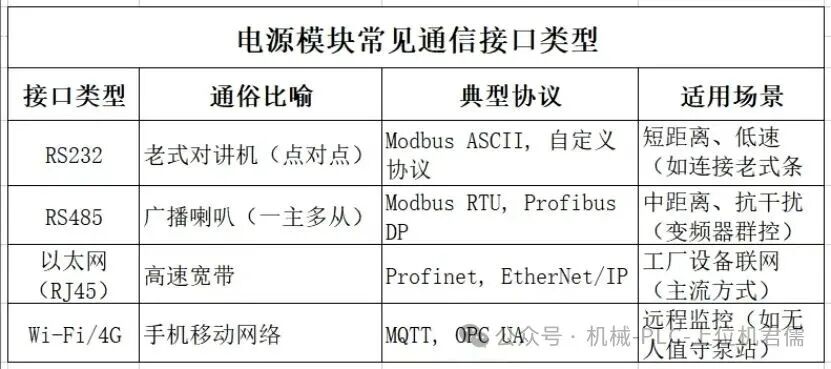
4. Key professional terminology explained
(1) Protocol:
In simple terms: The language rules for the PLC to “chat” with other devices.
Examples:
Modbus: Like “Mandarin”, simple and universal, supported by almost all devices.
Profinet: Like “German”, specific to Siemens devices but highly efficient.
(2) Baud Rate:
In simple terms: The “speed of communication”, measured in bps (bits per second).
Examples:
9600bps ≈ slow reading (suitable for simple sensors).
1Gbps ≈ super fast talking (industrial Ethernet, suitable for large data volumes).
(3) Master/Slave:
In simple terms:
Master: The PLC is the “boss”, actively issuing commands.
Slave: Inverters and sensors are the “employees”, responding only to commands.
(4) Real-Time:
In simple terms: Data transmission cannot be delayed; for example, emergency stop signals must be delivered within milliseconds!
Professional solutions:
Profinet IRT (synchronous real-time), EtherCAT (ultra-fast bus).
5. Why is the communication module important?
(1) Without it, the PLC is “mute” and “deaf”:
It cannot receive remote commands (such as mobile app control).
It cannot see the status of other devices (such as whether the robot is in position).
(2) The “networking” requirement of modern factories:
Enables smart manufacturing (data upload to MES/ERP systems). Supports remote maintenance (engineers debugging PLC from home).
In summary:
The communication module is the PLC’s “social tool”, allowing the PLC to chat with HMIs, send commands to inverters, and report data to the cloud. Choosing the right interfaces and protocols can upgrade your PLC from a “standalone version” to a “networked intelligent version”!