Click the blue text aboveFollow us In order to implement the “Work Arrangement for Deepening the Large-Scale Deployment and Application of IPv6 in 2024” issued by the Central Cyberspace Affairs Commission, the National Development and Reform Commission, and the Ministry of Industry and Information Technology, and to promote the use of IPv6 in the internet access office networks of various party and government agencies, public institutions, and state-owned enterprises in our city, the Chongqing Municipal Committee of the Cyberspace Administration organized the preparation of the “IPv6 Transformation Guide for Internet Office Networks (1.0)”, providing a reference for the IPv6 transformation of office networks in various units.
Table of Contents
Chapter One Overview
1.1 Policy Background
1.2 Basic Principles
Chapter Two Basic Structure of Internet Office Networks
2.1 Basic Structure of Internet Systems
2.2 Typical Network Topology of Office Networks
Chapter Three IPv6 Function Testing of Internet Office Networks
3.1 IPv6 Testing Process for Office Networks
3.2 Terminal Testing
3.3 Testing of Interfaces Provided by Operators
3.4 Firewall Testing
3.5 Router Testing
3.6 Switch Testing
Chapter Four IPv6 Upgrade Solutions for Office Networks
4.1 IPv6 Address Planning
4.2 VLAN Planning
4.3 Main Equipment Configuration Reference
4.4 Implementation Steps
4.5 Acceptance Testing
Chapter Five Common Problems and Solutions
5.1 Network Device Issues
5.2 DNS Resolution Issues
5.3 Address Allocation Issues
5.4 Security Issues
5.5 Website Access Issues
Acknowledgments
Chapter One Overview
With the rapid development of the global internet and the continuous advancement of network technology, the Internet Protocol Version 6 (IPv6) as the next-generation network protocol can provide almost unlimited IP address resources, support more efficient network configurations, more secure network connections, and wider heterogeneous network access. Given the exhaustion of IPv4 address resources, the deployment and application of IPv6 has become an urgent need for internet users in society, including individuals, families, units, and enterprises.
This guide targets typical office networks and provides a comprehensive framework for IPv6 transformation, helping users evaluate the current network status based on existing office network architecture and mainstream terminal devices, and providing practical references during the IPv6 upgrade process, achieving a smooth upgrade of office networks to IPv6 while minimizing the impact on existing business.
This guide mainly addresses common internet office network environments, providing examples based on widely used network devices and their operating interfaces to guide users in assessing, configuring, and upgrading IPv6 network status. For special network architectures or specialized equipment, it is recommended to seek professional technical support and customized solutions.
1.1 Policy Background
The General Office of the Central Committee of the Communist Party of China and the General Office of the State Council issued the “Action Plan for Promoting the Large-Scale Deployment of Internet Protocol Version 6 (IPv6)” in 2017. The Central Cyberspace Affairs Commission, the National Development and Reform Commission, and the Ministry of Industry and Information Technology issued the “Notice on Accelerating the Promotion of the Large-Scale Deployment and Application of Internet Protocol Version 6 (IPv6)” in 2021. All regions and departments have earnestly implemented it according to their actual conditions, accelerating the promotion of internet upgrades and evolution, and making significant progress in the deployment and application of IPv6.
The Central Cyberspace Affairs Commission, the National Development and Reform Commission, and the Ministry of Industry and Information Technology issued the “Work Arrangement for Deepening the Large-Scale Deployment and Application of IPv6 in 2024”, clarifying the development goals for the IPv6 transformation and upgrade of internet office networks in party and government agencies, and requiring demonstration to encourage the entire society’s enterprises and institutions to actively use IPv6.
1.2 Basic Principles
Given that the evolution of IPv6 networks is a long-term process, and that IPv4 networks are still widely used, this guide proposes the following basic principles considering comprehensive business operations, transformation costs, and other factors:
(1) Dual-stack Priority. The network transformation should generally adopt the IPv4/IPv6 dual-stack approach, encouraging users with conditions to adopt the IPv6 single-stack approach.
(2) Minimal Changes. The network transformation should be based on existing equipment and networks, minimizing changes to the network architecture and the number of devices replaced as much as possible.
(3) Safe and Smooth. The network transformation should be uniformly planned, tailored to local conditions, implemented step by step, and conducted safely and steadily, with infrastructure in place first, and terminals and applications gradually transformed to ensure smooth business switching.
Chapter Two Basic Structure of Internet Office Networks
2.1 Basic Structure of Internet Systems
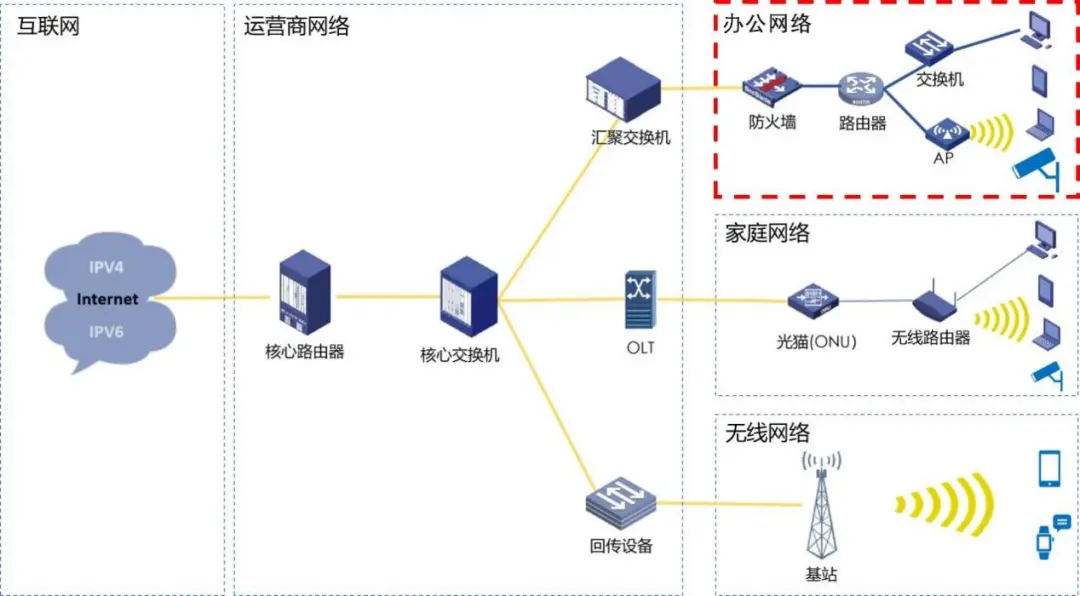
Figure 2-1 Basic Structure of Internet Systems
The internet system can be divided into three parts: the user access side, the operator network, and the internet. The user access side is divided into office networks, home networks, and wireless networks according to user scenarios. This guide focuses on testing and transforming typical office networks for IPv6.
2.2 Typical Network Topology of Office Networks
Office networks generally consist of entrance and exit devices, aggregation layer devices, access layer devices, and various terminals. Network devices typically include firewalls, routers, and Layer 2/3 switches, while terminals generally include office computers, mobile phones, tablets, etc. The following diagram shows the typical network structure of office networks:
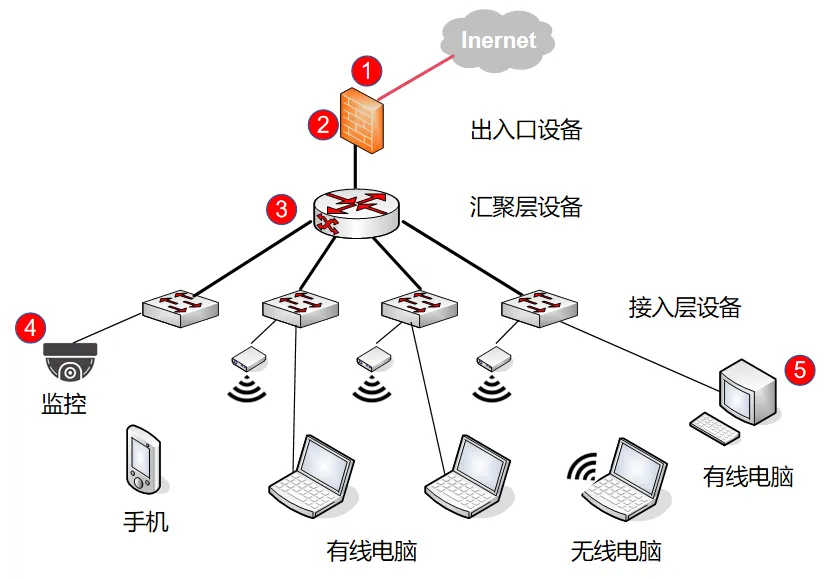 Figure 2-2 Basic Structure of Internet Systems
Legend:
① Operator provided interface, generally a fiber optic dedicated line.
② Entrance and exit devices, generally firewalls, exit routers, Layer 3 switches, etc.
③ Aggregation layer devices, generally routers, Layer 3 switches, etc.
④ Access layer devices, generally Layer 2 access switches, wireless APs, etc.
⑤ Various terminals, generally including office computers, mobile phones, tablets, etc.
Chapter Three IPv6 Function Testing of Internet Office Networks
3.1 IPv6 Testing Process for Office Networks
Before upgrading and transforming the office network to IPv6, it should first be tested whether the office network supports IPv6. For different levels of devices, corresponding IPv6 functions are required:
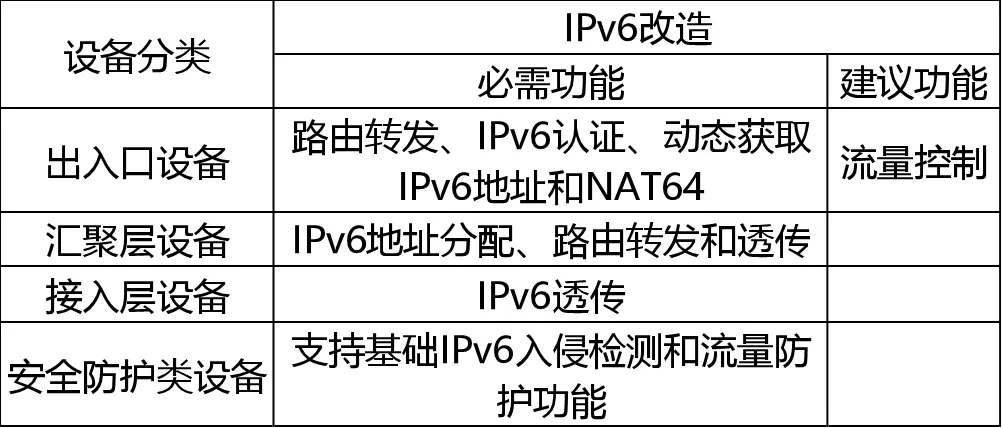
Note: Units/enterprise users should conduct tiered testing according to the functional requirements in the above table based on their office network structure.
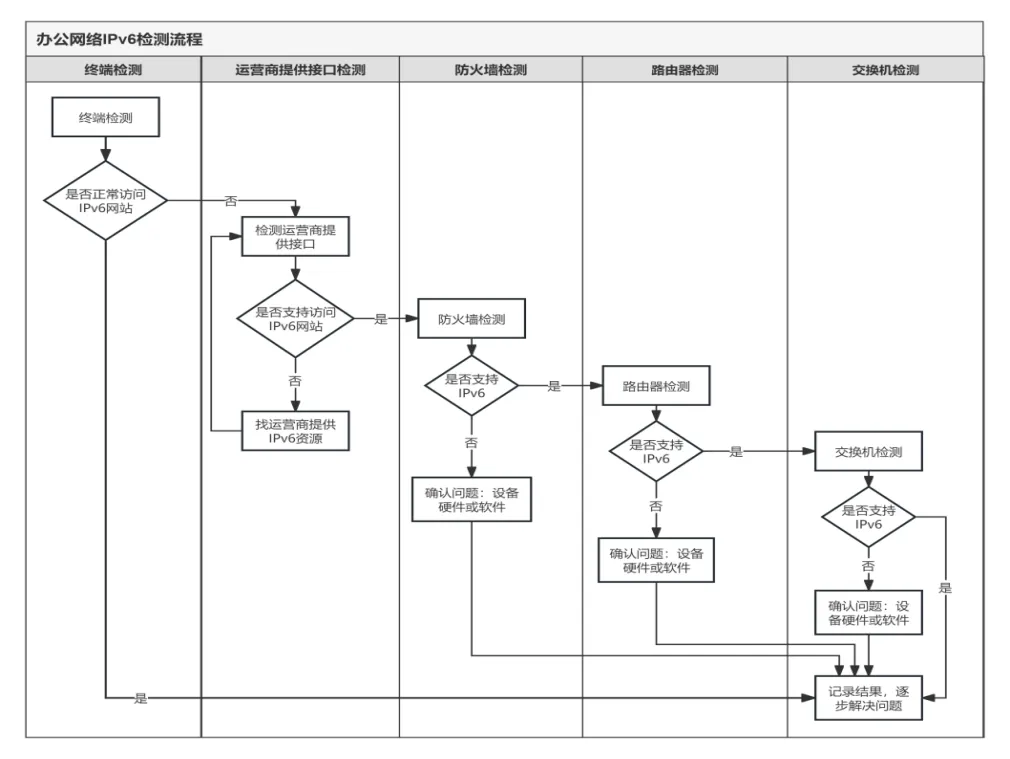
Figure 3-1 Testing Process Diagram
Description:This testing process only verifies whether the device supports the IPv6 protocol and verifies it by configuring the IPv6 address. Further testing of IPv6-related functions is required.
3.2 Terminal Testing
Connect the terminal to the office network and test whether it supports the IPv6 protocol and can access IPv6 websites.
3.2.1 Fixed Terminal Testing
(1) Open the network card settings on the computer terminal and check if there is an IPv6 protocol stack – “Internet Protocol Version 6 (TCP/IP6)” (taking Windows and Tongxin UOS as examples). The network card settings for Windows and Tongxin UOS are shown in the following images:
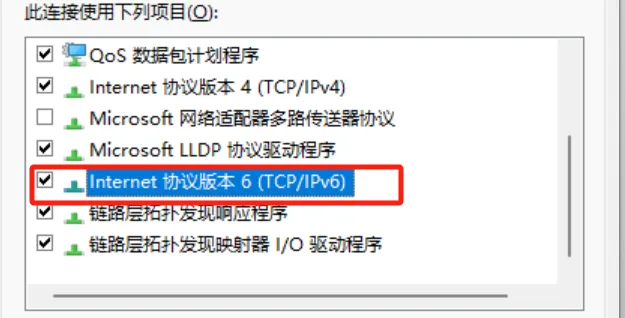
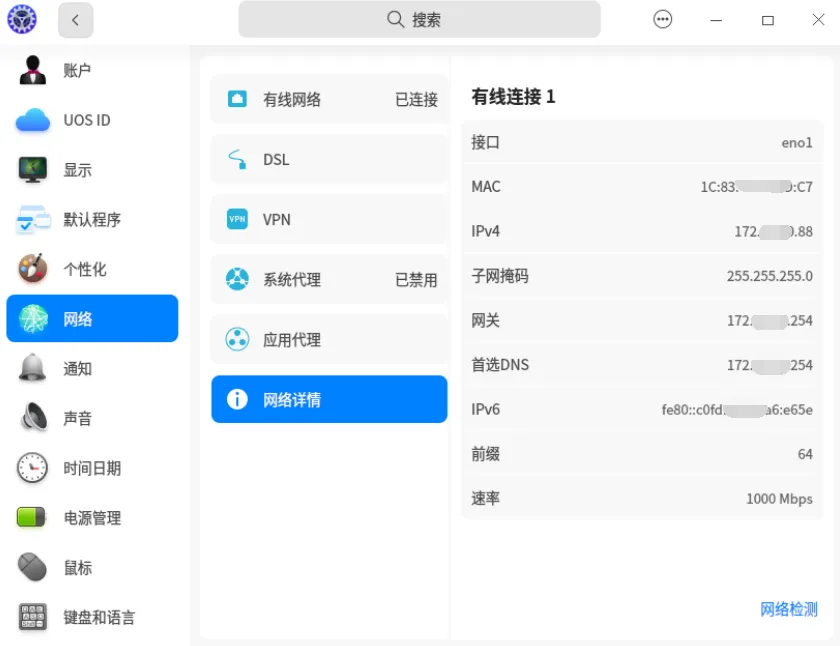
(2) Run the command ipconfig /all or the Ping command to see if a public IPv6 address has been obtained, or access IPv6 protocol-supported websites (such as test-IPv6.com, ipw.cn) for testing.
① The testing results for support are as follows:
Run the command ipconfig /all and check if the fixed terminal has obtained a public IPv6 address, gateway, and DNS server. The running screenshot is as follows:
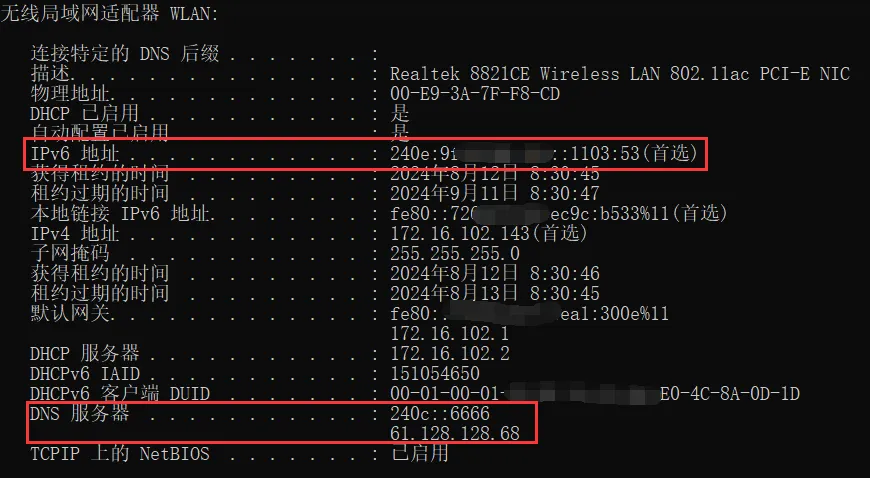
For IPv6-supported websites, run the Ping command, which can resolve the DNS domain name to an IPv6 address and can be pinged successfully. The running screenshot is as follows:
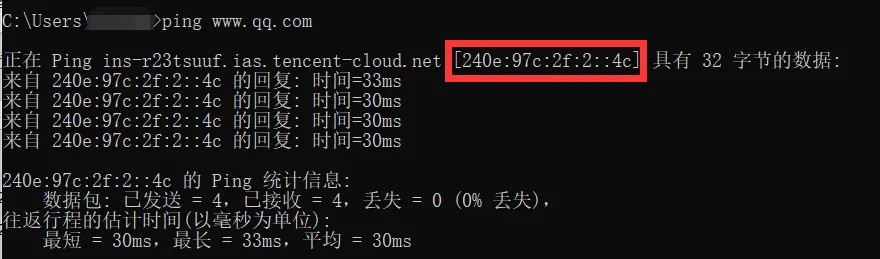
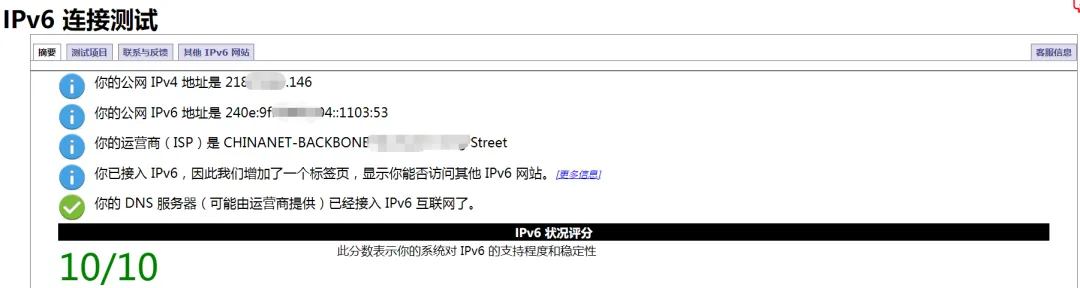
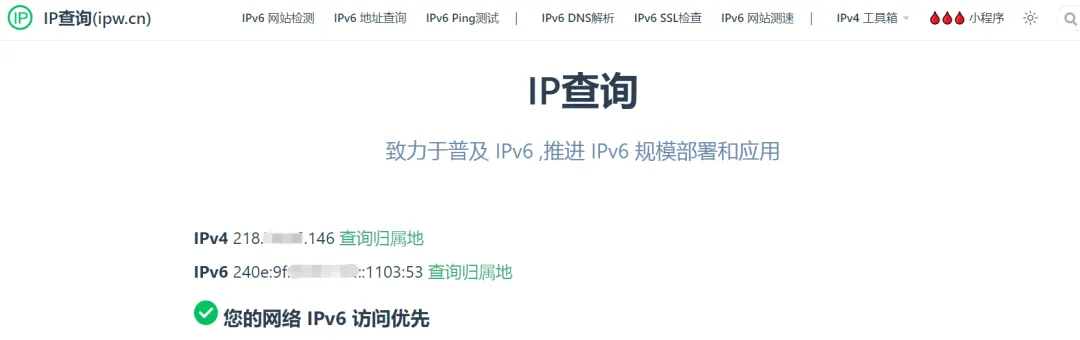
Accessing test-IPv6.com, the IPv6 connection test passes; accessing ipw.cn shows that the IPv6 status is normal. The testing screenshot is as follows:
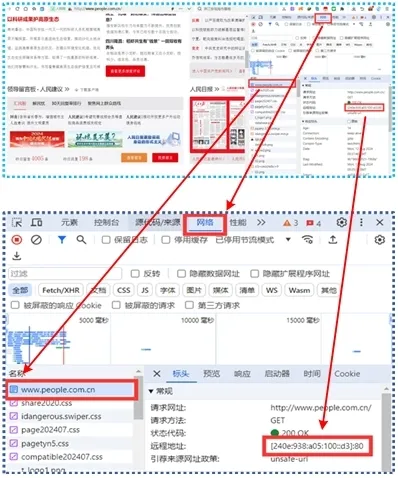
By opening the IPv6 website in the browser, you can see the remote address is an IPv6 address (verification method: open the browser to access the webpage, then press F12, refresh the page by pressing F5, randomly locate one of the directory files, and check the “Remote Address” property in the “Header” attribute of the “Network” section); the webpage screenshot is as follows:
② The testing results for non-support are as follows:
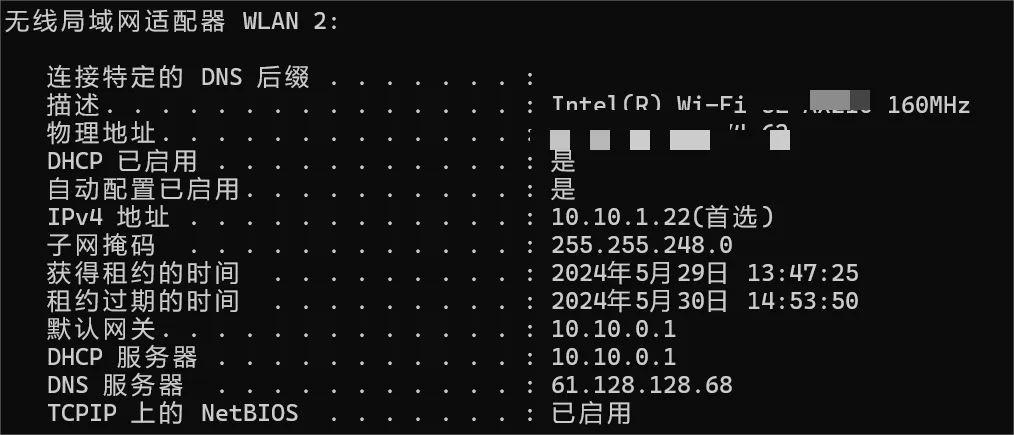
Run the command ipconfig /all, and the fixed terminal can only obtain IPv4 addresses, gateways, and DNS servers. The running screenshot is as follows:
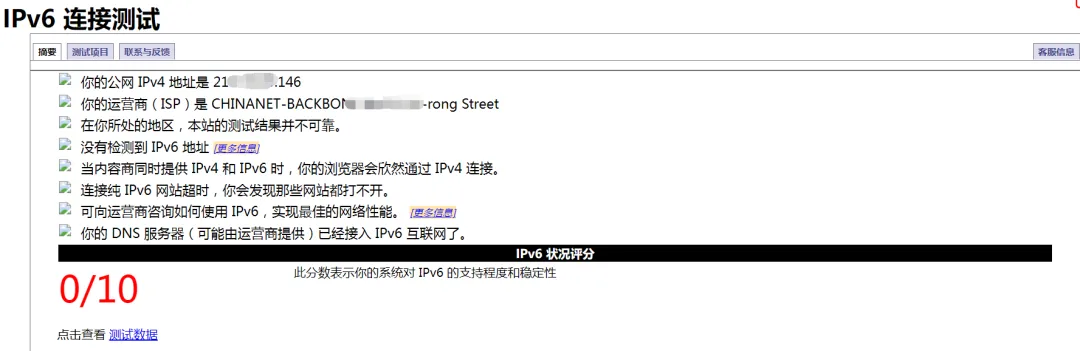
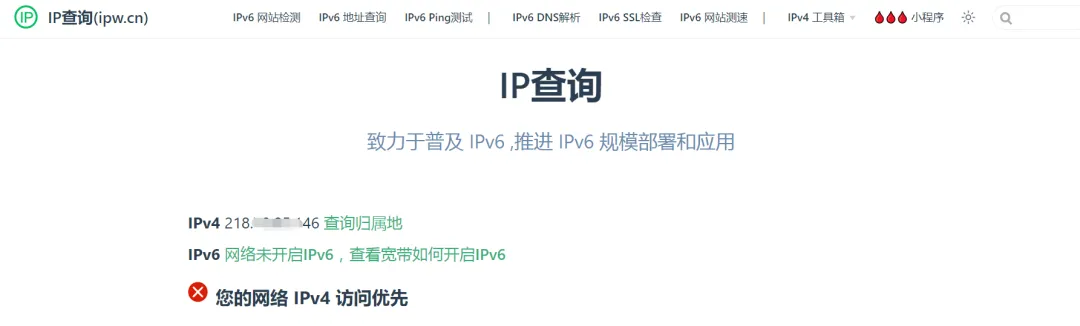
Accessing test-IPv6.com, the IPv6 connection test does not pass; accessing ipw.cn shows that it is accessed via IPv4. The testing screenshot is as follows:
3.3.2 Mobile Terminal Testing
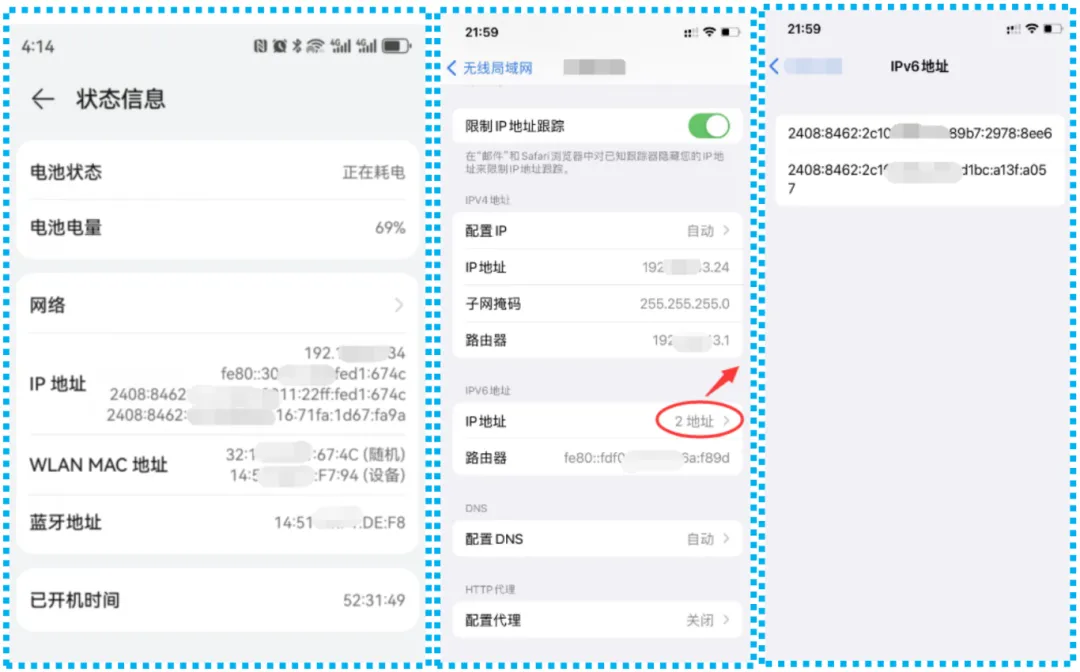
Current smart mobile terminals basically default to support IPv6 protocol. By opening the wireless local area network and joining the office network, check whether an IPv6 address has been obtained (taking mainstream smart mobile terminal devices as examples).
Android/HarmonyOS terminals: Settings – About Phone – Status Information.
iOS terminals: Settings – Wireless Local Area Network – After joining the office network, click “ⓘ” – scroll down to the bottom.
① The testing results for support are as follows:
Mobile terminals normally obtain public IPv6 addresses. The screenshots for Android/HarmonyOS terminals and iOS terminals are as follows:
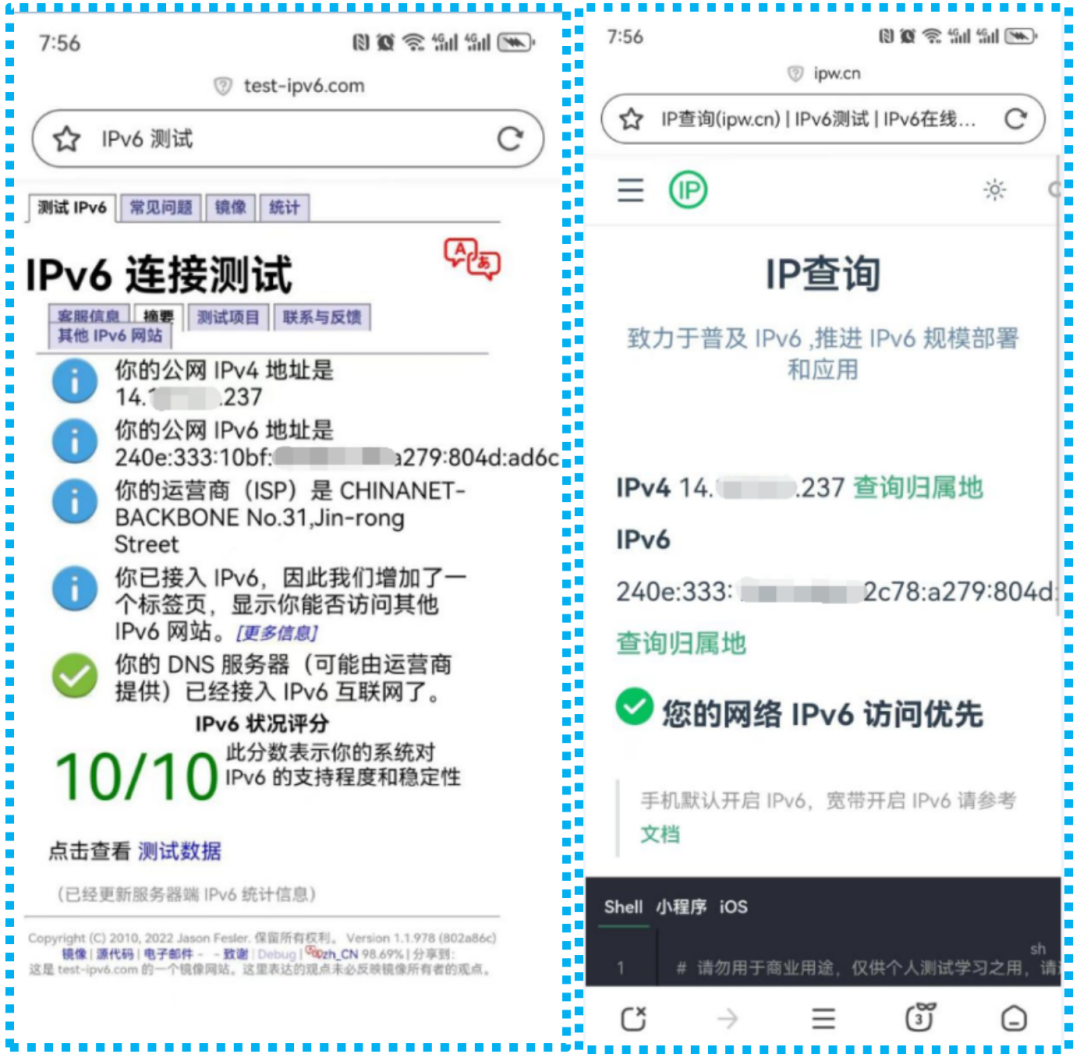
Accessing test-IPv6.com, the IPv6 connection tests all pass; accessing ipw.cn shows that the IPv6 status is normal. The testing screenshot is as follows:
② The testing results for non-support are as follows:
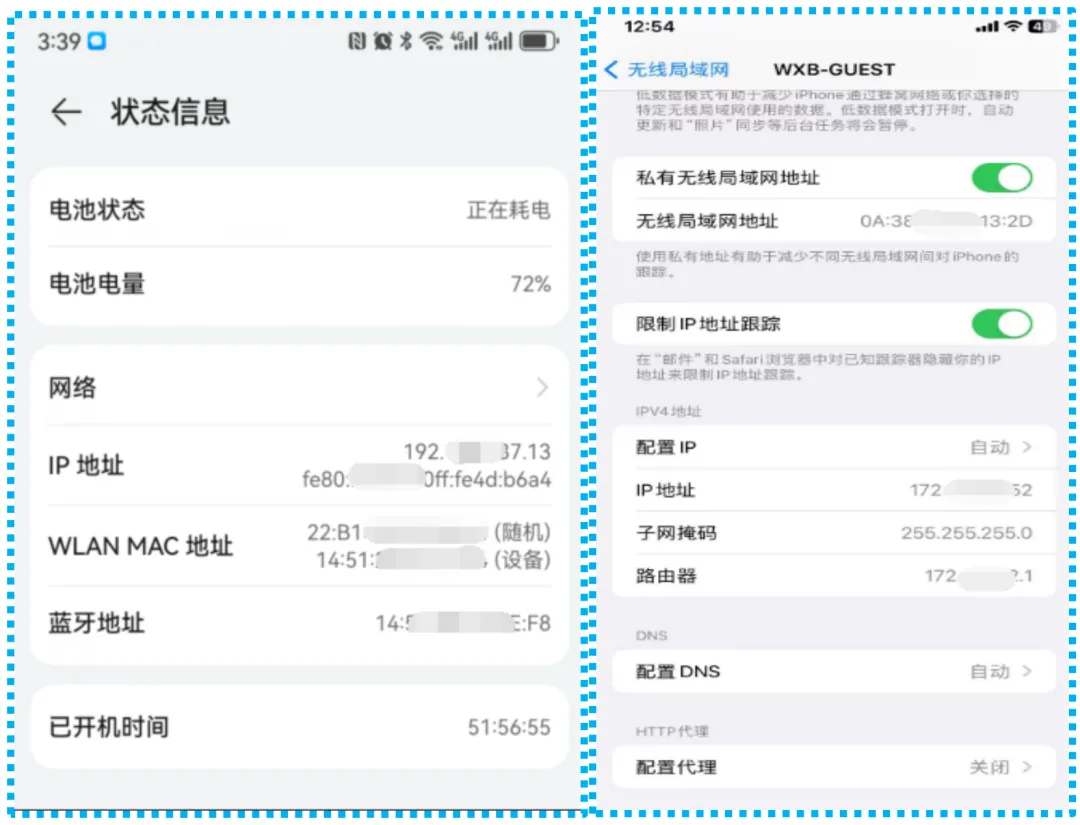
Mobile terminals can only obtain IPv4 addresses and cannot obtain public IPv6 addresses. The screenshots of the Android/HarmonyOS user interface and iOS user interface are as follows:
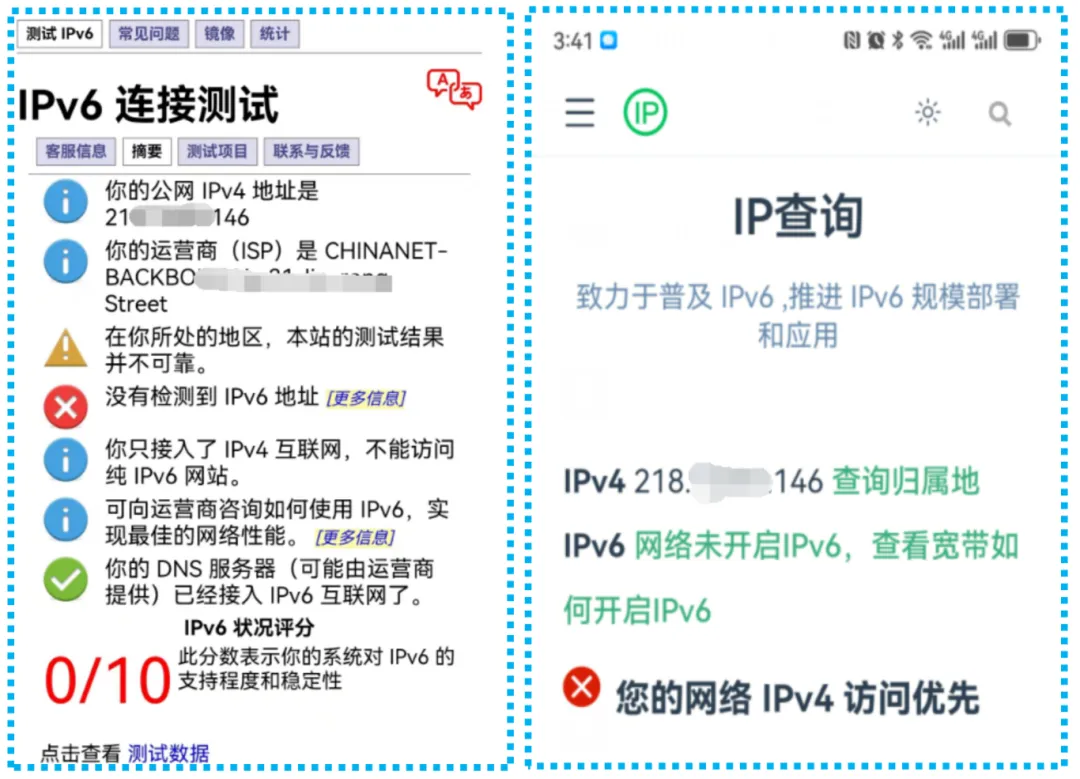
Accessing test-IPv6.com, the IPv6 connection test does not pass; accessing ipw.cn shows that it is accessed via IPv4. The testing screenshot is as follows:
3.3 Testing of Interfaces Provided by Operators
At the exit of the internet office network, connect a laptop directly to the interface link provided by the operator, configure the IPv6 address assigned by the operator on the network card or obtain the IPv6 address through dialing, then ping the IPv6 gateway address provided by the operator and access IPv6 protocol-supported websites (such as test-IPv6.com, ipw.cn). If normal access is possible, it indicates that the IPv6 interface link and address resources provided by the operator are normal.
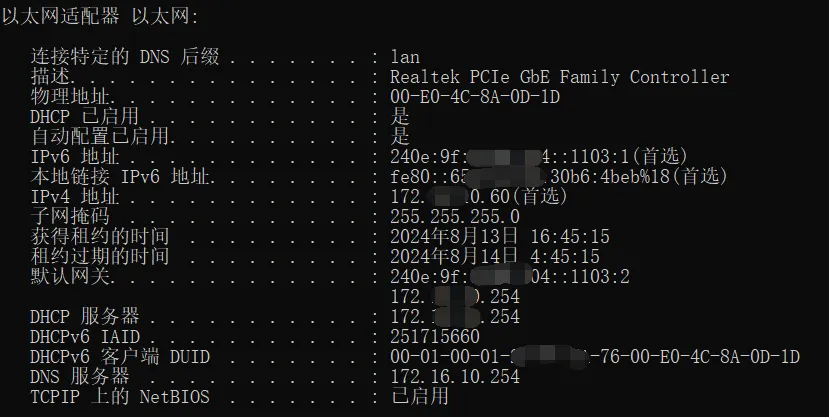
① The testing results for support are as follows:
After setting the computer to the IPv6 address provided by the operator, it can successfully ping the opposite end’s IPv6 address. The running screenshot is as follows:
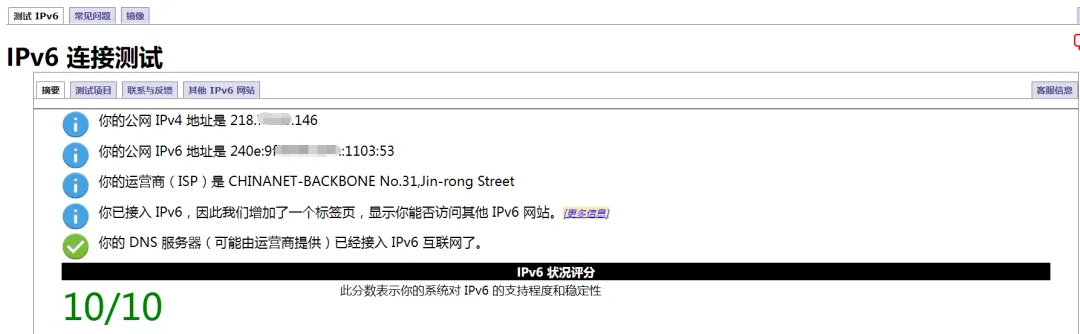
The computer accesses test-IPv6.com, and the IPv6 connection tests all pass; accessing ipw.cn shows that the IPv6 status is normal. The testing screenshots are as follows:
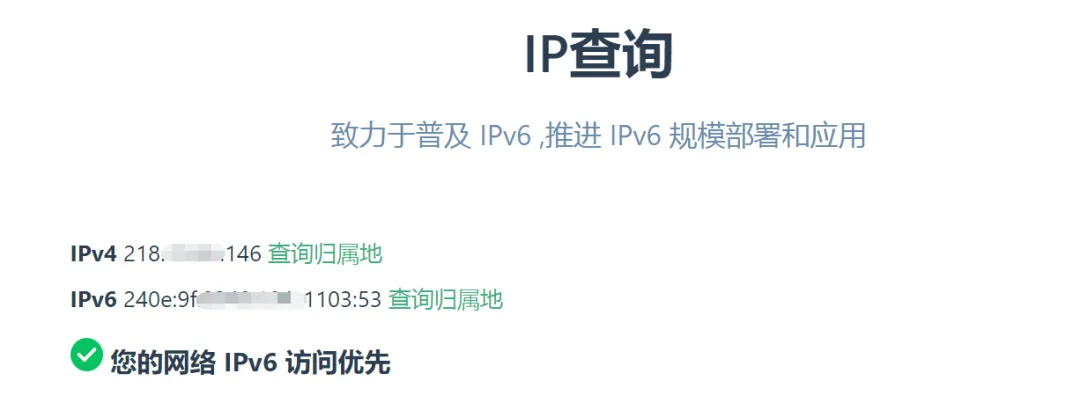
② The testing results for non-support are as follows:
After setting the computer to the IPv6 address provided by the operator, it cannot successfully ping the opposite end’s IPv6 address. The running screenshot is as follows:
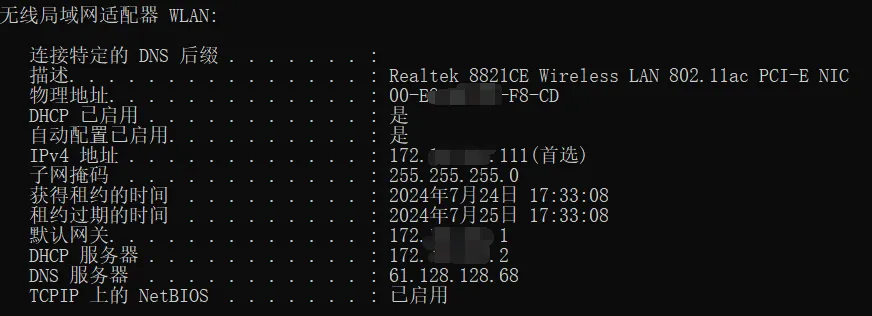
3.4 Firewall Testing
Log in to the firewall configuration interface, open the IPv6 protocol in the global configuration, and configure an IPv6 address on any free port. If the configuration is successful, it indicates that the device supports IPv6.
For example, in the Huawei USG series firewall, enable the IPv6 function on any port and configure the IPv6 address.
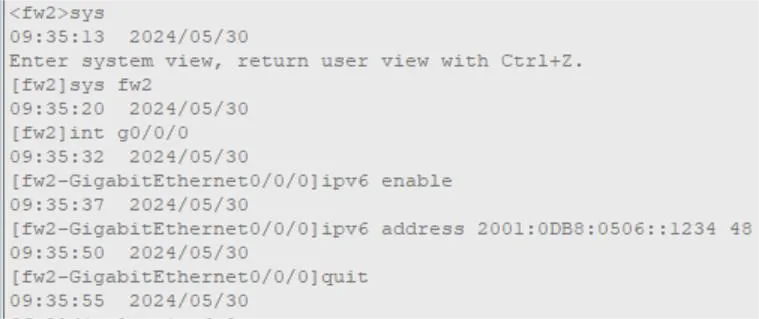
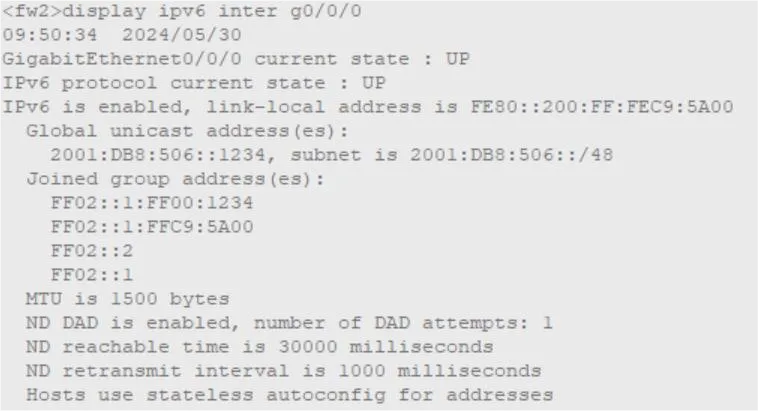
By checking the command, it can be seen that the firewall port has been configured with an IPv6 address, indicating that the firewall supports the IPv6 protocol.
3.5 Router Testing
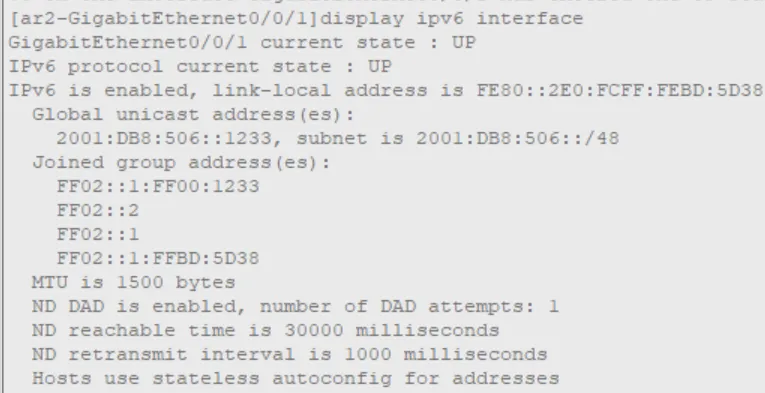
Log in to the router configuration interface, open the IPv6 protocol in the global configuration, and configure an IPv6 address on any free port. If the configuration is successful, it indicates that the device supports IPv6.
For example, in the Huawei AR series router, enable the IPv6 function on any port and configure the IPv6 address.

By checking the command, it can be seen that the router port has been configured with an IPv6 address, indicating that the router supports the IPv6 protocol.
3.6 Switch Testing
Log in to the switch configuration interface, open the IPv6 protocol in the global configuration, enter the VLAN interface, configure the IPv6 address, and if the configuration is successful, it indicates that the device supports IPv6.
For example, in the Huawei S3700 switch, enable the IPv6 function on the switch and configure the IPv6 address on the VLAN port.
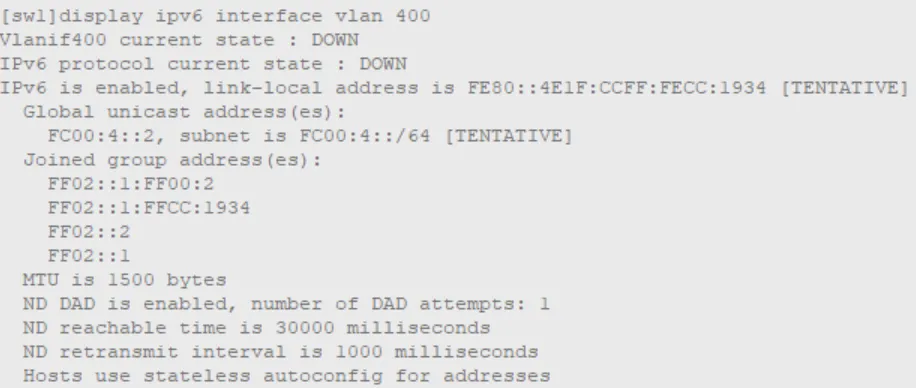
By checking the command, it can be seen that the VLAN port of the switch has been configured with an IPv6 address, indicating that the switch supports the IPv6 protocol.
Chapter Four IPv6 Upgrade Solutions for Office Networks
4.1 IPv6 Address Planning
In the process of IPv6 network transformation, IPv6 address planning will determine the planning of network and ISP interconnection, routing planning, AS planning, NAT planning, etc., and will also have a decisive impact on the compatibility and scalability of the network. It is the first and most important step in the IPv6 network transformation.
4.1.1 Planning Principles
(1) IPv6 address allocation should be hierarchical to simplify the routing table. IPv6 address allocation should aim to assign contiguous IP address space to each area; similar services and functions should be allocated contiguous IP address space to facilitate routing aggregation and security control.
(2) The allocation of IPv6 addresses needs to have sufficient flexibility and manageability, taking into account the needs of existing services, new services, and various special services, balancing the use of addresses between short-term needs and long-term development and network expansion, and reserving corresponding address segments. From a security perspective, it is necessary to achieve IPv6 address allocation records and historical audits as much as possible.
(3) Subnet segment addresses should be continuous to facilitate aggregation and should correspond to the original IPv4 addresses to some extent, reserving segments for Loopback addresses.
(4) At least one IPv6 address in each subnet is recommended to be used as the gateway address for that subnet.
(5) Configure IPv6 addresses for out-of-band management ports of various security devices, connecting them to the management switch to achieve out-of-band management.
4.1.2 Planning Case
Generally, the IPv6 addresses we obtain are 48 or 64 bits, and we can divide this /48 or /64 address segment into multiple /64 address segments for providing to user terminals and various services of office networks. Terminals can automatically obtain corresponding IPv6 addresses through configuration; a specific /64 segment can be selected for further division into multiple /127 segments to provide interconnection ports for device links. For device link interconnection addresses, upstream devices use smaller IP addresses, and downstream devices use larger IP addresses; multiple /128 segments can be divided for device loopback interfaces for network management.
The IPv6 business address segment allocated to enterprises by operators is 240E:250:2814::/48. When used, this entire large segment needs to be further divided into various small segments of addresses for wired and wireless terminal users within the enterprise, as well as some other IPv6 business terminals.
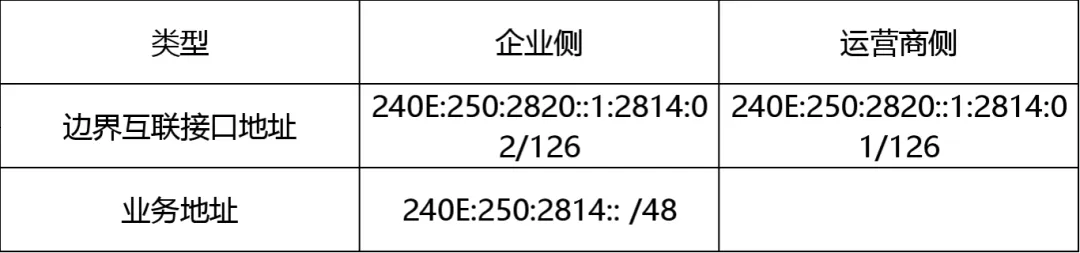
The IPv4 and IPv6 gateways for wired and wireless users are deployed on the core switch, which uniformly allocates IPv4 and IPv6 addresses; in IPv6 address allocation, IPv6 stateless auto-configuration can be configured on the switch, or DHCPv6 address allocation can be used.
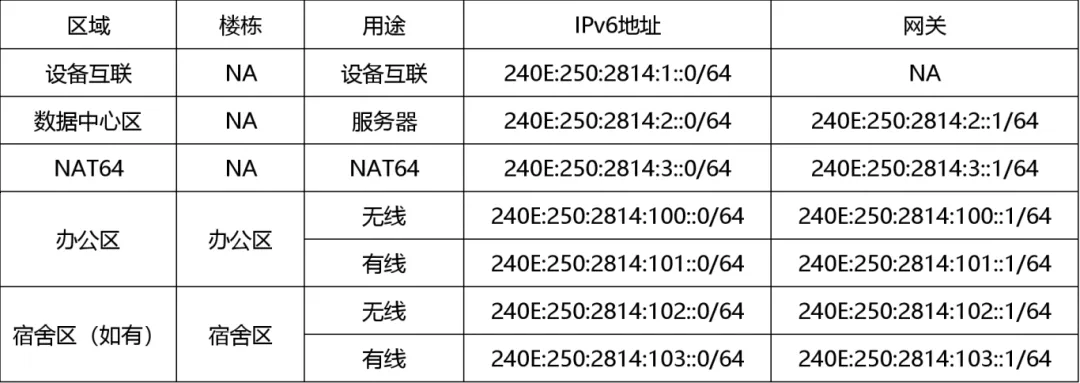
(1) Mainly adhere to four principles: uniqueness, scalability, continuity, and practicality;
(2) Device management and interconnection addresses: use the 240E:250:2814:1::0/64 segment;
(3) Loopback address planning, use a continuous IP address segment, also use the 240E:250:2814:1::0/64 segment;
(4) The IPv6 business gateway is uniformly set to the first address of the segment, i.e., ::1;
(5) After completing the IP address planning, both static IP addresses can be configured, and dynamic IP addresses can be allocated using the DHCP server, considering actual needs.
4.2 VLAN Planning
4.2.1 Planning Principles
The VLAN for IPv6 networking should generally reuse the VLAN of the IPv4 network to construct a dual-stack.
4.2.2 Planning Case
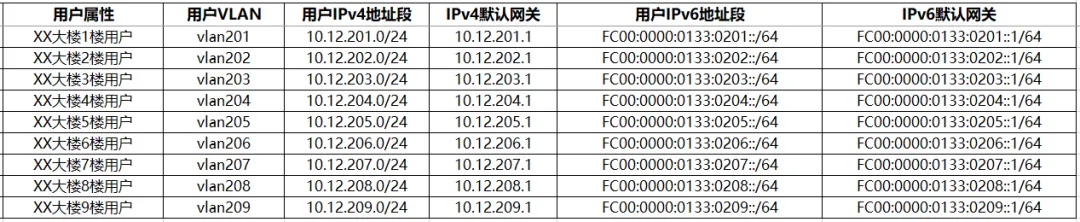
Business addresses are based on VLAN information, associating VLAN information with IPv6 address prefixes to construct independent IPv6 address prefixes for each VLAN, with different subnet segments for address allocation for different business VLANs.
For example, the number 20N in the VLAN planning 20N represents “Building 2, Floor N”, corresponding to the prefix in the user’s IPv6 address:
4.3 Main Equipment Configuration Reference
4.3.1 Basic Functions and Configuration Command Reference
(1) Configure the global IPv6 unicast address of the interface
The ipv6 address command is used to manually configure the global unicast address of the interface.
(2) Configure the gateway address of the interface
The gateway command is used to configure the gateway address of the interface.
(3) Configure DNS
The dns server command is used to configure the domain name server.
(4) Configure static routing
The ip route-static command is used to configure unicast static routes.
The ip route-static 0.0.0.0 0.0.0.0 command is used to configure the default route.
(5) Configure DHCP service
The dhcpv6 prefix-pool command is used to create a DHCPv6 prefix pool and enter the prefix pool view.
The prefix command is used to configure the DHCPv6 address prefix/prefix length.
The dhcpv6 pool command is used to create a DHCPv6 address pool and enter the address pool view.
The prefix-pool command is used to bind the DHCPv6 address pool to the DHCPv6 prefix pool.
The dhcpv6 pool command is used to specify the DHCPv6 address pool used under the interface.
(6) Other functions
Use the dhcrelay command for DHCP relay configuration. If DHCPv6 is used for stateful address distribution and management, the relay command configuration needs to be performed on the switch, and the address pool needs to be configured to the server.
It is important to note: The DHCPv6 relay assigns the task of distributing IPv6 addresses to the DHCPv6 Server. This networking structure moves the DHCPv6 address pool from the core switch to the server, which is generally adopted in slightly larger networks.
4.4 Implementation Steps
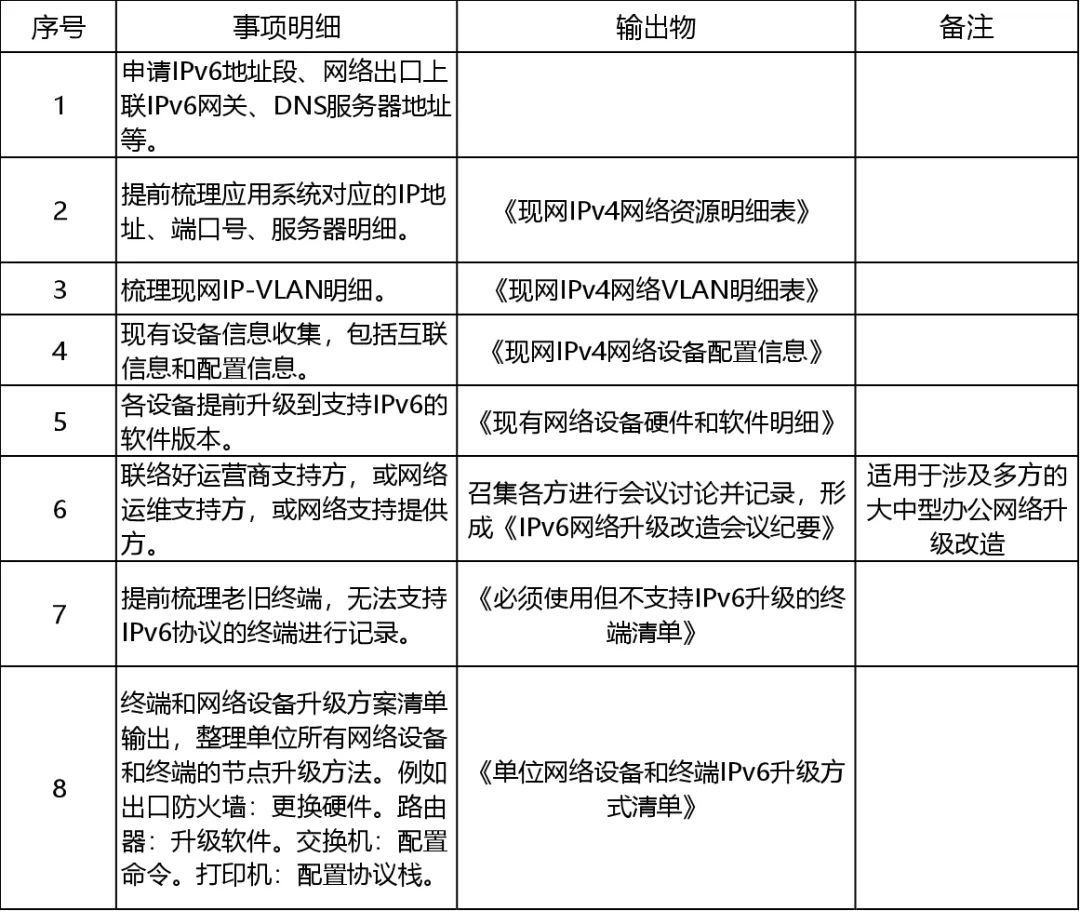
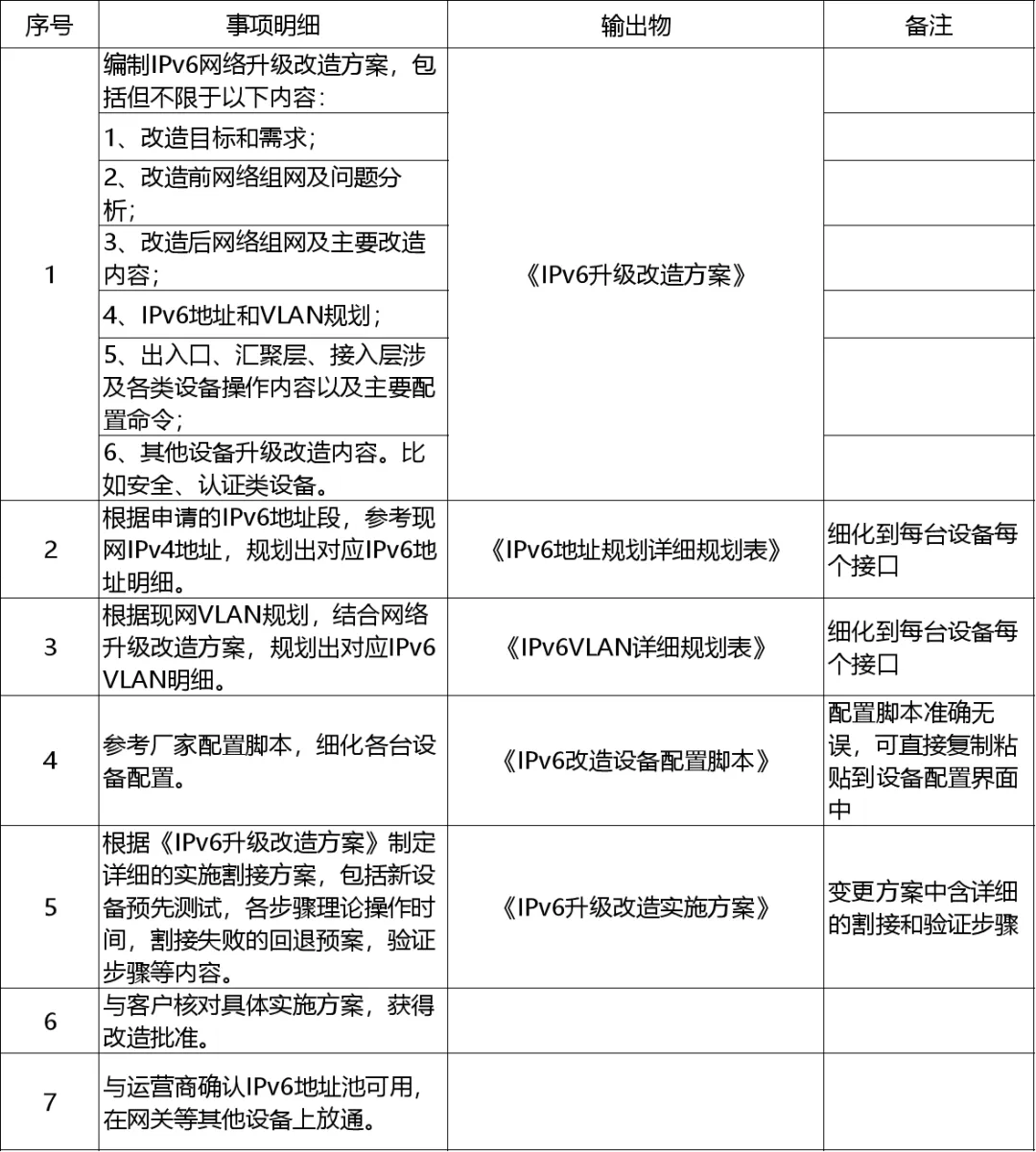
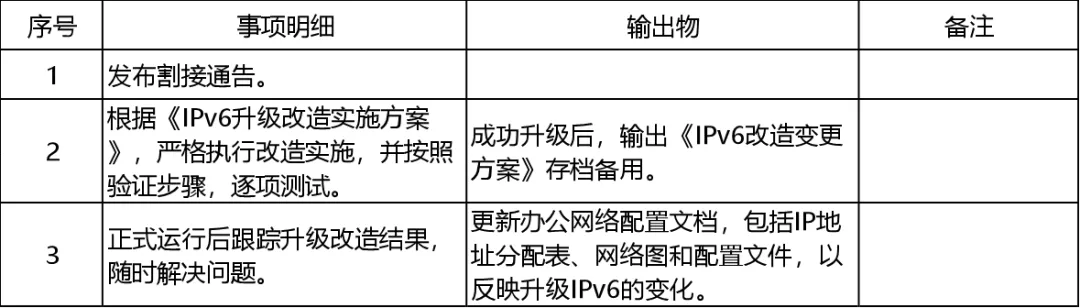
The upgrade transformation can be divided into three phases: preparation phase, planning phase, and implementation phase. The relevant work contents are as follows:
4.4.1 Preparation Phase
4.4.2 Planning Phase
4.4.3 Implementation Phase
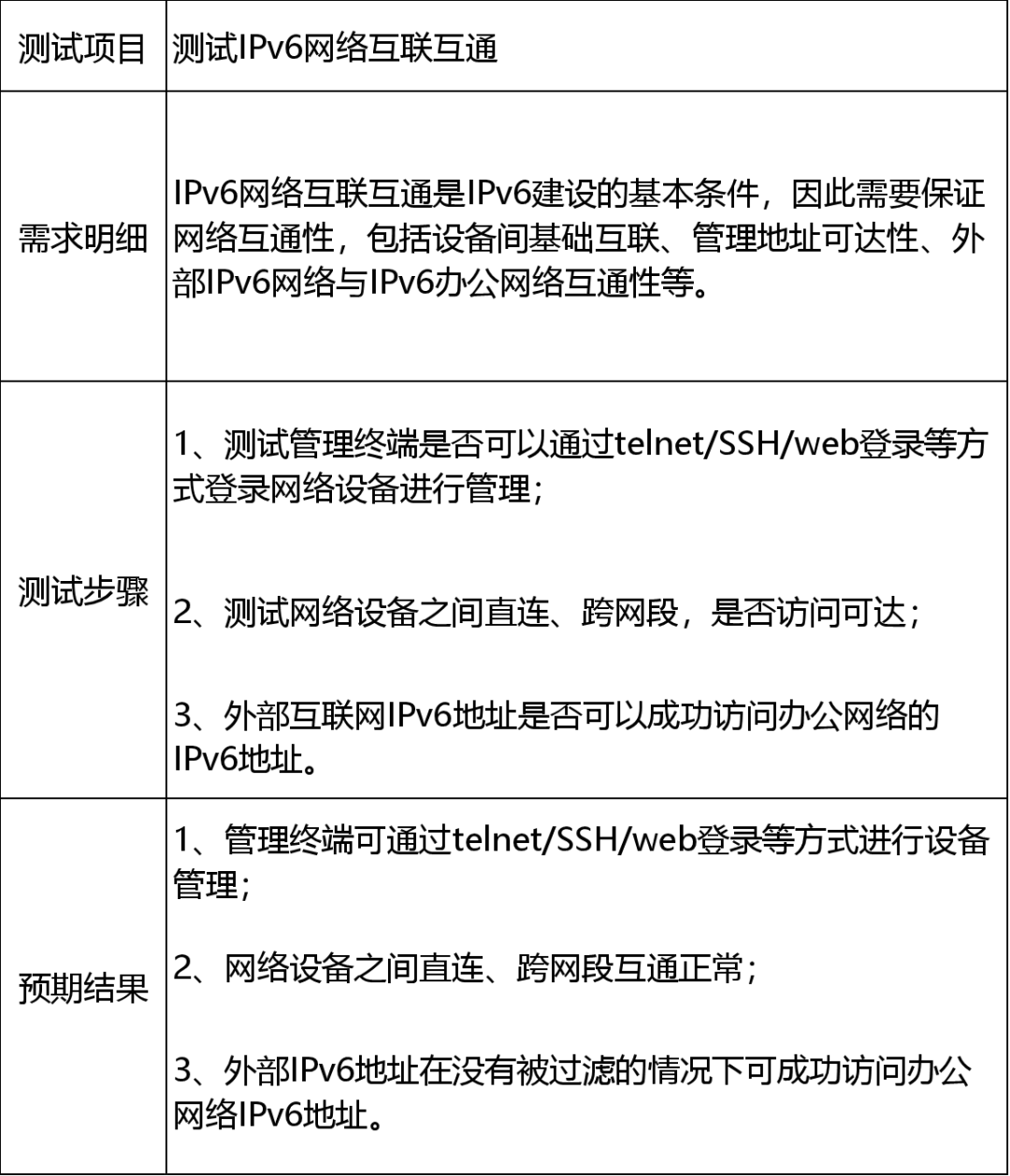
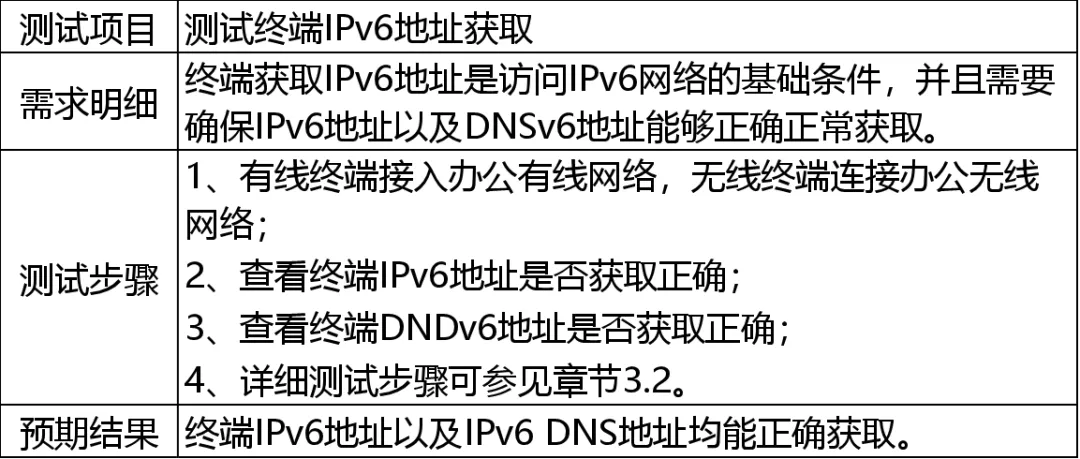
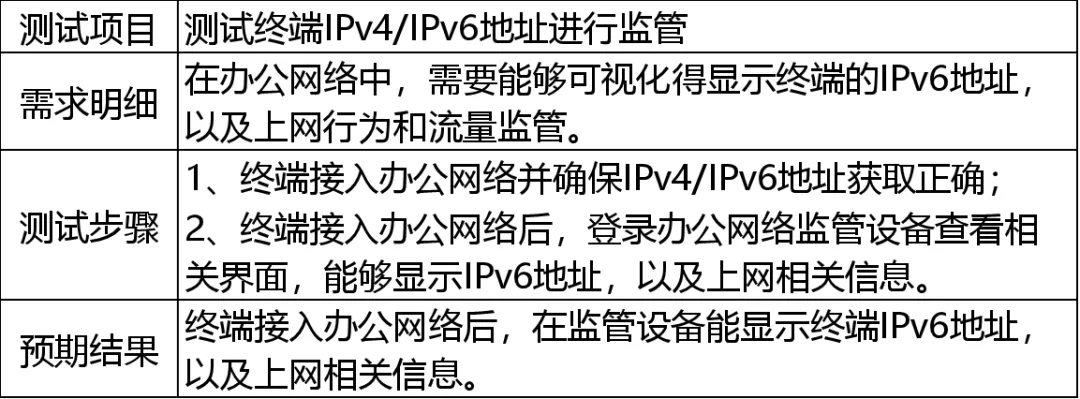
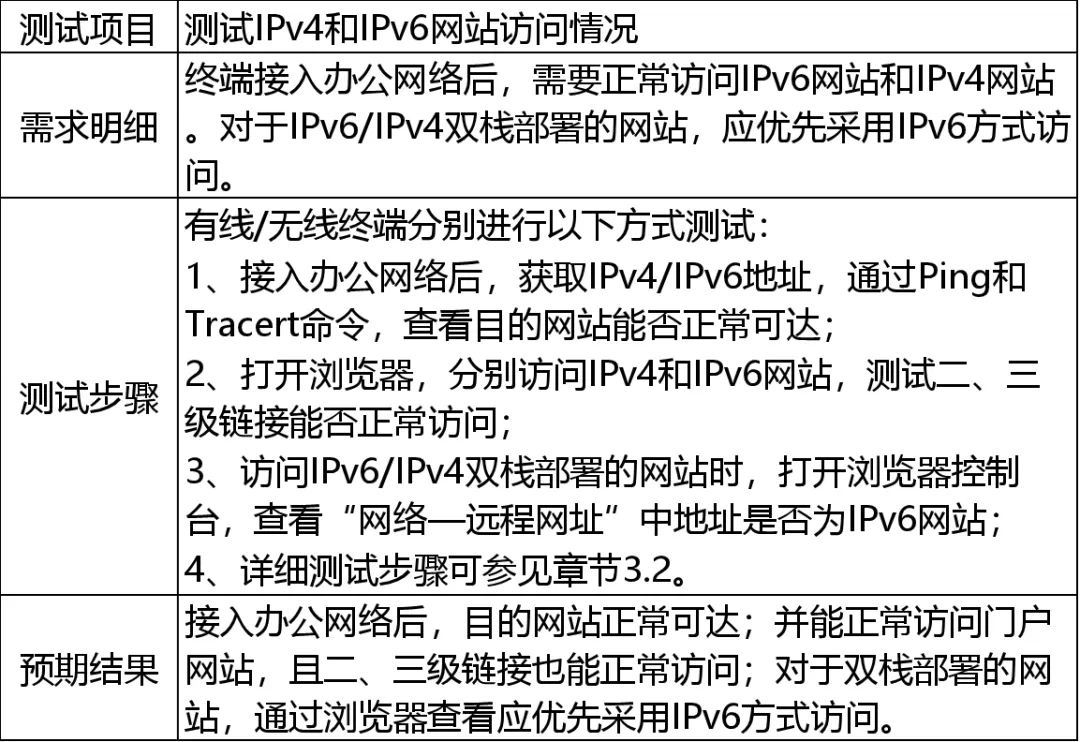
4.5 Acceptance Testing
4.5.1 Testing IPv6 Network Interconnectivity
4.5.2 Testing Terminal IPv6 Address Acquisition
4.5.3 Testing SDN Controller IPv6 Address Display
4.5.4 Testing Portal Website Access
Chapter Five Common Problems and Solutions
5.1 Network Device Issues
(1) Insufficient IPv6 flow table on export devices leading to stuttering and packet loss. Most export devices (such as firewalls) use different table items for forwarding IP traffic for IPv4 and IPv6, and the performance capacity corresponding to them is also different. Conventional network devices’ performance optimization tends to support high concurrent traffic for IPv4, which may result in fewer table items and capacity for IPv6.
Solution: Increase the flow table capacity of the device or replace the high-performance export network device.
(2) Internet export devices using ADSL dial-up links may encounter issues where the device does not support obtaining IPv6 addresses after dialing, resulting in IPv6 not being enabled.
Solution: ADSL should first dial through the optical modem to obtain the IPv6 address, and then dynamically allocate it to internal network devices.
(3) Terminal device software versions are outdated. For example, Android system 8.0, HarmonyOS 3.0, and iOS 9 and earlier versions do not support IPv6.
Solution: Use the software update function built into various terminal devices to update the system to the latest version.
5.2 DNS Resolution Issues
(1) The DNS server does not respond to IPv6 AAAA resolution requests, causing terminals to time out while waiting for AAAA responses, leading to slow access for dual-stack IPv4 and IPv6.
Solution: Replace with a DNS server that supports AAAA request responses, such as 61.128.128.68, 114.114.114.114, etc.
(2) After the terminal is configured with dual-stack IPv6, the traffic accessing the internet prioritizes IPv6, causing link congestion due to the failure of exit load balancing.
Solution: Implement load balancing for IPv4/6 traffic scheduling through policy routing, user routing, and application routing.
5.3 Address Allocation Issues
(1) Some Android system phones do not support DHCPv6, resulting in some users being unable to obtain IPv6 addresses.
Solution: Enable stateless IPv6 address acquisition on the user end.
(2) IPv6 routing selection issues. If enterprises have multiple operator export links, there may be uneven traffic load issues, with most traffic directed towards the export dedicated line that supports IPv6.
Solution: Configure NAT66 or IPv6 policy routing on export devices to achieve multi-link load balancing.
5.4 Security Issues
(1) Both IPv4 and IPv6 share common security issues, and due to the inclusion of some unique labels and extension headers in the IPv6 protocol header, there are also some unique threat attack methods for IPv6 (e.g., RH0 attacks, flood attacks). Therefore, IPv6 security should be considered.
Solution: After deploying IPv6, timely adjust the protection strategies of security devices to avoid security incidents.
(2) After IPv6 deployment, internal hosts are directly exposed to the internet without NAT protection, requiring attention to network security protection.
Solution: Configure NAT66 on export devices and increase IPv6 security firewall devices and strategies.
5.5 Website Access Issues
(1) The “window issue” occurs when accessing IPv6 webpages with IPv6 single-stack. If the webpage contains external links to other websites that do not support IPv6, some information may not be displayed.
Solution: Users should access pages using IPv4/v6 dual-stack addresses; the web server can implement IPv6 to IPv4 functionality through DNS proxy.
(2) After enabling dual-stack IPv4/6 and configuring IPv6 addresses, if IPv6 cannot actually access the internet, it may be due to most IPv4 DNS defaulting to support IPv6 resolution, leading to slow page loading due to traffic prioritizing IPv6.
Solution: Check the reasons for IPv6 not being able to connect to the internet, and disable the user’s IPv6 protocol stack before resolving the issue.
Acknowledgments
This guide was compiled with the strong support of the following units, and we express our heartfelt thanks! (In no particular order)
China Academy of Information and Communications Technology, Technology and Standards Research Institute, Internet Center
China Telecom Corporation Limited, Chongqing Branch
Fujian Wanyou Network Technology Co., Ltd.
Zhengzhou MuYun Electronic Technology Co., Ltd.
Attachment: “IPv6 Transformation Guide for Internet Office Networks (1.0)”(👈 Click to download)
Source: Cyberspace Administration of Chongqing
 Welcome to follow
and discover
the beauty of the network world
📝 Editor | Liu Fanghao Proofreader | Wang Xiaoxiao Reviewer | Yuan Xiaoping
| Statement: Except for original content specifically stated, the text and images of the pushed articles are sourced from the internet and major mainstream media. Copyright belongs to the original author. If you believe the content infringes on your rights, please contact us for deletion.