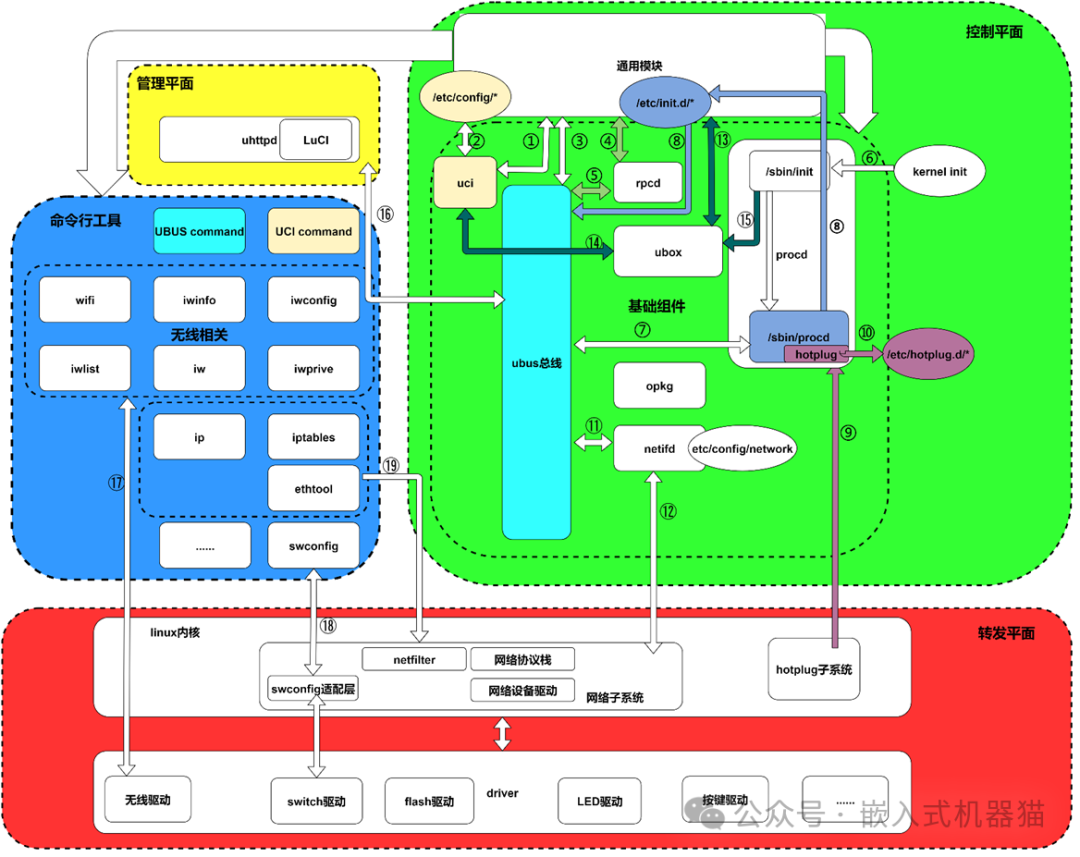
Recently, I have also changed my work content, moving from one Linux platform to another Linux platform. Many people may have worked on products like AP and AC, and they must have come across the OpenWRT system. Indeed, I have also started to get acquainted with this system, and since I am new to it, I have researched a lot of information. Here, I will organize my notes and share them. OpenWrt is an open-source embedded operating system based on Linux, primarily used for routers and other network devices. It provides a highly customizable, flexible, and powerful software platform for network devices, widely used in home networks, enterprise networks, and Internet of Things (IoT) scenarios.
1. Origin and Development of OpenWrt
- •
Origin: OpenWrt initially appeared in 2004 as a third-party firmware project for the Linksys WRT54G router. At that time, Linksys released the Linux source code used by its WRT54G router due to GPL requirements, and community developers created the OpenWrt project based on this.
- •
Development: Over time, OpenWrt has evolved from a simple third-party firmware into a powerful, modular operating system deeply customized for network functions, supporting hundreds of different routers and embedded hardware platforms.
2. Core Features of OpenWrt
1. Highly Modular and Customizable
- •
OpenWrt uses the opkg package management system, similar to Debian/Ubuntu’s apt, allowing users to freely choose to install or uninstall packages such as VPN, firewall, QoS, network monitoring tools, etc.
- •
The system adopts the Buildroot build system, enabling developers to easily trim and customize system components to meet different hardware and application needs.
2. Powerful Network Features
- •
Supports various network protocols: IPv4 / IPv6, DHCP, DNS, NAT, firewall (iptables/nftables), QoS, traffic shaping, etc.
- •
Native support for multi-WAN load balancing and failover, suitable for enterprise applications.
- •
Supports VPN (OpenVPN, WireGuard, IPsec), suitable for remote access and secure communication.
- •
Provides Mesh network support (e.g., B.A.T.M.A.N., OLSR), used to build wireless mesh networks.
3. Web Management Interface (LuCI)
- •
OpenWrt provides a web management interface called LuCI, developed in Lua, allowing users to configure the router via a browser without needing command line knowledge.
- •
LuCI offers an intuitive graphical interface, including network settings, wireless configuration, firewall, service management, etc.
4. Cross-Platform and Hardware Compatibility
- •
Supports multiple CPU architectures, such as MIPS, ARM, x86, x86_64, etc., compatible with a large number of routers, development boards, and even x86 mini PCs.
- •
The official and community maintain a large number of firmware images for devices, making it easy for users to find versions compatible with their hardware.
5. Active Community and Continuous Updates
- •
OpenWrt has a large and active open-source community that continuously develops features, fixes vulnerabilities, and provides security updates.
- •
The project is hosted on GitHub, ensuring high transparency, and developers can contribute code or report issues.
3. Typical Uses of OpenWrt
1. Home Router Upgrade
- •
By flashing OpenWrt firmware onto a factory router with limited functionality and a closed system, it can be transformed into a powerful and highly customizable smart router.
- •
Enables features such as parental controls, guest networks, ad filtering (e.g., AdBlock), remote management, etc.
2. Enterprise Network Deployment
- •
Used as an enterprise-grade gateway, firewall, VPN server, traffic control device, etc.
- •
Supports multiple WAN interfaces for load balancing and failover, improving network availability and stability.
3. Network Experiments and Development
- •
Developers can quickly set up a network experimental environment based on OpenWrt to test various network protocols, services, and security policies.
- •
Due to its open-source nature, it is very suitable for learning embedded Linux, network programming, and system customization.
4. Internet of Things (IoT) and Edge Computing
- •
OpenWrt can serve as the operating system for IoT devices, providing stable network connectivity and remote management capabilities.
- •
Can be combined with sensors, cameras, and other devices to build smart home or monitoring systems.
4. Comparison of OpenWrt with Other Router Firmwares
|
Feature |
OpenWrt |
DD-WRT |
Tomato |
Stock Firmware |
|---|---|---|---|---|
|
Open Source |
✅ Yes |
✅ Yes |
✅ Yes |
❌ No |
|
Customizability |
Very High |
Medium to High |
Medium |
Low |
|
Package Management |
opkg (Powerful) |
Limited |
Limited |
None |
|
Web Interface |
LuCI (Flexible) |
Built-in Interface |
Built-in Interface |
Vendor Customized |
|
Community Support |
Active |
Active |
Smaller |
Vendor Support |
|
Supported Devices |
Many (Official + Community) |
Relatively Many |
Relatively Few |
Specific Brand Models |
|
Feature Richness |
Extremely High (Expandable) |
High |
High |
Average |
5. Installation and Usage of OpenWrt
1. Installation Methods
- •
Flashing: Flash the OpenWrt firmware onto the router via the web interface, TFTP, or USB drive.
- •
Supported Devices: You can check on the OpenWrt official website whether your router model is supported.
- •
Note: Flashing carries risks and may brick the device; please ensure you understand the steps and back up the original firmware.
2. Initial Configuration
- •
After flashing, usually connect to the computer via the LAN port and access
<span>192.168.1.1</span>(specific IP depends on the firmware) to enter the LuCI interface. - •
Set the administrator password, wireless network, LAN/WAN, and other basic network parameters.
3. Advanced Usage
-
Log in to OpenWrt via SSH (command line interface) to install additional packages, such as:
opkg update
opkg install luci-app-adblock  # Install ad-blocking plugin
opkg install wireguard # Install WireGuard VPN-
Can configure firewall rules, port forwarding, dynamic DNS, UPnP, network diagnostics, and other advanced features.
6. The Future of OpenWrt
- •
The OpenWrt project continues to evolve, gradually transitioning from a single router firmware to a more general embedded Linux platform.
- •
After merging with the LEDE (Linux Embedded Development Environment) project, it has become more unified and stable, with closer community collaboration.
- •
In the future, it will continue to strengthen support for emerging technologies such as IPv6, 5G, Wi-Fi 6/6E, MESH, SDN (Software Defined Networking).
7. Conclusion: Why Choose OpenWrt?
|
Reasons for Choice |
Description |
|---|---|
|
🧩 High Freedom and Flexibility |
Can install features as needed to create a personalized router |
|
🔧 Powerful Features |
Supports professional features such as VPN, QoS, firewall, ad filtering, etc. |
|
🛠️ Strong Customizability |
Suitable for developers, geeks, and network engineers for in-depth research |
|
🌐 Active Community |
Rich documentation, tutorials, and user support available |
|
📶 Wide Compatibility |
Supports a large number of routers and embedded devices |
|
🔄 Long-term Updates |
Continuous security patches and feature improvements |