(Click the public account above to quickly follow)
Source: Author of Bole Online Column – JerryQu
Link: http://web.jobbole.com/85635/
Click → Learn how to join as a column author
We know that the HTTP/2 protocol consists of two RFCs: one is RFC 7540, which describes the HTTP/2 protocol itself; the other is RFC 7541, which describes the header compression technology used in the HTTP/2 protocol. This article will guide you through a detailed understanding of HTTP/2 header compression technology through practical examples.
Why Compress
In HTTP/1, HTTP requests and responses consist of three parts: “status line, request/response headers, and message body”. Generally, the message body is compressed using gzip, or it is a pre-compressed binary file (such as images or audio), but the status line and headers are transmitted in plain text without any compression.
As web functionalities become increasingly complex, the number of requests generated by each page is also increasing. According to statistics from HTTP Archive, the current average page generates hundreds of requests. The increasing number of requests leads to more traffic consumed by headers, especially since content like UserAgent and Cookie, which do not change frequently, must be transmitted each time, which is a complete waste.
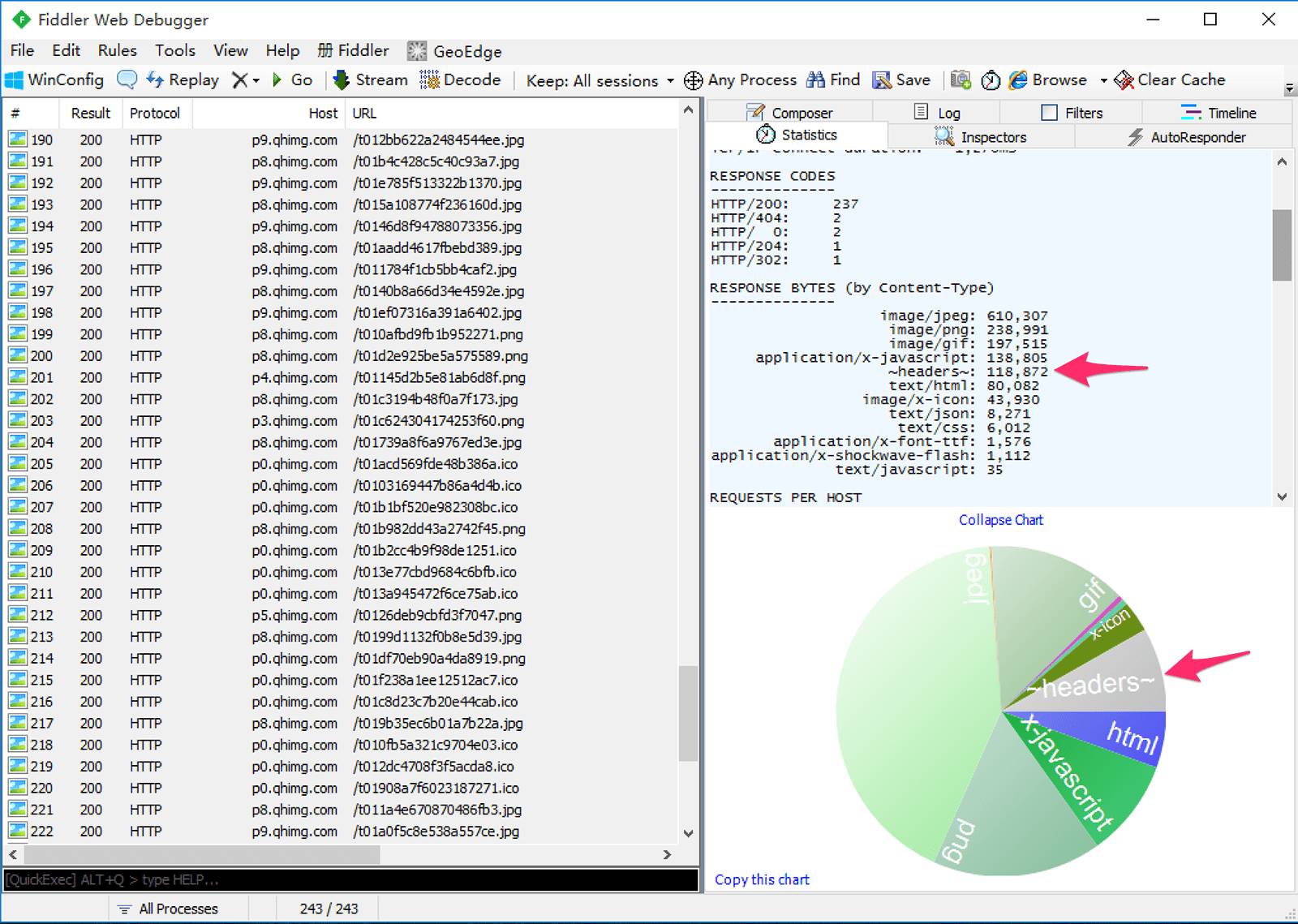
The following is a capture result from a page I opened. It can be seen that the network overhead of transmitting headers exceeds 100kb, which is more than the HTML itself:
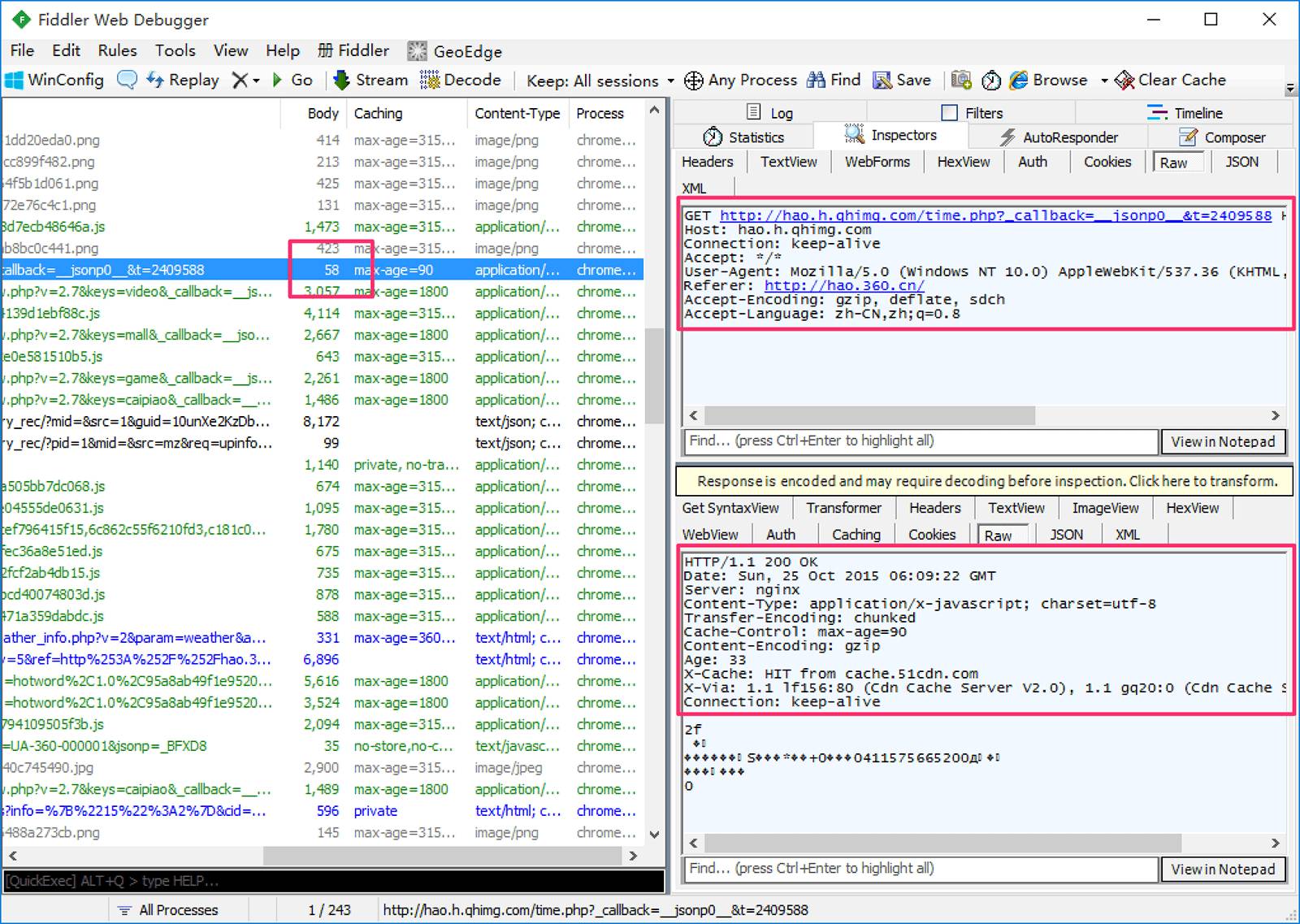
Below is the detail of one of the requests. It can be seen that to obtain 58 bytes of data, several times the traffic was spent on the header transmission:
In the HTTP/1 era, there were many optimization schemes that could be tried to reduce header traffic consumption, such as merging requests, enabling cookie-free domains, etc., but these schemes would introduce new problems to varying degrees, which will not be discussed here.
Effect After Compression
Next, I will use the capture records of visiting this blog to illustrate the changes brought by HTTP/2 header compression. For how to use Wireshark to capture and decrypt HTTPS websites, please see my article.
First, let’s look at the image. The selected stream in the image is the request header sent by the browser during the first visit to this site:
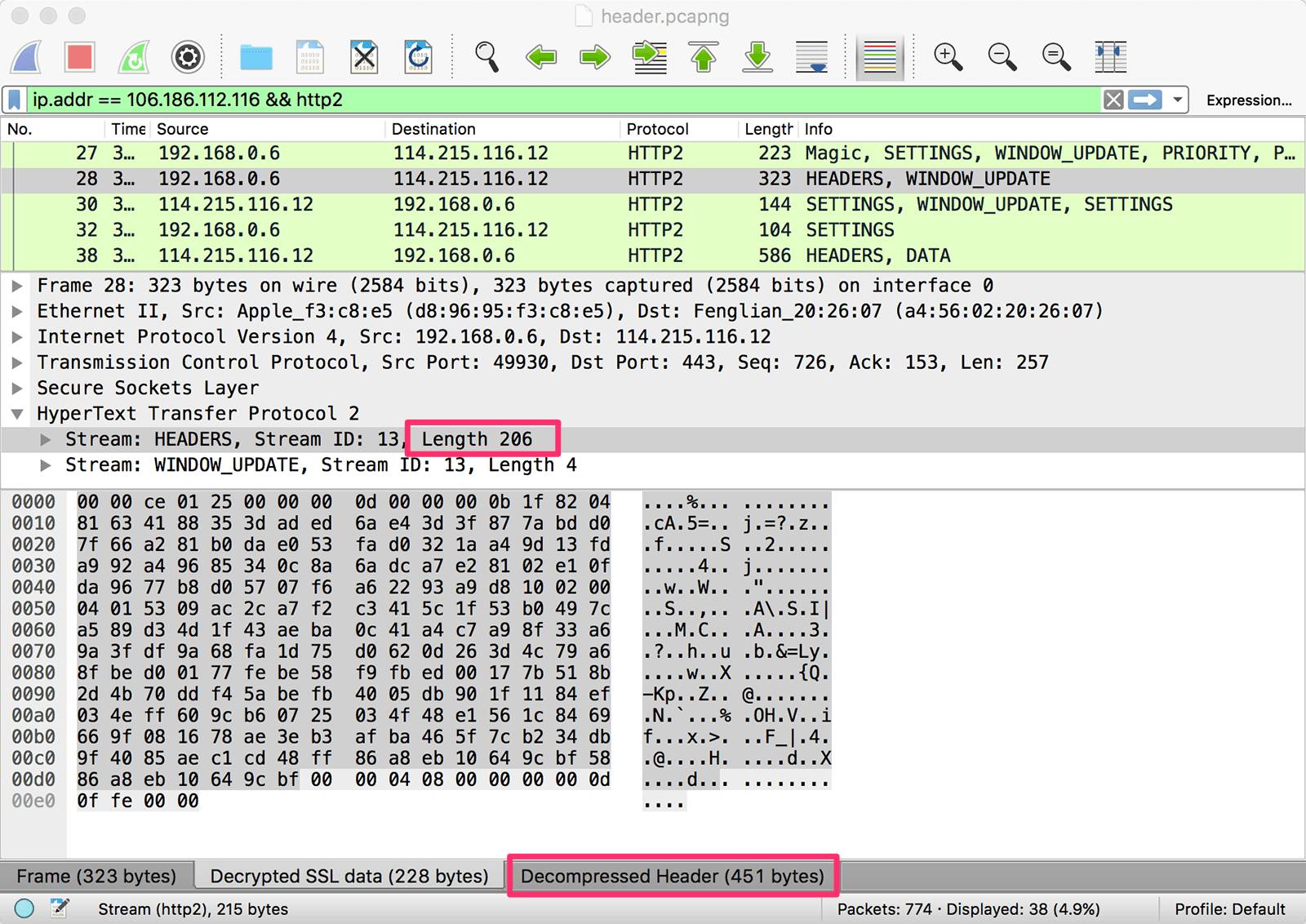
From the image, it can be seen that the length of this HEADERS stream is 206 bytes, while the decoded header length is 451 bytes. This shows that the size of the compressed header has been reduced by more than half.
But is that all? Here’s another image. The selected stream in the image is the request header sent by the browser after clicking the link to this site:
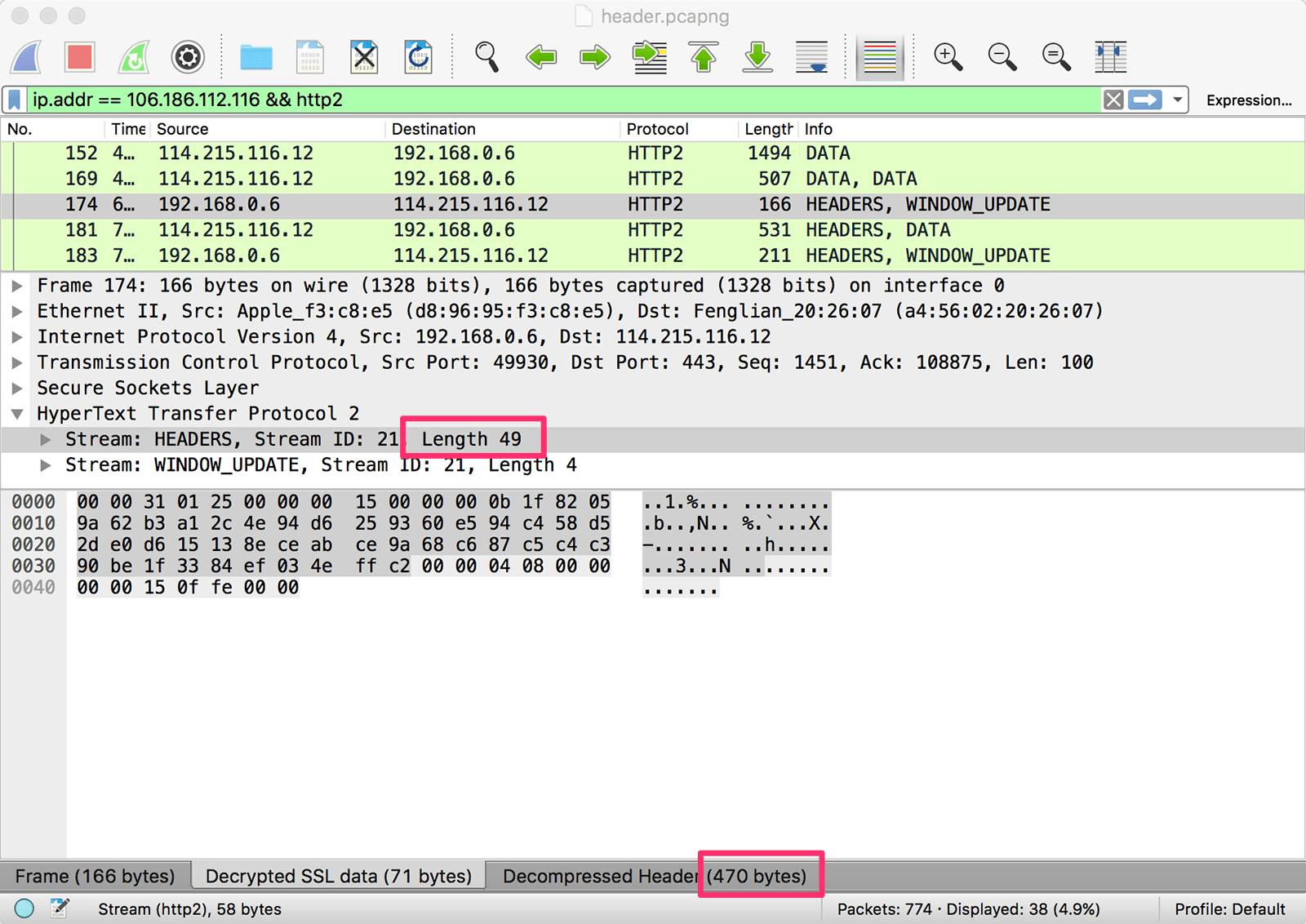
It can be seen that this time, the length of the HEADERS stream is only 49 bytes, but the decoded header length is 470 bytes. This time, the size of the compressed header is almost only 1/10 of the original size.
Why is there such a big difference between the two? Let’s expand the header information from both requests and check the byte count for the same field transmitted twice:
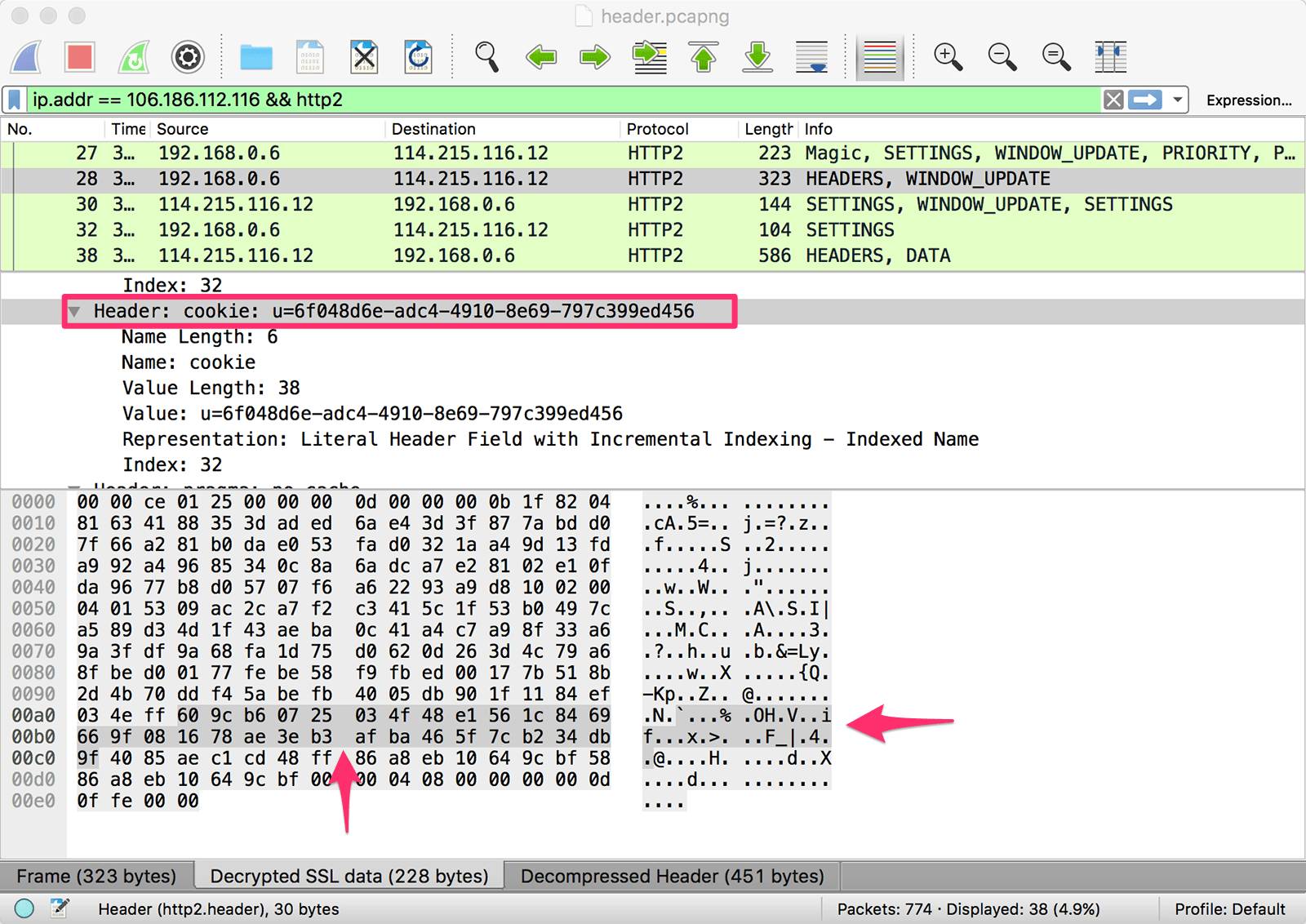
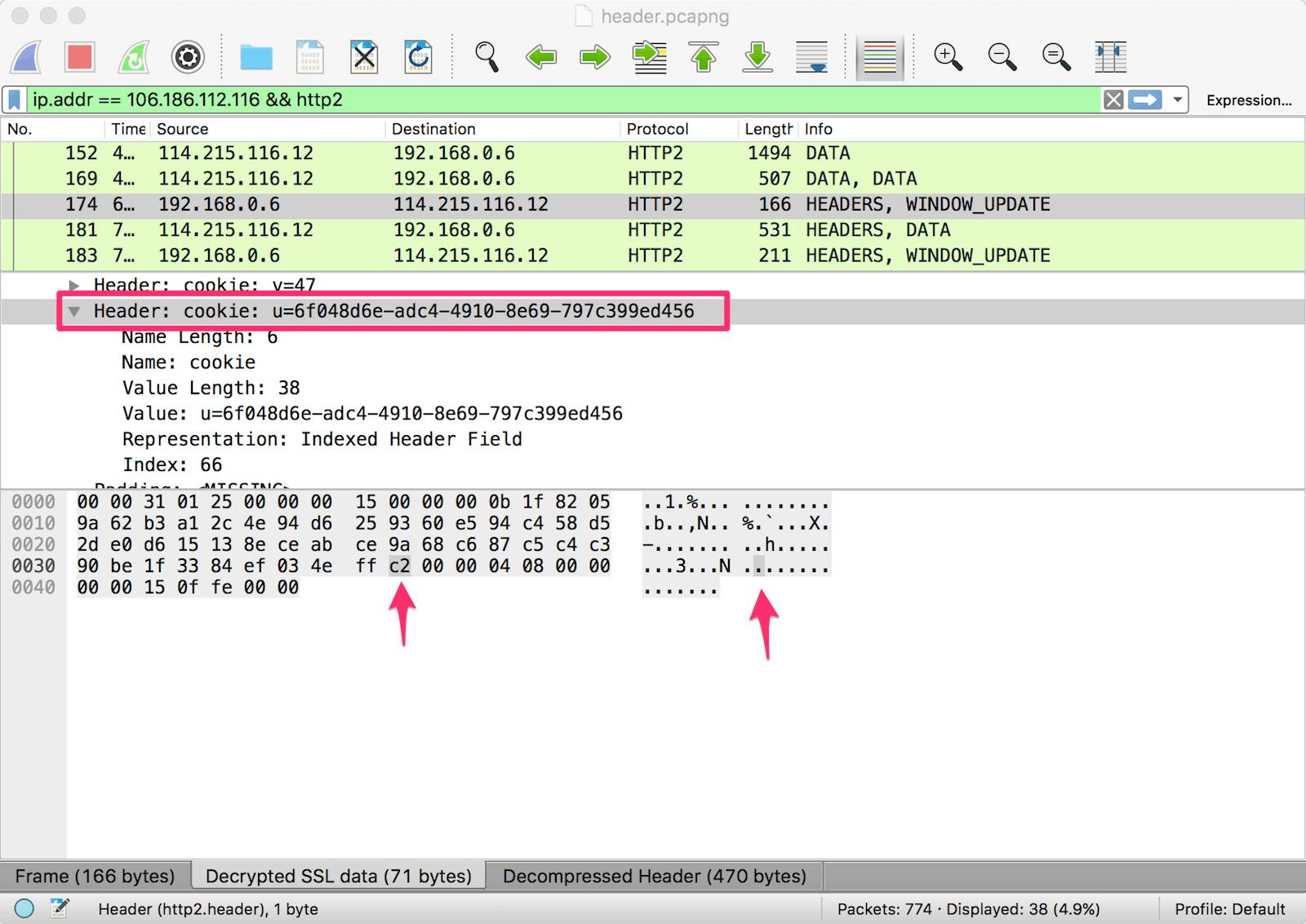
By comparing, it can be found that the reason the second request header is very small is that most key-value pairs only occupy one byte. Especially for headers like UserAgent and Cookie, the first request requires many bytes, while subsequent requests only need one byte.
Technical Principles
The following screenshot is taken from Google performance expert Ilya Grigorik’s presentation “HTTP/2 is here, let’s optimize!” at the Velocity 2015 • SC conference, which intuitively describes the principles of header compression in HTTP/2:
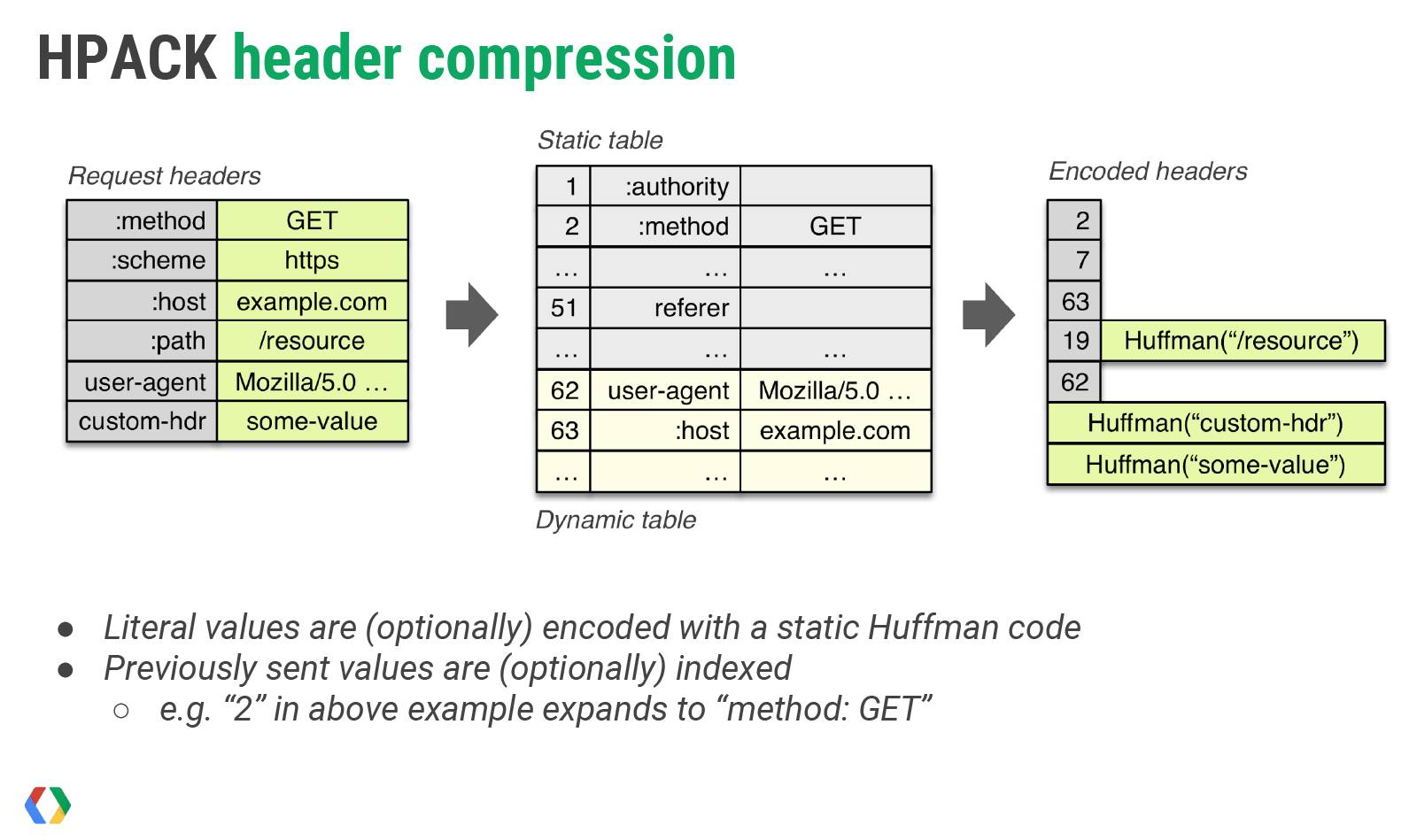
Let me explain in simple terms, header compression requires maintaining:
-
A static dictionary (Static Table) that contains common header names and combinations of particularly common header names and values;
-
A dynamic dictionary (Dynamic Table) that can dynamically add content;
-
Support for Huffman coding based on a static Huffman code table;
The role of the static dictionary has two aspects: 1) For completely matching header key-value pairs, such as :method: GET, it can be represented with a single character; 2) For key-value pairs where the header name can match, such as cookie: xxxxxxx, the name can be represented with a single character. The static dictionary in HTTP/2 is as follows (only a portion is shown, the complete table is here):
| Index | Header Name | Header Value |
|---|---|---|
| 1 | :authority | |
| 2 | :method | GET |
| 3 | :method | POST |
| 4 | :path | / |
| 5 | :path | /index.html |
| 6 | :scheme | http |
| 7 | :scheme | https |
| 8 | :status | 200 |
| … | … | … |
| 32 | cookie | |
| … | … | … |
| 60 | via | |
| 61 | www-authenticate |
At the same time, the browser can inform the server to add cookie: xxxxxxx to the dynamic dictionary, so that the entire key-value pair can be represented with a single character. Similarly, the server can also update the other party’s dynamic dictionary. It should be noted that the dynamic dictionary is context-related and requires maintaining different dictionaries for each HTTP/2 connection.
Using dictionaries can greatly enhance compression effectiveness, with the static dictionary being usable from the first request. For content not present in the static or dynamic dictionaries, Huffman coding can also be used to reduce size. HTTP/2 uses a static Huffman code table (see details), which also needs to be built into both the client and server.
By the way, the status line information (Method, Path, Status, etc.) in HTTP/1 is split into key-value pairs in HTTP/2 (those starting with a colon), which can also benefit from dictionary and Huffman compression. Additionally, all header names in HTTP/2 must be lowercase.
Implementation Details
Having understood the basic principles of HTTP/2 header compression, let’s look at the specific implementation details. The header key-value pairs in HTTP/2 have the following situations:
1) The entire header key-value pair is in the dictionary
0 1 2 3 4 5 6 7
+—+—+—+—+—+—+—+—+
| 1 | Index (7+) |
+—+—————————+
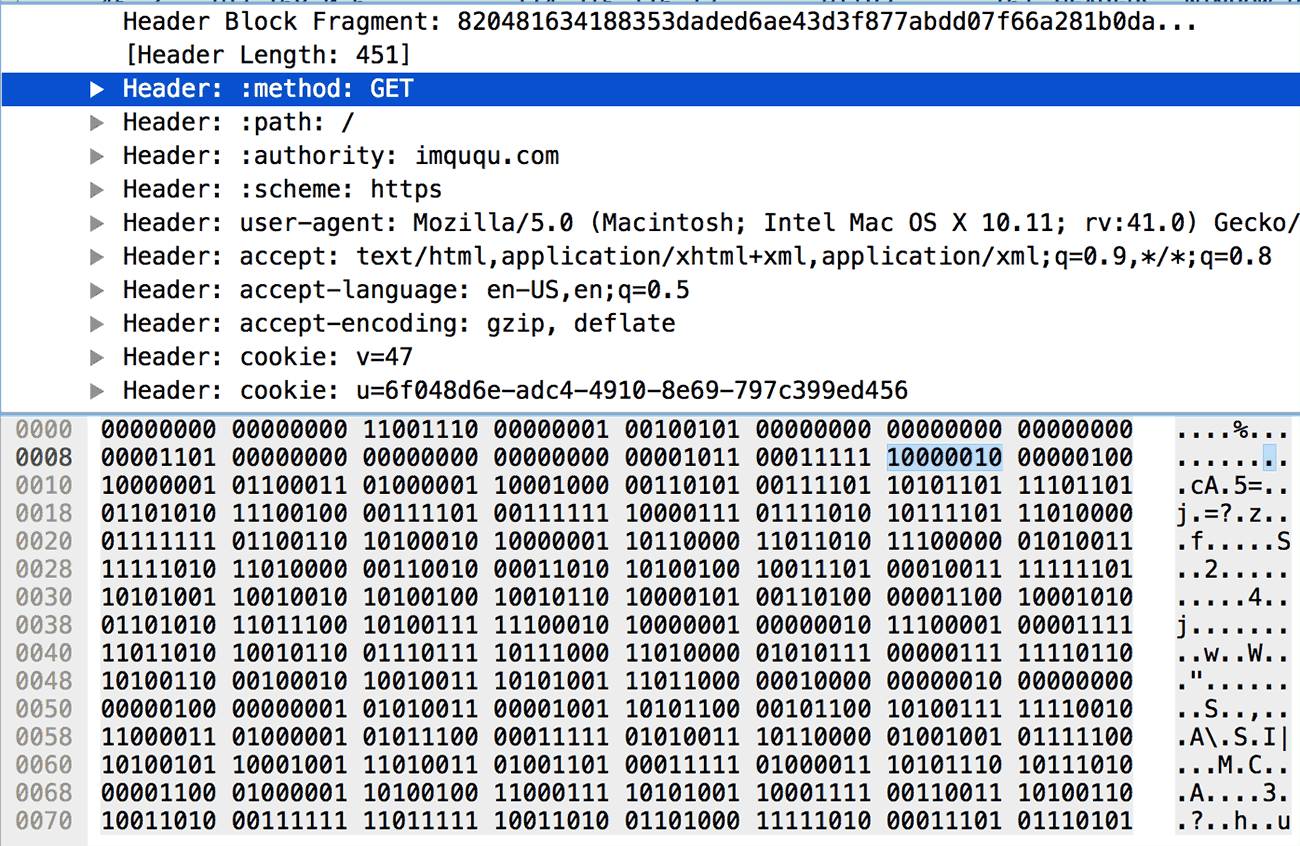
This is the simplest case, where a single byte can represent this header. The leftmost bit is fixed to 1, and the following seven bits store the index of the key-value pair in the static or dynamic dictionary. For example, in the image below, the header index value is 2 (0000010), which can be queried in the static dictionary to get :method: GET.
2) The header name is in the dictionary, updating the dynamic dictionary
0 1 2 3 4 5 6 7
+—+—+—+—+—+—+—+—+
| 0 | 1 | Index (6+) |
+—+—+———————–+
| H | Value Length (7+) |
+—+—————————+
| Value String (Length octets) |
+——————————-+
In this case, the first byte is used to represent the header name: the left two bits are fixed to 01, and the following six bits store the index of the header name in the static or dynamic dictionary. The next byte’s first bit H indicates whether the header value uses Huffman coding, and the remaining seven bits indicate the length L of the header value, followed by L bytes of the specific content of the header value. For example, in the image below, the index value is 32 (100000), which can be queried in the static dictionary to get cookie; the header value uses Huffman coding (1), and the length is 28 (0011100); the next 28 bytes are the value of the cookie, which can be decoded using Huffman coding.
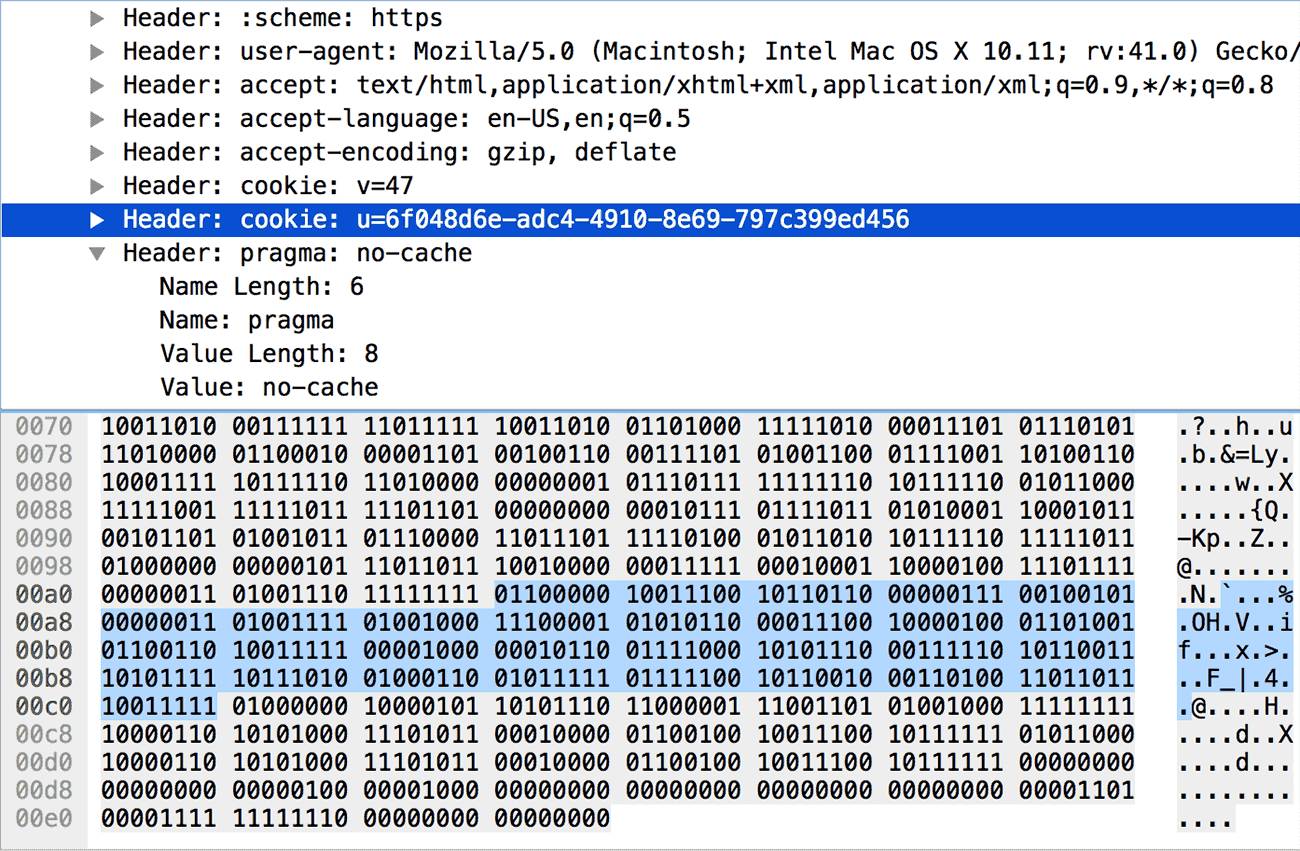
The client or server seeing this format of header key-value pair will add it to their dynamic dictionary. Subsequent transmissions of such content will conform to the first case.
3) The header name is not in the dictionary, updating the dynamic dictionary
0 1 2 3 4 5 6 7
+—+—+—+—+—+—+—+—+
| 0 | 1 | 0 |
+—+—+———————–+
| H | Name Length (7+) |
+—+—————————+
| Name String (Length octets) |
+—+—————————+
| H | Value Length (7+) |
+—+—————————+
| Value String (Length octets) |
+——————————-+
This case is similar to the second case, but since the header name is not in the dictionary, the first byte is fixed to 01000000; then it declares whether the name uses Huffman coding and its length, and includes the specific content of the name; then it declares whether the value uses Huffman coding and its length, and finally includes the specific content of the value. For example, in the image below, the length of the name is 5 (0000101), and the length of the value is 6 (0000110). After decoding the specific content, we can get pragma: no-cache.
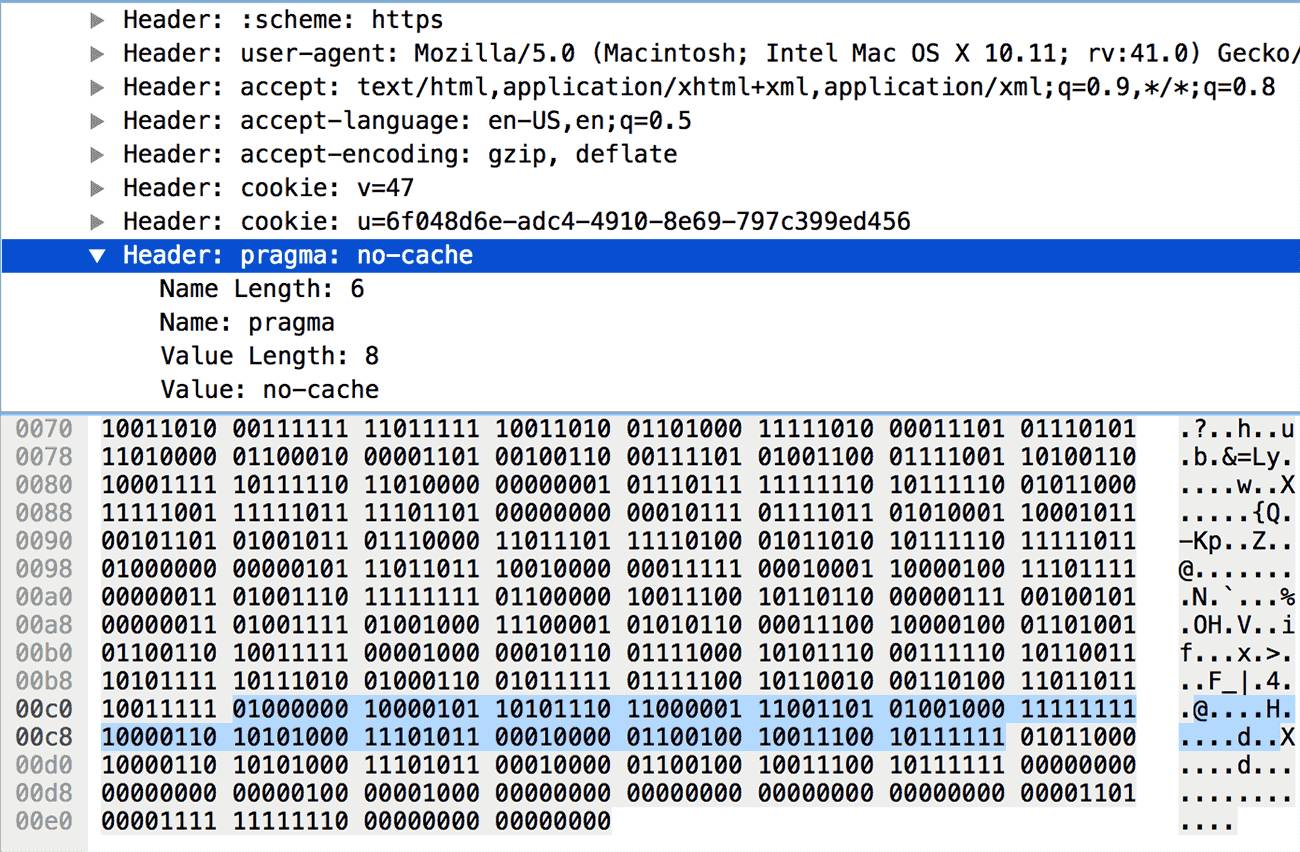
The client or server seeing this format of header key-value pair will add it to their dynamic dictionary. Subsequent transmissions of such content will conform to the first case.
4) The header name is in the dictionary, but updating the dynamic dictionary is not allowed
0 1 2 3 4 5 6 7
+—+—+—+—+—+—+—+—+
| 0 | 0 | 0 | 1 | Index (4+) |
+—+—+———————–+
| H | Value Length (7+) |
+—+—————————+
| Value String (Length octets) |
+——————————-+
This case is very similar to the second case, with the only difference being that the first byte’s left four bits are fixed to 0001, leaving only four bits to store the index, as shown in the image below:
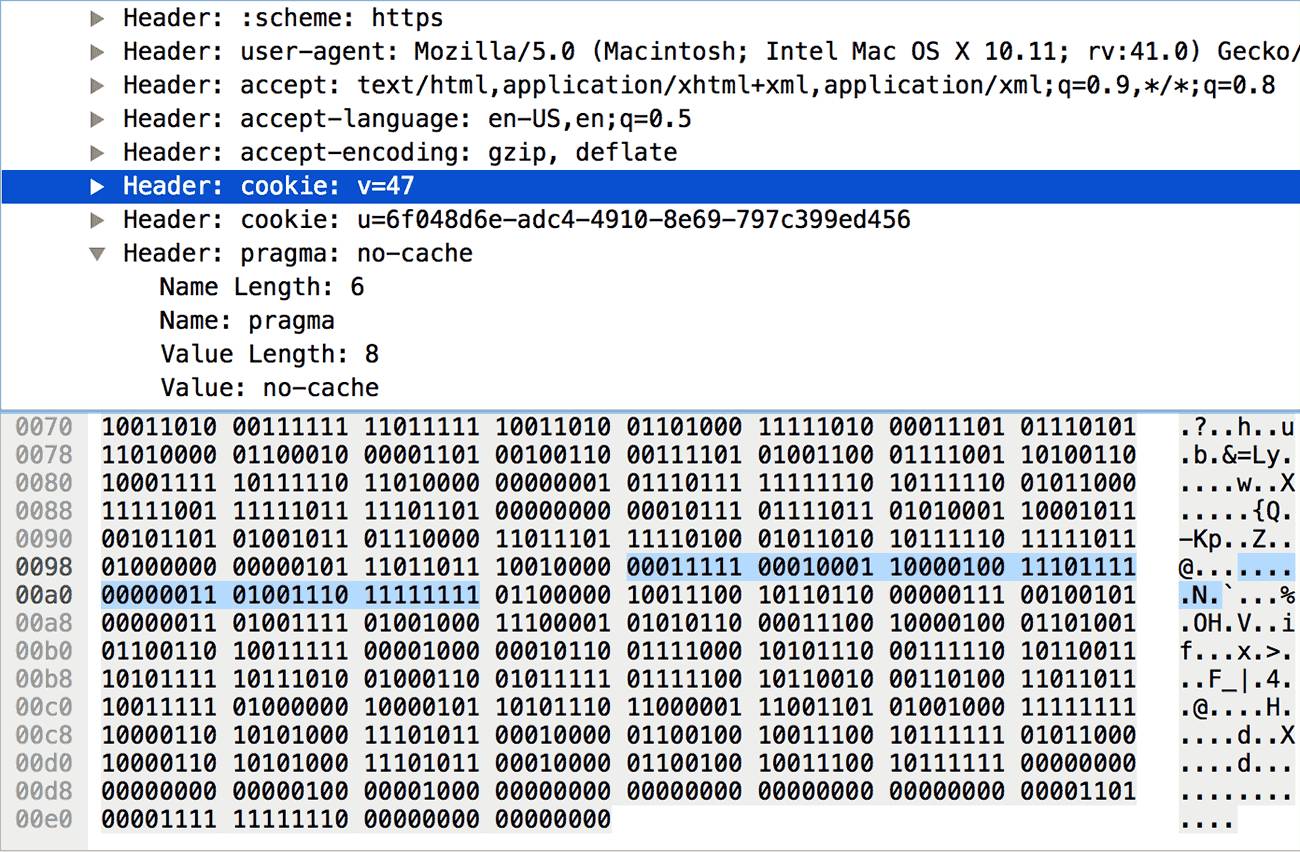
Here, another knowledge point needs to be introduced: decoding integers. In the image above, the first byte is 00011111, which does not represent the header name’s index as 15 (1111). The first byte, after removing the fixed 0001, leaves four bits available, and the number of bits is denoted as N, which can only represent integers less than “2 ^ N – 1 = 15”. For I, the value needs to be calculated according to the following rules (pseudo-code in RFC 7541, via):
if I < 2 ^ N – 1, return I # I is less than 2 ^ N – 1 then return directly
else
M = 0
repeat
B = next octet # B is equal to the next eight bits
I = I + (B & 127) * 2 ^ M # I = I + (B low seven bits * 2 ^ M)
M = M + 7
while B & 128 == 128 # B highest bit = 1 continue, otherwise return I
return I
For the data in the image above, according to this rule, the index value is calculated to be 32 (00011111 00010001, 15 + 17), representing cookie. It should be noted that all numbers written as (N+) in the protocol, such as Index (4+), Name Length (7+), must be encoded and decoded according to this rule.
This format of header key-value pair is not allowed to be added to the dynamic dictionary (but Huffman coding can be used). For some very sensitive headers, such as cookies used for authentication, this can enhance security.
5) The header name is not in the dictionary, and updating the dynamic dictionary is not allowed
0 1 2 3 4 5 6 7
+—+—+—+—+—+—+—+—+
| 0 | 0 | 0 | 1 | 0 |
+—+—+———————–+
| H | Name Length (7+) |
+—+—————————+
| Name String (Length octets) |
+—+—————————+
| H | Value Length (7+) |
+—+—————————+
| Value String (Length octets) |
+——————————-+
This case is very similar to the third case, with the only difference being that the first byte is fixed to 00010000. This case is rare, and there are no screenshots; you can imagine it. Similarly, this format of header key-value pair is also not allowed to be added to the dynamic dictionary, and can only use Huffman coding to reduce size.
In fact, the protocol also specifies two other formats that are very similar to 4 and 5: simply change the fourth bit of the first byte from 1 to 0. This indicates “do not update the dynamic dictionary this time”, while 4 and 5 indicate “absolutely do not allow updating the dynamic dictionary”. The difference is not significant, so we will skip it here.
Having understood the technical details of header compression, it is theoretically easy to write an HTTP/2 header decoding tool. I am relatively lazy, so I directly found the compressor.js in node-http2 to verify:
var Decompressor = require(‘./compressor’).Decompressor;
var testLog = require(‘bunyan’).createLogger({name: ‘test’});
var decompressor = new Decompressor(testLog, ‘REQUEST’);
var buffer = new Buffer(‘820481634188353daded6ae43d3f877abdd07f66a281b0dae053fad0321aa49d13fda992a49685340c8a6adca7e28102e10fda9677b8d05707f6a62293a9d810020004015309ac2ca7f2c3415c1f53b0497ca589d34d1f43aeba0c41a4c7a98f33a69a3fdf9a68fa1d75d0620d263d4c79a68fbed00177febe58f9fbed00177b518b2d4b70ddf45abefb4005db901f1184ef034eff609cb60725034f48e1561c8469669f081678ae3eb3afba465f7cb234db9f4085aec1cd48ff86a8eb10649cbf’, ‘hex’);
console.log(decompressor.decompress(buffer));
decompressor._table.forEach(function(row, index) {
console.log(index + 1, row[0], row[1]);
});
The original header data comes from the third screenshot in this article, and the running result is as follows (the static dictionary only shows a portion):
{ ‘:method’: ‘GET’,
‘:path’: ‘/’,
‘:authority’: ‘imququ.com’,
‘:scheme’: ‘https’,
‘user-agent’: ‘Mozilla/5.0 (Macintosh; Intel Mac OS X 10.11; rv:41.0) Gecko/20100101 Firefox/41.0’,
accept: ‘text/html,application/xhtml+xml,application/xml;q=0.9,*/*;q=0.8’,
‘accept-language’: ‘en-US,en;q=0.5’,
‘accept-encoding’: ‘gzip, deflate’,
cookie: ‘v=47; u=6f048d6e-adc4-4910-8e69-797c399ed456’,
pragma: ‘no-cache’ }
1 ‘:authority’ ”
2 ‘:method’ ‘GET’
3 ‘:method’ ‘POST’
4 ‘:path’ ‘/’
5 ‘:path’ ‘/index.html’
6 ‘:scheme’ ‘http’
7 ‘:scheme’ ‘https’
8 ‘:status’ ‘200’
… …
32 ‘cookie’ ”
… …
60 ‘via’ ”
61 ‘www-authenticate’ ”
62 ‘pragma’ ‘no-cache’
63 ‘cookie’ ‘u=6f048d6e-adc4-4910-8e69-797c399ed456’
64 ‘accept-language’ ‘en-US,en;q=0.5’
65 ‘accept’ ‘text/html,application/xhtml+xml,application/xml;q=0.9,*/*;q=0.8’
66 ‘user-agent’ ‘Mozilla/5.0 (Macintosh; Intel Mac OS X 10.11; rv:41.0) Gecko/20100101 Firefox/41.0’
67 ‘:authority’ ‘imququ.com’
It can be seen that this segment of header data extracted from Wireshark can be decoded normally, and the dynamic dictionary has also been updated (62 – 67).
Conclusion
One important point in optimizing the performance of HTTP/2 websites is “to use as few connections as possible”. The header compression mentioned in this article is one important reason: the more requests and responses generated on the same connection, the more complete the dynamic dictionary accumulates, and the better the header compression effect. Therefore, for HTTP/2 websites, the best practice is not to merge resources and not to scatter domain names.
By default, browsers will use the same connection for the following situations:
-
Resources under the same domain name;
-
Resources under different domain names, but meeting two conditions: 1) resolved to the same IP; 2) using the same certificate;
The first point is easy to understand, while the second point can easily be overlooked. In fact, Google has already done this; a series of Google websites share the same certificate, which can be verified as follows:
$ openssl s_client –connect google.com:443 |openssl x509 –noout –text | grep DNS
depth=2 C = US, O = GeoTrust Inc., CN = GeoTrust Global CA
verify error:num=20:unable to get local issuer certificate
verify return:0
DNS:*.google.com, DNS:*.android.com, DNS:*.appengine.google.com, DNS:*.cloud.google.com, DNS:*.google–analytics.com, DNS:*.google.ca, DNS:*.google.cl, DNS:*.google.co.in, DNS:*.google.co.jp, DNS:*.google.co.uk, DNS:*.google.com.ar, DNS:*.google.com.au, DNS:*.google.com.br, DNS:*.google.com.co, DNS:*.google.com.mx, DNS:*.google.com.tr, DNS:*.google.com.vn, DNS:*.google.de, DNS:*.google.es, DNS:*.google.fr, DNS:*.google.hu, DNS:*.google.it, DNS:*.google.nl, DNS:*.google.pl, DNS:*.google.pt, DNS:*.googleadapis.com, DNS:*.googleapis.cn, DNS:*.googlecommerce.com, DNS:*.googlevideo.com, DNS:*.gstatic.cn, DNS:*.gstatic.com, DNS:*.gvt1.com, DNS:*.gvt2.com, DNS:*.metric.gstatic.com, DNS:*.urchin.com, DNS:*.url.google.com, DNS:*.youtube–nocookie.com, DNS:*.youtube.com, DNS:*.youtubeeducation.com, DNS:*.ytimg.com, DNS:android.com, DNS:g.co, DNS:goo.gl, DNS:google.analytics.com, DNS:google.com, DNS:googlecommerce.com, DNS:urchin.com, DNS:youtu.be, DNS:youtube.com, DNS:youtubeeducation.com
Using multiple domain names with the same IP and certificate to deploy web services has special significance: it allows terminals that support HTTP/2 to establish only one connection and take advantage of the various benefits brought by the HTTP/2 protocol; while terminals that only support HTTP/1.1 will establish multiple connections to achieve more concurrent requests simultaneously. This is also a good choice before HTTP/2 is fully popularized.
Author Profile (Click → Join as a column author)
JerryQu: Focused on web development, with an emphasis on web performance optimization and security. https://imququ.com

Support the author to write more good articles, thank you!
[Today’s recommended WeChat public account ↓]

For more recommendations, see “Public Accounts Worth Following in Technology and Design”.
It recommends popular public accounts related to technology, design, geeks, and IT matchmaking. The technology covers: Python, web front-end, Java, Android, iOS, PHP, C/C++, .NET, Linux, databases, operations, big data, algorithms, IT careers, etc. Click “Public Accounts Worth Following in Technology and Design” to discover exciting content!