Highlights: “Quick Guide” provides a sense of direction, covering various data types comprehensively, from basics to advanced topics like escape characters<span>
</span> and <span> , etc.</span>
<span>

</span>
and <span> , etc.</span>2 Data Types
C++ requires that when creating a variable or constant, the corresponding data type must be specified; otherwise, memory cannot be allocated for the variable.
2.1 Integer Types
The purpose of integer variables is to represent integer types data.
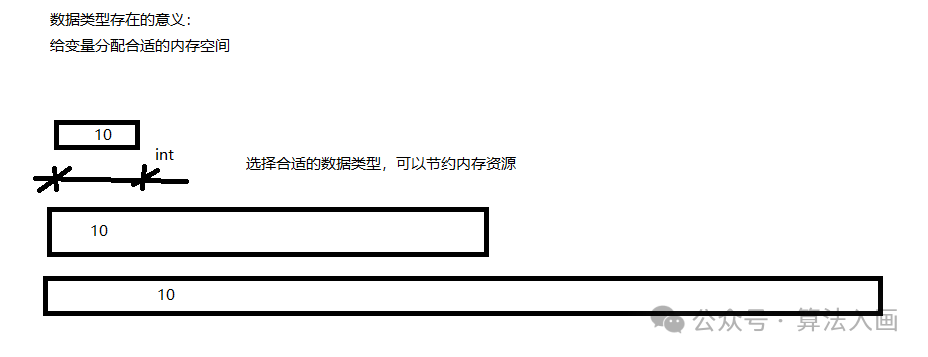
In C++, the types that can represent integers include the following,with differences in the memory space they occupy.:
| Data Type | Memory Size | Value Range |
|---|---|---|
| short (short integer) | 2 bytes | (-2^15 ~ 2^15-1) |
| int (integer) | 4 bytes | (-2^31 ~ 2^31-1) |
| long (long integer) | 4 bytes on Windows, 4 bytes (32-bit) or 8 bytes (64-bit) on Linux | (-2^31 ~ 2^31-1) |
| long long (long long integer) | 8 bytes | (-2^64 ~ 2^64-1) |
Graphical representation:
Code Practice:
#include <iostream>
using namespace std;
int main(){    // Integer    //1. Short Integer (-2^15 ~ 2^15-1) (-32768 ~ 32767)
    short num1 = 10000;
    //2. Integer    int num2 = 20;
    //3. Long Integer    long num3 = 30;
    //4. Long Long Integer    long long num4 = 40;    cout << num1 << endl;    cout << num2 << endl;    cout << num3 << endl;    cout << num4 << endl;
    system("pause");    return 0;
}
The most commonly used int type
2.2 sizeof Keyword
The purpose of the sizeof keyword is to determine the memory size occupied by a data type
Syntax: sizeof(data type/variable)
Code Practice:
#include <iostream>
using namespace std;
int main(){    // Integer, short, int, long, long long     // Memory sizes: 2, 4, 4, 8    // Syntax: sizeof(data type/variable)    short num1 = 10;    cout << "short occupies memory size:" << sizeof(num1) << endl;
    int num2 = 10;    cout << "int occupies memory size:" << sizeof(num2) << endl;
    long num3 = 10;    cout << "long occupies memory size:" << sizeof(num3) << endl;
    long long num4 = 10;    cout << "long long occupies memory size:" << sizeof(num4) << endl;
    system("pause");    return 0;
}
Everyone, practice and see the results!
2.3 Floating Point Types
The purpose is to represent decimal numbers.
Floating point variables are divided into two types:
-
Single precision float
-
Double precision double
The difference lies in the range of significant digits they can represent.
| Data Type | Memory Size | Significant Digit Range |
|---|---|---|
| float | 4 bytes | 7 significant digits |
| double | 8 bytes | 15-16 significant digits |
Code Practice:
#include <iostream>
using namespace std;
int main(){    //1. Single precision float    //2. Double precision float    //By default, when outputting a decimal, it shows 6 significant digits
    float f1 = 3.14f;   //f indicates the first letter of float, by default, the compiler assumes it is double precision, adding f indicates it is float    cout << "f1 = " << f1 << endl;
    double d1 = 3.1415926;    cout << "d1 = " << d1 << endl;
    cout << "f1 occupies memory size:" << sizeof(float) << " bytes" << endl;  //4 bytes    cout << "d1 occupies memory size:" << sizeof(double) << " bytes" << endl;  //8 bytes
    //Scientific notation    float f2 = 3e2; //e after the number is positive, representing multiplication by 10 to the power of, 10^2, 3*10^2=300    cout << "f2 = " << f2 << endl;
    float f3 = 3e-2;//e after the number is negative, representing multiplication by 10 to the power of, 10^-2, 3/10^(-2)=0.03    cout << "f3 = " << f3 << endl;
    system("pause");    return 0;
}
2.4 Character Type
The purpose of character type variables is to display a single character.
Syntax: char ch = ‘a’;
Note 1: When displaying character type variables, use single quotes to enclose the character, not double quotes.
Note 2: Only one character can be inside single quotes, not a string.
-
In C and C++, character type variables occupy only 1 byte.
-
Character type variables do not store the character itself in memory, but rather the corresponding ASCII code.
a -> 1
b -> 2
c -> 3
Convert letters to decimal, then convert decimal to binary for storage.
Code Practice:
#include <iostream>
using namespace std;
int main(){    //1. Character type variable creation    char ch = 'a';    cout << "ch = " << ch << endl;
    //2. Memory size occupied by character type variable    cout << "ch occupies memory size:" << sizeof(ch) << " bytes" << endl;
    //3. Common errors with character type variables    // char ch2 = "b";       // When creating a character type variable, double quotes cannot be used, only single quotes    //char ch3 ='adgfg';     // When creating a character type variable, only one character can be placed inside single quotes, not multiple characters

    //4. ASCII code corresponding to character type variable    cout << (int)ch << endl;   // Prints 97, ASCII code for 'a'    cout << (int)'a' << endl;  // Prints 97    cout << (int)'A' << endl;  // Prints 65    cout << (int)'0' << endl;  // Prints 48    cout << (int)'9' << endl;  // Prints 57    cout << (int)'!' << endl;  // Prints 33    cout << (int)'@' << endl;  // Prints 64    cout << (int)'#' << endl;  // Prints 35    cout << (int)'$' << endl;  // Prints 36    cout << (int)'%' << endl;  // Prints 37    cout << (int)'^' << endl;  // Prints 94
    system("pause");    return 0;
}
ASCII Code Table:
| ASCII Value | Control Character | ASCII Value | Character | ASCII Value | Character | ASCII Value | Character |
|---|---|---|---|---|---|---|---|
| 0 | NUL | 32 | (space) | 64 | @ | 96 | ` |
| 1 | SOH | 33 | ! | 65 | A | 97 | a |
| 2 | STX | 34 | ‘ | 66 | B | 98 | b |
| 3 | ETX | 35 | # | 67 | C | 99 | c |
| 4 | EOT | 36 | $ | 68 | D | 100 | d |
| 5 | ENQ | 37 | % | 69 | E | 101 | e |
| 6 | ACK | 38 | & | 70 | F | 102 | f |
| 7 | BEL | 39 | , | 71 | G | 103 | g |
| 8 | BS | 40 | ( | 72 | H | 104 | h |
| 9 | HT | 41 | ) | 73 | I | 105 | i |
| 10 | LF | 42 | * | 74 | J | 106 | j |
| 11 | VT | 43 | + | 75 | K | 107 | k |
| 12 | FF | 44 | , | 76 | L | 108 | l |
| 13 | CR | 45 | – | 77 | M | 109 | m |
| 14 | SO | 46 | . | 78 | N | 110 | n |
| 15 | SI | 48 | 0 | 80 | P | 112 | p |
| 16 | DLE | 48 | 0 | 80 | P | 112 | p |
| 17 | DC1 | 49 | 1 | 81 | Q | 113 | q |
| 18 | DC2 | 50 | 2 | 82 | R | 114 | r |
| 19 | DC3 | 51 | 3 | 83 | S | 115 | s |
| 20 | DC4 | 52 | 4 | 84 | T | 116 | t |
| 21 | NAK | 53 | 5 | 85 | U | 117 | u |
| 22 | SYN | 54 | 6 | 86 | V | 118 | v |
| 23 | ETB | 55 | 7 | 87 | W | 119 | w |
| 24 | CAN | 56 | 8 | 88 | X | 120 | x |
| 25 | EM | 57 | 9 | 89 | Y | 121 | y |
| 26 | SUB | 58 | : | 90 | Z | 122 | z |
| 27 | ESC | 59 | ; | 91 | [ | 123 | { |
| 28 | FS | 60 | < | 92 | / | 124 | | |
| 29 | GS | 61 | = | 93 | ] | 125 | } |
| 30 | RS | 62 | > | 94 | ^ | 126 | ~ |
| 31 | US | 63 | ? | 95 | _ | 127 | Delete |
ASCII codes are roughly composed of the following two parts:
-
ASCII non-printing control characters: The numbers on the ASCII table 0-31 are assigned to control characters used to control some peripheral devices like printers.
-
ASCII printable characters: The numbers 32-126 are assigned to characters that can be found on the keyboard and will appear when viewing or printing documents.
2.5 Escape Characters
The purpose is to represent some ASCII characters that cannot be displayed.
The commonly used escape characters are: \n \s \t
| Escape Character | Meaning | ASCII Code Value (Decimal) |
|---|---|---|
| \a | Alert | 007 |
| \b | Backspace (BS), moves the current position to the previous column | 008 |
| \f | Form feed (FF), moves the current position to the beginning of the next page | 012 |
| \n | New line (LF), moves the current position to the beginning of the next line | 010 |
| \r | Carriage return (CR), moves the current position to the beginning of the current line | 013 |
| \t | Horizontal tab (HT), (jumps to the next TAB position) | 009 |
| \v | Vertical tab (VT) | 011 |
| \ | Represents a backslash character “\” | 092 |
| ‘ | Represents a single quote character | 039 |
| “ | Represents a double quote character | 034 |
| \? | Represents a question mark | 063 |
| \0 | Number 0 | 000 |
| \ddd | Octal escape character, d range 0-7 | 3-digit octal |
| \xhh | Hexadecimal escape character, h range 0-9, a-f A-F | 3-digit hexadecimal |
Code Practice:
#include <iostream>
using namespace std;
int main(){    // Common escape characters    // New line character \n     cout << "hello Cplusplus,\ndoit" << endl;
    // Backslash, use two "\\" inside double quotes    cout << "dhg\\sd" << endl;

    // Horizontal tab \t     cout << "bbb,\t你好" << endl;

    system("pause");    return 0;
}
Output
hello Cplusplus,doitdhg\sdbbb,Press any key to continue . . . Note:
// Backslash, use two “\” cout << “dhg\\sd” << endl;
If this line is written as
// Backslash \ cout << “dhg\\sd” << endl;
It will be commented out and you won’t see the output result.
2.6 String Type
The purpose is to represent a string of characters.
Two styles:
1.C-style string:char variable_name[] = “string_value”
Code Example:
#include <iostream>
using namespace std;
int main(){    char srt1[] = "good night";    cout << srt1 << endl;
    system("pause");    return 0;
}
Output: good nightNote: C-style strings must be enclosed in double quotes.
2.C++-style string: string variable_name = “string_value”
Code Example:
#include <iostream>
#include <string>
using namespace std;
int main(){    //1. C-style string    //Notes:  char string_name[] must not miss the brackets    //Notes: The right side of the equal sign must be enclosed in double quotes, not single quotes    char srt1[] = "good night";    cout << srt1 << endl;
    //2. C++-style string    //Notes: Must include the header file #include <string>    string str2 = "hello Cpp";    cout << str2 << endl;

    system("pause");    return 0;
}
Output: good nighthello CppNote: C++-style strings must be enclosed in double quotes after including the header file #include <string>.
Comparison of C++ strings with Python strings:
| Feature | C++ String | Python String |
|---|---|---|
| Storage Method | Dynamic memory (<span>std::string</span>) or fixed array (<span>char[]</span>) |
Immutable object, managed by the interpreter |
| Mutability | ✅ Supports in-place modification | ❌ Any modification generates a new object |
| Memory Safety | Requires manual boundary checking (character arrays) or relies on <span>std::string</span> |
✅ Automatically prevents overflow |
| Character Type | Distinguishes between <span>char</span> and strings |
Single character is a string of length 1 |
| Concatenation Efficiency | In-place appending is efficient (<span>std::string</span>) |
<span>join()</span> > <span>+</span> (avoids temporary objects) |
| Substring Operations | <span>substr()</span> copies to generate a new object |
Slicing without copying (shared memory) |
| Type System | Static type (compile-time checking) | Dynamic type (runtime resolution) |
| Unicode Support | Must be explicitly handled by the developer | ✅ Built-in full support |
2.7 Boolean Type bool
The purpose of the boolean data type is to represent true or false values.
The bool type has only two values:
-
true true (essentially 1)
-
false false (essentially 0)
The bool type occupies a memory size of: 1 byte
Code Example:
#include <iostream>
#include <string>
using namespace std;
int main(){    bool flag = true;    cout << flag <<endl;    // Check the memory size occupied by bool type    cout << sizeof(flag) << endl;

    flag = false;    cout << flag << endl;
    system("pause");    return 0;
}
Output: 1102.8 Data Input
The purpose is to obtain data from the keyboard.
Keyword: cin
Syntax: cin >> variable
2.8.1 Integer Input
Code Example:
#include <iostream>
#include <string>
using namespace std;
int main(){    // 1. Integer    int a = 0;    cout << "Please assign a value to integer variable a" << endl;    cin >> a;    cout << "Integer variable a=" << a << endl;

    system("pause");    return 0;
}
Keyboard input: 102 Console output: Integer variable a=102 Please press any key to continue...2.8.2 Floating Point Input
Code Example:
#include <iostream>
#include <string>
using namespace std;
int main(){
    // 2. Floating Point    float f =3.1678f;    cout << "Please assign a value to floating point variable f" << endl;    cin >> f;    cout << "Floating variable f=" << f << endl;
    system("pause");    return 0;
}
Please assign a value to floating point variable f Keyboard input: 1.1654 Floating variable f=1.1654 Please press any key to continue...2.8.3 Character Input (only a single character)
#include <iostream>
#include <string>
using namespace std;
int main(){    // 3. Character    char bf = 'd';    cout << "Please assign a value to character variable bf" <<endl;    cin >> bf;    cout << "Character data bf=" << bf <<endl;

    system("pause");    return 0;
}
Please assign a value to character variable bf Keyboard input: j Character data bf=j Please press any key to continue...Note: Character type represents a single character.
2.8.4 String Input
#include <iostream>
#include <string>
using namespace std;
int main(){    // 4. String    string str_s = "GLOIUGOIGhuhkh";    cout << "Please assign a value to string variable str_s" << endl;    cin >> str_s;    cout <<"String variable str_s=" << str_s << endl;
    system("pause");    return 0;
}
Please assign a value to string variable str_s Keyboard input: jhfkhgf String variable str_s=jhfkhgf Please press any key to continue...2.8.5 Boolean Type Input
#include <iostream>
#include <string>
using namespace std;
int main(){    // 5. Boolean    bool flag = false;    cout << "Please assign a value to boolean variable flag" << endl;    cin  >> flag;    cout <<"Boolean variable flag=" <<flag << endl;
    system("pause");    return 0;
}
Please assign a value to boolean variable flag Keyboard input: 1 Boolean variable flag=1 Please press any key to continue...Note: For boolean types, any non-zero value represents 1.