Hello everyone, I am your familiar friend, Xi Yangyang! I wonder if you have ever encountered this situation: while chatting with friends on WeChat, they excitedly send you a Douyin command, which could be a super interesting short video, a link to a product you desire, or an entry to a lively live stream. However, sometimes when you click on it, nothing happens, and many friends are left confused.
Don’t worry! Today, I will explain to you several ways to correctly open Douyin commands. After reading this content, I guarantee that no matter what kind of Douyin command you receive in the future, you will be able to open it smoothly!

1. First, understand: What is a Douyin command?
In fact, a Douyin command is a type of sharing code generated by the Douyin app itself, mainly divided into two types:
- Product commands: These commands usually contain the words “Douyin Express Version Command” and are mostly used to share products in Douyin, such as daily necessities or delicious snacks, which can be shared through this command.
- Video commands: Typically marked with “Douyin Command”, followed by a long string of alphanumeric combinations, plus a web address. Here’s a crucial detail — you must copy all of this content completely; not a single symbol can be missed, otherwise, it won’t open!
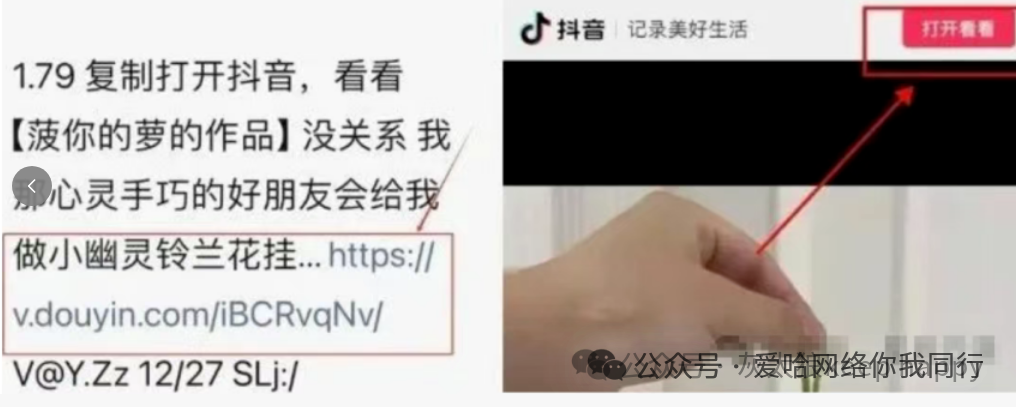
2. 3 Simple Ways to Open, Guided by Gray Wolf
First method: Directly click the link to jump (the easiest)
If the URL shared by your friend appears in blue in WeChat, it means WeChat has recognized it as a clickable link; just tap it with your finger:
- Find the complete blue link in the chat message;
- Gently tap this link with your finger;
- Your phone will automatically jump to the Douyin app. If you are using an iPhone, you may need to tap the “Allow Jump” button to open it smoothly.
Second method: Copy the entire message (super practical)
If clicking the link does not respond, try copying the entire message; the steps are very simple:
- Press and hold the command message sent by your friend, then select the first “Copy” option;
- Open Douyin or Douyin Express Version on your phone;
- At this point, there are generally two situations:
A. Douyin will immediately recognize the content you copied and pop up a small box; just click “Open” to complete it;
B. If Douyin does not respond after opening, manually tap the search icon, paste the copied content into the search box, and press the search key.
Here are three important points to note:
- You must copy the text and link in the message completely; nothing can be missed;
- It’s best to update Douyin to the latest version, as older versions may not recognize new commands;
- When copying, avoid unnecessary spaces, as they may affect recognition.
Third method: Open with a mobile browser (the most reliable)
If the previous two methods still do not work, use this method, which is the least likely to fail:
- Select all content in the message and copy it completely;
- Open the built-in browser on your phone, such as Safari on iPhone or the default browser on Android;
- Paste the copied text into the top URL bar of the browser;
- Follow the page prompts to operate, and you will be redirected to the Douyin app.
There are also two points to note here:
- On Android phones, you may need to select the option “Open in Douyin App” in the browser;
- iPhone users need to go to settings to allow app-to-app jump permissions; otherwise, it may not redirect.
3. Gray Wolf’s Tips: Practical Skills + Safety Precautions
- If you have tried the above three methods and still cannot open it, first check if your phone is connected to the internet, you can also clear Douyin’s old data, or try restarting your phone;
- If it shows “Command has expired”, it is likely that the video or product in the link has been deleted by the author; just ask your friend to resend it;
- iPhone users must remember to enable Douyin’s jump permissions in “Settings”, and ensure the phone system version is not too old; if all else fails, restarting the phone can help;
- You can usually save frequently used commands in your phone’s notes for easy reference later; Android users can also create a Douyin shortcut icon on the phone’s desktop for more convenience;
- The most important point: if the command contains words like “Claim large red envelopes” or “Win a prize”, be sure to be cautious! Protect your personal information and account security, and do not enter passwords casually to avoid being scammed.