Click the blue text Follow us1.1 Virtual Data Storage Deployment1.1.1 Disk Mode Description
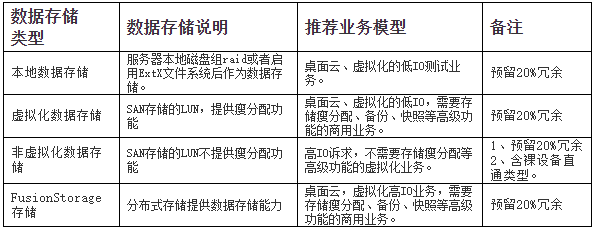
FusionSphere currently supports four types of disk configuration modes: ordinary disk, thin disk, ordinary zeroed thick disk, and raw device disk. Block storage (non-virtualized storage) only supports ordinary mode disks and raw device disks, and does not support thin disks and ordinary zeroed thick disks; virtualized storage supports ordinary disks, thin disks, and ordinary zeroed thick disks.

Ordinary disk storage (block storage) supports ordinary disks, but there are slight differences between these two storage methods corresponding to ordinary disks:
A. Ordinary Disk for Non-Virtualized Storage:
When creating disks in virtualized storage and non-virtualized storage, the necessary space for disk allocation is assigned without writing zeros to the disk, resulting in a fast disk creation speed.
B. Ordinary Disk for Virtualized Storage:
When creating disks, the necessary space for disk allocation is assigned, and during the creation process, a zeroing operation is performed on the space allocated on the physical device, making disk creation time-consuming, similar to VMware’s thick provisioning with zeroing.
Thin Disk
Thin disk: When initially created, the file size of the thin disk is only the size of the file’s metadata, while the storage capacity occupied by the disk is the actual used size, meaning that the disk will allocate space equal to the actual usage, but not exceeding the specified disk capacity at creation. When there is an IO first write, the necessary space will be allocated and zeroed first. Compared to ordinary disks, thin disks have reduced performance but save space, similar to VMware’s thin provisioned disks. For example, creating a thin disk with a capacity of 100G may only occupy 20K of actual storage, and as the virtual machine performs IO writes, the actual occupied capacity will continue to expand but will not exceed 100G. When storage space is insufficient, the thin disk will be unable to write.
Disks created on FusionStorage data storage also belong to the thin disk mode.
Ordinary Zeroed Thick Disk
Ordinary zeroed thick disk: The ordinary zeroed thick disk is essentially a thin disk at the underlying level, but differs from thin disks in that the ordinary zeroed thick disk will pre-allocate space at the file system level, ensuring that there is always available space for the disk, preventing the issue of being unable to write when storage space is insufficient as seen with thin disks.
Raw Device Disk
The raw device disk directly binds the physical LUN of the SAN storage to the business virtual machine, providing higher IO performance. This type of data storage can only be used as a whole raw device mapped disk and cannot be split, so it can only create disks with the same capacity as the data storage and does not support advanced features of virtualized storage. Raw device mapped storage is only supported by certain operating systems’ virtual machines, such as Redhat Linux Enterprise 5.4/5.5/6.1/6.2 64bit.
1.1.2 Data Storage Deployment
1.1.3 Storage Subsystem Deployment

Done