SemaphoreWe all know about queues, which can be used to transmit different types of data.However, sometimes we only need to convey a state without transmitting specific information.Thus, we introduce semaphores, which do not transmit data but rather convey states, serving as notifications and saving memory.
A semaphore cannot transmit data; it only has a count value to represent the quantity of resources.
It serves a notification purpose.
The count represents the quantity of resources.
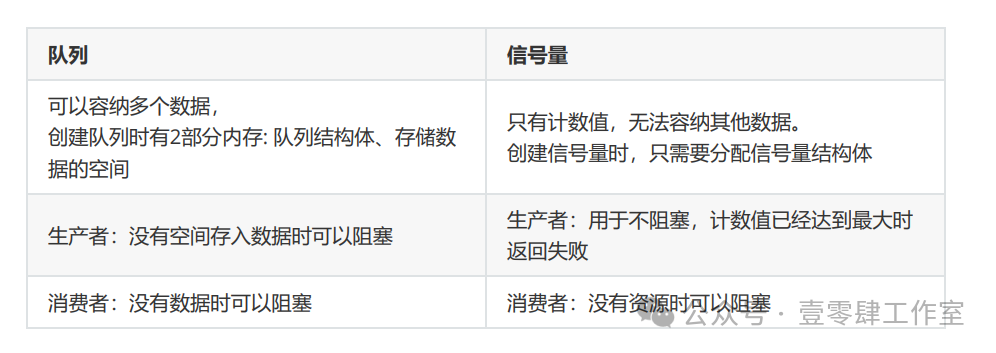
Question 1: If queues can also achieve synchronization, why use semaphores?
- Queues can transmit data, which requires storage space.
- Using semaphores does not require data transmission, thus saving space.
- Semaphores do not require data copying, making them more efficient.
Question 2:How to create a semaphore?
-
Create a semaphore.
-
After the producer produces, increment the count value by 1 (give).
-
After the consumer takes out, decrement the count value by 1 (take).
Let’s understand a few concepts:
Count: When an event occurs, give the semaphore, increment the count value by 1, process the event, take the semaphore, decrement the count value by 1.
Resource Management: To access a resource, you must first take the semaphore, decrement the count value by 1, and after using the resource, give the semaphore, incrementing the count value by 1.
Comparison of two types of semaphores:
Counting Semaphore: The value range is 0 to any number.
Binary Semaphore: The value range is 0 or 1, but the initial value of a binary semaphore is 0.
Aside from the different values, all other operations are identical.
A semaphore is also akin to a queue.
A queue has a structure called Queue, which contains a pointer pointing to a buffer that stores data.
However, for a semaphore, this buffer is not needed; only the structure is required.
For semaphores, the core is the count value of the semaphore.
This count value is stored in the initial count value passed when initializing the semaphore.
After creating the semaphore, you can increment or decrement the semaphore’s value.
To increment the semaphore’s count value and take something out.
Initially, the value is 0; calling the take function will decrement the semaphore by 1. If there is no data, the semaphore cannot decrement to -1, entering a blocked state, and you can specify how long to block.
In the blocked state, if another task puts data in, it will wake up from the blocked state and enter the Ready state.
For give, the semaphore is incremented by 1, unlocking it.
-
For counting semaphores, this value can accumulate but cannot exceed the maximum value specified at creation.
-
For binary semaphores, the value can only be 0 or 1. If the value is 1, calling give again will not succeed. You can check the return value of the give function to see if the accumulation was successful.
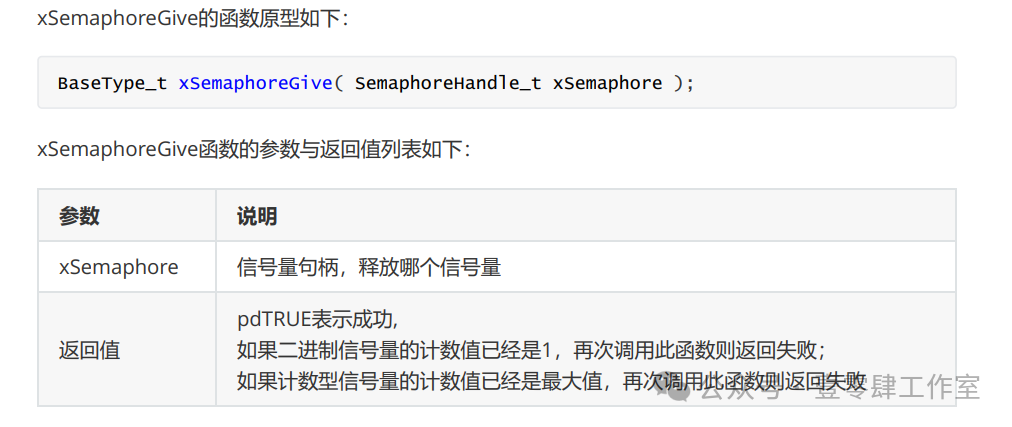
No matter which type of semaphore, as long as it does not exceed the maximum value specified at creation, it can accumulate successfully.
For take, the semaphore is decremented by 1, locking it.
If the semaphore’s value is 0, it cannot take successfully. If unsuccessful, you can specify the blocking time.
- 0 take fails, returns err.
- portMax_Delay blocks until successful.
When multiple tasks execute take, which task is woken up when another task executes give?
- The highest priority task is given priority to execute take.
- If priorities are the same, the task that has waited the longest ** is given priority to execute take.
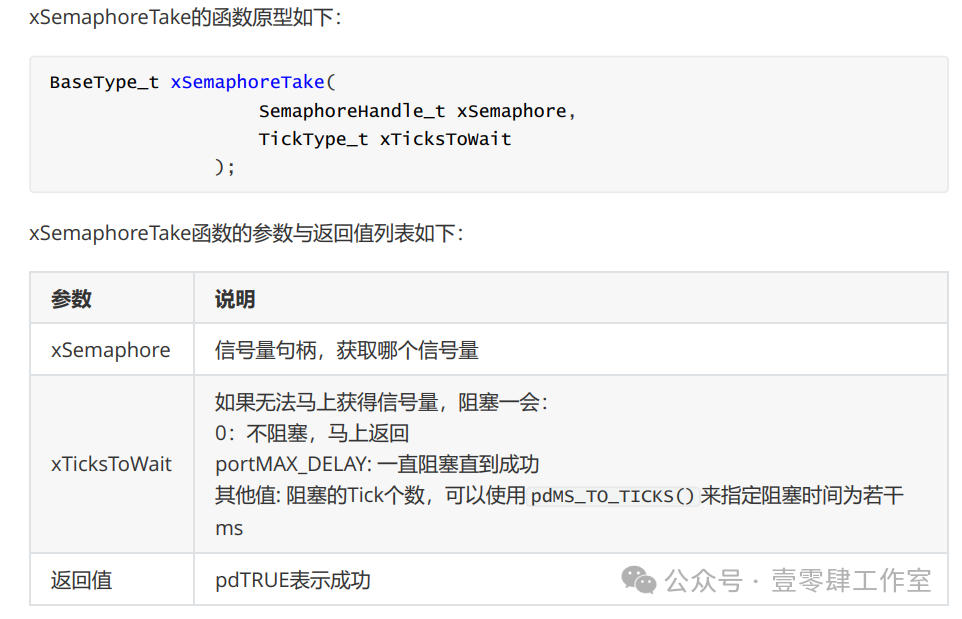
pdTRUE indicates that Take was successful.
Usage of semaphores:
When using semaphores, first create them, then add resources, obtain resources, and use handles to represent a semaphore.
Define these two macros and include a header file:
#include “semphr.h”
#define configSUPPORT_DYNAMIC_ALLOCATION 1 /* Semaphore related macros */#define configUSE_COUNTING_SEMAPHORES 1
1. Create a dynamic counting semaphore:Function xSemaphoreCreateCounting()This function is used to create a counting semaphore, with the required memory allocated through dynamic memory management methods.
Prototype code:
SemaphoreHandle_t xSemaphoreCreateCounting(UBaseType_t uxMaxCount, UBaseType_t uxInitialCount )Parameters:uxMaxCount: Maximum count value of the counting semaphore, when the semaphore value equals this value, releasing the semaphore will fail.uxInitialCount: Initial value of the counting semaphore.Return value:NULL: Counting semaphore creation failed.Other values: Counting semaphore created successfully, returning the counting semaphore handle.Usage:
static SemaphoreHandle_t xSemCalc;xSemCalc=xSemaphoreCreateCounting(10, 0);2. give Release the counting semaphore
xSemaphoreGive() Task-level semaphore release function xQueueGiveFromISR() Interrupt-level semaphore release function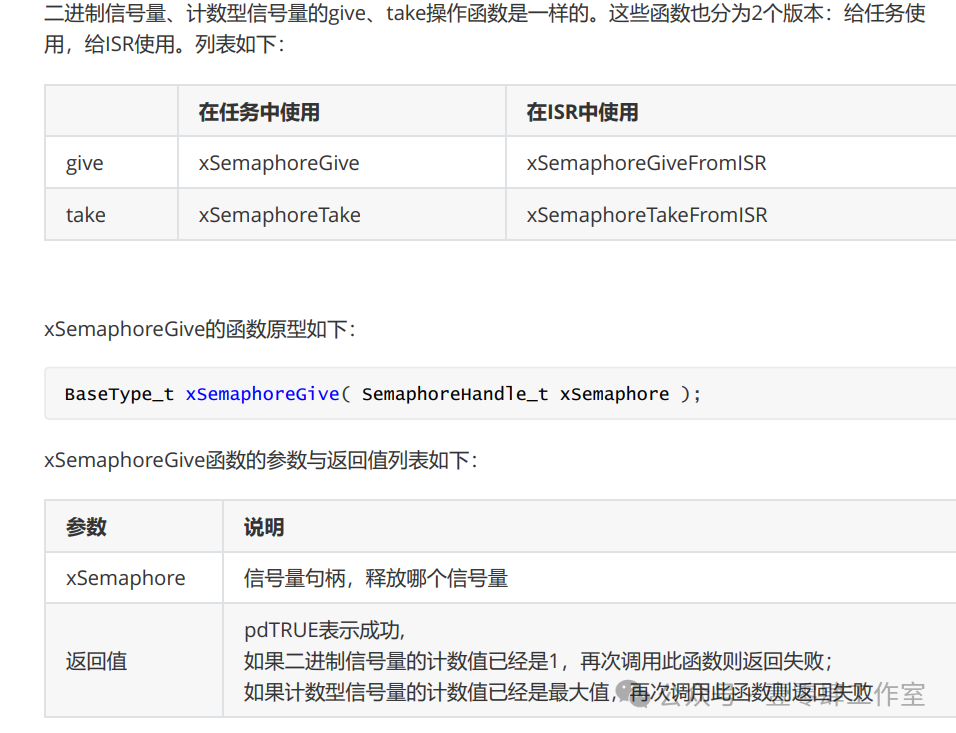
3. take to obtain the counting semaphore
xSemaphoreTake() Task-level function to obtain semaphore xSemaphoreTakeFromISR() Interrupt-level function to obtain semaphore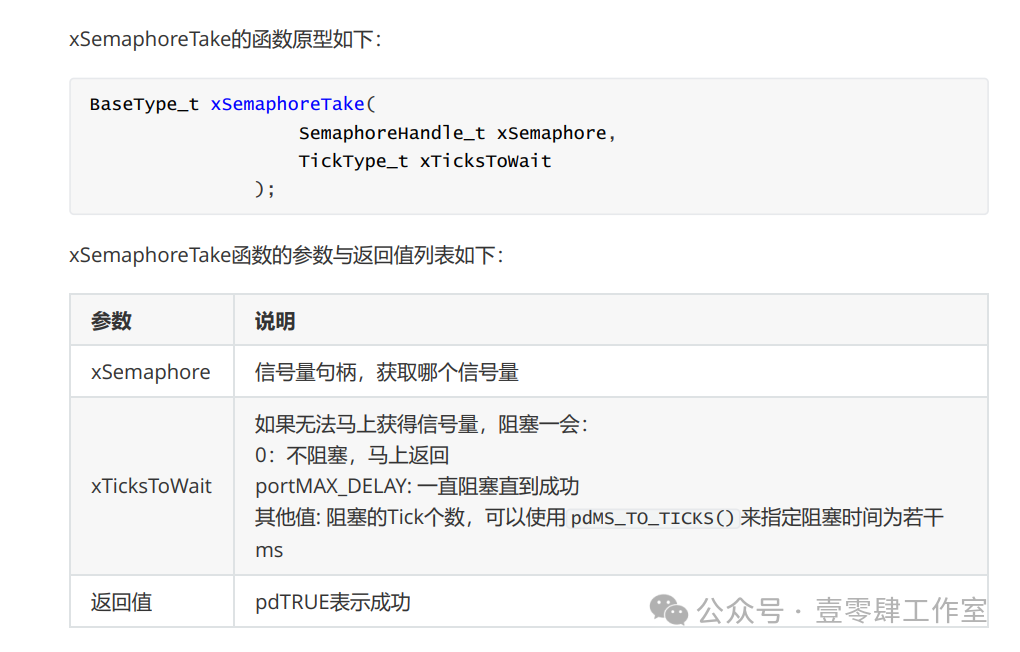
4. Delete the semaphore
For dynamically created semaphores, if they are not used and are no longer needed, they can be deleted to reclaim memory.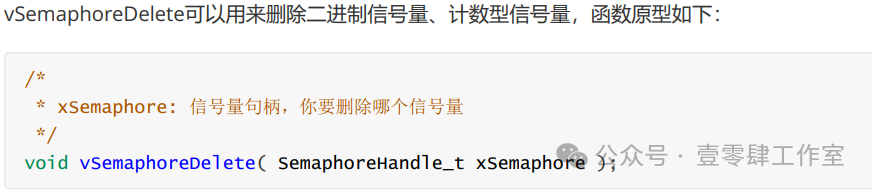
Using Counting Semaphores to Achieve Synchronization
Although synchronization functionality is achieved, we need to ensure data integrity ourselves.
Reference code is as follows:
#include "FreeRTOS.h"#include "task.h"#include "usart1.h"#include "queue.h"#include "semphr.h"
char Task1Flag = 0;char Task2Flag = 0;char Task3Flag = 0;
static TaskHandle_t app_task1_handle = NULL;static TaskHandle_t app_task2_handle = NULL;
TaskHandle_t app_task3_handle;BaseType_t xReturn;TaskHandle_t xReturn3;
/* Task 1 */ static void app_task1(void* pvParameters); static void app_task2(void* pvParameters);
static SemaphoreHandle_t xSemCalc;
void vApplicationIdleHook(void){
	Task1Flag = 0; Task2Flag = 0; Task3Flag = 0; printf("5");}
int main(void){
  uart1_init(9600);
	/* Create app_task1 task */
	xSemCalc=xSemaphoreCreateCounting(10, 0);
	/* Create app_task1 task */
	xTaskCreate((TaskFunction_t )app_task1, 		/* Task entry function */
			(const char*    )"app_task1", 		/* Task name */
			(uint16_t       )100, 			/* Task stack size */
			(void*          )NULL, 			/* Task entry function parameter */
			(UBaseType_t    )1, 			/* Task priority */
			(TaskHandle_t*  )&app_task1_handle); 	/* Task control block pointer */
		xReturn = xTaskCreate((TaskFunction_t )app_task2, 		/* Task entry function */
			(const char*    )"app_task2", 		/* Task name */
			(uint16_t       )100, 			/* Task stack size */
			(void*          )NULL, 			/* Task entry function parameter */
			(UBaseType_t    )1, 			/* Task priority */
			(TaskHandle_t*  )&app_task2_handle); 	/* Task control block pointer */
//	xTaskCreate(app_task3,"Task3",100,NULL,2,&app_task3_handle);
	/* Start task scheduling */
vTaskStartScheduler();
}
static void app_task1(void* pvParameters){
	volatile int i =0; for(;;) {
		for(i=0;i<100000000;i++){
			xSemaphoreGive(xSemCalc);
			Task1Flag=1;
			vTaskDelete(NULL);
		}
	}}
static void app_task2(void* pvParameters){
	for(;;) {
		Task2Flag=0;
		xSemaphoreTake(xSemCalc,portMAX_DELAY);
		Task1Flag=0;
		Task2Flag=1;
	}}
Using Binary Semaphores to Achieve Mutual Exclusion
Note that the initial value of a binary semaphore is 0. Therefore, when creating a binary semaphore, you need to manually give it; otherwise, it will remain in a blocked state when taking.
Task3 and Task4 exclusively use the serial port.
Create a binary semaphore to achieve mutual exclusion.
Function xSemaphoreCreateBinary()Using this function to create a binary semaphore, the RAM required for the semaphore is dynamically allocated by FreeRTOS’s memory management. The created binary semaphore is initially empty, meaning that it cannot be obtained using the function xSemaphoreTake() right after creation.
SemaphoreHandle_t xSemaphoreCreateBinary( void )Return value:NULL: Binary semaphore creation failed.Other values: Handle of the successfully created binary semaphore.Usage:
static SemaphoreHandle_t xSemUART;xSemUART = xSemaphoreCreateBinary();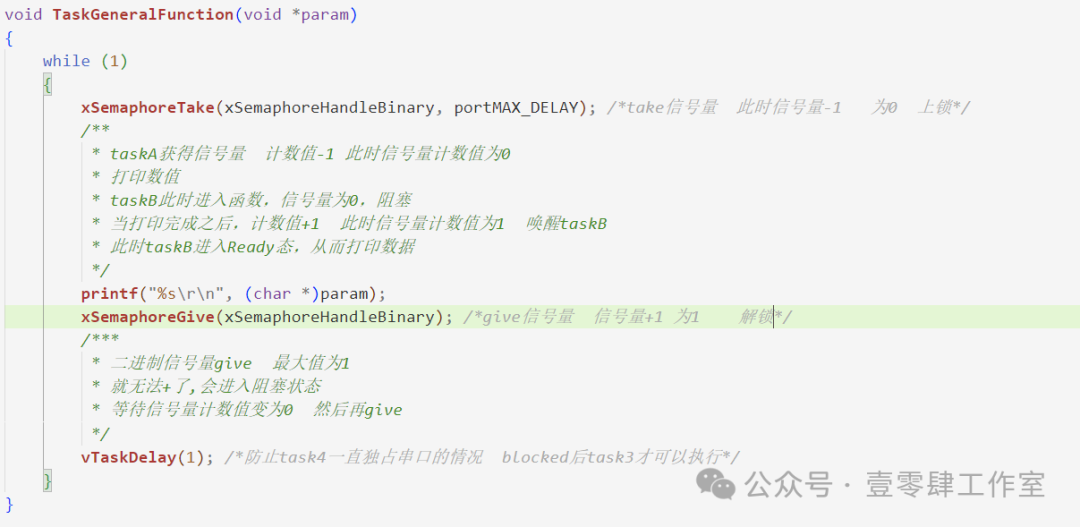 The rest is consistent with counting semaphores, so I won’t elaborate further. In the next lesson, we will discuss mutexes.