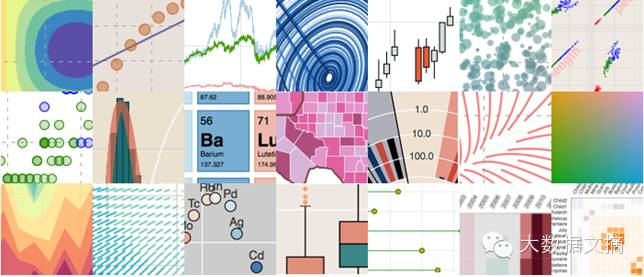
About Reprint Authorization
This is a work from Big Data Digest. Individuals are welcome to share it in their social circles. Media, self-media, and organizations must apply for authorization to reprint. Please leave a message with “Organization Name + Article Title + Reprint”. Those who have already applied for authorization do not need to apply again, as long as they reprint according to the agreement. However, a QR code for Big Data Digest must be placed at the end of the article.
Big Data Digest is willing to create a high-quality visualization discussion group for readers, with the following measures:
(1) Regular sharing sessions within the group
(2) Ensure a suitable number of sharers and learners (1:1). There is no limit on the number of sharers, and if the number of learners is less than that of sharers, they will be sorted by application order.
Click “Read the original text” at the end of the article to fill out the form to join the group.
Compiled by: Huang Nian, Xi Xiongfen
Proofread by: Wang Jing
Image source: bokeh.pydata.org
Introduction
Recently, I have been watching a video from the SciPy 2015 conference held in Austin, Texas, titled “Creating Python Data Applications with Blaze and Bokeh,” and I can’t help but repeatedly think about the powerful capabilities these two libraries provide to data scientists using Python around the world. In this article, I will take you through various ways to implement data visualization using Bokeh and explain why Bokeh is an essential “tool” for every data scientist.
What is Bokeh?
Bokeh is an interactive visualization library for Python that is specifically designed for rendering in web browsers. This is the core difference between Bokeh and other visualization libraries. As shown in the figure below, it illustrates how Bokeh displays data in a web browser.
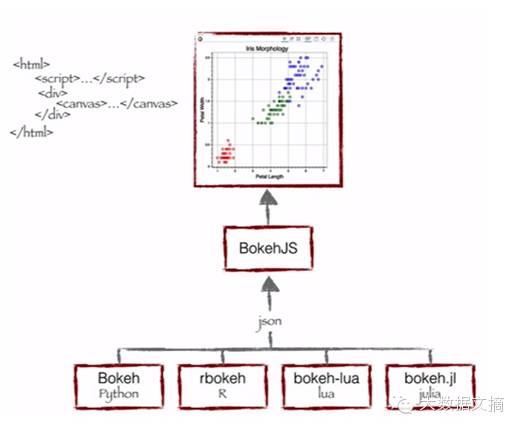
As you can see, Bokeh bundles multiple languages (Python, R, Lua, and Julia). These bundled languages produce a JSON file, which serves as input for BokehJS (a JavaScript library), and subsequently displays the data in modern web browsers.
Bokeh can create clean and beautiful interactive visualizations like D3.js, even for very large or streaming datasets, allowing for efficient interaction. Bokeh helps everyone quickly and easily create interactive charts, dashboards, and data applications.
What can Bokeh offer data scientists like me?
I initially started my data science journey as a business intelligence professional, gradually learning predictive modeling, data science, and machine learning. I primarily used QlikView and Tableau for data visualization, and SAS and Python for predictive and data analysis. I had hardly used JavaScript.
Therefore, for all my previous data products or ideas, I could only either outsource them or present them through website wireframes, neither of which was suitable for rapid prototyping. Now, with Bokeh, I can continue using Python and quickly create these prototypes.
Advantages of Bokeh:
-
Bokeh allows you to quickly create complex statistical charts with simple commands.
-
Bokeh provides output to various media, such as HTML, Notebook documents, and servers.
-
We can also embed Bokeh visualizations in Flask and Django applications.
-
Bokeh can convert visualizations written in other libraries (such as Matplotlib, Seaborn, and ggplot).
-
Bokeh flexibly combines interactive applications, layouts, and different style choices for visualizations.
Challenges faced by Bokeh:
-
Like any emerging open-source library, Bokeh is undergoing constant changes and developments. Therefore, the code you write today may not be fully reusable in the future.
-
Compared to D3.js, Bokeh has relatively fewer visualization options. Thus, in the short term, Bokeh cannot challenge D3.js’s dominance.
Considering the advantages and challenges of Bokeh, it is an ideal tool for rapid prototyping of products. However, if you want to innovate in a product environment, D3.js may still be your best choice.
Visualizing with Bokeh
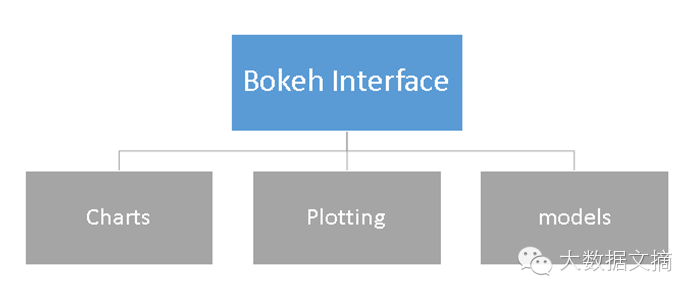
Bokeh offers powerful and flexible features that make it easy to use and highly customizable. It provides users with multiple visualization interfaces, as shown in the figure below:
-
Charts: A high-level interface for quickly building complex statistical charts.
-
Plotting: An intermediate-level interface focused on constructing various visual symbols.
-
Models: A low-level interface that provides maximum flexibility for application developers.
In this article, we will only cover the first two interfaces, Charts and Plotting.
Charts
As mentioned, it is a high-level interface used to present information in standard visualization formats. These formats include box plots, bar charts, area charts, heat maps, donut charts, and many other graphics. You can generate these charts simply by inputting data frames, NumPy arrays, or dictionaries.
Let’s look at the general method for creating a chart:
1. Import libraries and functions/methods
2. Prepare data
3. Set output mode (Notebook document, web browser, or server)
4. Create the chart and select the style of the chart (if needed)
5. Visualize the chart
To better understand these steps, let me demonstrate with the following example:
Chart Example 1: Creating a bar chart with Bokeh and displaying it in a web browser
We will follow the steps listed above to create a chart:
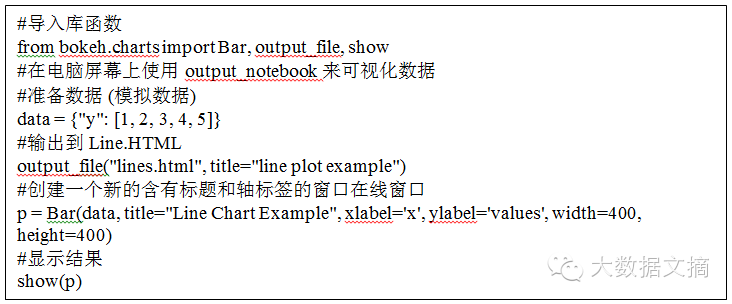

In the chart above, you can see the tool options at the top (zoom, resize, reset, rotate zoom), which help you interact with the chart. You can also see multiple chart options (legend, X-axis labels, Y-axis labels, grid lines, width, height, etc.) and various chart examples.
Chart Example 2: Using a box plot to compare the distribution of sepal length and petal length in the IRIS dataset in a Notebook document
To create this visualization chart, I first need to import the IRIS dataset using the Sklearn library. Then, I will visualize the chart in an IPython Notebook document following the steps mentioned above.

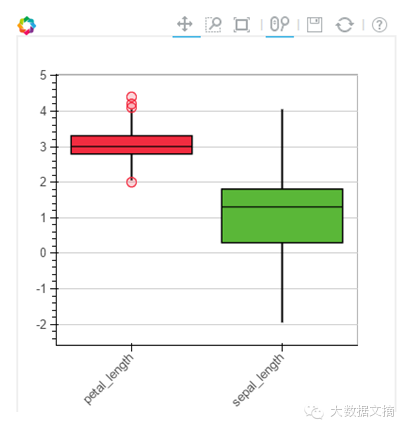
Chart Example 3: Creating a line chart on the Bokeh server
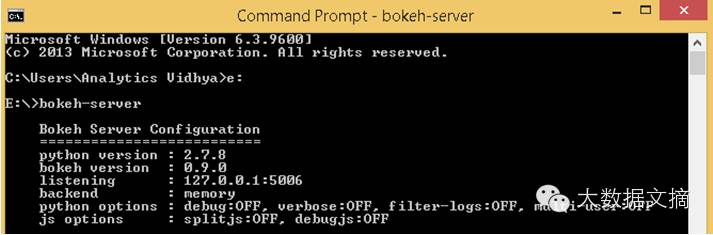
Before plotting the visualization chart on the Bokeh server, you first need to run the server.
If you are using the conda package, you can run the command “bokeh-server” in any directory. If not, “python ./bokeh-server” usually works as well.
There are several advantages to visualizing plots on the Bokeh server:
-
The charts have a larger audience.
-
Interactive visualization can be performed on large datasets.
-
Charts can be automatically updated based on data streams.
-
Dashboards and applications can be created.
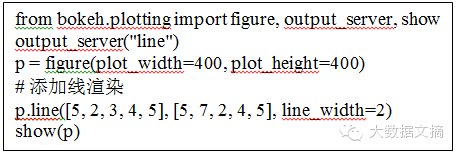
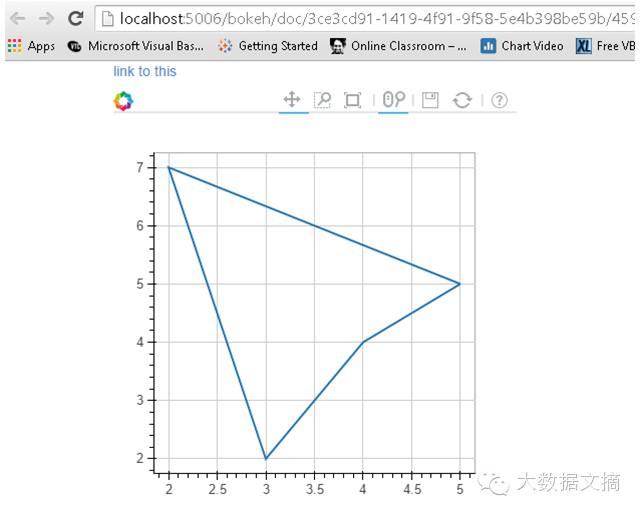
Before starting to plot on the Bokeh server, I first initialized it by running the “bokeh-server” command, and then executed the relevant commands for visualization.
Plotting
Plotting is an intermediate-level interface focused on constructing visual symbols. Here, you can combine various visual elements (points, circles, lines, patches, and many other elements) and tools (hover, zoom, save, reset, and other tools) to create visualizations.
Charts created using Bokeh’s Plotting interface come with a set of default tools and visual effects. Plotting can be done in the following steps:
1. Import libraries, methods, or functions
2. Choose the output method (Notebook document, web browser, server)
3. Activate the plot (similar to Matplotlib)
4. Execute subsequent plotting operations that will affect the already generated graphics.
5. Visualize the chart
To better understand these steps, let me provide an example:
Plotting Example 1: Creating a 2D scatter plot (square markers) in a Notebook document
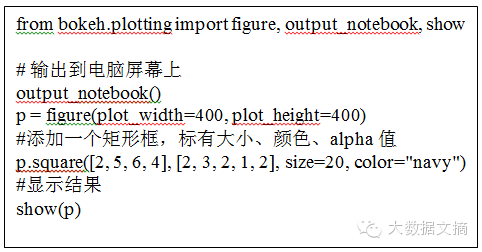
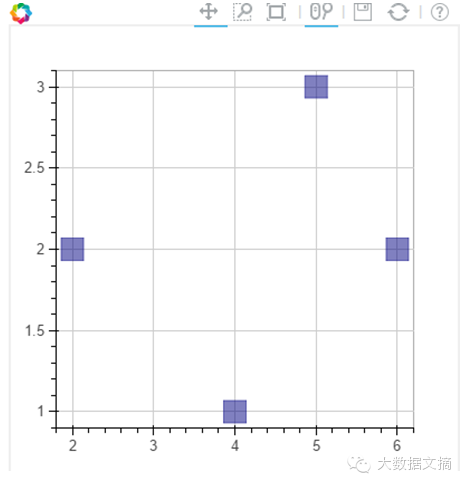
Similarly, you can create various other types of charts: such as lines, angles, arcs, ellipses, images, patches, and many other charts.
Plotting Example 2: Combining two visual elements in one chart
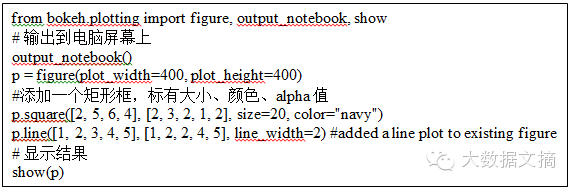
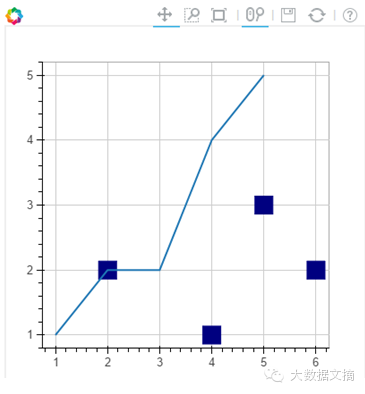
Plotting Example 3: Adding a hover tool and axis labels to the above chart
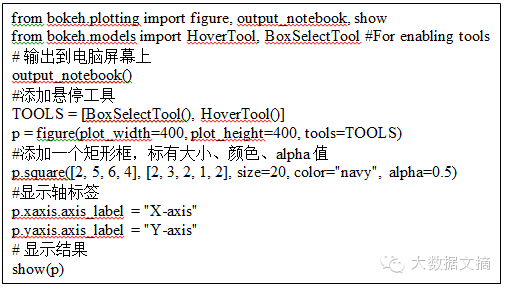
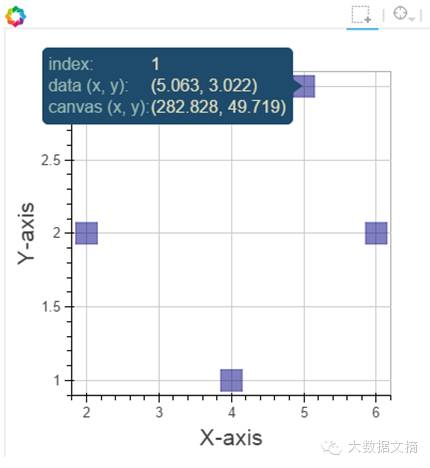
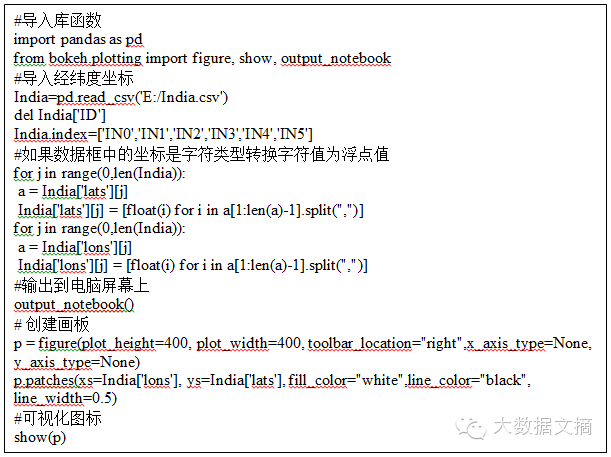
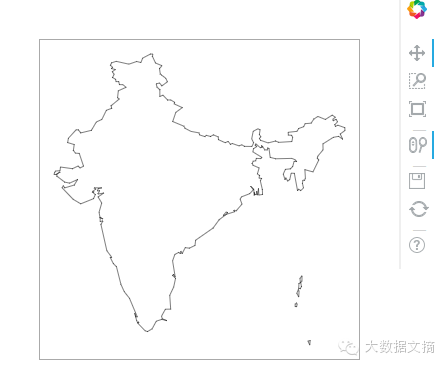
Plotting Example 4: Using latitude and longitude data to plot a map of India
Note: I already have a CSV file containing the latitude and longitude polygon data for the borders of India. I will use this data to plot.
Here, we will use patch plotting; let’s look at the commands below:
Conclusion
In this article, we discussed how to create visualizations with Bokeh and how to present the visualization results in Notebook documents, HTML documents, and on the Bokeh server. We also talked about how to create personalized visual charts using the plotting interface, which allows you to combine various visual elements to display data information.
Original article:
http://www.analyticsvidhya.com/blog/2015/08/interactive-data-visualization-library-python-bokeh/?utm_source=feedburner&utm_medium=email&utm_campaign=Feed%3A+AnalyticsVidhya+%28Analytics+Vidhya%29
Related Articles Recommended, click the image to read
How to Build a Predictive Model in Python in 10 Minutes

[Essentials] A Data Scientist’s New Year Plan

About the Compiler
Reply “Volunteer” to learn about us and how to join us
Column Chief Editor:

Column Members:

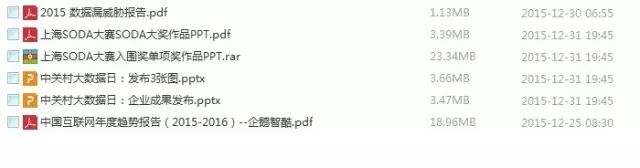
[Limited Time Download] Essential Resources
Click the image below to read “7 Major Trends in Big Data Development in 2016”
Before January 31, 2016
For the December 2015 essential document package download, please click the bottom menu of Big Data Digest: Download etc.–December Download
Exciting articles from Big Data Digest:
Reply with 【Finance】 to see historical articles from the 【Finance and Business】 column
Reply with 【Visualization】 to experience the perfect combination of technology and art
Reply with 【Security】 for fresh cases about leaks, hackers, and defense
Reply with 【Algorithm】 for interesting and informative stories
Reply with 【Google】 to see its initiatives in the big data field
Reply with 【Academician】 to see how many academicians discuss big data
Reply with 【Privacy】 to see how much privacy remains in the big data era
Reply with 【Healthcare】 to view six articles in the healthcare field
Reply with 【Credit Reporting】 for four articles on big data credit reporting
Reply with 【Big Countries】 for the “Big Data National Archives” of the USA and 12 other countries
Reply with 【Sports】 for big data applications in tennis, NBA, and more
Reply with 【Volunteer】 to learn how to join Big Data Digest
Long press the fingerprint to follow “Big Data Digest”

Focusing on big data, sharing daily