Servers, as nodes of the network, store and process 80% of the data and information on the internet, and are referred to as the soul of the internet. .
It is not just a simple machine, but more like a precision engineering marvel, consisting of multiple key components working together to achieve efficient data processing and storage.
Mastering the basic knowledge of servers is an essential skill for network engineers
01
What is a Server
A server is a high-performance computer that provides services to other clients in a network; it has high-speed CPU processing capabilities, can run reliably for long periods, has strong I/O external data throughput capacity, and better scalability.
The internal structure of a server is similar to that of a regular computer (CPU, hard drive, memory, system bus, etc.)
Server: indirectly serves multiple users; Personal Computer (PC): directly serves individuals.
02
Classification of Servers
01 Classification by Physical Structure
The most commonly used in industrial scenarios are rack servers (generally 2U) and blade servers (a high-density version of rack servers, generally 8U or 10U, where each removable blade can be understood as a server).
1. Tower Server: Its shape and structure are similar to that of a vertical PC host.
2. Rack Server: Uniform standard appearance, used with cabinets.
3. Blade Server: Multiple card-type server units are installed in a rack-mounted chassis (more expensive).
02 Classification by CPU Architecture
1. CISC Server (Complex Instruction Set)
X86 architecture: AMD and Intel perform well, with 32-bit x86 processors.
X86-64 architecture: 64-bit x86 extended processors, sometimes also referred to as x64, IA-32, EMT64, etc.
2. RISC Server (Reduced Instruction Set)
ARM architecture – mainly used in mobile CPU and MCU.
Mobile CPU manufacturers include Qualcomm Snapdragon, Huawei Kirin, MediaTek, Samsung Exynos, etc.; MCU manufacturers include STM32, GD32, etc.
Server processors include Huawei HiSilicon Kunpeng, Ampere, Amazon Graviton.
3. MPIS architecture, PowerPC architecture, SPARC architecture (Scalable Processor Architecture)
4. VLIW Server (Very Long Instruction Word)
Intel IA-64 architecture, AMD Athlon 64 architecture.
03 Classification by Network Scale Scenario
Enterprise-level, entry-level.
04 Classification by Purpose
General-purpose, dedicated servers.
05 Servers can also simply be divided into X86 servers and non-X86 servers.
X86: PC servers, based on CISC complex instruction sets (the personal laptops we use can also be understood as X86 servers).
Non-X86: Mainly includes mainframe computers, minicomputers, and Unix servers. These types of servers generally require specialized operating systems (while X86 servers can run on Windows or Linux).
Differences between Non-X86 and X86
1. X86 is generally referred to as micro computers, while non-X86 has much higher computing power and performance, positioned as mid-to-high-end in the server market, with high prices.
(However, with the advent of cloud computing and the idea of parallel computing, we can divide a large task into multiple smaller tasks and assign them to different machines for computation, allowing multiple microcomputers to perform large-scale calculations. Therefore, although the performance and reliability of X86 servers have not improved, the overall reliability and performance of the X86 cluster have improved.)@Network Engineers Club
2. General-purpose X86 servers are much better than non-X86 servers.
(For example, Hypervisor software can run on all X86 servers, and virtualization software such as KVM, VMware can operate on all X86 servers.)
3. Non-X86 servers have strong customization features.
(Different vendors’ non-X86 servers require customized operating systems and virtualization software – the virtualization software for vendor A’s non-X86 server cannot run on vendor B’s non-X86 server), so non-X86 servers have poor horizontal compatibility and scalability.
03
Components of a Server
Hardware Components
CPU, Memory, Hard Drive, Power Supply, Fan
I/O (array card, network card, HBA card, HCA card – used in IB networks, etc.)
Management Module (in-band – consumes server resources / out-of-band management, servers have dedicated management ports – connecting to a management component inside the server)
Software Components
Firmware (system firmware, hardware firmware – such as BIOS/UEFI)
System Software (programming language programs, operating systems, database management systems, etc.)
Application Software (general/custom application software, commercial application software, etc.)
01 Central Processing Unit (CPU)
The CPU mainly consists of the ALU (Arithmetic Logic Unit), Cache (high-speed buffer memory), and Bus.
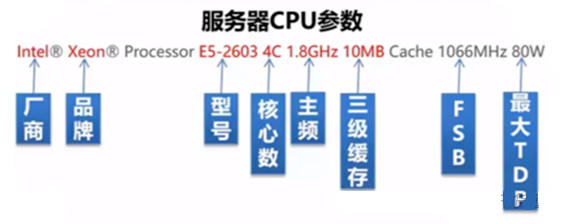
1.Common CPU Parameters
(1)Clock Speed
The clock frequency of the CPU refers to the number of operations the CPU can perform per second. Generally, the higher the clock speed, the faster the CPU.
Overclocking: The clock speed is not fixed and can be run at higher speeds in certain scenarios, but it may damage the CPU’s lifespan.
Underclocking: In energy-saving mode, the system CPU will reduce its speed to enhance battery life.
(2)Core Count
This indicates the parallel processing capability of the CPU; the more cores, the faster the parallel processing speed.
(3)Threads
This refers to the number of logical threads of the processor, generally one thread corresponds to one core.
Hyper-Threading: A physical core can correspond to multiple threads (dividing a core into multiple smaller cores for parallel computation), allowing a single core to process multiple tasks in parallel, improving efficiency.
(4)Cache
Cache, also known as multi-level cache, is used to alleviate memory bottlenecks; currently, there are level 2 and level 3 caches. The larger the cache, the better (since current memory development lags behind CPU).
(5)FSB (Front Side Bus)
This indicates the speed of data transmission between the CPU and external devices.
TDP (Thermal Design Power)
This is the indicator of heat release when the chip reaches maximum load, and it is the maximum amount of heat that the computer’s cooling system must be able to dissipate.
(6)VT (Virtualization Technology)
VT is Intel’s technology, while AMD corresponds to the AMD-V technology.
It can meet the demands of different upper-layer operating systems on lower-layer processors.
02 Memory
Memory works in conjunction with the CPU. When the CPU is calculating, it caches the necessary data and instructions in memory, which also needs to communicate with the hard drive.
1. Memory is mainly divided into RAM (Random Access Memory), ROM (Read-Only Memory), and Cache (High-Speed Buffer).
(1)RAM: Internal memory that exchanges data directly with the CPU, also called main memory (RAM), which can be read and written at any time.
(2)ROM: Generally, relevant data is written into the ROM during memory manufacturing (usually stores basic programs and data for computers), and the information inside can only be read; it is not lost when power is off.
(3)Cache: High-speed buffer memory, located between the CPU and memory, is a storage area that reads and writes data faster than main memory (when reading and writing data to main memory, this data is also stored in the cache).
When accessing data, the CPU reads directly from the cache instead of accessing the slower main memory; if the required data is not in the cache, the CPU then reads the data from the main memory.
2. Types of Memory Classification
Memory is mainly divided into SRAM (Static Random Access Memory) and DRAM (Dynamic Random Access Memory).
SRAM is faster than DRAM and has lower power consumption, but SRAM is more expensive and is generally used for cache memory (like L1, L2, L3 cache).
DRAM is typically the memory we use, and it comes in several types:
SDRAM (Synchronous Dynamic Random Access Memory)
RDRAM (Rambus Dynamic Random Access Memory)
EDO DRAM (Extended Data Out Dynamic Random Access Memory)
FPM DRAM (Fast Page Mode Dynamic Random Access Memory)
Among them, SDRAM can be further subdivided into the following types:
DDR (Double Data Rate Synchronous Dynamic RAM), DDR2, DDR3, DDR4 (mainstream), DDR5.
3. Memory-Related Parameters
(1)Memory Clock Speed
Similar to CPU clock speed, it represents the highest working frequency that memory can achieve, generally used to indicate memory speed.
Now, memory will be configured with high-speed cache, ensuring that communication speed between memory and CPU continues to increase.@Network Engineers Club
(2)Memory Capacity
4GB and 8GB memory are mainstream configurations; SDRAM memory modules come in dual-sided and single-sided designs, with each side using 8 or 9 memory chips (the extra one is for ECC).
(3)CL Latency
It is the delay time required for memory to access data, which is the response speed after the memory receives instructions from the CPU.
(4)Parity (ECC)
This is a method used for error correction during data transmission, divided into odd parity and even parity (ECC is generally only found in enterprise-level memory).
(5)Access Time
Measured in ns (nanoseconds), the smaller the value, the faster the access speed, and the higher the price.
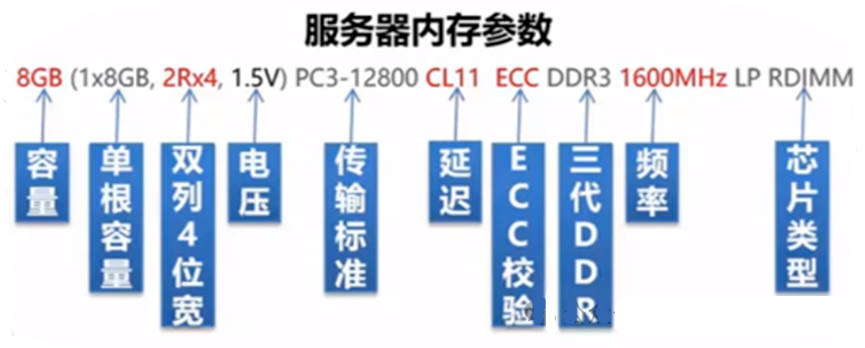
2Rx4: This indicates that the memory module has two sides, with 4 memory chips on each side.
Some memory module DDRx models are represented by PCx (for example, PC3 also represents DDR3).
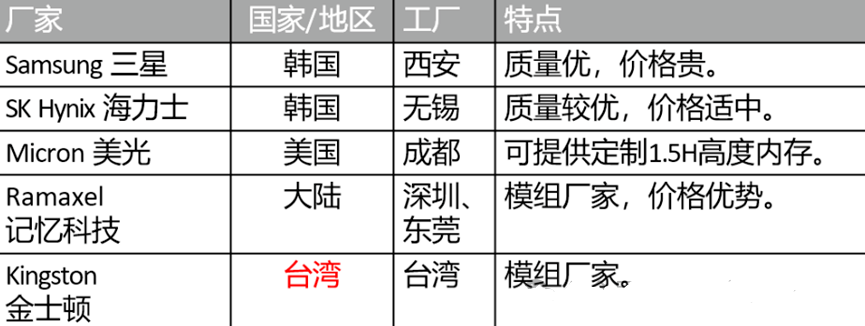
4. Major Memory Manufacturers
03 Hard Drives
1. Servers have front and rear hard drives; what is the difference? – Not absolute
Generally, the hard drives inserted at the back of the server are called local drives (for installing the server’s operating system, application software, etc.).
The front drives can be used for hyper-converged virtual storage (i.e., when configuring virtual machines on the server, resources from front drives are usually allocated).@Network Engineers Club
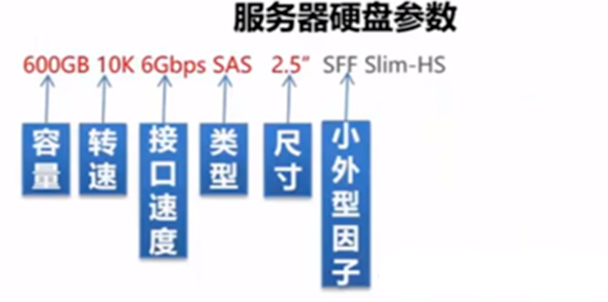
2. Hard drives are mainly divided into two types based on their medium:
HDD (Hard Disk Drive)
SSD (Solid State Drive, fast read/write speed, high price)
There is also a type called HHD (Hybrid Hard Drive), which includes the essential components of a mechanical hard drive such as read/write heads, platters, motors, etc., and also has built-in NAND flash memory chips.
3. Storage Interface Protocols
SCSI, FC, SAS, SATA, PCIe, etc.
Common expansion slots are M.2 and PCI-E — servers use PCI-E, cloud terminals use M.2.
04 Network Cards, Storage Cards, RAID Cards
These three types of cards are inserted into the server’s motherboard through PCI slots (the interface with the motherboard is generally PCI interface; now there are also PCI-X, PCI-E interfaces).
1. Network Card – connects to the network switch via network cables.
In ordinary scenarios, electrical network cards are used, but in some industrial scenarios, optical network cards may be needed for higher-speed network connections.
(1)Classification of Server Network Cards – based on the type of encapsulation protocol
NIC: Specifically refers to Ethernet cards that support TCP/IP protocols, used in Ethernet networks.
CAN: Converged network cards, essentially Ethernet cards but supporting FCoE functionality (FC over Ethernet).
HCA: Specifically refers to InfiniBand cards, used in high-bandwidth, low-latency high-performance computing projects.
HBA: FC-HBA cards connect to fiber switches; iSCSI-HBA cards connect to storage devices.
Electrical network card: RJ45 interface.
Optical network card: LC/SC/FC/ST interface (needs to be used with optical modules).
2. Optical Module – inserted into the optical port.
Used to achieve optical-electrical conversion, where the sender converts electrical signals into optical signals, which are transmitted via optical fiber, and the receiver converts the optical signals back into electrical signals (optical fibers can transmit over long distances and have high transmission rates).
(1)Can be classified by interface speed into SFP (1G), SFP+ (10G), SFP28 (25G), QSFP+ (40G), QSFP28 (100G), XFP, etc.
(2)Can be classified by transmission distance into single-mode and multi-mode, where single-mode has a longer transmission distance (and is more expensive), while multi-mode has a shorter distance.
3. Fiber Jumpers
Used for jump connections in the link between devices and fiber wiring (meaning connecting different devices through fiber wiring).
Fiber Interface Classification (based on interface shape)
LC (small square card-type – smaller than SC), SC (large square card-type – most commonly used in routers and switches), FC (round with threads – most commonly used in patch panels), ST (round snap-on connection), etc.
Note: The interfaces on both ends of the fiber jumper must match the optical module interface.
4. Storage Card – connects to storage devices via network cables.
Servers can connect directly to storage devices through storage cards, allowing storage devices to provide storage services to the server.@Network Engineers Club
HBA cards can also be referred to as storage cards, commonly used include FC-HBA (connecting to fiber switches) and iSCSI-HBA (connecting to storage devices).
5. RAID Card – connects to hard drives through a bus.
This solves the problem of configuring RAID for local disks. Through RAID cards, local disks can be configured into RAID groups (there is also a software method).
Source: 5G Communication
Reviewed by: Zhao Lixin