1. Technical Foundations and Overview
Q: What is HTTP? A: HTTP is a standard TCP for requests and responses between client and server. It is actually built on top of TCP.
When we open the Baidu webpage, it looks like this:
https://www.baidu.com
The extra ‘S’ actually stands for TLS/SSL. We won’t explain that here, so the technical foundation of HTTP is illustrated as follows:
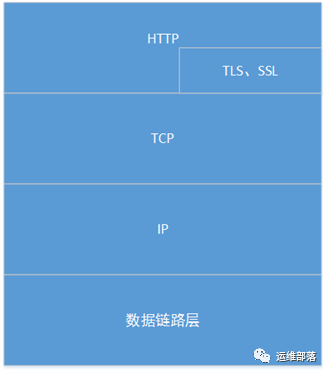
What about the HTTP protocol? The HTTP protocol (HyperText Transfer Protocol) is the protocol used for transferring data from the server to the client browser. On the web, servers and clients communicate using the HTTP protocol. With the OOP concept, we conclude that the structure of this session is a simple request/response sequence, where the browser sends a request and the server responds.

2. In-Depth Understanding of Technical Foundations and Workflow
Since HTTP is based on the TCP protocol at the transport layer, and TCP is a connection-oriented end-to-end protocol, a TCP connection must be established before using the HTTP protocol. This is why we talk about the “three-way handshake” process of TCP connections. As shown in the figure:
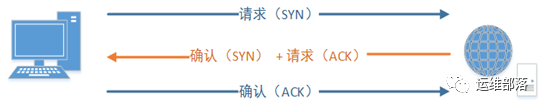
On the web, the reason HTTP uses TCP instead of UDP is that a webpage must transmit a lot of data and ensure its integrity. The TCP protocol provides a series of functions for transmission control, data organization in order, and error correction.
One HTTP operation is called a transaction, and its workflow can be divided into four steps:
-
1. The client and server need to establish a connection. (For example, when a hyperlink is clicked, HTTP begins.)
-
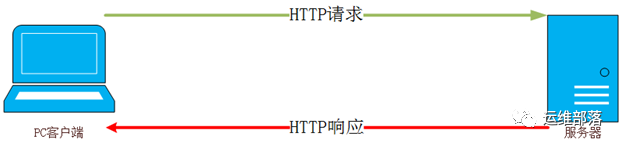
2. After establishing the connection, a request is sent.
-
3. After the server receives the request, it responds with the response information.
-
4. The client receives the information returned by the server and displays it on the user’s screen through the browser, then the client disconnects from the server.
Establishing a connection is actually based on the TCP connection. The core workflow diagram (excluding the connection process) is as follows:
3. Detailed Explanation of HTTP Message Workflow
An HTTP message consists of requests from the client to the server and responses from the server to the client.
1. The format of the request message is as follows:
Request Line General Header Request Header Entity Header (Empty Line) Message Body
As shown in the figure, the message content sent when requesting an article from my blog:
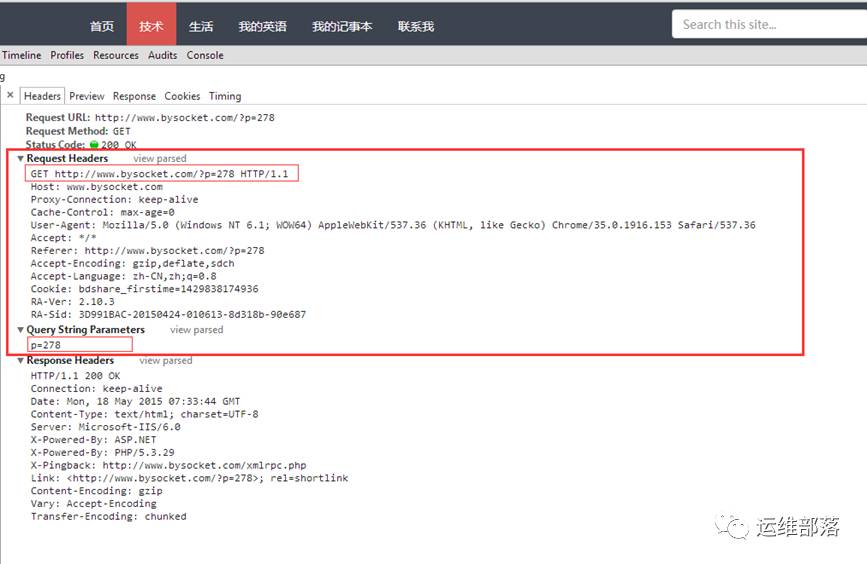
For a detailed explanation of the request message:
-
1. Request Line Method Field + URL + HTTP Protocol Version
-
2. General Header Cache-Control Field: Specifies the caching mechanism that the request and response should follow. keep-alive indicates that the connection remains active [this will be validated in the Baidu example below].
-
3. Request Header Host Field: Use your imagination. Referer Field: Allows the client to specify the resource address of the requested URL. User-Agent Field: Request user information. [You can see some information about the client browser’s kernel.]
-
4. Message Body: As shown in the figure, “p=278” generally indicates that the request body contains request parameters.
2. The format of the response message is as follows:
Status Line General Header Response Header Entity Header (Empty Line) Message Body
As shown in the figure, this is the content of the response for this blog:
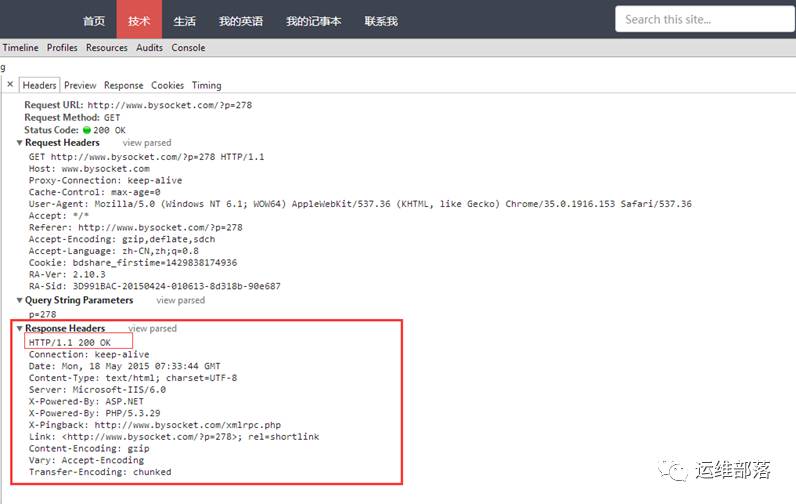
For a detailed explanation of the response message:
-
1. Status Line HTTP Protocol Version + Status Code + Text Description of Status Code [For example, here, 200 indicates that the request was successful.]
-
2. General Header keep-alive indicates that the connection remains active [this will be validated in the Baidu example below]. Date Field: Time description.
-
3. Response Header Server Field: Information about the software of the original server processing the request.
-
4. Entity Header Content-Type Field: This indicates the media type of the entity received by the recipient. (This also indicates what your message body is.) (Empty Line)
-
5. Message Body: Here is the HTML response page, which can be viewed in the response tab of the screenshot. A simple request/response has been completed.
4. Supplementary Knowledge on HTTP Protocol
Related to request messages:
Request Line – Request Method
GET: Request to retrieve the resource identified by Request-URI POST: Append new data to the resource identified by Request-URI HEAD: Request to retrieve the response message header for the resource identified by Request-URI PUT: Request the server to store a resource, using Request-URI as its identifier DELETE: Request the server to delete the resource identified by Request-URI TRACE: Request the server to echo back the received request information, mainly for testing or diagnosis CONNECT: Reserved for future use OPTIONS: Request to query the server’s performance or to query options and requirements related to the resource
Related to response messages:
Response Line – Status Code
1xx: Informational – Indicates that the request has been received and is being processed 2xx: Success – Indicates that the request has been successfully received, understood, and accepted 3xx: Redirection – Further action must be taken to complete the request 4xx: Client Error – Indicates that there is a syntax error in the request or that the request cannot be fulfilled 5xx: Server Error – Indicates that the server failed to fulfill a valid request
Common status codes:
200 OK: Request succeeded (followed by the response document for GET and POST requests.) 304 Not Modified: Document has not been modified as expected. The client has a cached document and has made a conditional request (usually providing the If-Modified-Since header indicating that the client only wants documents updated since a specified date). The server tells the client that the original cached document can still be used. 404 Not Found: The server cannot find the requested page. 500 Internal Server Error: The request was not completed. The server encountered an unexpected condition.
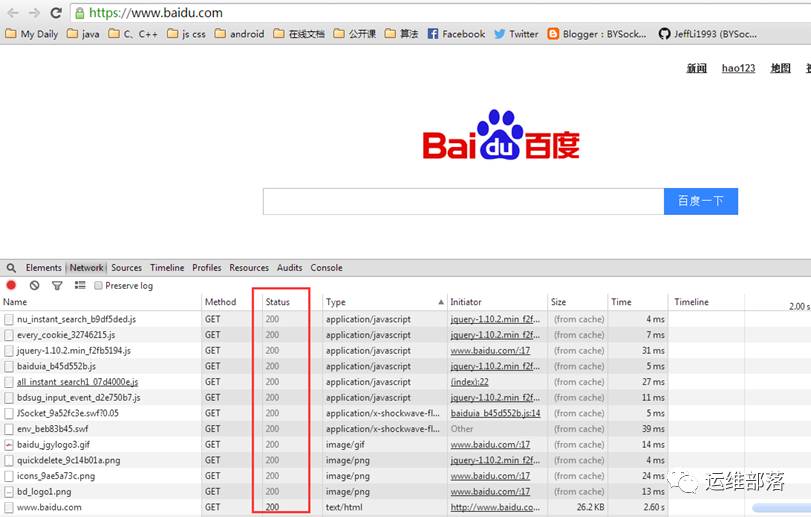
For example, 304, when the browser first opens Baidu, as shown in the figure:
Refresh:
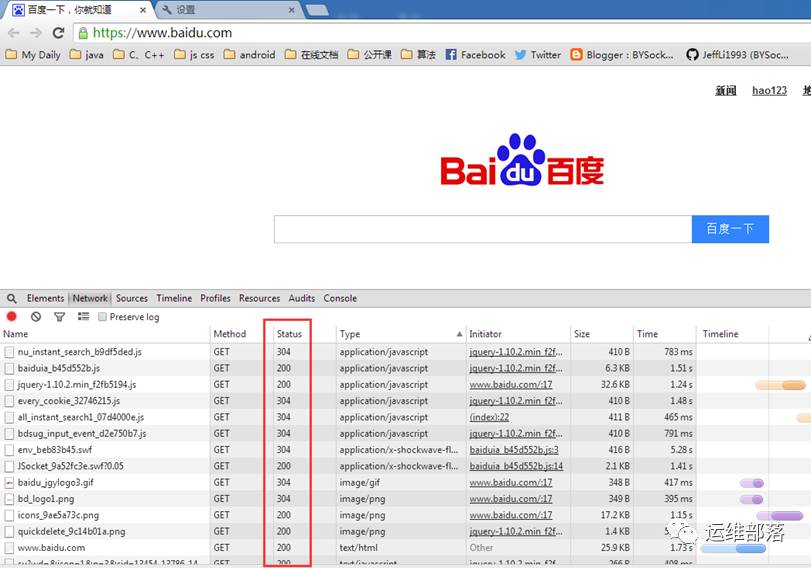
The 304 above proves that
1. 304 Status Code: Some images and JS files are cached on the local client, and after requesting again, the cached files can be used. 2. All the above HTTP requests rely on a single TCP connection, which is known as a persistent connection.
5. About Web Application Frameworks or Specifications for HTTP Protocol
Those familiar with JavaEE will know the Servlet specification. The web application container implements the objects in the HTTP protocol, namely the request and response objects. For example, the javax.servlet.http.HttpServletResponse object certainly contains a description of the status code, as shown in the figure:
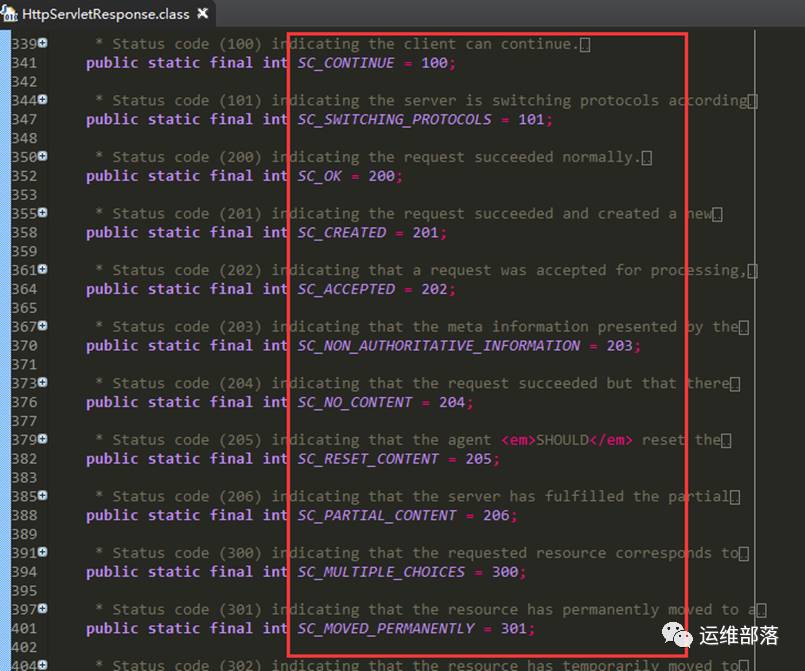
As for how to use them, stay tuned for a series of articles.
6. Conclusion
In summary, the HTTP protocol is like a conversation; the language is the protocol itself. Therefore, to master the HTTP protocol, it is sufficient to understand the following points:
-
1. What is used for communication via the HTTP protocol
-
2. How to communicate via the HTTP protocol