UDS DoIP Large File Transfer
This example demonstrates how to use UDS (Unified Diagnostic Services) to transfer large binary files to the ECU via the DoIP protocol, utilizing streaming file reading. This method is optimized for handling extremely large files without needing to load the entire file into memory at once.
Overview
This example implements a large file transfer sequence using the following UDS services:
- • RequestDownload (0x34) – Initiates the download process
- • TransferData (0x36) – Transfers data blocks sequentially
- • RequestTransferExit (0x37) – Completes the transfer process
Core Innovation: Streaming vs Traditional Method
Traditional Method (Previous Example)
// Old method: Load the entire file into memory at once
const hexStr = await fsP.readFile(hexFile, 'utf8')
const map = HexMemoryMap.fromHex(hexStr)
for (const [addr, data] of map) {
  pendingBlocks.push({ addr, data }) // All data loaded into memory
}
Limitations:
- • ❌ High memory consumption for large files
- • ❌ Risk of insufficient memory for multi-GB files
- • ❌ Slow startup time for large files
- • ❌ Cannot handle files larger than available RAM
Streaming Method (This Example)
// New method: Open file handle for streaming read
fHandle = await fsP.open(hexFile, 'r')

// Only read the data needed for the current transfer
const data = Buffer.alloc(maxChunkSize)
const { bytesRead } = await fHandle.read(data)
Advantages:
- • ✅ Memory Efficient: Loads only small chunks of data at a time
- • ✅ Scalable: Can handle files of any size (GB+)
- • ✅ Fast Startup: Begins transfer immediately
- • ✅ Real-time Processing: Reads data on demand
- • ✅ Low Resource Usage: Minimal memory footprint
Architecture and Process
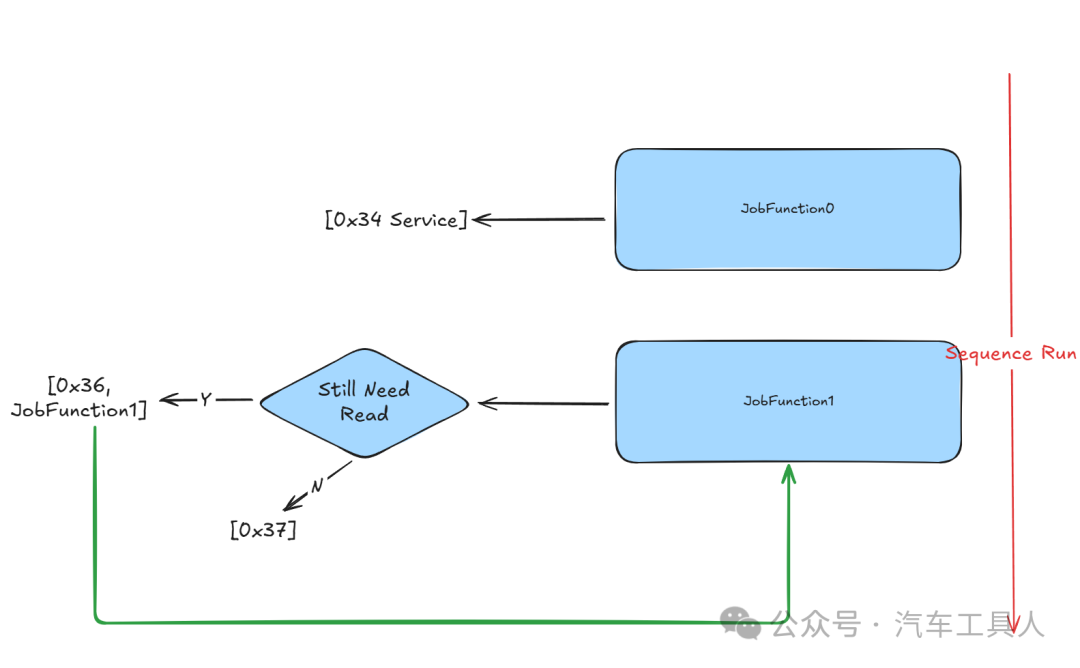
The transfer process follows this sequence:
- 1. JobFunction0: Initiates download request and receives ECU capability information
- 2. “Still Need Read” Check: Determines if more data needs to be transferred
- 3. JobFunction1: Performs chunked data transfer using streaming read
- 4. Sequential Processing: Continues until the entire file transfer is complete
Implementation Details
File Stream Setup
let fHandle: fsP.FileHandle | undefined

Util.Init(async () => {
  const hexFile = path.join(process.env.PROJECT_ROOT, 'large.bin')
  fHandle = await fsP.open(hexFile, 'r')  // Open for streaming read
})

Util.End(async () => {
  if (fHandle) {
    await fHandle.close()  // Properly clean up resources
  }
})
JobFunction0 – Download Initialization
Prepares for data reception by the ECU and negotiates transfer parameters:
Util.Register('Tester.JobFunction0', async () => {
if (fHandle) {
    const fileState = await fHandle.stat()
    console.log('File size:', fileState.size)

    const r34 = DiagRequest.from('Tester.RequestDownload520')
    const memoryAddress = Buffer.alloc(4)
    memoryAddress.writeUInt32BE(0)
    r34.diagSetParameterRaw('memoryAddress', memoryAddress)
    r34.diagSetParameter('memorySize', fileState.size)

    r34.On('recv', (resp) => {
      // Get maximum block size from ECU response
      maxChunkSize = resp.diagGetParameterRaw('maxNumberOfBlockLength').readUint32BE(0)
      maxChunkSize -= 2// Reserve space for sequence counter

      // Align to 8-byte boundary to optimize transfer
      if (maxChunkSize & 0x07) {
        maxChunkSize -= maxChunkSize & 0x07
      }
    })
    return [r34]
  }
return []
})
JobFunction1 – Streaming Data Transfer
Executes the actual file transfer using streaming read:
Util.Register('Tester.JobFunction1', async () => {
if (fHandle) {
    const list = []
    const data = Buffer.alloc(maxChunkSize)  // Reusable buffer

    // Transfer multiple blocks per batch (combine36 = 6)
    for (let i = 0; i < combine36; i++) {
      const { bytesRead } = await fHandle.read(data)  // Streaming read

      const transferRequest = DiagRequest.from('Tester.TransferData540')
      transferRequest.diagSetParameterSize('transferRequestParameterRecord', bytesRead * 8)
      transferRequest.diagSetParameterRaw(
        'transferRequestParameterRecord',
        data.subarray(0, bytesRead)  // Only send actual data
      )

      // Block sequence counter (1-255 loop)
      const blockSequenceCounter = Buffer.alloc(1)
      blockSequenceCounter.writeUInt8(cnt & 0xff)
      transferRequest.diagSetParameterRaw('blockSequenceCounter', blockSequenceCounter)
      cnt++

      list.push(transferRequest)

      // Check if more data remains
      if (bytesRead == maxChunkSize) {
        if (i == combine36 - 1) {
          // Continue to next batch
          list.push(DiagRequest.from('Tester.JobFunction1'))
        }
      } else {
        // Reached end of file
        console.log(`Read ${bytesRead} bytes, no more data to read.`)

        // Send transfer exit request
        const r37 = DiagRequest.from('Tester.RequestTransferExit550')
        r37.diagSetParameterSize('transferRequestParameterRecord', 0)
        list.push(r37)

        // Clean up resources
        await fHandle.close()
        fHandle = undefined
        break
      }
    }
    return list
  }
return []
})
Memory Usage Comparison
| Method | 1GB File | 4GB File | 10GB File |
|---|---|---|---|
| Traditional Method | ~1GB RAM | ~4GB RAM | ~10GB RAM |
| Streaming Method | ~4KB RAM | ~4KB RAM | ~4KB RAM |
Use Cases
This streaming method is suitable for:
- • ECU Firmware Updates: Large binary files
- • Calibration Data Transfer: Automotive applications
- • Software Deployment: Embedded systems
- • Data Logging: Diagnostic information transfer
- • Any scenario requiring memory-efficient large file transfer
This implementation shows significant improvements over traditional methods, enabling reliable transfer of extremely large files in resource-constrained environments.
As always, EcuBus-Pro is a fully open-source automotive software, and we welcome more like-minded friends to join us, whether you are an expert or a beginner, we look forward to your participation.
Follow our public account, click the menu: Contact Author, join the EcuBus-Pro WeChat group