Software Description
Downloading a 4GB movie with a certain tool limited to 50KB/s would take about 3 hours;To download a magnet link for course materials, you need to install a dedicated BT software, which is full of ads and secretly mines in the background;Switching to a new laptop, the commonly used download tools do not support Mac, and I have to find alternatives again…
If you are also tormented by “download speed limits, single protocol, and platform incompatibility,” thenGopeed, the open-source high-speed download tool is definitely a lifesaver! Lightweight and not bloated, covering all protocols, unlimited download speed, usable on Windows/Mac/Linux/mobile, from downloading materials to resources, the whole process is smooth and lag-free, open-source and free with no ads, even better than paid tools!
✨ Why is it called the “King of Download Tool Alternatives”? 4 Core Advantages Crush the Competition
1. Open-source and free, safe and transparent without hidden traps
Most download tools on the market either hide “membership speed limits” (free version 100KB/s, paying for membership instantly becomes 10MB/s) or secretly bundle plugins and run traffic in the background, while Gopeed completely avoids these traps:👉 100% Open Source: The code is fully public on GitHub, anyone can check for malicious programs, no need to worry about “stealing traffic” or “collecting privacy,” programmers have tested it and found “no hidden operations”;👉 All Features Free: Whether it’s multi-threaded acceleration, BT downloads, or magnet link parsing, all features are available without locking membership, you can use the full features without spending a penny;👉 No Ads, No Bundling: The interface is clean, without “pop-up ads” or “floating window promotions,” the installation package doesn’t even have “additional component” options, just download and use it directly, perfect for cleanliness enthusiasts.
Programmer A Kai tested: “Comparing with a certain paid download tool, downloading an 8GB Linux image, Gopeed utilized my home 100M bandwidth (peak 12MB/s), while the free version of the paid tool only provided 500KB/s, and only unlocked full speed with a membership, Gopeed saved me 68 yuan in membership fees every year!”
🚀 3 Core Features to Solve All Download Pain Points
1. Multi-protocol Coverage: One Tool Replaces Many, No Need to Switch Back and Forth
No need to install “HTTP downloader + BT software + magnet parsing tool,” Gopeed is enough:👉 Supports HTTP/HTTPS: Download web materials, software installation packages, compressed files, just paste the link to download, multi-threading maximizes speed;👉 Perfectly Compatible with BT/Magnet: Download movies from magnet links, games from torrent files, automatically parse Tracker servers, even rare resources can quickly find nodes;👉 Also supports FTP/ED2K: Familiar ED2K links (eMule resources) and FTP server files can also be directly imported, no need to dig out antique tools.
Designer Xiao Tao’s feedback: “In the past, I used tool A for HTTP links and tool B for BT resources, cluttering my desktop with 3 download software. Now with Gopeed, whether it’s the official material package or forum BT resources, I just paste the link to download, and my desktop is finally clean!”
2. Unlimited Multi-threading: Maximize Bandwidth, Download Large Files Quickly
The most impressive feature is “unlimited speed”—Gopeed imposes no artificial speed limits, the speed depends entirely on your home bandwidth:👉 Multi-threaded acceleration: By default, 16 threads are enabled (customizable up to 32 threads), downloading large files is like “multiple pipes drawing water simultaneously,” downloading a 4GB movie on a 100M bandwidth can be done in 20 minutes, which is 3 times faster than single-threaded;👉 Intelligent segmentation: Large files are divided into multiple small blocks for simultaneous downloading, even if the network drops in the middle, it can continue from the breakpoint without starting over;👉 Rare resource optimization: For BT rare resources, it automatically searches for more Tracker nodes, old games that used to take 3 days to download can now be completed in 1 day.
Drama enthusiast Xiao Li tested: “Downloading a 10GB 4K movie used to be limited to 1MB/s with a certain tool, taking 3 hours. With Gopeed, it directly utilized my home 200M bandwidth (peak 25MB/s), finishing in 40 minutes, and no ads to interrupt!”
3. Lightweight and Simple + Multi-Platform: Can Be Installed on Old Computers/Mobiles, Resource Efficient
Many download tools take up several GB of memory after installation and run background processes, but Gopeed achieves extreme “lightweight”:👉 Miniature size: The Windows version installation package is only 5MB, the Mac version is 8MB, smaller than a high-definition wallpaper, easily stored on a USB drive, just plug it in on a new computer to use;👉 Low memory usage: Memory usage during downloads is consistently below 100MB, even on an 8-year-old laptop, downloading files while running a browser and Word does not lag;👉 Full platform compatibility: Supports Windows, Mac, Linux, Android, iOS (requires sideloading), download magnet links on mobile, download materials on the computer, and data can be synchronized (cloud sync feature must be enabled), continue downloading on mobile when out, and resume on the computer at home.
Student Xiao Wang said: “My old laptop can’t run heavy download tools, but using Gopeed to download a 1GB course material only occupied 60MB of memory, and it can stay in the background without affecting my homework, perfect for old computers!”
🎯 Who Should Use It? These 4 Types of People Will Directly “Deify” It
👉 Drama/Resource Enthusiasts: Download Movies, Games, Documentaries
Unlimited speed + multi-protocol, whether it’s high-definition movies via HTTP, old games via BT, or documentaries via magnet links, all can be downloaded quickly without the wait.
👉 Designers/Programmers: Download Materials, Installation Packages, Code Libraries
Multi-threaded acceleration for large design materials (like PSD templates, 3D models), supports FTP server downloads for development resources, no need to switch tools back and forth, doubling efficiency.
👉 Students: Download Course Materials, Literature, Learning Videos
Lightweight and does not occupy resources on old computers, mobile can also download magnet link course materials, supports breakpoint resume after disconnection, no need to worry about starting over.
👉 Open Source Enthusiasts: Safe, Transparent, Customizable
Open-source code supports secondary development, allowing for custom features (like custom skins, batch download scripts), with no privacy risks, making it safe to use.
📌 Get Started in 1 Minute, Universal Steps for All Platforms
- Download Gopeed: Go to the GitHub official website (search “Gopeed”) or domestic open-source platforms, select the corresponding system version (Windows/Mac/Linux/Android);
- Start Downloading:
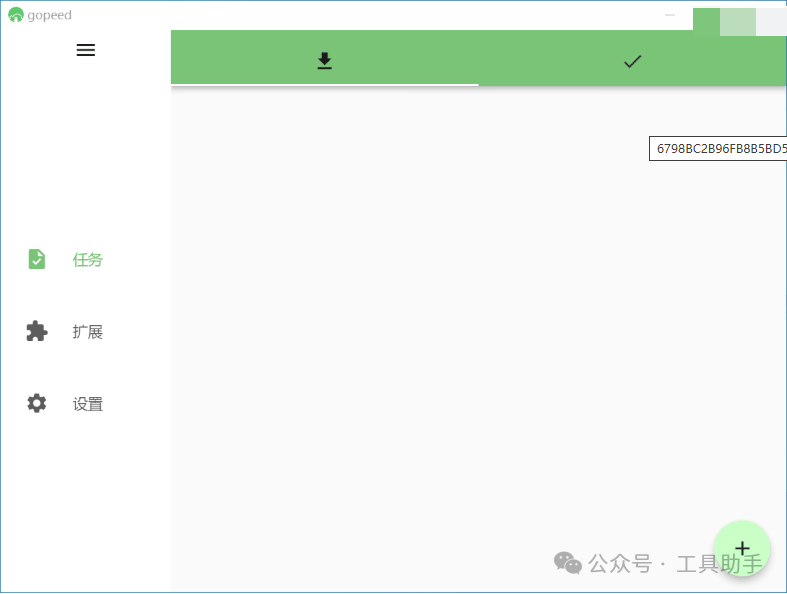
- Download HTTP/HTTPS: Copy the link, open Gopeed, click “+”, paste the link → select save path → click “start”;
- Download BT/Magnet: Copy the magnet link or drag in the torrent file, it will automatically parse and start downloading;
💡 Tip: The mobile version supports “background downloading,” allowing you to download resources while out, and it won’t interrupt when the screen is locked, so you can directly watch when you get home!
I used to think that “free download tools either have speed limits or incomplete functions,” but after using Gopeed, I found that there really exists a tool that is open-source, lightweight, unlimited speed, and multi-protocol! It doesn’t have flashy features, but it excels at “fast downloads, smooth usage, and full platform compatibility.”
If you are also tired of download speed limits, ad pop-ups, and bloated tools, you might as well try Gopeed—after all, a download tool that can fully utilize bandwidth, does not occupy resources, and is free is truly rare!
Resource Acquisition
Thunder Link: https://pan.xunlei.com/s/VOYuXOwZz6nxm9Jn_bZCWMXxA1?pwd=fjhs#
| GitHub Address: (including Android, Windows, Mac, Linux, iOS,…)https://github.com/GopeedLab/gopeed |
The software is for personal testing only, please do not use it for commercial or illegal purposes. It is recommended to completely delete it from your computer within 24 hours after downloading. If it involves violations and infringements, please delete it or contact me.