Task Management
Single-task system for front and back ends
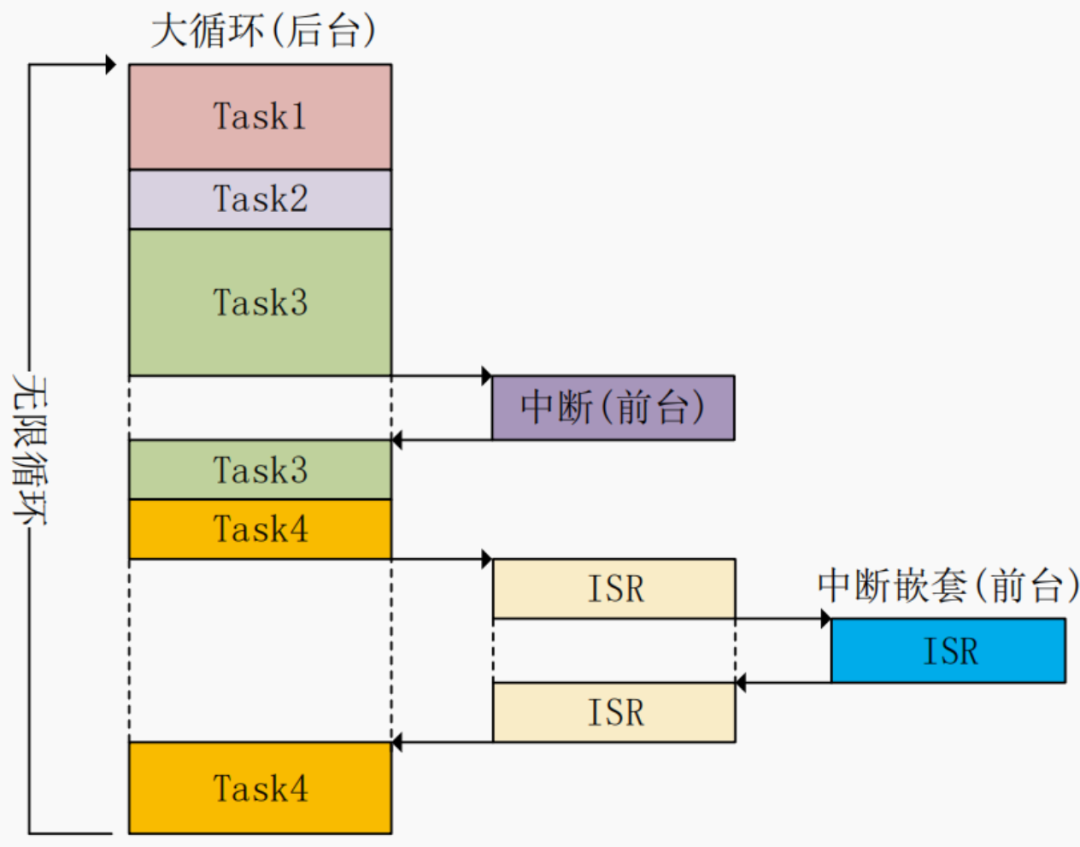
Divide and conquer multi-task system
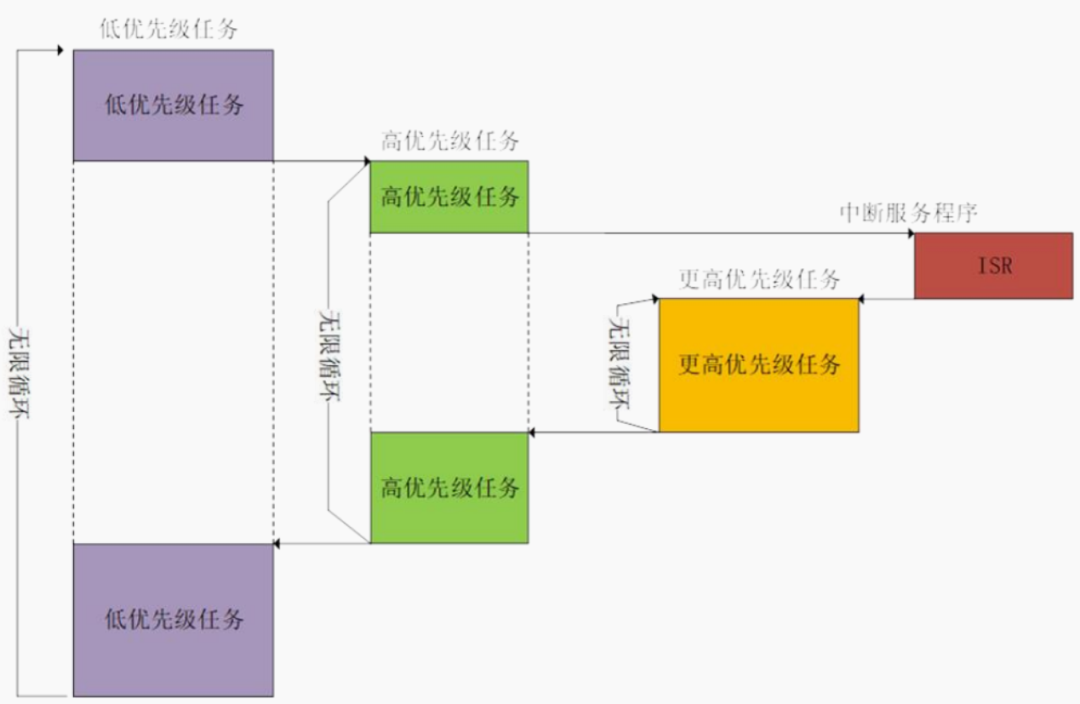
FreeRTOS is a preemptive real-time multi-tasking system, where the core task scheduler allows multiple tasks to appear to execute “in parallel”, while in reality, only one task occupies the CPU at any given time.
Tasks
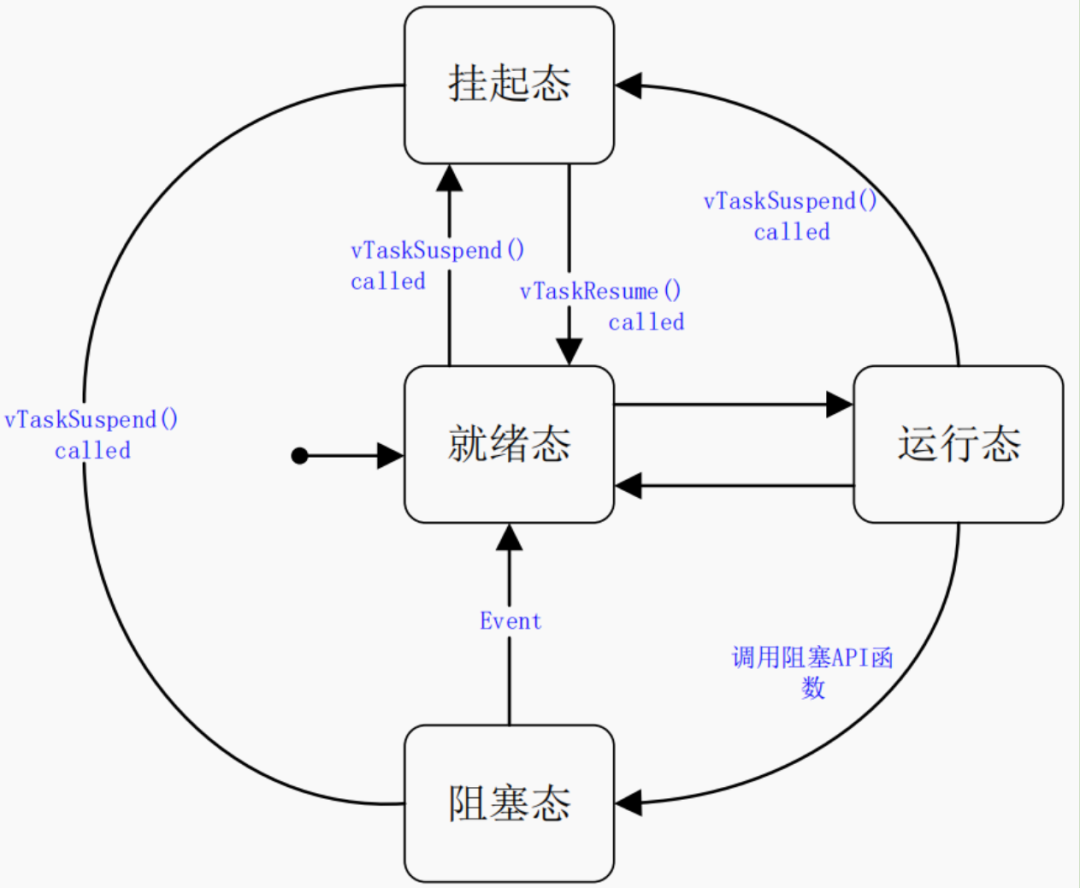
Task State
- • running
- • not running:
- • ready
- • blocked
- • suspended
In most cases, the APIs we need for task management include: create, suspend, resume, and delete, while the task implementation is a function.
void ATaskFunction( void *pvParameters );
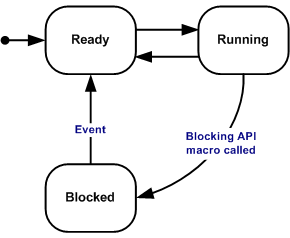
Complete state transition diagram: (different from state machine custom condition transitions)
In the previous section on memory management, we mentioned the storage of task information and the implementation of task context switching.
- • Task Control Block Task attributes: TCB_t, which is automatically allocated to each task when using the function xTaskCreate().
- • Task stack (to correctly restore a task’s execution) The task scheduler saves the current task’s context (CPU register values, etc.) in this task’s stack during task switching. When this task runs again, it will first use the values saved in the stack to restore the context, and after restoring the context, the task will continue from where it was interrupted. (distinguishing between static and dynamic task creation)
Task execution framework:
void ATaskFunction( void *pvParameters )
{
/* For different tasks, local variables are placed in the task's stack, each with its own copy */
int32_t lVariableExample = 0;
/* Task functions are usually implemented as an infinite loop */
for( ;; )
{
/* Task code */
}
/* If the program exits the loop, it must use vTaskDelete to delete itself
* NULL indicates that it is deleting itself
*/
vTaskDelete( NULL );
/* The program will not reach here; if it does, an error has occurred */
}

BaseType_t xTaskCreate( TaskFunction_t pxTaskCode, // Function pointer, task function
const char * const pcName, // Task name
const configSTACK_DEPTH_TYPE usStackDepth, // Stack size, in words, 10 means 40 bytes
void * const pvParameters, // Parameters passed to the task function
UBaseType_t uxPriority, // Priority
TaskHandle_t * const pxCreatedTask ); // Task handle, used to operate on this task later
/* Use volatile to prevent the variable from being optimized away */ The following must be noted:1 Higher priority or later created tasks run first2 Multiple tasks can use the same function, using the same functional function, void vTaskFunction( void *pvParameters ), with different parameters3 The function used to delete tasks is as follows:void vTaskDelete( TaskHandle_t xTaskToDelete ), passing null deletes itself
Example:
void vTask1( void *pvParameters )
{
const TickType_t xDelay100ms = pdMS_TO_TICKS( 100UL );
BaseType_t ret;
/* The main body of the task function is generally an infinite loop */
for( ;; )
{
/* Print task information */
printf("Task1 is running\r\n");
ret = xTaskCreate( vTask2, "Task 2", 1000, NULL, 2, &xTask2Handle );
if (ret != pdPASS)
printf("Create Task2 Failed\r\n");
// If not sleeping, the Idle task cannot execute
// The Idle task will clean up the memory used by task 2
// If not sleeping, the Idle task cannot execute, and memory will eventually run out
vTaskDelay( xDelay100ms );
}

void vTask2( void *pvParameters )
{
/* Print task information */
printf("Task2 is running and about to delete itself\r\n");
// Can directly pass NULL as a parameter, this is just to demonstrate function usage
vTaskDelete(xTask2Handle);
}

int main( void )
{
prvSetupHardware();
xTaskCreate(vTask1, "Task 1", 1000, NULL, 1, NULL);
/* Start the scheduler */
vTaskStartScheduler();
/* If the program reaches here, it indicates an error, usually due to insufficient memory */
return 0;
}
Flowchart: (non-standard 🙈)
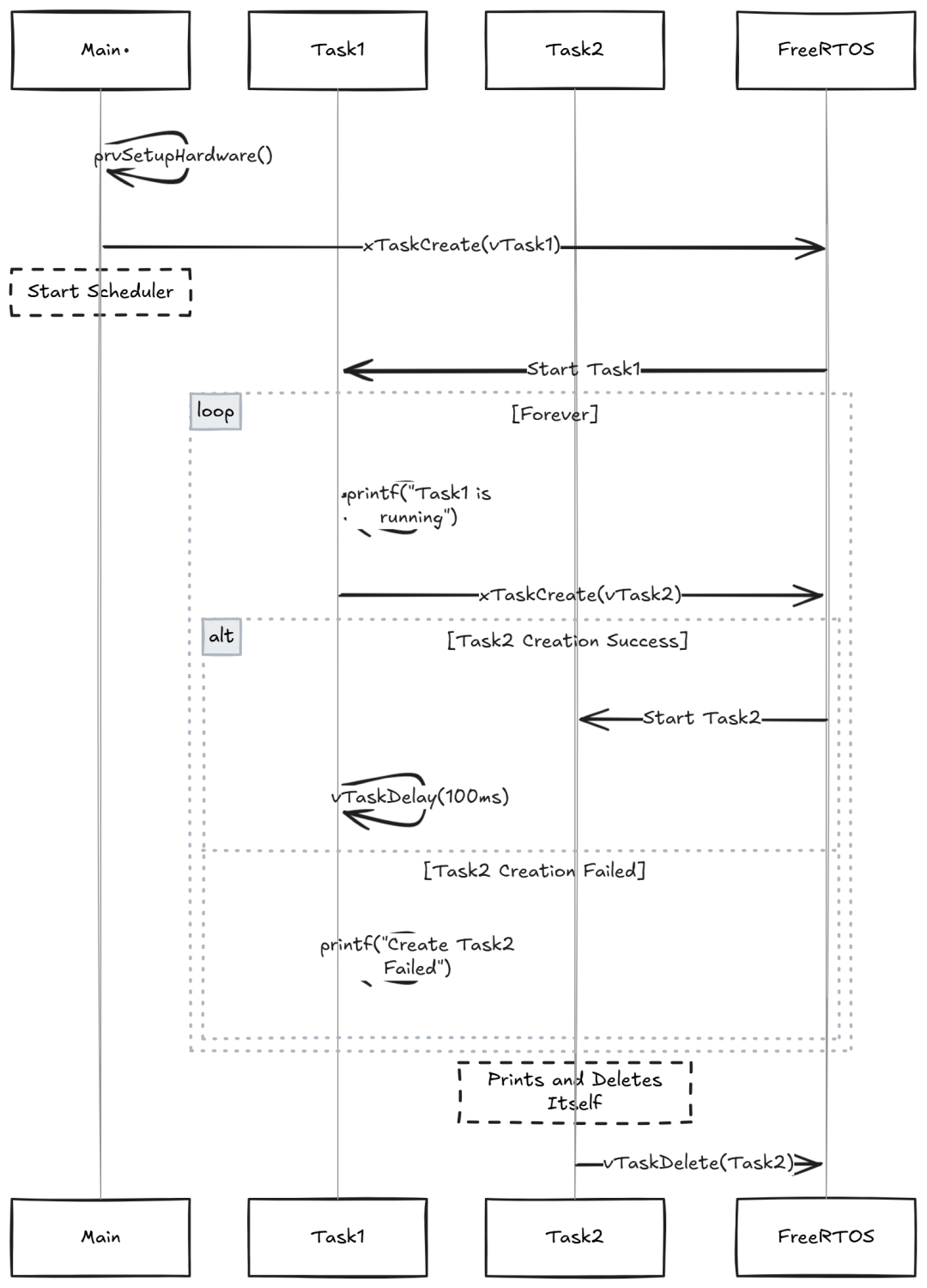
After task 2 is deleted, task 1 has the highest priority and continues to run. It calls vTaskDelay() to enter the Block state, allowing the Idle task to execute: it releases the memory of task 2 (TCB, stack), and after the time is up, task 1 continues executing.
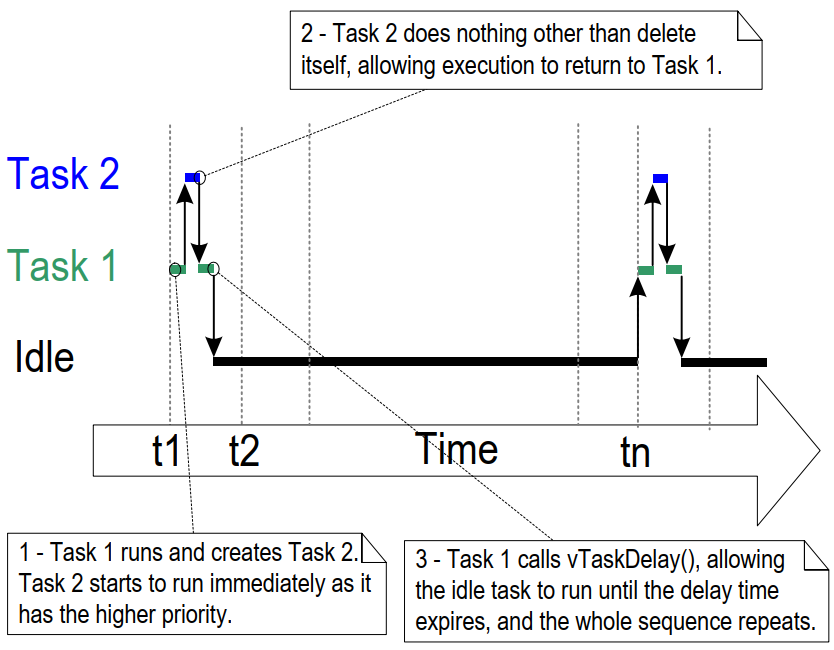
The Idle task in FreeRTOS runs when the CPU is idle, responsible for cleaning up the memory of deleted tasks. If vTask1 does not call vTaskDelay(), the Idle task in the system will have no opportunity to run, which may lead to memory leaks.
Task Scheduling
- • FreeRTOS ensures that the highest priority runnable task can execute immediately
- • For runnable tasks of the same priority, they are executed in turn
The range of priority values is:0~(configMAX_PRIORITIES – 1), priority values are unrestricted, but the higher the value, the more memory is wasted, and the higher the priority (unlike NVIC interrupt priority).
In summary, the core idea of task scheduling is to map task priorities to a bitmap and quickly find the highest priority task through bit operations, allowing the corresponding task to execute.
This means quickly finding the highest bit set to 1 from a 32-bit number.
How the source code executes
              **Priority Grouping**
- FreeRTOS divides task priorities into two levels: major priority and minor priority.
- Major priority corresponds to a 32-bit bitmap (`uxTopReadyPriority`), where each bit indicates whether a task of that major priority is ready.
- Minor priority is used to further distinguish multiple tasks under the same major priority.
From the source code, in the <span>task.c</span> file, the <span>vTaskSwitchContext()</span><code><span> function is responsible for selecting the next task to run:</span>
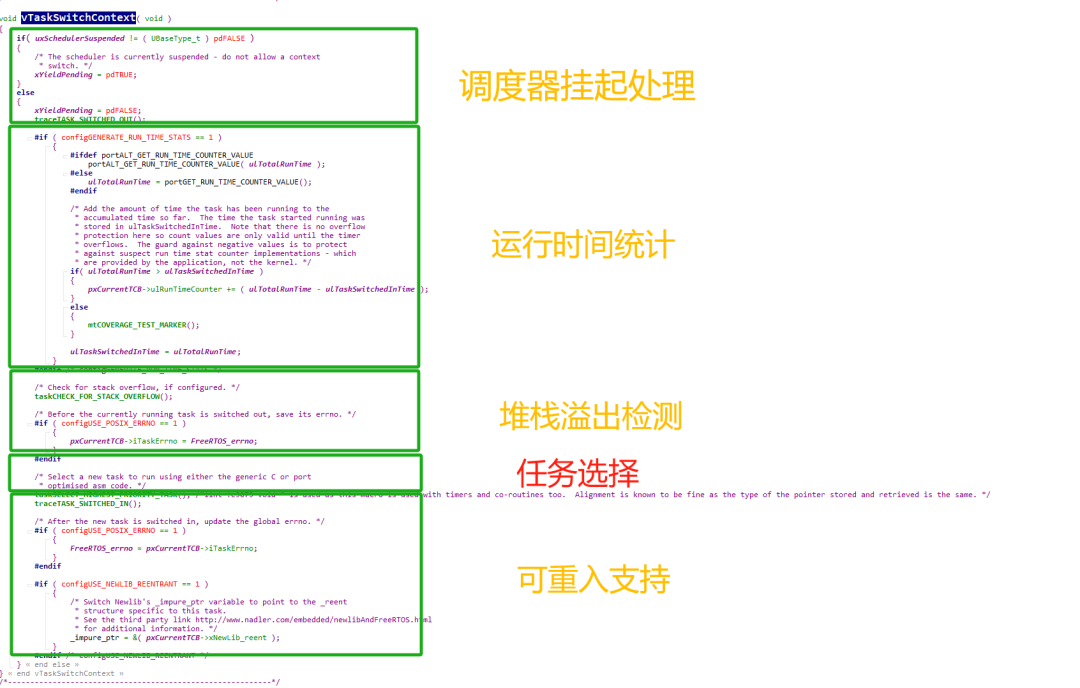
Look at the task scheduling function definition
- •
<span>uxTopReadyPriority</span>indicates the bitmap of the main priority of the current ready tasks - •
<span>portGET_HIGHEST_PRIORITY</span>finds the highest main priority - •
<span>listGET_OWNER_OF_NEXT_ENTRY</span>selects a specific task from the corresponding minor priority list of the main priority
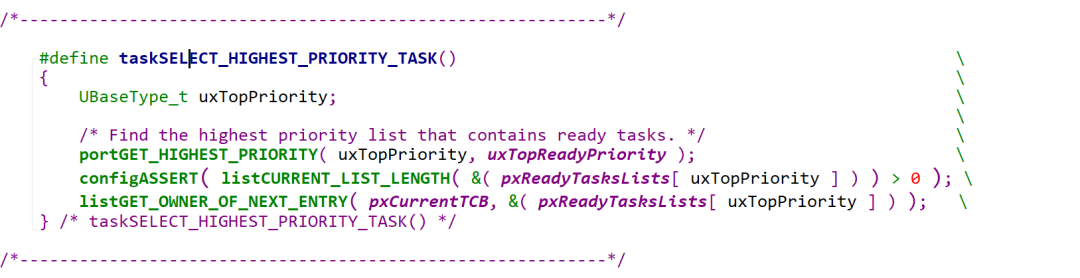
1) Priority Bitmap
- •
<span>uxTopReadyPriority</span>is a 32-bit variable, where each bit indicates whether a task of that major priority is readyeg:<span>uxTopReadyPriority = 0b00001010</span>indicates that major priorities 1 and 3 have tasks ready
2) Finding the Highest Major Priority
- •
<span>portGET_HIGHEST_PRIORITY</span>macro uses the<span>__clz()</span>instruction to calculate the position of the highest significant bit. (Architecture-specific assembly instruction) - •
<span>uxTopPriority</span>: output parameter, stores the highest major priority - •
<span>uxReadyPriorities</span>: input parameter, indicates the major priority bitmap

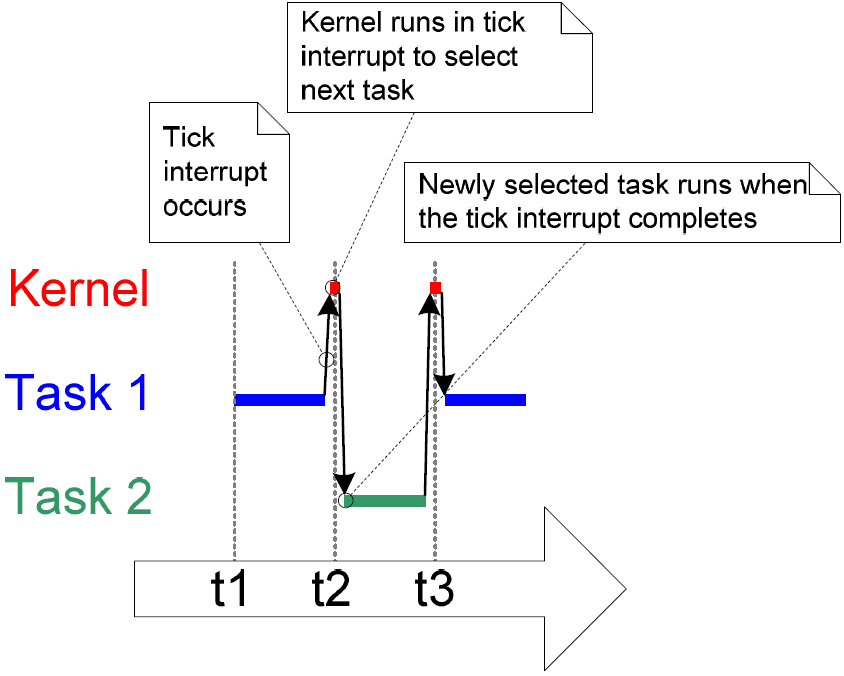
As mentioned earlier, the core of task scheduling is to quickly find the highest bit set to 1 from a 32-bit number, which is the competition for major priority. Now we come to the minor priority—— further distinguishing multiple tasks under the same major priority. If there are 3 tasks that can run with the same priority, this is where Tick comes into play, ensuring fairness and allowing the 3 tasks to execute in turn.
- • Tick—— uses a timer to generate interrupts at fixed intervals (based on the system’s main frequency)
- • The time between two interrupts is called the time slice (tick period)
- • The length of the time slice is determined by configTICK_RATE_HZ
- • With the same priority, this is time-slice round-robin scheduling—— allowing multiple tasks of the same priority to share CPU time.Time-slice round-robin scheduling
- > Each task will run for a fixed time slice (usually 1 tick period), pointing to the timer interrupt handler, selecting the next ready task and then switching to the next ready task (this also takes time)
- > FreeRTOS uses a ready list
<span>pxReadyTasksLists</span>to manage tasks under each priority, with tasks of the same priority existing in a doubly linked list. After each task runs for a time slice, it moves to the end of the list. - > If time-slice round-robin is disabled, only the current task can voluntarily yield the CPU,
<span>vTaskDelay(x) (parameter measured in ticks)</span>or<span>blocking</span>, to switch to the next task.
Task Deletion vTaskDelete()
Task execution is in while(1), to exit, the task must be deleted immediately.
- • Tasks are created by xTaskCreate(), and when calling the function vTaskDelete() to delete a task, the idle task must be given time to run to delete the stack and control block memory previously allocated for this task.
- • Only memory allocated to tasks by the kernel will be automatically released after the task is deleted
- • In statically created tasks, memory allocated to tasks by the user needs to be released by the user.pvPortMalloc() for allocation, vPortFree() for release
- Otherwise, it will lead to memory leaks!!!
Task Sleep Delay
- • vTaskDelay: must wait for a specified number of Tick Interrupts to become ready, relative time
- • vTaskDelayUntil: must wait until a specified absolute time to become ready, absolute time
If you choose an empty loop delay to implement periodic task execution, task 1 with a higher priority than task 2 will cause task 2 to be “starved”, and task 1 will always execute, occupying a large number of machine cycles.
Calling the vTaskDelay() API function instead of an empty loop, when a task calls vTaskDelay( 100 ), that task will remain in the blocked state until the heartbeat count delays 100 ticks, allowing lower priority tasks to execute as well.
Comparison Chart
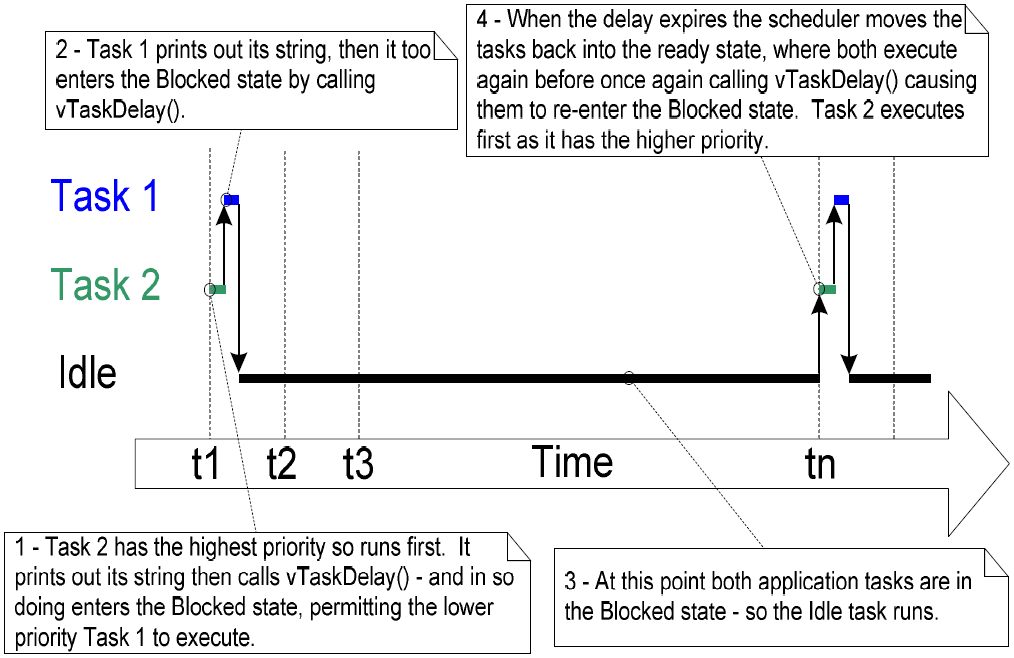
The amount of execution time that idle can obtain is a measure of the system’s processing capability margin. In this system, time-related is basically in tick units, and you can use the constant portTICK_RATE_MS to convert milliseconds to heartbeat cycles.
Idle Tasks and Hook Functions
Idle executes its hook function.
The role of the Idle task: to release the memory of deleted tasks.
(The significance of using vTaskDelete() was mentioned earlier)
A good program has tasks that are event-driven: most of the time, they are in a blocked state. It is possible that all tasks we create cannot execute, but the scheduler must find a task that can run: therefore, we need to provide an idle task.
When using the vTaskStartScheduler() function to create and start the scheduler, this function internally creates the idle task:
• The idle task has a priority of 0: it cannot prevent user tasks from running, and any task can preempt it.
• The idle task is either in the ready state or in the running state, and will never block.
(Idle Task Hook Functions): (like interrupt service callback functions)
• Execute some low-priority, background functions that need to run continuously.
• Measuring the time occupied by the idle task can calculate the processor utilization/system processing margin.
• Idle being executed means there are no important tasks to do, allowing the system to enter low-power modes.
Limitations:
• Cannot cause the idle task to enter a blocked state or suspended state.
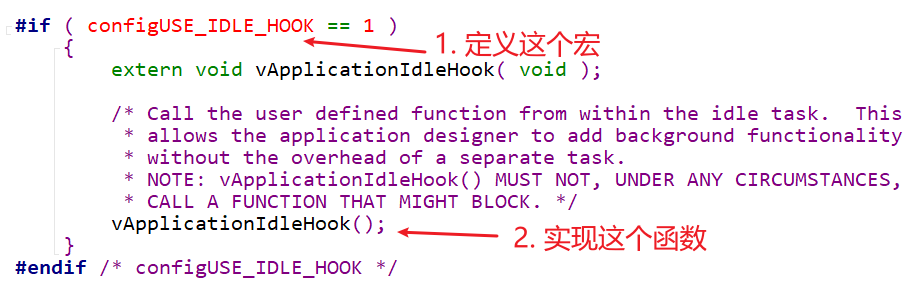
If the application uses the vTaskDelete() API function, the idle hook function must be able to return quickly. Because after a task is deleted, the idle task is responsible for reclaiming kernel resources. If the idle task is always running in the hook function, it cannot perform the reclamation work.
In the FreeRTOS\Source\tasks.c path:
Coroutines
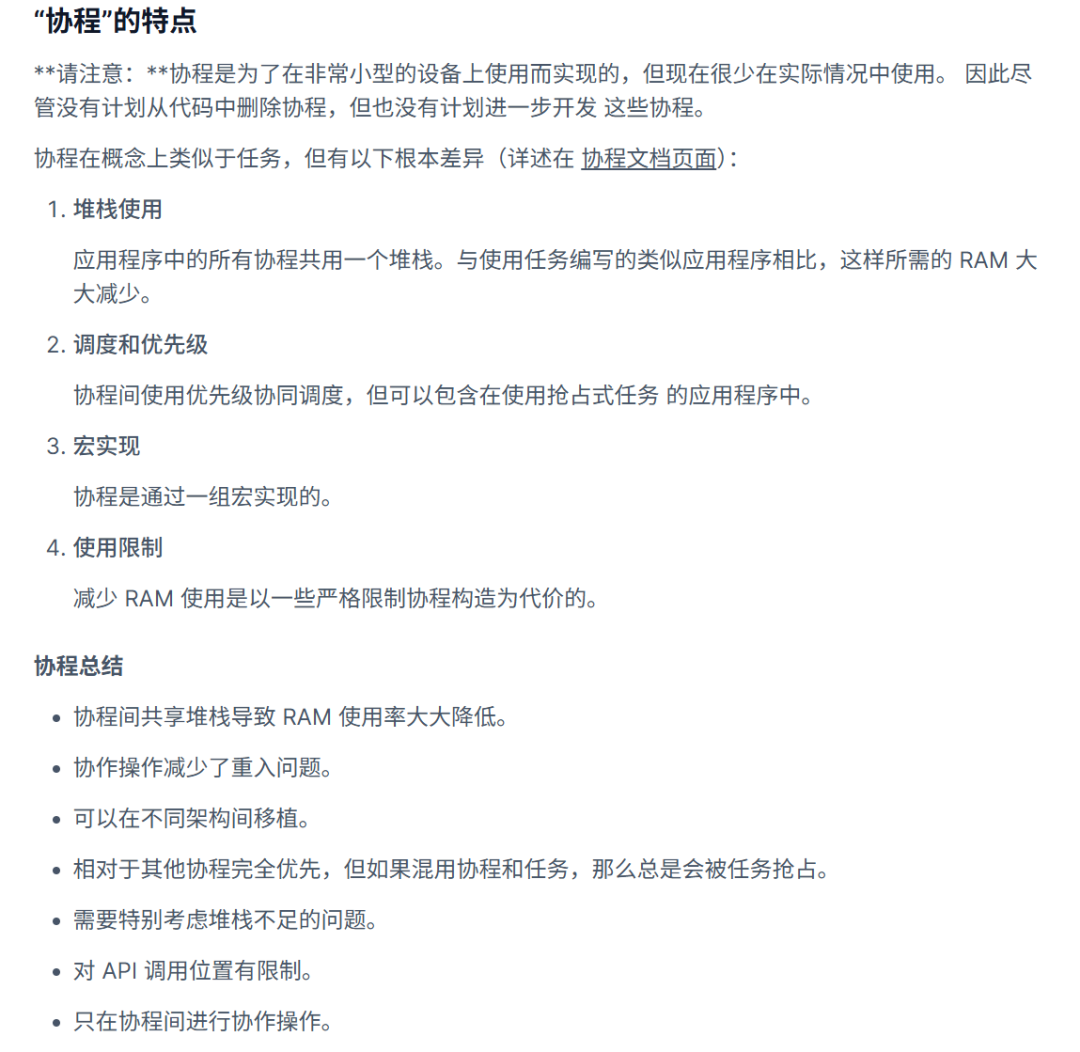
Finally, there is a corresponding concept (excerpted from the official documentation overview).
Coroutine Implementation
void vACoRoutineFunction( CoRoutineHandle_t xHandle,
                          UBaseType_t uxIndex )
{
    crSTART( xHandle );

    for( ;; )
    {
        -- Co-routine application code here. --
    }

    crEND();
}
If tasks and coroutines are mixed in the same program, the priority of tasks is always higher than that of coroutines.
Reference:Official User Manual
http://www.FreeRTOS.org