
“How to recharge at home?” “Recharge successful, but why is there still no gas?” “I recharged and pressed the button, but what should I do if there is still no gas?”
Recently, many gas users have been leaving messages on the WeChat public account inquiring about the recharge and gas purchase issues for smart IoT gas meters. Beijing Gas Group provides various gas purchase channels for smart IoT gas meter users, and you can choose according to your needs.

Is my home equipped with a smart IoT gas meter?
Identification Method ①
Check the gas meter
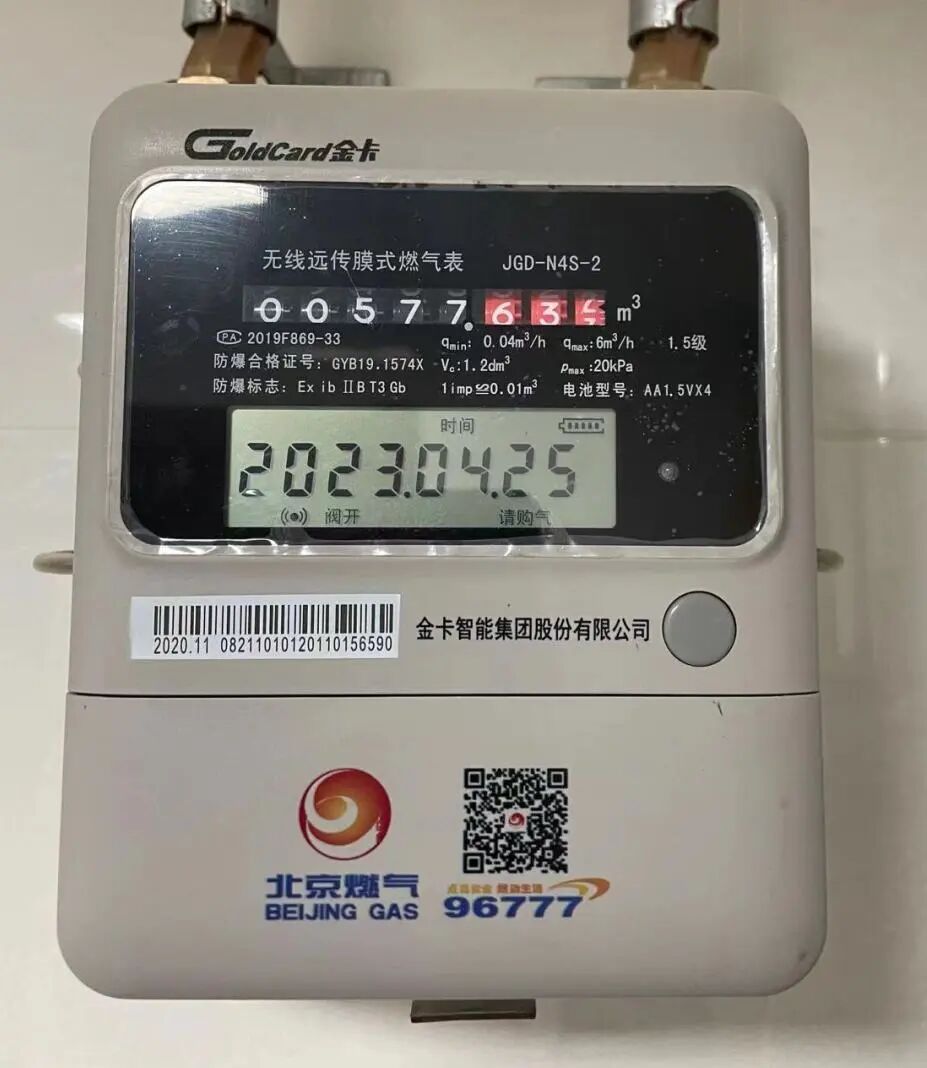
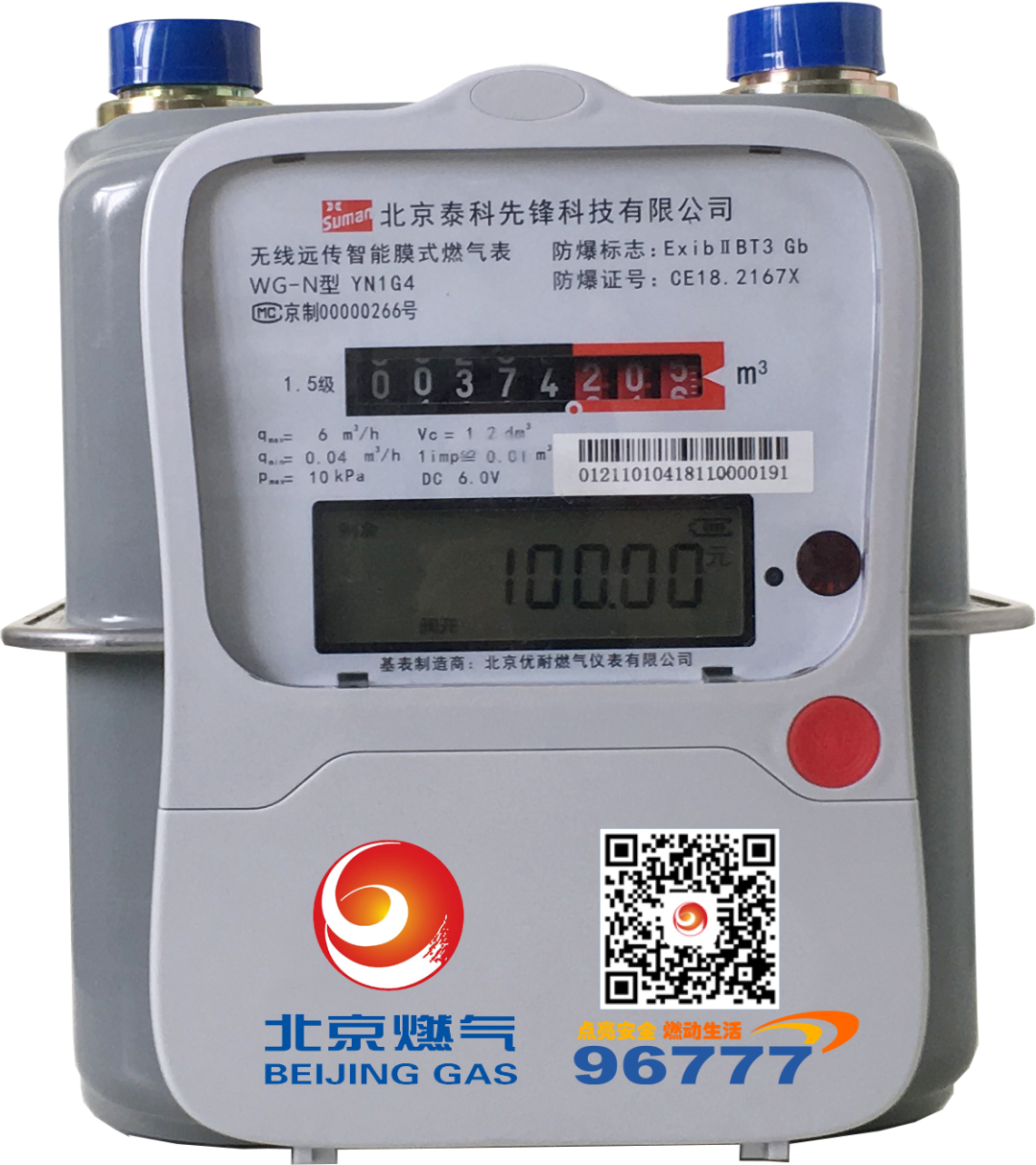
Smart IoT Gas Meter
If your gas meter has the words or symbols “Smart IoT Gas Meter“, “Wireless Remote Transmission (Smart) Membrane Gas Meter“, or “NB-IOT“, it indicates that you are using a smart IoT gas meter.
Identification Method ②
Check the gas card
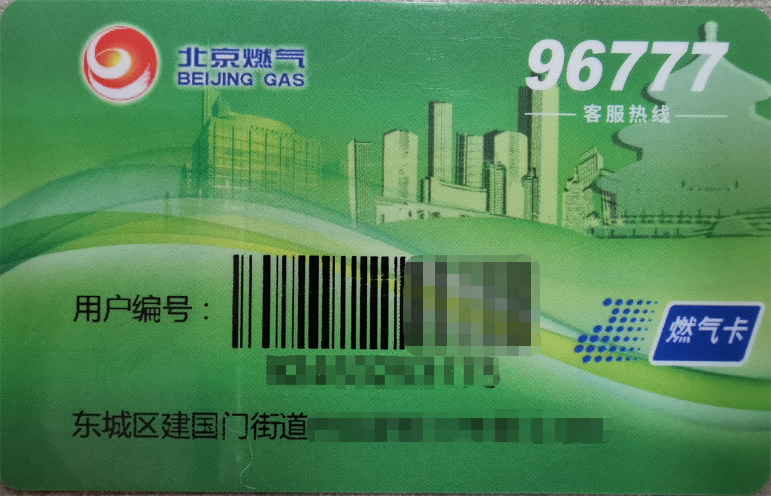
The gas card for the smart IoT gas meter is a dedicated green gas card,which does not have gas purchase functionality and is only used for recording user number and address information. You can complete the recharge using the 11-digit user number (or 20-digit meter number) at various partner channels, without needing the gas card.
What methods can I use to recharge?
Beijing Gas Smart IoT Gas Meter (NB Meter) Recharge Channels
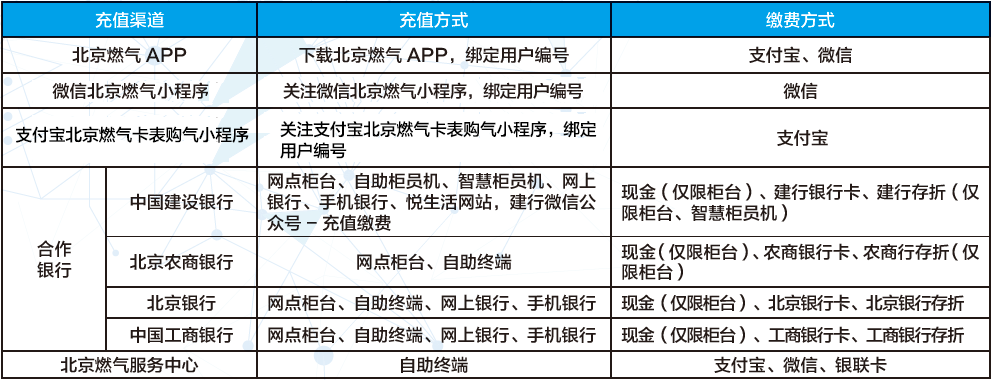
(Click the image to view a larger version)
If you find it inconvenient to purchase gas online, you can still go to offline outlets or partner banks to purchase gas. You can use the Beijing Gas APP, click on “Service Outlets”, then click on “Beijing Gas Service Center” or “Self-service Gas Sale Terminal”, select your area, and check the nearest gas center or self-service terminal.
How to recharge at home?
You can use the Beijing Gas WeChat Mini Program, Beijing Gas Card Meter Purchase Alipay Mini Program, or the Beijing Gas APP to recharge.
01WeChat Mini Program<<<<
Open the “Beijing Gas” WeChat Mini Program → If using for the first time, please bind the user number → Click “Gas Payment” → Click the “Recharge” button → Select or enter the amount to recharge → Confirm payment.
> Click here to view the gas purchase process in the WeChat Mini Program<
02Beijing Gas APP<<<<
Open the “Beijing Gas” APP and log in → For first-time users, click the white “+” in the upper right corner to bind the user number → Click “Recharge Payment” → Click the “Recharge” button below → Select or enter the amount to recharge → Confirm payment.
> Click here to view the gas purchase process in the APP<
03Alipay Mini Program<<<<
Open the “Beijing Gas Card Meter Purchase” Alipay Mini Program → Select “Smart Meter Purchase” → Enter the user number or scan the gas meter number on the gas meter → Click “Query” → For first-time users, click “Bind User Number” → Enter or select the recharge amount → Click payment → Choose your payment method and confirm payment.
> Click here to view the gas purchase process in the Alipay Mini Program<
Common Issues During Use
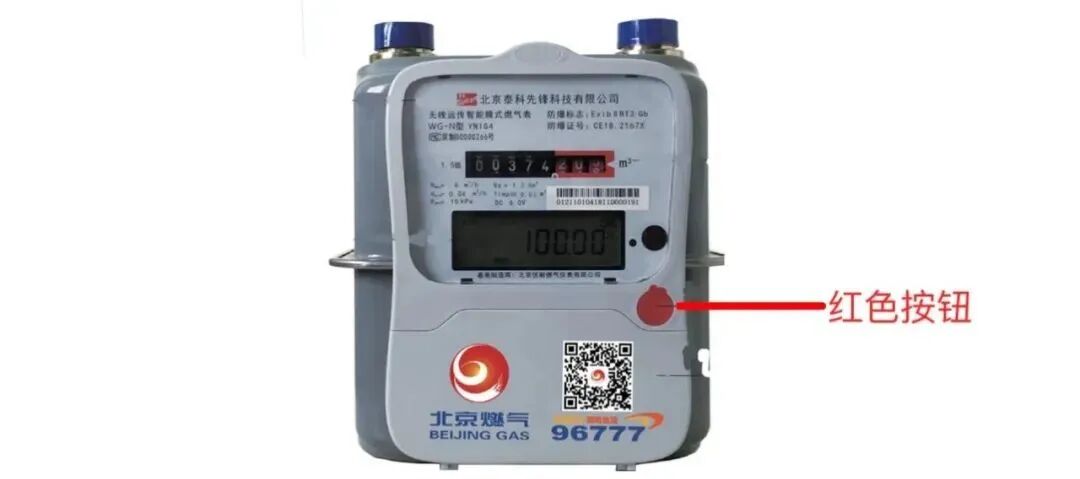
Press the red/gray button on the gas meter
Check the remaining amount on the LCD screen
Please pay attention to recharge in advance
To avoid situations where there is insufficient amount in the meter
and cannot use gas normally
1. What should I do if the recharge is unsuccessful?
If the online recharge is unsuccessful but the amount has been deducted, the system will automatically refund during the night reconciliation period. You can also go to the nearest gas service center for a refund. If multiple recharges are unsuccessful, please contact the nearest gas service center for staff assistance with the recharge process.
2. Why can’t I purchase gas?
If your home has just replaced a new smart IoT meter, you need to wait for the meter replacement information to be updated before recharging. If the replacement information has not been updated, it may result in unsuccessful recharges. The first recharge (including transferred gas volume) for the newly replaced gas meter has a certain overdraft function, which will not affect normal gas usage. When the overdraft amount is exceeded, the gas meter will close the valve. If the recharge exceeds the overdraft amount, press and hold the red or gray button on the gas meter for more than 3 seconds to complete communication and restore gas usage.
3. What should I do if there is still no gas after recharging?
After successfully recharging the smart IoT meter (NB meter), it will automatically communicate at night to update the balance in the meter. If the valve has been closed due to insufficient payment, or if you want to see the balance after recharging in real-time, you can press and hold the red or gray button on the gas meter for more than 3 seconds to force communication. After successful communication, the meter will display the balance, and you can resume gas usage.
4. What if there is still gas/amount in the gas meter, but I can’t use gas?
1. If there is still a balance in your gas meter but you cannot use gas, it may be due to a dead battery. Replacing the battery promptly can restore gas usage.
2. Another possibility is that if you have installed a gas shut-off valve at home, check if it is due to the shut-off valve closing the valve.
5. Why does the barcode on the gas meter show that the user does not exist, whether scanned or entered manually?
If it is the first binding after replacing the meter, it may take time for data synchronization. Generally, after replacing the meter, you can input the meter number or user number in the Beijing Gas APP the next day to bind. If you still cannot bind after 3 working days, please contact the gas service center to confirm whether the data has been updated.
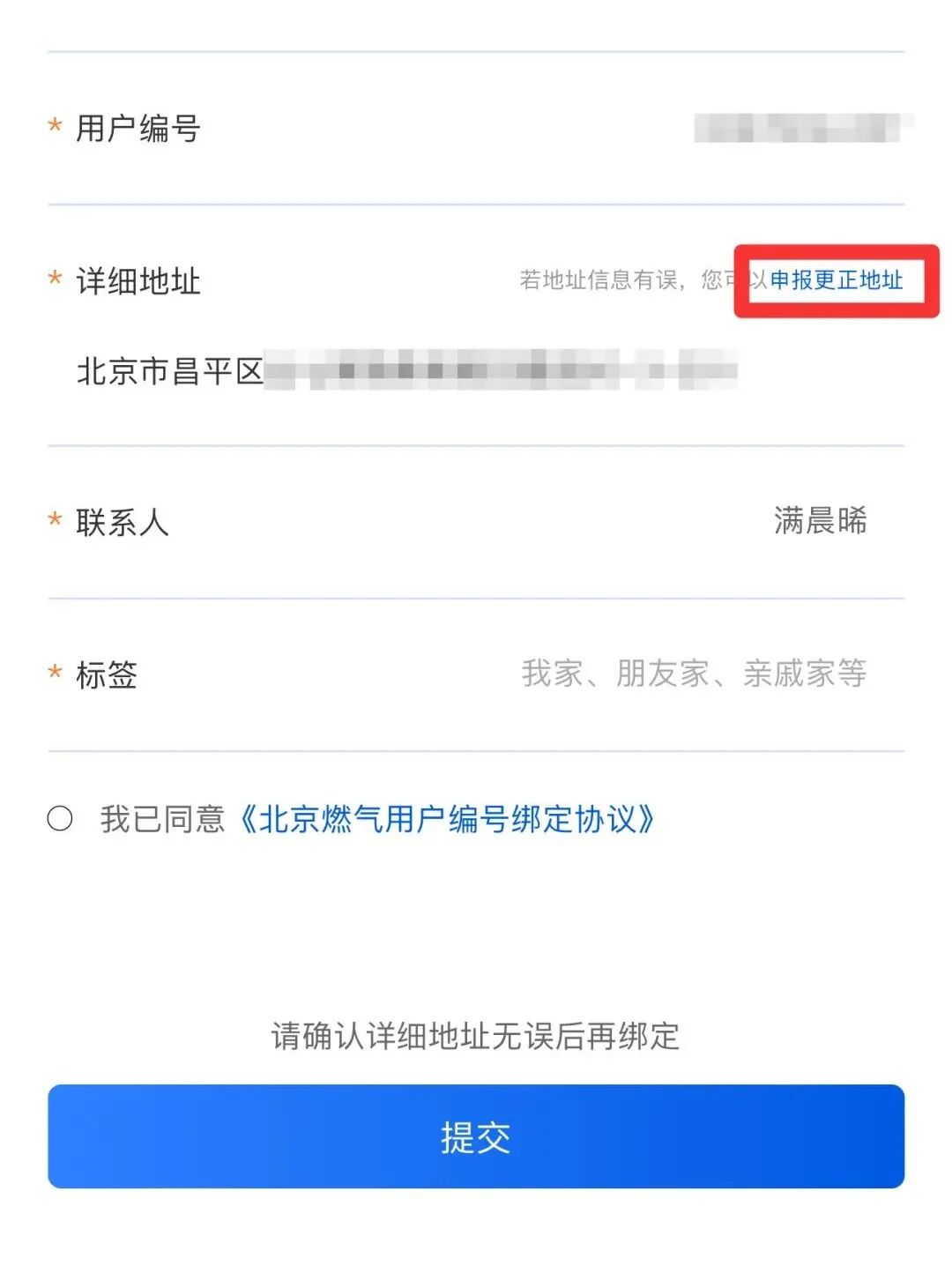
6. What should I do if the address is incorrect when binding the user number?
If you are using the Beijing Gas APP, you can directly click “Report Address Correction” as shown in the image below. For WeChat and Alipay Mini Programs, please call the Beijing Gas customer service hotline 96777 for assistance.
If you encounter refund issues, meter errors, or APP display problems
Please call the Beijing Gas customer service hotline 96777
or consult the Beijing Gas service center by phone
【END】

Beijing Gas is always with you
Ensuring your safe gas usage
————————————-
We welcome you to scan the QR code to download and use the “Beijing Gas” APP

Beijing Gas APP
Your gas steward by your side
Source: Beijing Gas 96777