A long time ago, I implemented this feature in a DIY smart curtain project to change the window opening strategy on rainy days. Today, I need to use the base station to query location information, so I thought I would write an article to introduce both functionalities together for my future reference.
1. Principles of WiFi Positioning Technology
The WiFi positioning technology is based on the following core principles:
-
1) Signal Strength Measurement: The device scans the surrounding WiFi hotspots, recording the MAC address and signal strength (RSSI) of each hotspot.
-
2) Fingerprint Database: A fingerprint database is established using the information of WiFi hotspots at known locations.
-
3) Location Matching: The scanned WiFi information is matched with the database to determine the device’s location.
2. Overall Workflow
WiFi Scan → Data Upload → Location Resolution → Weather Query → Result Display3. Core Code Implementation
### 1. WiFi Scanning Module
// WiFi information structure
typedef struct {
    uint8_t wifi_ssid[33];    // WiFi name
    uint8_t wifi_mac[12];     // MAC address
    int8_t  wifi_rssi;        // Signal strength
} wifi_info_t;

// WiFi scanning task
void wifi_scan_task(void *pvParameters) {
    wifi_scan_config_t scan_config = {
        .ssid = NULL,
        .bssid = NULL,
        .channel = 0,
        .show_hidden = false
    };
    // Start scanning
    ESP_ERROR_CHECK(esp_wifi_scan_start(&scan_config, true));
    // Get scan results
    uint16_t ap_count = MAX_AP_RECORDS;
    wifi_ap_record_t ap_info[MAX_AP_RECORDS];
    ESP_ERROR_CHECK(esp_wifi_scan_get_ap_records(&ap_count, ap_info));
    // Save WiFi information
    for (int i = 0; i < ap_count; i++) {
        memcpy(wifi_info[i].wifi_ssid, ap_info[i].ssid, sizeof(ap_info[i].ssid));
        memcpy(wifi_info[i].wifi_mac, ap_info[i].bssid, sizeof(ap_info[i].bssid));
        wifi_info[i].wifi_rssi = ap_info[i].rssi;
    }
    // Send data to positioning service
    send_wifi_info();
}
### 2. Location Positioning Service
The project uses a third-party WiFi positioning service API, sending WiFi information via HTTP POST requests:
// Construct JSON packet
cJSON *root = cJSON_CreateObject();
cJSON *location = cJSON_CreateObject();
cJSON *wifi_list = cJSON_CreateArray();
// Add device information
cJSON_AddNumberToObject(root, "timestamp", 1515743846505);
cJSON_AddStringToObject(root, "id", "12345678900987654321012345");
// Add WiFi list
for (int i = 0; i < MAX_AP_RECORDS; i++) {
    if (wifi_info[i].wifi_rssi != 0) {
        cJSON *wifi = cJSON_CreateObject();
        cJSON_AddNumberToObject(wifi, "signalStrength", wifi_info[i].wifi_rssi);
        // Format MAC address
        char mac_str[18];
        snprintf(mac_str, sizeof(mac_str), "%02X:%02X:%02X:%02X:%02X:%02X",
            wifi_info[i].wifi_mac[0], wifi_info[i].wifi_mac[1], wifi_info[i].wifi_mac[2],
            wifi_info[i].wifi_mac[3], wifi_info[i].wifi_mac[4], wifi_info[i].wifi_mac[5]);
        cJSON_AddStringToObject(wifi, "macAddress", mac_str);
        cJSON_AddItemToArray(wifi_list, wifi);
    }
}
cJSON_AddItemToObject(location, "wifis", wifi_list);
cJSON_AddItemToObject(root, "location", location);
### 3. Location Information Parsing
After receiving the JSON data returned by the positioning service, we parse the city code:
void wifi_address_parse(const char* json_response) {
    cJSON *root = cJSON_Parse(json_response);
    if (root == NULL) {
        printf("Error parsing JSON\n");
        return;
    }
    // Parse location information
    cJSON *location = cJSON_GetObjectItem(root, "location");
    cJSON *address = cJSON_GetObjectItem(location, "address");
    cJSON *context = cJSON_GetObjectItem(address, "context");
    // Find district code
    cJSON *item = NULL;
    cJSON_ArrayForEach(item, context) {
        if (cJSON_IsObject(item)) {
            cJSON *type = cJSON_GetObjectItem(item, "type");
            if (type && strcmp(type->valuestring, "District") == 0) {
                cJSON *District_code = cJSON_GetObjectItem(item, "code");
                strncpy(location_info.city_code, District_code->valuestring,
                        sizeof(location_info.city_code) - 1);
                // Update global flag
                global_flag.scan_wifi_flag = 1;
                update_global_flag(&global_flag);
                // Get weather information
                get_weather_info();
                break;
            }
        }
    }
    cJSON_Delete(root);
}
### 4. Weather Information Retrieval
Use the Amap weather API to get the local weather:
void get_weather_info() {
    char weather_full_url[256];
    snprintf(weather_full_url, sizeof(weather_full_url),
              "%s?city=%s&key=%s",
              WEATHER_BASE_URL,
              location_info.city_code,
              WEATHER_MY_KEY);
    // Send HTTP GET request
    esp_http_client_config_t config = {
        .url = weather_full_url,
        .method = HTTP_METHOD_GET,
        .transport_type = HTTP_TRANSPORT_OVER_TCP,
        .timeout_ms = 10000,
        .buffer_size = 8192,
        .event_handler = _http_get_weather_event_handler,
        .is_async = false,
    };
    esp_http_client_handle_t client = esp_http_client_init(&config);
    esp_err_t err = esp_http_client_perform(client);
    esp_http_client_cleanup(client);
}
### 5. Weather Data Parsing
static void weather_info_parse(const char* json_response, weather_info_t *info) {
    cJSON *root = cJSON_Parse(json_response);
    if (root == NULL) return;
    // Parse weather information in the lives array
    cJSON *lives = cJSON_GetObjectItemCaseSensitive(root, "lives");
    if (cJSON_IsArray(lives) && cJSON_GetArraySize(lives) > 0) {
        cJSON *live = cJSON_GetArrayItem(lives, 0);
        // Extract various weather data
        cJSON *item = cJSON_GetObjectItem(live, "province");
        if (cJSON_IsString(item)) {
            snprintf(info->province, sizeof(info->province), "%s", item->valuestring);
        }
        item = cJSON_GetObjectItem(live, "city");
        if (cJSON_IsString(item)) {
            snprintf(info->city, sizeof(info->city), "%s", item->valuestring);
        }
        item = cJSON_GetObjectItem(live, "temperature");
        if (cJSON_IsString(item)) {
            info->temperature = atoi(item->valuestring);
        }
        item = cJSON_GetObjectItem(live, "humidity");
        if (cJSON_IsString(item)) {
            info->humidity = atoi(item->valuestring);
        }
        // ... other weather parameters
    }
    cJSON_Delete(root);
}
4. Conclusion
This ESP32 WiFi positioning and weather retrieval project demonstrates a typical implementation of location-aware technology in modern IoT devices. Through WiFi positioning technology, we can achieve device location awareness without increasing hardware costs, thereby providing location-based services.
5. Frequently Asked Questions:
1) WiFi positioning API:
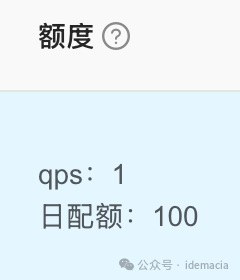
https://lotboard.newayz.com/dashboard After registering on the official website, you can enter My Applications to view the API documentation and create new applications to obtain the correspondingKey. This is a paid service, and it seems quite expensive, with only 100 free requests per day, which is fine for personal use.The documentation states that at least 4 WiFi information points are needed for positioning, but in actual tests, it is better to calculate based on 10. The WiFi positioning test is still very accurate.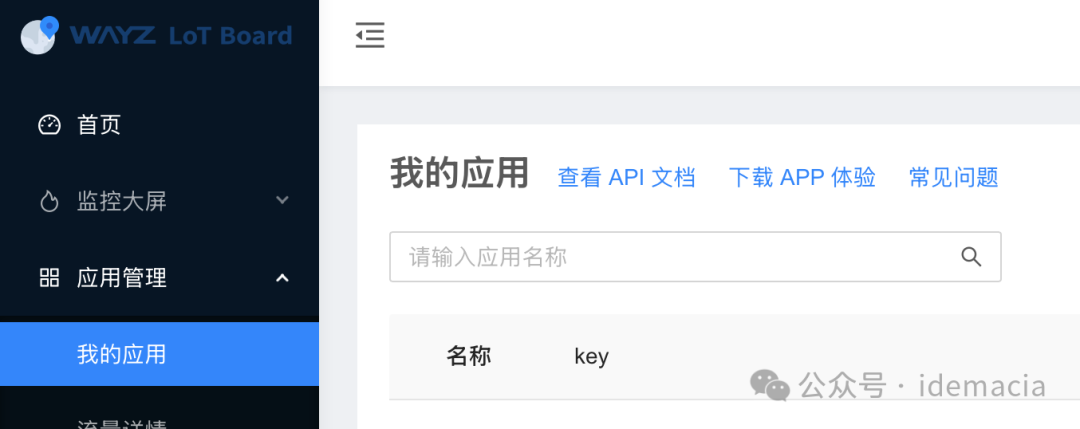
Below is a free LBS database I recently discovered. The quota is quite generous, and it can locate with just one WiFi information point. However, I am not sure about the inclusion of WiFi information; I have not tested it yet. I have only used their base station positioning, which occasionally has base stations not in the database, leading to incorrect positioning.Additionally, the port number for this API request keeps changing. When I first used it, it was 81, then it changed to 83. As of writing this article, it is 84. The next article will introduce how to use base stations for positioning.
http://www.cellocation.comYou can check the homepage for usage documentation. This address provides the following services: Base Station | WIFI | LBS Positioning | Longitude and Latitude | Query | API Interface; the next article will introduce how to use base stations for location positioning. The image below shows the explanation of free usage:

2) Amap API calls:
https://lbs.amap.comJust register on the official website,
### 1. Then log in to the Amap Open Platform Console. If you do not have a developer account, pleaseregister as a developer.
### 2. Go to [Application Management], click on the top right corner of the page [Create New Application], fill out the form to create a new application.
### 3. Go to [Application Management], select the application for which you need to create a Key, and click [Add Key], selecting [Web Service] in the service platform of the form.。
### 4. After successful creation, you can obtain the Key and security key.
This is an introduction to the projects supported by individual developers and the free quota:
https://lbs.amap.com/upgrade#price