In this era of information explosion, learning has never been more important. Last time, we explored task management in FreeRTOS, and today, we will delve into the mysteries of message queues in FreeRTOS, adding valuable knowledge to your repository. Have you ever been confused about message queues in FreeRTOS but struggled to find answers? Don’t worry, we have prepared the most comprehensive and professional analysis for you, making you a ‘knowledge expert’ among your friends!
1. Concept and Function of Message Queues
First, let’s look at the concept of message queues. A message queue is a data structure commonly used for communication between tasks. It allows messages of variable lengths to be passed between tasks and between interrupts and tasks. Compared to a global array in bare metal, using a message queue has several advantages, such as timeout mechanisms, preventing conflicts in multi-task access, and solving the problem of message passing between interrupt service routines and tasks.
2. Operation Mechanism of Message Queues
2.1 Creation of Message Queues
Memory allocation: When creating a message queue, FreeRTOS first allocates a block of memory for the message queue. The size of this memory is calculated using the formula: Memory Size = Size of Message Queue Control Block + (Size of Single Message Space * Length of Message Queue).
2.2 Sending Messages
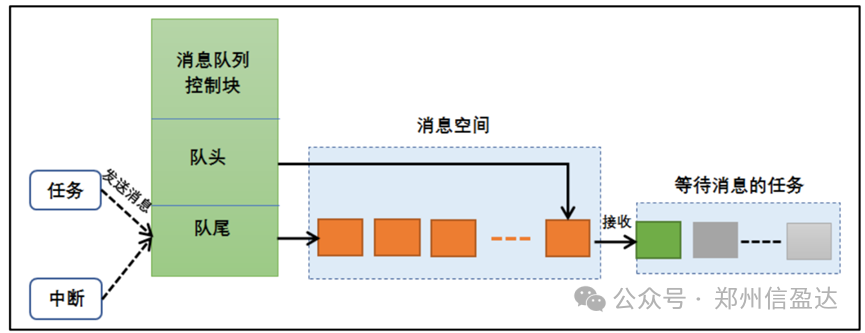
Sending ordinary messages: When sending a message, if the queue is not full or allows overwriting, FreeRTOS will copy the message to the end of the message queue. If the queue is full or does not allow overwriting, it will block according to the user-specified timeout. During this time, if the queue does not allow enqueueing, the task will remain blocked waiting for the queue to allow enqueueing. When other tasks read data from their waiting queue (making the queue not full), the task will automatically transition from the blocked state to the ready state. If the waiting time exceeds the specified blocking time, even if the queue still does not allow enqueueing, the task will automatically transition from the blocked state to the ready state, at which point the sending task or interrupt will receive an error code errQUEUE_FULL. Sending urgent messages: The process of sending urgent messages is almost the same as sending regular messages, except that when sending urgent messages, the sending position is at the front of the message queue rather than the end, allowing the receiver to prioritize urgent messages for timely processing.
2.3 Reading Messages
When reading queue data: If the queue is empty within the blocking timeout, the task will remain blocked waiting for valid queue data. When other tasks or interrupt service routines write data to their waiting queue, the task will automatically transition from the blocked state to the ready state. Outside the blocking timeout, if the waiting time exceeds the specified blocking time, even if there is no valid data in the queue, the task will automatically transition from the blocked state to the ready state. When the message queue is no longer in use, it should be deleted to free system resources, and once this operation is completed, the message queue will be permanently deleted.
2.4 Blocking Mechanism
When reading messages, if no messages are found in the queue, there are three possible responses:
1. Exit message reading directly without blocking.
2. Wait for a while (the waiting time is the set timeout), if no message arrives after a long time, exit message reading, exit blocking, and enter the ready state.
3. Wait indefinitely; I will never exit unless you give me a message.
The operation process of the message queue is illustrated in the figure below.
3. Application Scenarios of Message Queues
The application scenarios of message queues are a topic of great interest. Message queues can be used in situations where messages of variable lengths need to be sent, including message exchanges between tasks. The queue is the main communication method between tasks in FreeRTOS, allowing information to be transmitted between tasks and between interrupts and tasks. The messages sent to the queue are implemented through copying, which means that the data stored in the queue is the original data, not a reference to the original data.

4. Message Queue Control Block
The message queue control block is a core component of the message queue. It is allocated by the system when the message queue is created to store key information about the message queue, enabling the system to manage the message queue effectively.
The main functions of the message queue control block include storing and managing key information about the message queue, including but not limited to:
1. Storage location of messages: Implemented through head and tail pointers, pointing to the starting and ending positions of messages in the queue.
2. Message size: Defines the maximum size of a single message in the queue, aiding the system in memory management during message sending and receiving.
3. Queue length: Indicates the number of messages that can be stored in the queue. This length is specified when the queue is created and cannot be changed once created.
In summary, the FreeRTOS message queue control block is an important part of the message queue operation mechanism, enabling the system to efficiently manage the message queue and achieve communication and synchronization between tasks.

5. Common Functions of Message Queues
5.1 Message Queue Creation Function xQueueCreate()
xQueueCreate() is used to create a new queue and return a handle that can be used to access this queue. The queue handle is essentially a pointer to the queue data structure type.
Function: xQueueCreate and xQueueCreateStatic Description: xQueueCreate dynamically creates a queue from heap memory. xQueueCreateStatic statically creates a queue, with memory allocated by the user. Parameters: uxQueueLength: Maximum length of the queue. uxItemSize: Size of each data item in the queue. (For xQueueCreateStatic) pucQueueStorage: Pointer to the user-provided storage area. (For xQueueCreateStatic) pxQueueBuffer: Pointer to the static queue control block. Return value: Returns the queue handle on success, NULL on failure. Example of creation function: QueueHandle_t xQueue1 = xQueueCreate(10, sizeof(unsigned long)); if (xQueue1 == NULL){ // Handle queue creation failure}5.2 Message Queue Deletion Function vQueueDelete()
The queue deletion function directly deletes based on the message queue handle. After deletion, all information of this message queue will be reclaimed and cleared by the system, and this message queue can no longer be used. However, it is important to note that if a message queue has not been created, it cannot be deleted either. It is obvious that something that has not been created does not exist, so it cannot be deleted.
Function: vQueueDelete Description: Deletes the queue and frees its occupied resources. Parameters: xQueue Queue handle. Return value: None. Example of vQueueDelete(): vQueueDelete(xQueue1);
5.3 Function to Send Messages to Message Queue
Function: xQueueSend, xQueueSendFromISR, xQueueSendToFront, xQueueSendToFrontFromISR Description: xQueueSend and xQueueSendToFront are used to send messages to the end or front of the queue, respectively. xQueueSendFromISR and xQueueSendToFrontFromISR are the versions used in interrupt service routines. Parameters: xQueue: Queue handle. pvItemToQueue: Pointer to the message to be sent. xTicksToWait: Timeout for waiting for queue space to become available (for non-ISR functions). Return value: Returns pdTRUE on success, pdFALSE on failure. Example of xQueueSend(): unsigned long ulVar = 10UL; if (xQueueSend(xQueue1, &ulVar, (TickType_t)10) != pdPASS) { // Handle send failure }5.4 Function to Read Messages from Message Queue
Function: xQueueReceive, xQueuePeek, xQueueReceiveFromISR, xQueuePeekFromISR Description: xQueueReceive reads and removes messages from the queue. xQueuePeek reads but does not remove messages from the queue. xQueueReceiveFromISR and xQueuePeekFromISR are the versions used in interrupt service routines. Parameters: xQueue: Queue handle. pvBuffer: Pointer to the buffer for receiving messages. xTicksToWait: Timeout for waiting for messages to become available in the queue (for non-ISR functions). Return value: Returns pdTRUE on success, pdFALSE on failure. Example of reading messages: unsigned long ulReceived; if (xQueueReceive(xQueue1, &ulReceived, (TickType_t)10) == pdPASS) { // Handle successful message reception }
6. Precautions for Using Message Queues
When using the message queue functions provided by FreeRTOS, it is important to understand the following points:
1. Before using functions like xQueueSend(), xQueueSendFromISR(), xQueueReceive(), etc., you must first create the required message queue and operate based on the queue handle.
2. Queue reading adopts a first-in-first-out (FIFO) mode, meaning that data stored in the queue will be read in the order it was stored. Of course, FreeRTOS also supports last-in-first-out (LIFO) mode, where the data read will be from the end of the queue.
3. When obtaining messages from the queue, you must define a storage area for the read data, and this area must be at least as large as the message size; otherwise, it may lead to illegal address errors.
4. Both sending and receiving messages are done by copying. If the messages are too large, you can send and receive the address of the message instead.
5. The queue is a kernel object with its own independent permissions and does not belong to any task. All tasks can write to and read from the same queue. It is common for multiple tasks or interrupts to write to a queue, but it is less common for multiple tasks to read from it.

7. Conclusion
As one of the important communication mechanisms in FreeRTOS, message queues provide an efficient and reliable solution for data exchange between tasks. By using message queues appropriately, we can build embedded systems that are well-structured and easy to maintain. I hope this article helps you better understand and apply the message queue functionality in FreeRTOS, contributing to your embedded development journey. If you have more questions or interests regarding FreeRTOS or other embedded technologies, feel free to follow our public account for more exciting content!