

1. Founding Time and Standardization
-
Founding Time:
<span>secrets</span>module was first released as part of the Python standard library in Python 3.6 (December 23, 2016). Its design is based on the security random number generation standard proposed in PEP 506 (September 2015). -
Core Contributors:
-
Steven D’Aprano: Main author of PEP 506, Python core developer
-
Christian Heimes: Cryptographic security expert, maintainer of Python security modules
-
Python Security Team: Responsible for the ongoing maintenance and updates of the module
-
Module Positioning: Provides cryptographically secure random number generation functions for managing sensitive data (such as tokens, passwords, keys, etc.)
2. Official Resources
-
Python Documentation Link:https://docs.python.org/3/library/secrets.html
-
PEP 506 Specification:https://peps.python.org/pep-0506/
-
Source Code Location:https://github.com/python/cpython/blob/main/Lib/secrets.py
-
Security Best Practices:https://security.openstack.org/guidelines/dg_avoid-predictable-passwords.html
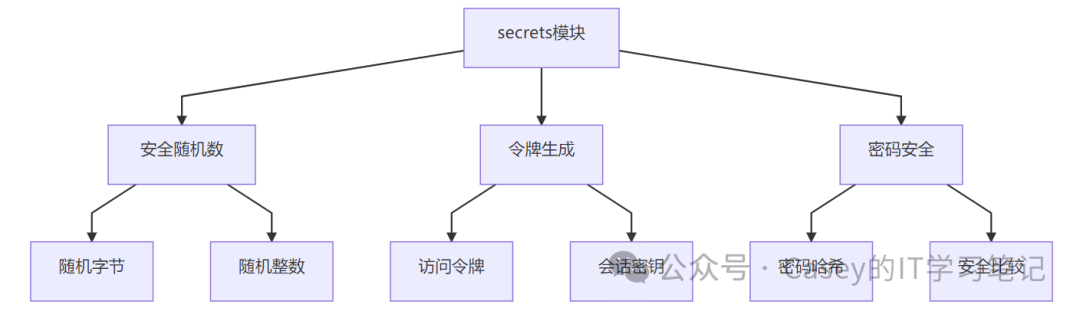
3. Core Functions
4. Application Scenarios
1. Generating Secure Tokens
import secrets

# Generate a URL-safe 32-byte token
reset_token = secrets.token_urlsafe(32)
print(f"Password reset token: {reset_token}")
# Example output: Wk8sSx2bGdKXy1rN0VjR3JhMlZfLVpSLTIw

# Generate a hex format API key
api_key = secrets.token_hex(24)
print(f"API Key: {api_key}")
# Example output: 4f3a9c7b1e6d0298a45f2b87c1e0d3e7f4a5b6c9
2. User Password Handling
import secrets
import hashlib

def create_password_hash(password):
    # Generate a 16-byte secure salt
    salt = secrets.token_bytes(16)
    # Use PBKDF2 for password hashing
    return hashlib.pbkdf2_hmac(
        'sha256',
        password.encode(),
        salt,
        100000  # Iteration count
    )

# Secure password comparison
def verify_password(input_pass, stored_hash, salt):
    new_hash = hashlib.pbkdf2_hmac(
        'sha256',
        input_pass.encode(),
        salt,
        100000
    )
    return secrets.compare_digest(new_hash, stored_hash)
3. Session Management
from flask import session
import secrets

@app.before_request
def ensure_session_security():
    if 'csrf_token' not in session:
        # Generate a 32-byte CSRF token
        session['csrf_token'] = secrets.token_hex(32)

    if 'session_id' not in session:
        # Generate a 128-bit session ID
        session['session_id'] = secrets.token_urlsafe(32)
4. Secure Random Selection
import secrets

# Securely randomly select an element from a list
winners = ["Alice", "Bob", "Charlie", "Diana"]
secure_winner = secrets.choice(winners)
print(f"Winner: {secure_winner}")

# Generate a random password
import string
alphabet = string.ascii_letters+string.digits+"!@#$%^&*"
password = ''.join(secrets.choice(alphabet) for i in range(16))
print(f"Generated password: {password}")
5. Underlying Logic and Technical Principles
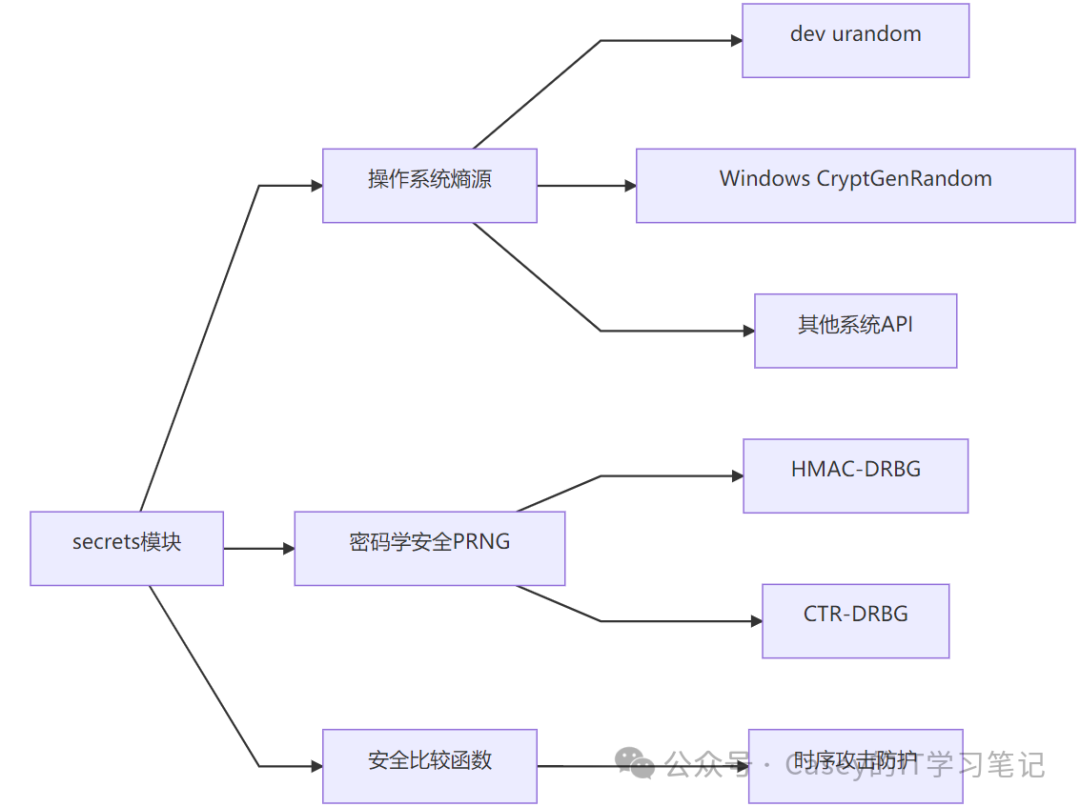
Security Architecture
Key Technologies
-
Entropy Source Utilization:
-
Linux/Unix: Uses
<span>/dev/urandom</span>device -
Windows: Uses
<span>CryptGenRandom</span>API -
macOS: Uses
<span>getentropy()</span>system call
Random Number Generation Algorithm:
-
HMAC-Based Deterministic Random Bit Generator (HMAC-DRBG)
-
NIST SP 800-90A standard
-
Supports up to 256-bit security strength
Secure Comparison Mechanism:
def compare_digest(a, b):
    # Constant time comparison to prevent timing attacks
    if len(a) != len(b):
        return False
    result = 0
    for x, y in zip(a, b):
        result |= x^y
    return result == 0
Predictability Prevention Design:
-
Uses system-level entropy pool (non-user-mode PRNG)
-
Regularly reinitializes internal state
-
Prevents entropy shortage issues on virtual machines
6. Installation and Usage
Installation Instructions
<span>secrets</span> is a standard library component of Python 3.6+, no separate installation is required
Version Compatibility
| Python Version | secrets Functionality Support |
|---|---|
| < 3.6 | Not available |
| 3.6 | Basic functionality |
| 3.10+ | Enhanced token functions |
Alternatives (Older Python Versions)
# Alternatives for Python 3.5 and below
import os

def token_bytes(n=32):
    return os.urandom(n)

def token_hex(n=32):
    return os.urandom(n).hex()

def token_urlsafe(n=32):
    return secrets.base64.urlsafe_b64encode(os.urandom(n)).rstrip(b'=').decode()
7. Security Strength Analysis
| Functionality | Security Strength | Recommended Length | Estimated Cracking Time |
|---|---|---|---|
| Password Reset Token | 128 bits | 16 bytes | > 10²⁶ years |
| Session ID | 256 bits | 32 bytes | > 10⁷⁷ years |
| API Key | 192 bits | 24 bytes | > 10⁵⁸ years |
| Database Primary Key | 128 bits | 16 bytes | > 10²⁶ years |
Note: Estimates based on current computing power (2023), assuming an attacker attempts 1 trillion guesses per second
8. Best Practice Guidelines
1. Token Length Selection
# Recommended lengths for different scenarios
TOKEN_LENGTHS = {
    "password_reset": 32,    # 256-bit strength
    "api_key": 48,           # 384-bit strength
    "session_id": 32,        # 256-bit strength
    "csrf_token": 16         # 128-bit strength
}
2. Secure Password Generation
import secrets
import string

def generate_password(length=16):
    alphabet = string.ascii_letters+string.digits+"!@#$%^&*"
    while True:
        password = ''.join(secrets.choice(alphabet) for i in range(length))
        # Ensure it contains upper and lower case letters and numbers
        if (any(c.islower() for c in password) and
            any(c.isupper() for c in password) and
            any(c.isdigit() for c in password)):
            return password
3. Key Management
# Generate encryption key
encryption_key = secrets.token_bytes(32)  # AES-256 key

# Secure storage scheme
import os
from cryptography.fernet import Fernet

def secure_key_storage(key):
    # Use environment variable to encrypt key
    storage_key = os.environ['STORAGE_KEY'].encode()
    cipher = Fernet(Fernet.generate_key())
    encrypted_key = cipher.encrypt(key)
    return encrypted_key
9. Comparison with Similar Solutions
| Feature | secrets | random | os.urandom | cryptography |
|---|---|---|---|---|
| Cryptographic Security | ⭐⭐⭐⭐⭐ | ⭐ | ⭐⭐⭐⭐⭐ | ⭐⭐⭐⭐⭐ |
| Usability | ⭐⭐⭐⭐⭐ | ⭐⭐⭐⭐⭐ | ⭐⭐⭐ | ⭐⭐ |
| Feature Richness | ⭐⭐ | ⭐⭐⭐⭐ | ⭐ | ⭐⭐⭐⭐⭐ |
| Standard Library | ⭐⭐⭐⭐⭐ | ⭐⭐⭐⭐⭐ | ⭐⭐⭐⭐⭐ | ❌ |
| Timing Attack Prevention | ⭐⭐⭐⭐ | ❌ | ❌ | ⭐⭐⭐⭐⭐ |
| Applicable Scenarios | Tokens/Keys | Simulation/Games | Basic Random Bytes | Complete Encryption Scheme |
10. Enterprise Application Cases
-
Financial Services:
-
Transaction verification code generation
-
User identity tokens
-
Encryption key derivation
Cloud Service Platforms:
-
AWS/Azure API key rotation
-
Container deployment keys
-
Temporary access credentials
Authentication Systems:
-
OAuth2 access tokens
-
JWT signing keys
-
Multi-factor authentication codes
Blockchain Applications:
-
Wallet private key generation
-
Smart contract random number sources
-
Transaction hash salting
Summary
The secrets module is the cornerstone of secure programming in Python, with core values in:
-
Cryptographic Security: Provides a true source of randomness, resisting prediction attacks
-
Ease of Use: Simple API replaces complex low-level cryptographic interfaces
-
Standardized Implementation: Follows NIST and industry security standards
-
Defense Hardening: Built-in protections against timing attacks and other security mechanisms
Technical Highlights:
-
Direct integration with operating system entropy sources
-
Provides high-level abstractions like token_urlsafe
-
compare_digest for timing attack prevention
-
Zero-dependency standard library implementation
Applicable Scenarios:
-
Password reset token generation
-
API key and secure credential creation
-
Session identifier management
-
Password and passphrase generation
-
Encryption key material derivation
-
Secure random selection operations
Basic Usage:
import secrets

# Generate a secure token
token = secrets.token_urlsafe(32)

# Generate a random password
password = ''.join(secrets.choice("abcdefghijklmnopqrstuvwxyzABCDEFGHIJKLMNOPQRSTUVWXYZ0123456789") for i in range(16))

# Secure comparison
if secrets.compare_digest(user_input, secret_value):
    grant_access()
Security Guidelines:
-
Never use
<span>random</span>module for handling security-sensitive data -
Token length should be at least 16 bytes (128-bit security strength)
-
Regularly rotate long-term keys
-
Use
<span>compare_digest</span>for security-sensitive comparison operations -
Combine with
<span>hashlib</span>for secure password storage
According to OWASP recommendations for 2023:
All new systems should use cryptographically secure RNGs to generate sensitive data
Session token length should be at least 128 bits
Authentication key length should be at least 256 bits
Password reset token validity should not exceed 1 hour
<span>secrets</span> module has become an essential tool for secure Python development, built into the standard library since Python 3.6, and can be used without additional installation.