
In programming, a variable is like a “cabinet” for storing data, and the data type determines the types of data that can be stored inside the cabinet. Together, variables and data types dictate how a program processes information, forming the foundation for building program logic and functionality.

Once, Xiao Ming opened a grocery store and found that everything was piled together, making it hard for customers to find items. So, he decided to give each item a “home.” He named each storage cabinet—just like a variable in a program, each cabinet has a specific name for storing particular items. Then, Xiao Ming categorized the cabinets: some were for food, some for clothes, and others for tools. This is similar to data types: different kinds of items are stored in different cabinets, keeping everything tidy and easy to find. Each time he restocked, Xiao Ming would use the action of “=” to place the goods into the designated cabinet, just like assigning data to a variable, ensuring the cabinet accurately holds the incoming items.
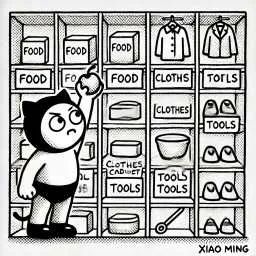
In Xiao Ming’s store, the rules are clear: each cabinet’s name must meet certain standards (for example, it cannot start with a number), otherwise, customers won’t be able to find the goods. Moreover, each type of goods must only be stored in its corresponding cabinet; otherwise, the whole store will be chaotic. This is like the naming rules for variables and the selection of data types in programming, ensuring the program runs correctly. With these simple management methods, Xiao Ming not only kept the store organized but also made it easier for customers to shop.
 In computer programming, variables, data types, and the assignment operator “=” are used at all times, not just in Python, but are crucial in any programming language. Establishing an efficient and tidy storage system in life can help you reduce the time spent looking for things, just as it does in programming.
What is a Variable?
A variable is like a storage cabinet in Xiao Ming’s grocery store, with each cabinet having a name that tells you what is inside.
What is a Data Type?
A data type is like the kind of items in a storage cabinet: some cabinets are for books, some for clothes. Different items must be stored in different cabinets to keep everything organized.
What is the Meaning of “=”?
The “=” operator is like the action of placing items in a storage cabinet, putting the items you have into a named cabinet so that you can find them accurately next time.

Next, we will use examples to demonstrate variables and data types in Python.
1. Variables and Constants
Defining and Assigning Variables
In Python, a variable is an identifier used to store data. Python variables do not require type declaration beforehand; they can be created directly through assignment. For example:
x = 10
name = "Alice"
These two lines of code store the integer 10 and the string “Alice” in the variables <span>x</span> and <span>name</span>, respectively.
Variable Naming Rules
-
According to Python’s official guidelines (PEP 8), variable names must meet the following conditions:
-
Must start with a letter (A-Z or a-z) or an underscore (_).
-
Subsequent characters can include letters, numbers, or underscores.
-
Case-sensitive, meaning
<span>var</span>and<span>Var</span>are different variables. -
Cannot use Python keywords (for example:
<span>if</span>,<span>for</span>,<span>while</span>, etc.).
The Concept of Constants
Python itself does not have built-in syntax support for constants. Typically, by convention, variable names are represented in all uppercase to indicate constants, such as:
PI = 3.14159This method serves merely as a programming convention to indicate to the programmer that the variable should not be modified.
2. Assignment Operator
The Meaning of “=”
The assignment operator <span>=</span> is used to assign the value on the right to the variable on the left. When performing an assignment operation, Python stores a reference to the object in the variable name. Refer to the example above for specific usage.
Multiple Assignments and Chained Assignments
Python allows multiple variable assignments in a single line. For example:
a, b, c = 1, 2, 3The above statement assigns 1 to <span>a</span>, 2 to <span>b</span>, and 3 to <span>c</span>.
Chained assignment allows the same value to be assigned to multiple variables, for example:
x = y = z = 0This assigns 0 to the variables <span>x</span>, <span>y</span>, and <span>z</span> simultaneously.
3. Data Types
<span>int</span>: Integer Type
Represents numbers without decimal parts, such as: 1, -3, 0.
a = 100<span>float</span>: Float Type
Represents numbers with decimal parts, such as: 3.14, -0.001.
b = 3.14<span>str</span>: String Type Used to store text data, which is a sequence of characters enclosed in single or double quotes.
s = "Hello, Python!"<span>list</span>: List Type Is an ordered mutable sequence that can store multiple elements, separated by commas and enclosed in square brackets.
lst = [1, 2, 3, "a", "b"]4. Type Conversion
<span>int()</span> function converts an object to an integer, provided the object can be converted to an integer form.
num = int("123.456") # Result is 123<span>float()</span> function converts an object to a float:
num = float("123") # Result is 123.0<span>str()</span> function converts an object to a string:
s = str(100) # Result is "100"<span>list()</span> function converts an iterable object to a list:
lst = list("abc") # Result is ['a', 'b', 'c']
Next, you can run and test the following code examples in IDLE:
Code Example 1: Variable Definition, Assignment, and Constant Convention
Exercise Objectives:
- Define variables and assign values
- Follow variable naming rules
- Understand the convention for constants (though Python does not enforce it)
Code Example:
# Define variables and assign values
x = 10
print("Initial x =", x)
# Modify variable value
x = 20
print("Modified x =", x)
# Constant convention: usually represented in all uppercase
PI = 3.14159
print("Constant PI =", PI)
# Although it can be modified, it is not recommended to modify constants
PI = 3.15
print("Modified PI =", PI)
Code Example 2: Variable Naming Rules and Error Demonstration
Exercise Objectives:
- Understand valid variable naming rules
- Observe errors produced by invalid variable naming (please do not uncomment the erroneous code, or the program will not run)
Code Example:
# Valid variable naming
student_name = "Alice"
_age = 18
score1 = 95
print(student_name, _age, score1)
# Invalid variable naming (the following code will produce an error if uncommented)
# 1st_score = 100  # Error: variable name cannot start with a number
# for = 50         # Error: variable name cannot use reserved keywords
Code Example 3: Multiple Assignments and Chained Assignments
Exercise Objectives:
- Master multiple assignments
- Understand chained assignments
Code Example:
# Multiple assignments: assigning values to multiple variables at once
a, b, c = 1, 2, 3
print("a =", a, "b =", b, "c =", c)
# Chained assignments: assigning the same value to multiple variables
x = y = z = 0
print("x =", x, "y =", y, "z =", z)
Case 4: Data Types and Type Conversion
Exercise Objectives:
- Define variables of different data types
- Use the
<span>type()</span>function to verify variable types
The
<span>type()</span>function is a built-in Python function that returns the type of the specified object (i.e., the class to which the object belongs). For example, when you call<span>type(123)</span>, it returns <class ‘int’>, indicating that 123 is an integer. This function is commonly used for debugging and type checking, helping programmers confirm the actual data type of a variable or expression. Additionally,<span>type()</span>can also be used as a metaclass for dynamically creating classes by passing three arguments (class name, base class tuple, and attribute dictionary) to generate new class objects.
- Practice commonly used type conversion functions
Code Example:
# Define variables
num_int = 42          # int type
num_float = 3.14      # float type
text = "Hello"        # str type
lst = [1, 2, 3]       # list type
# Print variable types
print("num_int type:", type(num_int))
print("num_float type:", type(num_float))
print("text type:", type(text))
print("lst type:", type(lst))
# Type conversion examples
str_to_int = int("100")        # Convert string to integer
str_to_float = float("2.718")    # Convert string to float
int_to_str = str(256)            # Convert integer to string
iterable_to_list = list("Python")# Convert iterable to list
print("Converted values:", str_to_int, str_to_float, int_to_str, iterable_to_list)
Through the above explanations, we have learned the basic concepts of variables and data types:
-
Variables are containers for storing data, and their names must start with a letter or underscore and are case-sensitive; constants are typically represented in uppercase letters.
-
Assignment Operator
<span>= </span>is used to assign the value on the right to the variable on the left, supporting both multiple assignments and chained assignments. -
Data Types include integers (
<span>int</span>), floats (<span>float</span>), strings (<span>str</span>), and lists (<span>list</span>), as well as type conversion through corresponding functions (such as<span>int()</span>,<span>float()</span>,<span>str()</span>,<span>list()</span>).
Mastering the above usages is a fundamental skill for every programmer, and we will learn about some new data types and variable naming conventions later. Let’s use these knowledge points as a foundation for deeper exploration. Now, I also leave two questions for you to ponder: if you write <span>1score = 90</span>, what problem will arise? In the chained assignment <span>x = y = z = 0</span>, if you later execute <span>x = 5</span>, will the values of <span>y</span> and <span>z</span> change? Please briefly explain. Feel free to leave comments!
The Python basic programming course will continue to be updated, stay tuned!