HTTP (Hypertext Transfer Protocol) is the foundation protocol for data communication on the World Wide Web (WWW) and is one of the most widely used protocols in modern internet applications.
1. Overview of HTTP
1.1 Basic Concepts
- Definition An application layer protocol based on the client-server model
- Function Specifies how clients and servers request and transfer resources
- Characteristics
- Stateless Protocol Each request is independent, and the server does not retain client state
- Extensible Supports new features through header fields
- Text-based (HTTP/1.x), changed to binary format in HTTP/2
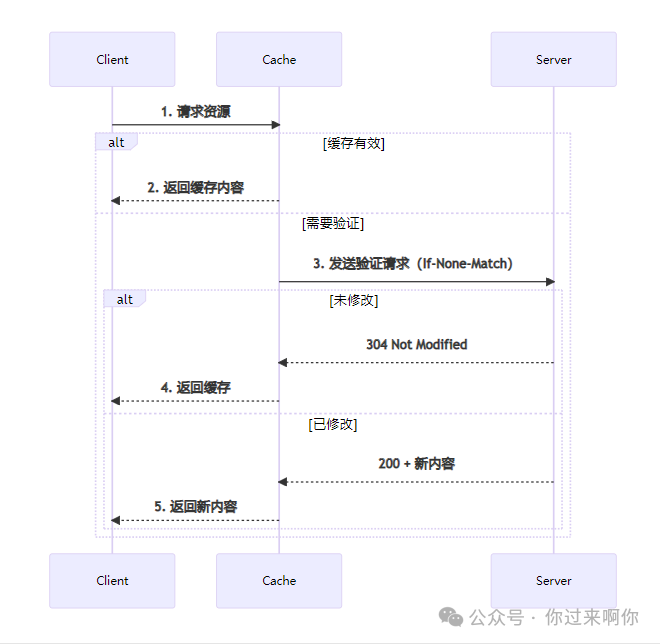
1.2 Workflow
2. Structure of HTTP Messages
2.1 Request Message
GET /index.html HTTP/1.1
Host: www.example.com
User-Agent: Mozilla/5.0
Accept: text/html

[Request Body]
- Request Line Method + URI + HTTP Version
- Request Headers Key-value pair metadata
- Empty Line Separates headers and body
- Request Body Optional (e.g., data submitted via POST)
2.2 Response Message
HTTP/1.1 200 OK
Date: Mon, 23 May 2025 22:38:34 GMT
Content-Type: text/html; charset=UTF-8
Content-Length: 138

<html>...</html>
- Status Line HTTP Version + Status Code + Status Text
- Response Headers Metadata information
- Empty Line Separates headers and body
- Response Body Content of the requested resource
3. Core Components of HTTP
3.1 Request Methods
| Method | Description | Idempotency |
|---|---|---|
| GET | Retrieve resource | Yes |
| POST | Submit data/create resource | No |
| PUT | Replace entire resource | Yes |
| DELETE | Delete resource | Yes |
| PATCH | Partially update resource | No |
| HEAD | Retrieve header information | Yes |
| OPTIONS | Query methods supported by the server | Yes |
3.2 Status Code Categories
| Status Code Range | Category | Example |
|---|---|---|
| 1xx | Informational Response | 100 Continue |
| 2xx | Success | 200 OK, 201 Created |
| 3xx | Redirection | 301 Moved Permanently |
| 4xx | Client Error | 400 Bad Request, 404 Not Found |
| 5xx | Server Error | 500 Internal Server Error |
3.3 Common Header Fields
General Headers
<span>Cache-Control</span>Cache control<span>Connection</span>Connection management<span>Date</span>Message date
Request Headers
<span>Host</span>Requested hostname<span>User-Agent</span>Client information<span>Accept</span>Acceptable media types<span>Authorization</span>Authentication information
Response Headers
<span>Server</span>Server information<span>Location</span>Redirection target<span>Content-Type</span>Response body type<span>Set-Cookie</span>Set cookie
4. HTTP Connection Management
4.1 Connection Types
| Type | Description | Characteristics |
|---|---|---|
| Non-persistent Connection | Default in HTTP/1.0 | Closes connection after each request/response |
| Persistent Connection | Default in HTTP/1.1 (Keep-Alive) | Reuses TCP connection |
| Pipelining | Feature of HTTP/1.1 | Sends multiple requests in succession |
4.2 Connection Optimization
- Parallel Connections Establish multiple TCP connections simultaneously
- Domain Sharding Distribute resources across different domains
- CDN Acceleration Retrieve resources from nearby locations
5. Evolution of HTTP Versions
5.1 Version Comparison
| Feature | HTTP/1.0 | HTTP/1.1 | HTTP/2 | HTTP/3 |
|---|---|---|---|---|
| Connection Reuse | ✗ | ✓ | ✓ | ✓ |
| Header Compression | ✗ | ✗ | ✓ | ✓ |
| Binary Transmission | ✗ | ✗ | ✓ | ✓ |
| Server Push | ✗ | ✗ | ✓ | ✓ |
| Multiplexing | ✗ | ✗ | ✓ | ✓ |
| Transport Layer Protocol | TCP | TCP | TCP | QUIC/UDP |
| Head-of-Line Blocking Resolution | ✗ | ✗ | Partially Resolved | ✓ |
5.2 Core Features of HTTP/2
- Binary Framing Layer Decomposes messages into independent frames
- Stream Multiplexing Allows multiple streams in parallel over a single connection
- Header Compression HPACK algorithm reduces header size
- Server Push Actively pushes related resources
5.3 Innovations in HTTP/3
- Based on QUIC Protocol Implements reliable transmission over UDP
- 0-RTT Connection Establishment Reduces handshake latency
- Improved Congestion Control
- Connection Migration Maintains connection during network switches
6. HTTPS Security Mechanisms
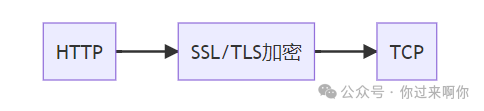
6.1 Core Components
- Encryption Algorithms
- Symmetric Encryption (AES)
- Asymmetric Encryption (RSA/ECC)
- Certificate System
- CA (Certificate Authority)
- Digital certificates verify identity
- Handshake Process
- Client Hello
- Server sends certificate
- Key exchange
- Establish encrypted communication
6.2 Advantages
- Data confidentiality (prevents eavesdropping)
- Data integrity (prevents tampering)
- Authentication (prevents impersonation)
7. Caching Mechanisms
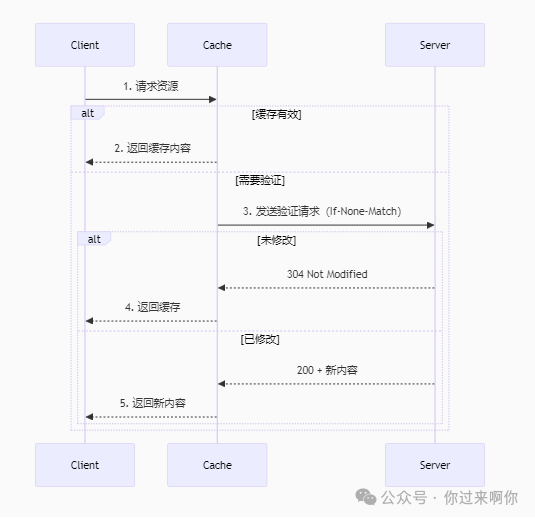
7.1 Cache Control Headers
| Header Field | Function |
|---|---|
<span>Cache-Control</span> |
Controls caching behavior (max-age, no-cache) |
<span>Expires</span> |
Resource expiration time |
<span>ETag</span> |
Resource identifier (validates cache) |
<span>Last-Modified</span> |
Resource last modified time |
7.2 Cache Validation Process
8. Cookie and Session Management
8.1 How Cookies Work
- Server sets cookies via
<span>Set-Cookie</span>header - Client automatically carries cookies in subsequent requests
- Server identifies user state through cookies
8.2 Cookie Attributes
<span>Domain</span>Effective domain<span>Path</span>Effective path<span>Expires/Max-Age</span>Validity period<span>HttpOnly</span>Prevents JavaScript access<span>Secure</span>Transmits only over HTTPS<span>SameSite</span>Restricts cross-site sending
9. RESTful API Design
9.1 Core Principles
- Resource-Oriented URIs represent resources (
<span>/users/123</span>) - Uniform Interface Uses standard HTTP methods
- Stateless Each request contains complete context
- Cacheable Clearly identifies cacheable resources
- Layered System Clients do not need to understand intermediate layers
9.2 Best Practices
- Use plural noun forms (
<span>/products</span>) - Version control (
<span>/api/v1/products</span>) - Filter sorting parameters (
<span>?sort=name&limit=10</span>) - Use standard status codes
- Return data in JSON format
10. Performance Optimization Practices
-
Reduce the number of requests
- Merge resources (CSS/JS)
- Use sprite images
Reduce resource size
- Compression (Gzip/Brotli)
- Image optimization (WebP/AVIF)
Utilize caching
- Set reasonable caching strategies
- Use Service Workers
HTTP/2 Optimization
- Enable server push
- Avoid domain sharding
CDN Acceleration
- Static resource distribution
- Edge computing
11. Security Protections
- Enforce HTTPS HSTS header
- Content Security Policy CSP header
- Cross-Origin Control CORS policy
- Clickjacking Protection X-Frame-Options
- Injection Attack Protection
- XSS: Input filtering/output encoding
- CSRF: Anti-CSRF Token
The HTTP protocol has evolved from HTTP/0.9 in 1991 to HTTP/3 today, continuously evolving to meet the needs of modern web applications. Understanding its core principles and working mechanisms is fundamental to building high-performance, secure web applications.