Automated Deployment of Yudao Project with Ansible
Introduction
Ansible is an extremely simple IT automation system. It can be used for configuration management, application deployment, cloud resource configuration, ad-hoc task execution, network automation, and multi-node orchestration. Ansible can easily achieve complex operations such as zero downtime rolling updates (in conjunction with load balancers).
Preparation
To obtain the necessary files for the project, reply with “Ansible Yudao Project” to get 
Prepare 4 virtual machines running Ubuntu 24.04 with the following configurations:
| IP | Hostname | Configuration | Role |
| 192.168.254.134 | ansible1 | 4 cores 8GB | Frontend and Backend Project Build Node |
| 192.168.254.135 | ansible2 | 4 cores 4GB | Middleware Running Node |
| 192.168.254.136 | ansible3 | 4 cores 4GB | Running Frontend and Backend Service Node |
| 192.168.254.137 | ansible4 | 2 cores 2GB | Ansible Node |
Change to Static IP
Edit the <span>/etc/netplan/50-cloud-init.yaml</span> file
network:
  version: 2
  renderer: networkd
  ethernets:
    ens33:
      dhcp4: no
      addresses:
        - 192.168.254.134/24
      routes:
        - to: default
          via: 192.168.254.2
      nameservers:
        addresses: [8.8.8.8, 114.114.114.114]
Then execute <span>netplan apply</span>
Disable IPv6
Edit the <span>/etc/sysctl.conf</span> file
net.ipv6.conf.all.disable_ipv6 = 1
net.ipv6.conf.default.disable_ipv6 = 1
net.ipv6.conf.lo.disable_ipv6 = 1
Change to Domestic Source
(Not recommended) Edit the <span>/etc/apt/sources.list</span> file
deb https://mirrors.aliyun.com/ubuntu/ noble main restricted universe multiverse
deb-src https://mirrors.aliyun.com/ubuntu/ noble main restricted universe multiverse

deb https://mirrors.aliyun.com/ubuntu/ noble-security main restricted universe multiverse
deb-src https://mirrors.aliyun.com/ubuntu/ noble-security main restricted universe multiverse

deb https://mirrors.aliyun.com/ubuntu/ noble-updates main restricted universe multiverse
deb-src https://mirrors.aliyun.com/ubuntu/ noble-updates main restricted universe multiverse

# deb https://mirrors.aliyun.com/ubuntu/ noble-proposed main restricted universe multiverse
# deb-src https://mirrors.aliyun.com/ubuntu/ noble-proposed main restricted universe multiverse

deb https://mirrors.aliyun.com/ubuntu/ noble-backports main restricted universe multiverse
deb-src https://mirrors.aliyun.com/ubuntu/ noble-backports main restricted universe multiverse
(Recommended) Edit the <span>/etc/apt/sources.list.d/ubuntu.sources</span> file
sudo mv /etc/apt/sources.list /etc/apt/sources.list.bakTypes: deb
URIs: https://mirrors.aliyun.com/ubuntu/
Suites: noble noble-updates noble-backports
Components: main restricted universe multiverse
Signed-By: /usr/share/keyrings/ubuntu-archive-keyring.gpg
Types: deb
URIs: https://mirrors.aliyun.com/ubuntu/
Suites: noble-security
Components: main restricted universe multiverse
Signed-By: /usr/share/keyrings/ubuntu-archive-keyring.gpgThen update the software source
sudo apt clean
sudo apt update
Install Ansible
Install and Configure uv
Install Python and pip
apt install python3-pip -yInstall uv
pip install uv --break-system-packages -i https://pypi.tuna.tsinghua.edu.cn/simpleIf you see the message <span>Successfully installed uv-0.7.13</span>, it indicates that uv has been successfully installed.
Configure uv
mkdir -p ~/.config/uv/
vim ~/.config/uv/uv.toml
The content of the <span>~/.config/uv/uv.toml</span> file is as follows:
[[index]]
url = "https://pypi.tuna.tsinghua.edu.cn/simple"
default = true
Install Ansible using uv
uv tool install ansible-core
uv tool update-shell
Then reconnect to the terminal and enter <span>ansible --version</span>. If the version number <span>ansible [core 2.18.6]</span> appears, the installation is successful.
Create SSH Keys and Distribute
ssh-keygen -t ed25519Distribute Keys to Other Three Machines
ssh-copy-id -i ~/.ssh/id_ed25519.pub [email protected]
ssh-copy-id -i ~/.ssh/id_ed25519.pub [email protected]
ssh-copy-id -i ~/.ssh/id_ed25519.pub [email protected]
Test
ssh [email protected]If you can log in without a password, it indicates that the distribution was successful.
Create the Ansible directory
mkdir /etc/ansible && cd /etc/ansibleIn the Ansible directory, create a hosts file and fill in the IP addresses of the other three machines
192.168.254.134
192.168.254.135
192.168.254.136
Use the following command to test connectivity
ansible all -m pingCreate an ansible.cfg file to configure the default Python interpreter directory for the other machines
[defaults]
interpreter_python = /usr/bin/python3.12
timeout = 5

[ssh_connection]
ssh_args = -o ConnectTimeout=5
If you see the following message after running <span>ansible all -m ping</span>, the configuration is complete:
192.168.254.136 | SUCCESS => {
    "changed": false,
    "ping": "pong"
}
192.168.254.135 | SUCCESS => {
    "changed": false,
    "ping": "pong"
}
192.168.254.134 | SUCCESS => {
    "changed": false,
    "ping": "pong"
}
Yudao Project Deployment
Introduction
The three roles are:
build: Build frontend and backend projects
db: Middleware (MySQL, Redis, Nacos)
server: Run frontend and backend projects
Create Ansible Project
Create Ansible Directory and Files
mkdir -p /opt/ansible/{group_vars,inventory,playbooks,roles} && cd /opt/ansibleEdit the configuration file
vim /opt/ansible/ansible.cfg[defaults]
inventory = inventory/hosts.ini
host_key_checking = False
retry_files_enabled = False
remote_user = root
roles_path = ./roles
interpreter_python = /usr/bin/python3.12
vault_password_file = /root/vault_pass.txtCreate a hosts.ini file in the inventory directory
[server]
server1 ansible_host=192.168.254.136
[db]
db1 ansible_host=192.168.254.135
[build]
build1 ansible_host=192.168.254.134
Create Build Role
ansible-galaxy init roles/build && cd roles/buildWrite Build Task
Navigate to the <span>tasks</span> directory
cd tasksInstall npm
Download the node.js official package <span>node-v22.16.0-linux-x64.tar.xz</span> and upload it to the <span>/opt/ansible/roles/build/files</span> directory
Create the <span>install_npm.yml</span> file in the <span>/opt/ansible/roles/build/tasks</span> directory
- name: Copy nodejs installation package
  copy:
    src: node-v22.16.0-linux-x64.tar.xz
    dest: /opt/
- name: Unarchive nodejs
  unarchive:
    src: /opt/node-v22.16.0-linux-x64.tar.xz
    dest: /opt/
    remote_src: yes
  args:
    creates: /opt/node-v22.16.0-linux-x64
- name: Write to system profile.d
  copy:
    dest: /etc/profile.d/nodejs.sh
    content: |
      export PATH=/opt/node-v22.16.0-linux-x64/bin:$PATH
    mode: '0755'
- name: Configure environment
  shell: |
    source /etc/profile.d/nodejs.sh
    npm config set registry https://mirrors.cloud.tencent.com/npm/
    npm install -g pnpm
  args:
    executable: /bin/bash
Install Vue3
Create the <span>build_vue3.yml</span> file in the <span>/opt/ansible/roles/build/tasks</span> directory
- name: Clone yudao-ui-admin-vue3 repository
  git:
    repo: https://gitee.com/yudaocode/yudao-ui-admin-vue3.git
    dest: /opt/yudao-ui-admin-vue3
    version: v2.6.0
    force: yes  # Force update if the directory already exists (optional)

- name: Replace backend address
  replace:
    path: /opt/yudao-ui-admin-vue3/.env.local
    regexp: 'localhost'
    replace: '192.168.254.136'

- name: Install build - pnpm install
  shell: |
    source /etc/profile.d/nodejs.sh
    cd /opt/yudao-ui-admin-vue3
    pnpm install
    pnpm build:local
  args:
    executable: /bin/bash

- name: Package remote directory
  ansible.builtin.command:
    cmd: tar czf /tmp/yudao-vue3.tar.gz -C /opt/yudao-ui-admin-vue3/dist .
  args:
    creates: /tmp/yudao-vue3.tar.gz

- name: Fetch file to Ansible control node
  ansible.builtin.fetch:
    src: /tmp/yudao-vue3.tar.gz  # File path on the build machine
    dest: ../roles/server/files/      # Temporary directory on the control node
    flat: yes
  run_once: true # Ensure it runs only once, even if there are multiple hosts in the play

- name: Clean up copied tar package and directory
  ansible.builtin.file:
    path: "{{ item }}"
    state: absent
    force: yes
  loop:
    - /opt/yudao-ui-admin-vue3/dist
    - /tmp/yudao-vue3.tar.gz
Install Java
Create the <span>build_java.yml</span> file in the <span>/opt/ansible/roles/build/tasks</span> directory
- name: Install JAVA and Maven
  apt:
    name:
      - openjdk-21-jdk
      - maven
    state: present
- name: Configure Maven Aliyun mirror
  blockinfile:
    path: /etc/maven/settings.xml
    marker: "<!-- {mark} ANSIBLE MANAGED MIRROR BLOCK -->"
    insertafter: "<mirrors>"
    block: |
      <mirror>
        <id>aliyunmaven</id>
        <mirrorOf>central</mirrorOf>
        <name>aliyun maven</name>
        <url>https://maven.aliyun.com/repository/central/</url>
      </mirror>
  become: yes
- name: Clone yudao-cloud repository
  git:
    repo: https://gitee.com/zhijiantianya/yudao-cloud.git
    dest: /opt/yudao-cloud
    version: v2.6.0(jdk17/21)
    force: yes  # Force update if the directory already exists (optional)
- name: Replace middleware address
  shell: |
    find ./ -name application-local.yaml -print0 | xargs -0 sed -i 's|jdbc:mysql://127.0.0.1:3306|jdbc:mysql://{{ hostvars['db1'].ansible_host }}:3306|g'
    find ./ -name application-local.yaml -print0 | xargs -0 sed -i 's|host: 127.0.0.1 # Address|host: {{ hostvars['db1'].ansible_host }} # Address|g'
    find ./ -name application-local.yaml -print0 | xargs -0 sed -i 's|server-addr: 127.0.0.1:8848|server-addr: {{ hostvars['db1'].ansible_host }}|g'
  args:
    chdir: /opt/yudao-cloud
- name: Install build - mvn
  shell: mvn clean package -Dmaven.test.skip=true
  args:
    chdir: /opt/yudao-cloud
    executable: /bin/bash
- name: Copy jar files to control node
  ansible.builtin.fetch:
    src: "/opt/yudao-cloud/{{ item }}"
    dest: ../roles/server/files/
    flat: yes
  loop:
    - ./yudao-gateway/target/yudao-gateway.jar
    - ./yudao-module-system/yudao-module-system-server/target/yudao-module-system-server.jar
    - ./yudao-module-infra/yudao-module-infra-server/target/yudao-module-infra-server.jar
Modify main.yml to import install_npm.yml, build_vue3.yml, build_java.yml sub Playbooks
Modify the main.yml file
- import_tasks: install_npm.yml
- import_tasks: build_vue3.yml
- import_tasks: build_java.yml
Create DB Role
Create in the <span>/opt/ansible</span> directory
ansible-galaxy init roles/db && cd roles/dbWrite DB Task
Upload <span>redis_7.4.4.deb</span>, <span>redis-server_7.4.4.deb</span>, <span>redis-tools_7.4.4.deb</span>, <span>nacos.service</span>, <span>ruoyi-vue-pro.sql</span>, <span>nacos-server-2.5.1.zip</span>, <span>mysql-server_8.4.4-1ubuntu24.04_amd64.deb-bundle.tar</span> to the <span>db/files</span> directory.
Navigate to the tasks directory in the db role
Install MySQL Database
First, create the file in <span>/root/vault_pass.txt</span> and change its permissions to 600, writing the key inside (e.g., <span>5jYsPvNgyMHubtbQ7U5YmVCbPsKQFQZAhKBgH</span>)
chmod 600 /root/vault_pass.txtThen fill in the database password in the <span>group_vars/db.yml</span> file
db_password: "123456"Execute the command in the Ansible directory to encrypt the database password
ansible-vault encrypt group_vars/db.ymlIf you need to change the database password, you will need to decrypt it, make changes, and then re-encrypt it. You can also use view to see the decrypted data (automatically decrypted).
⚠️ Since we defined in the
<span>/opt/ansible/ansible.cfg</span>file that<span>vault_password_file = /root/vault_pass.txt</span>, which is the file needed for decryption (the file containing the key), when using the<span>ansible-vault</span>command for encryption, decryption, viewing, etc., it will automatically use the decryption file. If not defined, you will need to explicitly specify the decryption file with<span>--vault-password-file</span>or use<span>--ask-vault-password</span>for interactive key input.ansible-vault decrypt group_vars/db.yml # Decrypt ansible-vault view group_vars/db.yml # View decrypted data ansible-vault view group_vars/db.yml --vault-password-file /root/vault_pass.txt # Explicitly specify decryption file ansible-vault view group_vars/db.yml --ask-vault-password # Interactive key input
Create the <span>mysql_install.yml</span> file
---
- name: Update apt package cache
  ansible.builtin.apt:
    update_cache: yes
    cache_valid_time: 3600

- name: Install required dependencies
  ansible.builtin.apt:
    name:
      - libaio1t64
      - libmecab2
      - debconf-utils
    state: present

- name: Get all services
  ansible.builtin.service_facts:

- name: Define persistent directory for MySQL DEB packages
  ansible.builtin.set_fact:
    mysql_deb_dest_dir: "/opt/mysql_installer_debs"

- name: Create persistent directory
  ansible.builtin.file:
    path: "{{ mysql_deb_dest_dir }}"
    state: directory
    mode: '0755'

- name: Set MySQL root password (for non-interactive installation)
  ansible.builtin.debconf:
    name: mysql-community-server
    question: "{{ item.question }}"
    value: "{{ item.value }}"
    vtype: "{{ item.vtype }}"
  loop:
    - { question: 'mysql-community-server/root-pass', value: "{{ db_password }}", vtype: 'password' }
    - { question: 'mysql-community-server/re-root-pass', value: "{{ db_password }}", vtype: 'password' }
  when: "'mysql.service' not in ansible_facts.services"

- name: Unarchive MySQL DEB Bundle
  ansible.builtin.unarchive:
    src: mysql-server_8.4.4-1ubuntu24.04_amd64.deb-bundle.tar
    dest: "{{ mysql_deb_dest_dir }}"
    remote_src: no
  when: "'mysql.service' not in ansible_facts.services"

- name: Install mysql-common
  ansible.builtin.apt:
    deb: "{{ mysql_deb_dest_dir }}/mysql-common_8.4.4-1ubuntu24.04_amd64.deb"
    state: present
  when: "'mysql.service' not in ansible_facts.services"

- name: Install client components
  ansible.builtin.apt:
    deb: "{{ item }}"
    state: present
  loop:
    - "{{ mysql_deb_dest_dir }}/mysql-community-client-plugins_8.4.4-1ubuntu24.04_amd64.deb"
    - "{{ mysql_deb_dest_dir }}/mysql-community-client-core_8.4.4-1ubuntu24.04_amd64.deb"
    - "{{ mysql_deb_dest_dir }}/mysql-community-client_8.4.4-1ubuntu24.04_amd64.deb"
    - "{{ mysql_deb_dest_dir }}/mysql-client_8.4.4-1ubuntu24.04_amd64.deb"
  when: "'mysql.service' not in ansible_facts.services"

- name: Install server components
  ansible.builtin.apt:
    deb: "{{ item }}"
    state: present
  loop:
    - "{{ mysql_deb_dest_dir }}/mysql-community-server-core_8.4.4-1ubuntu24.04_amd64.deb"
    - "{{ mysql_deb_dest_dir }}/mysql-community-server_8.4.4-1ubuntu24.04_amd64.deb"
    - "{{ mysql_deb_dest_dir }}/mysql-server_8.4.4-1ubuntu24.04_amd64.deb"
  when: "'mysql.service' not in ansible_facts.services"

- name: Clean up unarchived directory (optional)
  ansible.builtin.file:
    path: "{{ mysql_deb_dest_dir }}"
    state: absent
Import Database Configuration and Tables
Create the <span>mysql_initdb.yml</span> file
- name: Update apt package cache
  ansible.builtin.apt:
    update_cache: yes
    cache_valid_time: 3600
  when: ansible_os_family == "Debian"

- name: Install pip3 tool (ensure pip is available)
  ansible.builtin.apt:
    name: python3-pip
    state: present
    update_cache: yes
  when: ansible_os_family == "Debian"

- name: Install PyMySQL dependency
  ansible.builtin.pip:
    name: PyMySQL
    extra_args: --break-system-packages

- name: Check if database 'ruoyi-vue-pro' exists
  community.mysql.mysql_query:
    query: "SELECT SCHEMA_NAME FROM information_schema.SCHEMATA WHERE SCHEMA_NAME = 'ruoyi-vue-pro';"
    login_user: root
    login_password: "{{ db_password }}"
  register: db_exists_check

# Create database (only if it does not exist)
- name: Create database 'ruoyi-vue-pro' (if it does not exist)
  community.mysql.mysql_db:
    name: ruoyi-vue-pro
    state: present
    login_user: root
    login_password: "{{ db_password }}"
  when: db_exists_check.rowcount is defined and db_exists_check.rowcount[0] == 0
  register: db_created

# Check if table exists (when database exists)
- name: Check if 'system_users' table exists in 'ruoyi-vue-pro' database
  community.mysql.mysql_query:
    query: "SELECT TABLE_NAME FROM information_schema.TABLES WHERE TABLE_SCHEMA = 'ruoyi-vue-pro' AND TABLE_NAME = 'system_users';"
    login_user: root
    login_password: "{{ db_password }}"
  register: table_exists_check
  when: db_exists_check.rowcount is defined and db_exists_check.rowcount[0] > 0

# Determine if SQL needs to be imported
- name: Set flag for whether to import SQL
  ansible.builtin.set_fact:
    should_import_sql: >-
      {{ (db_created is defined and db_created.changed) or
         (table_exists_check is defined and table_exists_check.rowcount[0] == 0) }}

# Copy SQL file to remote server
- name: Copy initialization SQL file
  ansible.builtin.copy:
    src: files/ruoyi-vue-pro.sql
    dest: /tmp/ruoyi-vue-pro.sql
    mode: '0644'
  when: should_import_sql

# Import SQL data
- name: Import initialization SQL into database 'ruoyi-vue-pro'
  community.mysql.mysql_db:
    name: ruoyi-vue-pro
    state: import
    target: /tmp/ruoyi-vue-pro.sql
    login_user: root
    login_password: "{{ db_password }}"
  when: should_import_sql

# Clean up SQL file
- name: Clean up imported SQL file
  ansible.builtin.file:
    path: /tmp/ruoyi-vue-pro.sql
    state: absent
  when: should_import_sql

- name: Create root@% user for remote access via mysql CLI
  ansible.builtin.shell: |
    mysql -uroot -p'{{ db_password }}' -e "
    CREATE USER IF NOT EXISTS 'root'@'%' IDENTIFIED WITH caching_sha2_password BY '{{ db_password }}';
    GRANT ALL PRIVILEGES ON *.* TO 'root'@'%' WITH GRANT OPTION;
    FLUSH PRIVILEGES;"
Install Redis Database
Create <span>redis_install.yml</span> file
- name: Get system service status
  ansible.builtin.service_facts:

- name: If Redis is not running, execute offline installation process
  block:
    - name: Create temporary directory for .deb packages
      ansible.builtin.tempfile:
        state: directory
        suffix: redis_debs
      register: temp_deb_dir

    - name: Copy Redis .deb packages to target machine
      ansible.builtin.copy:
        src: "{{ item }}"
        dest: "{{ temp_deb_dir.path }}/"
        mode: '0644'
      loop:
        - files/redis_7.4.4.deb
        - files/redis-server_7.4.4.deb
        - files/redis-tools_7.4.4.deb

    - name: Offline install all Redis .deb packages
      ansible.builtin.apt:
        deb: "{{ temp_deb_dir.path }}/{{ item }}"
        state: present
      loop:
        - redis-tools_7.4.4.deb
        - redis-server_7.4.4.deb
        - redis_7.4.4.deb

    - name: Clean up temporary .deb package directory
      ansible.builtin.file:
        path: "{{ temp_deb_dir.path }}"
        state: absent

    - name: Ensure Redis service is started and set to start on boot
      ansible.builtin.systemd:
        name: redis-server
        state: started
        enabled: yes
    - name: Modify Redis configuration to allow remote connections (bind and protected-mode)
      ansible.builtin.lineinfile:
        path: /etc/redis/redis.conf
        regexp: "{{ item.regexp }}"
        line: "{{ item.line }}"
      loop:
        - { regexp: '^bind\s+', line: 'bind 0.0.0.0' }
        - { regexp: '^protected-mode\s+', line: 'protected-mode no' }
    - name: Restart Redis service
      ansible.builtin.systemd:
        name: redis-server
        state: restarted
  when: "'redis-server.service' not in ansible_facts.services"
Install Nacos
Create <span>nacos_install.yml</span> file
- name: Get system service status
  ansible.builtin.service_facts:

- name: If Nacos is not running, execute offline installation process
  block:
    - name: Ensure target machine has unzip tool installed
      ansible.builtin.apt: # or yum/dnf module, depending on your Linux distribution
        name:
          - unzip
          - openjdk-21-jdk
        state: present
      retries: 3 # Retry up to 10 times
      delay: 10 # Wait 15 seconds before each retry

    - name: Define persistent directory for Nacos
      ansible.builtin.set_fact:
        nacos_dir: "/opt/"

    - name: Remote copy and unarchive Nacos package
      ansible.builtin.unarchive:
        src: nacos-server-2.5.1.zip
        dest: "{{ nacos_dir }}"
        remote_src: no

    - name: Copy nodejs installation package
      copy:
        src: nacos.service
        dest: /etc/systemd/system/

    - name: Reload systemd manager configuration
      ansible.builtin.systemd:
        daemon_reload: yes

    - name: Start and enable Nacos on boot
      ansible.builtin.systemd:
        name: nacos
        state: started
        enabled: yes
  when: "'nacos.service' not in ansible_facts.services"
Modify main.yml to import <span>mysql_install.yml</span>, <span>mysql_initdb.yml</span>, <span>redis_install.yml</span>, <span>nacos_install.yml</span> subplaybooks
Modify the main.yml file
- import_tasks: mysql_install.yml
- import_tasks: mysql_initdb.yml
- import_tasks: redis_install.yml
- import_tasks: nacos_install.yml
Create Server Role
Create in the <span>/opt/ansible</span> directory
ansible-galaxy init roles/server && cd roles/serverWrite Server Task
Upload the yudao.service.j2 file to the <span>/opt/ansible/roles/server/templates</span> directory
Create and Start Yudao Service
Create <span>java.yml</span> file
---
- name: Update apt package cache
  ansible.builtin.apt:
    update_cache: yes
    cache_valid_time: 3600

- name: Install required dependencies
  ansible.builtin.apt:
    name:
      - openjdk-21-jdk
    state: present

- name: Create service directory
  ansible.builtin.file:
    path: /opt/yudao-cloud
    state: directory
    mode: '0755'

- name: Copy multiple jar files and rename
  ansible.builtin.copy:
    src: "{{ item.src }}"
    dest: "/opt/yudao-cloud/{{ item.dest }}"
    mode: '0644'
  loop:
    - { src: yudao-gateway.jar, dest: yudao-gateway.jar }
    - { src: yudao-module-infra-server.jar, dest: yudao-infra.jar }
    - { src: yudao-module-system-server.jar, dest: yudao-system.jar }

- name: Create systemd service file
  ansible.builtin.template:
    src: templates/yudao.service.j2
    dest: /etc/systemd/system/{{ item }}.service
    mode: '0644'
  loop:
    - yudao-gateway
    - yudao-infra
    - yudao-system

- name: Reload systemd
  ansible.builtin.systemd:
    daemon_reload: yes

- name: Start and enable service
  ansible.builtin.systemd:
    name: "{{ item }}"
    enabled: yes
    state: started
  loop:
    - yudao-gateway
    - yudao-infra
    - yudao-system
Start Nginx Frontend Service
Create <span>nginx.yml</span> file
---
- name: Update apt package cache
  ansible.builtin.apt:
    update_cache: yes
    cache_valid_time: 3600

- name: Install required dependencies
  ansible.builtin.apt:
    name:
      - nginx
    state: present

- name: Clean up release directory
  ansible.builtin.file:
    path: /var/www/html
    state: absent

- name: Recreate release directory
  ansible.builtin.file:
    path: /var/www/html
    state: directory
    mode: '0755'

- name: Release frontend site
  ansible.builtin.unarchive:
    src: yudao-vue3.tar.gz
    dest: /var/www/html
    remote_src: no
Modify main.yml to import <span>java.yml</span> and <span>nginx.yml</span> subplaybooks
Modify the main.yml file
- import_tasks: java.yml
- import_tasks: nginx.yml
Create Playbooks
Create playbooks in <span>/opt/ansible/playbooks</span>
Create Build Playbook
Create <span>build.yml</span> file
- name: Build frontend and backend projects
  hosts: build1
  any_errors_fatal: true
  roles:
    - build
Create DB Playbook
Create <span>db.yml</span> file
- name: Build middleware
  hosts: db
  any_errors_fatal: true
  vars_files:
    - ../group_vars/db.yml
  roles:
    - db
Create Server Playbook
Create <span>server.yml</span> file
- name: Build frontend and backend projects
  hosts: server1
  any_errors_fatal: true
  roles:
    - server
Create Total Playbook
Create <span>play.yml</span> file
- import_playbook: db.yml
- import_playbook: build.yml
- import_playbook: server.yml
Verification
Install <span>community.mysql</span>
ansible-galaxy collection install community.mysqlRun
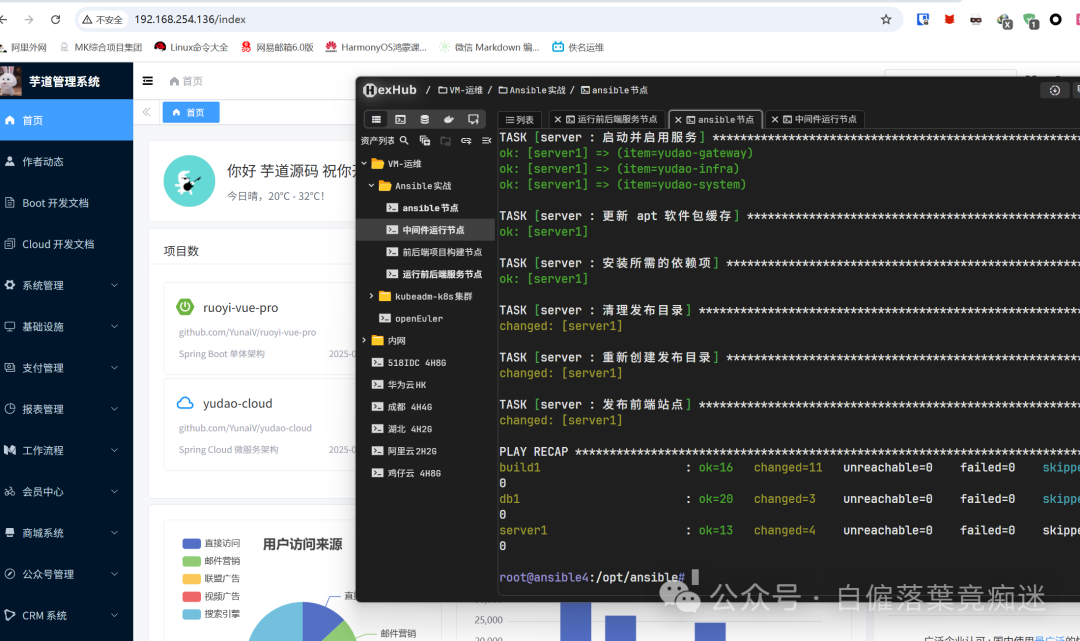
ansible-playbook /opt/ansible/playbooks/play.yml -i /opt/ansible/inventory/hosts.iniDisable the firewall
sudo systemctl disable ufw
sudo systemctl stop ufw