(Click the public account above to quickly follow)
Source: Cheng Mo
http://www.cnblogs.com/chengmo/archive/2010/10/02/1841355.html
If you have good articles to submit, please click → here for details
When developing shell batch processing programs, string-related operations are often involved. Many command statements, such as: awk and sed, can perform various string operations. In fact, the shell has a series of built-in operators that can achieve similar effects. As we know, using internal operators saves the time of starting external programs, thus making it very fast.
1. Judging and Reading String Values
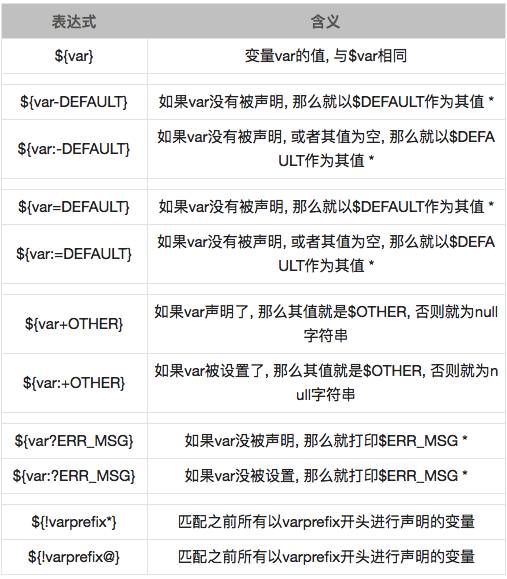
Adding “*” does not mean: Of course, if the variable var has been set, then its value is $var.
[chengmo@ localhost ~]$ echo ${abc-‘ok’}
ok
[chengmo@ localhost ~]$ echo $abc
[chengmo@ localhost ~]$ echo ${abc=’ok’}
ok
[chengmo@ localhost ~]$ echo $abc
ok
If abc is not declared with “=”, it will still assign a value to abc.
[chengmo@ localhost ~]$ var1=11;var2=12;var3=
[chengmo@ localhost ~]$ echo ${!v@}
var1 var2 var3
[chengmo@ localhost ~]$ echo ${!v*}
var1 var2 var3
${!varprefix*} and ${!varprefix@} are similar, allowing you to search for already defined variables by variable name prefix characters, regardless of whether they are empty values.
2. String Operations (Length, Reading, Replacing)
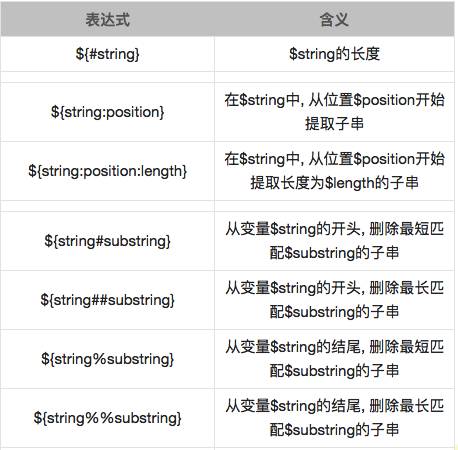
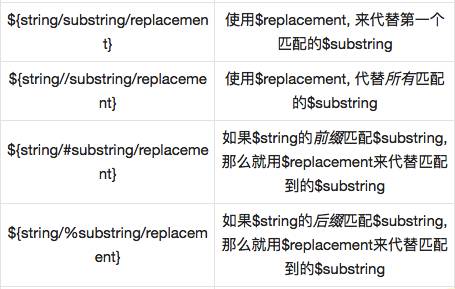
Note: “* $substring” can be a regular expression.
1. Length
[web97@salewell97 ~]$ test=’I love china’
[web97@salewell97 ~]$ echo ${#test}
12
${#variable_name} gets the string length
2. Substring Extraction
[chengmo@ localhost ~]$ test=’I love china’
[chengmo@ localhost ~]$ echo ${test:5}
e china
[chengmo@ localhost ~]$ echo ${test:5:10}
e china
${variable_name:start:length} gets the substring
3. String Deletion
[chengmo@ localhost ~]$ test=’c:/windows/boot.ini’
[chengmo@ localhost ~]$ echo ${test#/}
c:/windows/boot.ini
[chengmo@ localhost ~]$ echo ${test#*/}
windows/boot.ini
[chengmo@ localhost ~]$ echo ${test##*/}
boot.ini
[chengmo@ localhost ~]$ echo ${test%/*}
c:/windows
[chengmo@ localhost ~]$ echo ${test%%/*}
${variable_name#substring_regex} deletes the matching expression from the beginning of the string.
${variable_name%substring_regex} deletes the matching expression from the end of the string.
Note: ${test##*/} and ${test%/*} are the simplest methods to get the filename or directory address.
4. String Replacement
[chengmo@ localhost ~]$ test=’c:/windows/boot.ini’
[chengmo@ localhost ~]$ echo ${test/\/\}
c:\windows/boot.ini
[chengmo@ localhost ~]$ echo ${test//\/\}
c:\windows\boot.ini
${variable/find/replacement_value} One “/” indicates replacing the first occurrence, “//” indicates replacing all. When a “/” appears in the search, please escape it with “\/”.
3. Performance Comparison
In the shell, operations on strings can be achieved through awk, sed, expr, etc. Below we will conduct a performance comparison.
[chengmo@ localhost ~]$ test=’c:/windows/boot.ini’
[chengmo@ localhost ~]$ time for i in $(seq 10000);do a=${#test};done;
real 0m0.173s
user 0m0.139s
sys 0m0.004s
[chengmo@ localhost ~]$ time for i in $(seq 10000);do a=$(expr length $test);done;
real 0m9.734s
user 0m1.628s
The speed difference is over a hundred times; calling external commands for processing has a significantly different performance compared to built-in operators. In shell programming, try to use built-in operators or functions to complete tasks. Using awk, sed, etc., may yield such results.
Did you gain something from reading this article? Please share it with more people.
Follow “Linux Enthusiasts” to enhance your Linux skills