HTTP Identification Control
HTTPS Identification Control
Custom Identification Control
Background: During work hoursIT cannot access video websites
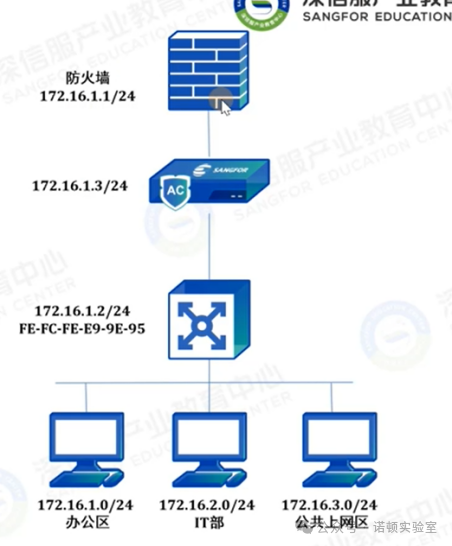
Background Analysis:HTTP message, which field identifies the URL?
Blocking HTTP websites, should the three-way handshake be allowed first?
HTTP Identification Working Principle:
HTTP website identification, after the terminal device resolves the domain name through DNS, completes the three-way handshake with the website server, sends a GET request, and the host field in the GET request packet is the specific URL of the website we are accessing.
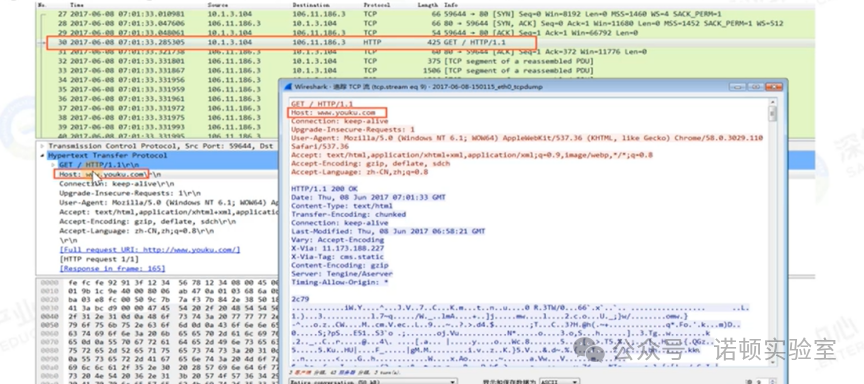
HTTP Control Principle:
If we block this URL, after the terminal device sends the GET request (i.e., completes HTTP identification), the device will masquerade as the website server and send a status code 302 packet to the terminal device, with the source IP being the website server’s IP address (actually sent by our device, identified by ip.id as 0x5826). The content of the packet informs the terminal device of the website server’s rejection interface.
Configuration Ideas:
1. Add [Behavior Management] – [Access Control Policy] – [Application Control] to access websites – check entertainment online audio and video and download, effective during work hours, action deny.
2. In [Applicable Objects], select the IT department, associating all users in the IT department with this control policy.
HTTPS Identification Control:
Introduction to HTTPS Protocol
What is HTTPS?
Full name Hypertext Transfer Protocol over Secure Socket Layer, the secure version of HTTP, HTTPS defaults to using TCP port 443. The ‘S’ in HTTPS actually stands for SSL (Secure Sockets Layer) protocol, which is a security transmission protocol for the web invented by Netscape. Over time, as Netscape lost market share, it handed over the maintenance of SSL to the Internet Engineering Task Force (IETF). The first version after Netscape was renamed to Transport Layer Security (TLS), which is based on SSL but has slight differences from SSLv3.0. Therefore, the SSL protocol is sometimes also referred to as the TLS protocol. Currently, the commonly used protocol is TLSv1.2.
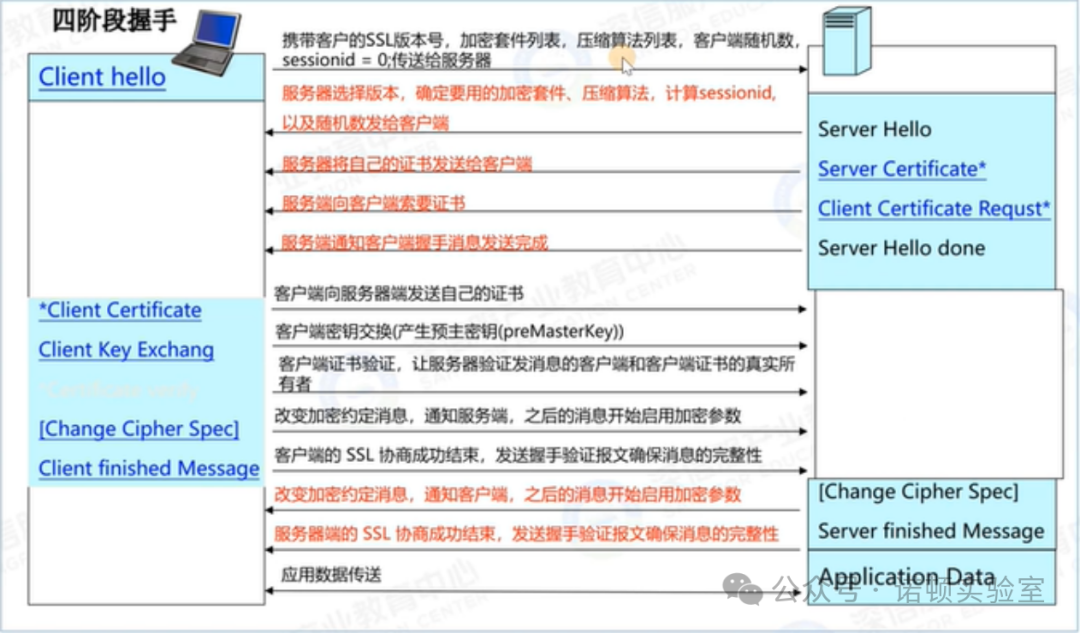
HTTP Identification Working Principle:
HTTPS website identification, after the terminal device resolves the domain name through DNS, completes the handshake with the website server, the terminal starts to send the Client Hello message (the first stage of the SSL handshake, in this message, the server_name field contains the domain name being accessed, and the web behavior management extracts the Server_Name field to identify HTTPS websites.
As shown in the figure below: the data packet captured when the terminal device accesses https://www.baidu.com.
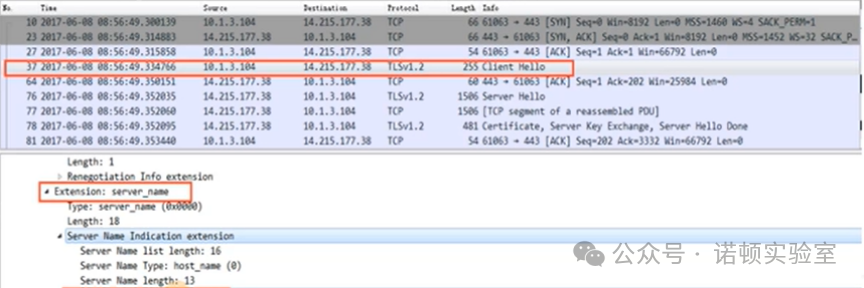
HTTPS Control Principle
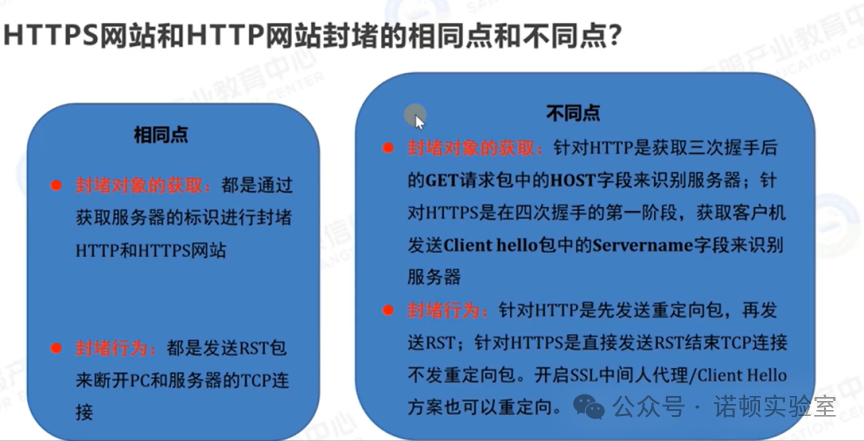
For blocking HTTPS websites, after the terminal device sends the Client Hello message, we identify the website, and then similar to HTTP blocking, masquerade as the website server to send an RST packet to the terminal device (ip.id is also 0x5826), disconnecting the connection between the terminal device and the website server.
The difference from HTTP blocking: The entire process of HTTPS is encrypted, and without performing SSL man-in-the-middle interception, it is impossible to intercept and forge specific packets, thus making it impossible to redirect to the rejection interface.
Configuration Ideas:
1. Add [Behavior Management] – [Access Control Policy] – [Application Control] to check access to websites – web applications – search engines, effective all day, action deny.
2. In [Applicable Objects], select the public internet area, associating all users in the public internet area with this control policy.
Client Hello Solution:
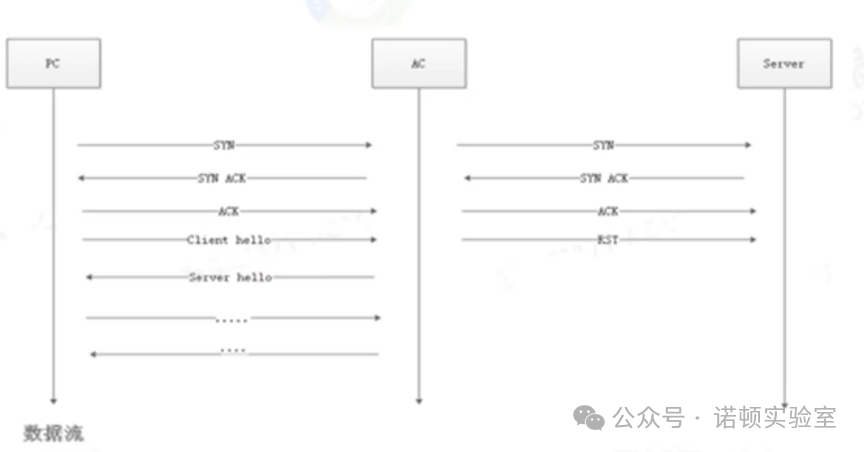
If only redirection is needed, then as long as the AC can complete the SSL handshake with the PC, there is no need to maintain requests on both sides like a man-in-the-middle proxy, so under the SSL man-in-the-middle scheme.
The data flow is simplified as follows:
The TCP three-way handshake initiated by the PC, the AC does not control, when the Client Hello from the PC reaches the AC, if it meets the conditions for redirection, the AC masquerades as the server to complete the SSL three-way handshake with the PC, waiting for the real HTTPS request to come, then the AC returns the redirection message, completing the entire redirection process. The process is actually similar to a man-in-the-middle proxy, just without maintaining connections on both sides.
Configuration Ideas– HTTPS Redirection:
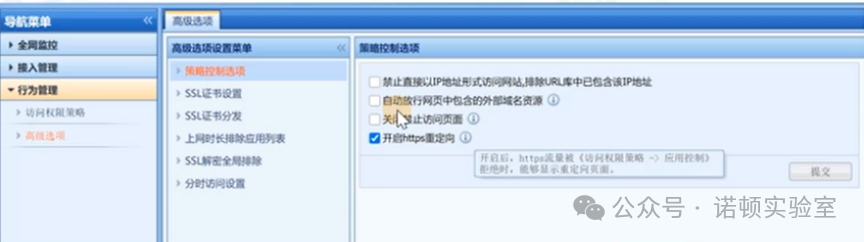
Navigation Menu → Behavior Management → Advanced Options → Policy Control →
Enable HTTPS Redirection
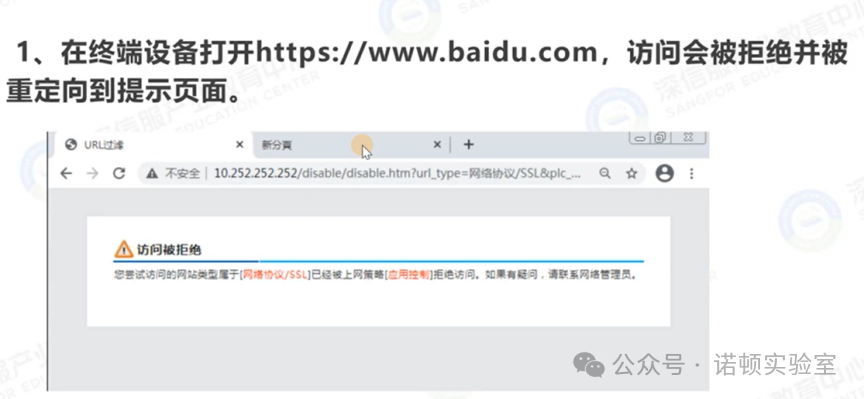
Effect Display:
How to troubleshoot when HTTPS websites cannot be blocked?
Is the URL database updated to the latest version?
Is the HTTPS website in the application identification library or UL rule library, and is the policy configured correctly?
Are the applicable users for the policy online, and is the user in the global exclusion address, and is direct access enabled?
Packet capture analysis: Is the ServerName correct, and does it correspond to the HTTPS website?
Custom Application Method
The global behavior management has a built-in rule library that covers common applications and websites, with continuous updates every half month, but there are inevitably some uncommon applications and websites that have not been updated. In this environment, as long as we provide the characteristics or URL of the application, we can identify and control it through customization.
Custom Application Ideas
In [Object Definition] – [Custom Application], we can identify the direction of the application data packets, protocol, target port, target IP, and matching target domain name. As long as we can determine these characteristics of the application, we can identify and control these applications.
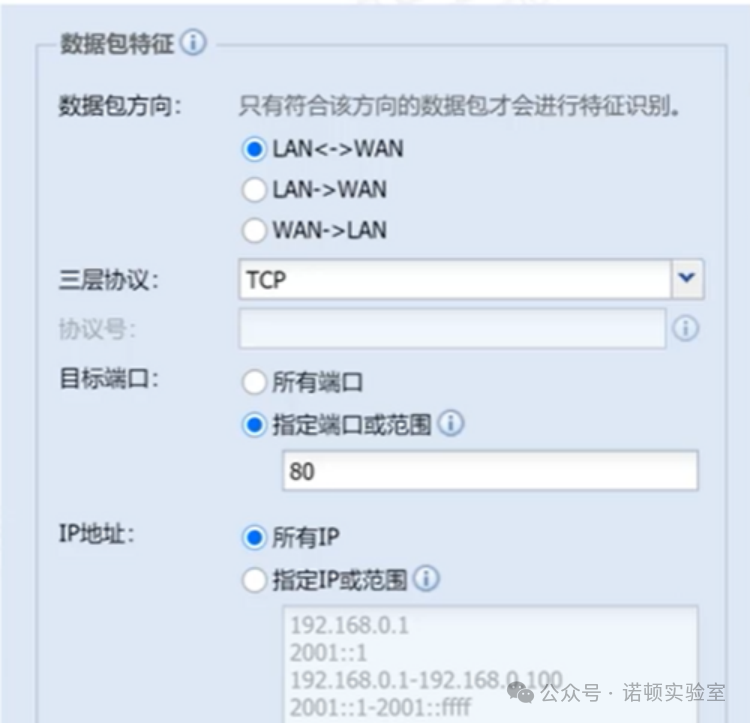
[Note] These characteristics need to be as precise as possible, for example: If only port 80 is filled in, and other conditions match all, it will cause all HTTP port 80 data to be recognized as this custom application.
Custom URL:
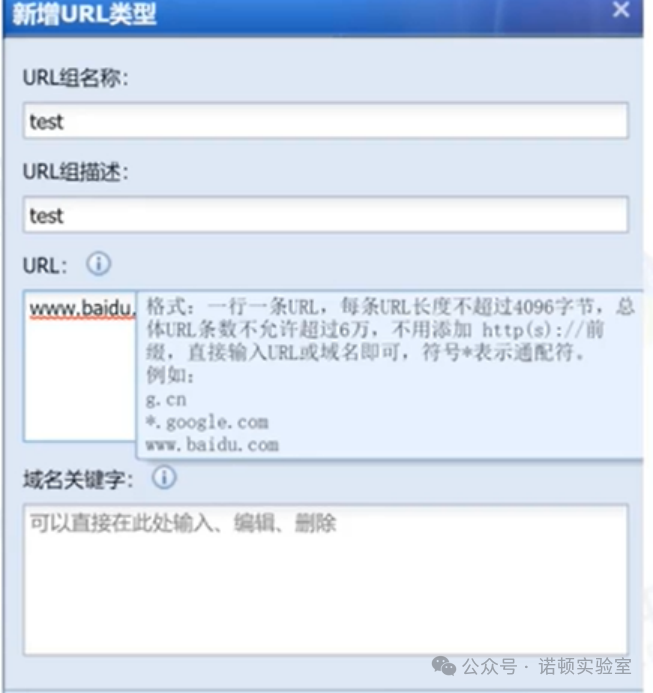
In [Object Definition] – [URL Classification Library], you can customize URLs, as shown in the figure below.
Supports matching URL and domain name keywords.
Summary of Object Customization:
Custom Admission Rules: You can define that certain processes must be running to allow (or disallow) internet access.
Custom Applications (block or audit precise applications)
Custom URLs (block or audit precise URLs)
Define keywords (used for keyword filtering or auditing)
The role of object customization: For precise control of applications, ensuring that 99.99% of daily applications can be recognized by the Sangfor built-in identification library, while performing precise control on 0.01% of applications.
Access Control Policy Troubleshooting Ideas:
1. Check device deployment; if it is in bypass mode, the device can only control some TCP applications.
2. [Global Monitoring] – [Network User Management] check if the users corresponding to the policy are online.
3. Check if the rule library “Application Identification”, “URL Library”, “Audit Rule Library” is up to date.
4. Check if the internet access permission policy is associated with the user, and check if the user is associated with multiple internet access permission policies, paying attention to the stacking order of the policies (priority decreases from top to bottom).
5. Check if [System Diagnosis] – [Internet Access Troubleshooting] has direct access enabled; check if [System Configuration] – [Global Exclusion Address] has excluded internal network PC IPs, target domain names, target IPs, etc.
6. Check if there are custom applications; disable or delete custom applications to see if the policy works normally.
7. Associate a user with an [Internet Audit Policy], enabling auditing for all applications, and enter [Built-in Data Center] to check if the applications recognized by the data center correspond to the applications actually used. If they do not correspond, roll back the application identification rule library and update the rule library again.
8. If the data center does not recognize any applications from the internal network PC, pay attention to check if the customer has other internet access lines, and perform packet capture analysis to see if user traffic goes through the AC.