Click on the blue text above“
Reply with “666” to receive the most popular Java core knowledge summary on the internet


-
Is He Tiantian here?
-
https://www.jianshu.com/p/68c30beca612
Code example: https://github.com/TiantianUpup/http-call
Introduction
The reason for writing this article stems from a conversation with a friend.

This touches on my knowledge blind spot, so I started by searching on Baidu for the differences and performance comparisons between HttpClient and OkHttp based on keywords. I couldn’t find the answers I wanted, so I went to Stack Overflow to see if anyone had asked this question, and it didn’t disappoint.
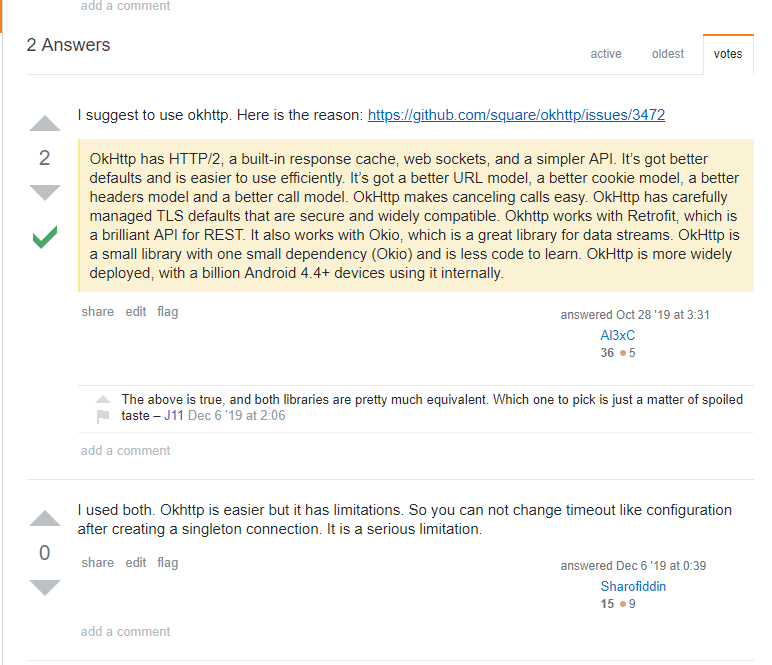
So I compared them in terms of usage, performance, and timeout configuration.
Usage
HttpClient and OkHttp are generally used to call other services, and the interfaces exposed by these services are usually HTTP. The common HTTP request types are GET, PUT, POST, and DELETE, so I will mainly introduce these request types.
Featured:2020 Latest Frequently Asked Corporate Interview Questions and Answers
Introduction to HttpClient Usage
Using HttpClient to send requests mainly involves the following steps:
-
Create a CloseableHttpClient or CloseableHttpAsyncClient object; the former is synchronous, while the latter is asynchronous.
-
Create an HTTP request object.
-
Call the execute method to execute the request; if it is an asynchronous request, the start method must be called before execution.
Create Connection:
CloseableHttpClient httpClient = HttpClientBuilder.create().build();
This connection is synchronous.
GET Request:
@Test
public void testGet() throws IOException {
    String api = "/api/files/1";
    String url = String.format("%s%s", BASE_URL, api);
    HttpGet httpGet = new HttpGet(url);
    CloseableHttpResponse response = httpClient.execute(httpGet);
    System.out.println(EntityUtils.toString(response.getEntity()));
}
Using HttpGet indicates that this connection is a GET request, and HttpClient calls the execute method to send the GET request.
PUT Request:
@Test
public void testPut() throws IOException {
    String api = "/api/user";
    String url = String.format("%s%s", BASE_URL, api);
    HttpPut httpPut = new HttpPut(url);
    UserVO userVO = UserVO.builder().name("h2t").id(16L).build();
    httpPut.setHeader("Content-Type", "application/json;charset=utf8");
    httpPut.setEntity(new StringEntity(JSONObject.toJSONString(userVO), "UTF-8"));
    CloseableHttpResponse response = httpClient.execute(httpPut);
    System.out.println(EntityUtils.toString(response.getEntity()));
}
POST Request:
-
Add Object
@Test
public void testPost() throws IOException {
    String api = "/api/user";
    String url = String.format("%s%s", BASE_URL, api);
    HttpPost httpPost = new HttpPost(url);
    UserVO userVO = UserVO.builder().name("h2t2").build();
    httpPost.setHeader("Content-Type", "application/json;charset=utf8");
    httpPost.setEntity(new StringEntity(JSONObject.toJSONString(userVO), "UTF-8"));
    CloseableHttpResponse response = httpClient.execute(httpPost);
    System.out.println(EntityUtils.toString(response.getEntity()));
}
This request is for creating an object and requires passing a JSON string.
-
Upload File
@Test
public void testUpload1() throws IOException {
    String api = "/api/files/1";
    String url = String.format("%s%s", BASE_URL, api);
    HttpPost httpPost = new HttpPost(url);
    File file = new File("C:/Users/hetiantian/Desktop/学习/docker_practice.pdf");
    FileBody fileBody = new FileBody(file);
    MultipartEntityBuilder builder = MultipartEntityBuilder.create();
    builder.setMode(HttpMultipartMode.BROWSER_COMPATIBLE);
    builder.addPart("file", fileBody);
    HttpEntity entity = builder.build();
    httpPost.setEntity(entity);
    CloseableHttpResponse response = httpClient.execute(httpPost);
    System.out.println(EntityUtils.toString(response.getEntity()));
}
Upload file using addPart.
DELETE Request:
@Test
public void testDelete() throws IOException {
    String api = "/api/user/12";
    String url = String.format("%s%s", BASE_URL, api);
    HttpDelete httpDelete = new HttpDelete(url);
    CloseableHttpResponse response = httpClient.execute(httpDelete);
    System.out.println(EntityUtils.toString(response.getEntity()));
}
Cancel Request:
@Test
public void testCancel() throws IOException {
    String api = "/api/files/1";
    String url = String.format("%s%s", BASE_URL, api);
    HttpGet httpGet = new HttpGet(url);
    httpGet.setConfig(requestConfig);

    long begin = System.currentTimeMillis();
    CloseableHttpResponse response = httpClient.execute(httpGet);
    while (true) {
        if (System.currentTimeMillis() - begin > 1000) {
            httpGet.abort();
            System.out.println("task canceled");
            break;
        }
    }
    System.out.println(EntityUtils.toString(response.getEntity()));
}
Call the abort method to cancel the request.Execution result:
task canceled
cost 8098 ms
Disconnected from the target VM, address:'127.0.0.1:60549', transport:'socket'

java.net.SocketException: socket closed...【省略】
OkHttp Usage
Using OkHttp to send requests mainly involves the following steps:
-
Create OkHttpClient object.
-
Create Request object.
-
Wrap Request object into Call.
-
Execute synchronous or asynchronous requests using Call; call execute for synchronous execution and enqueue for asynchronous execution.
Create Connection:
private OkHttpClient client = new OkHttpClient();
GET Request:
@Test
public void testGet() throws IOException {
    String api = "/api/files/1";
    String url = String.format("%s%s", BASE_URL, api);
    Request request = new Request.Builder()
            .url(url)
            .get()
            .build();
    final Call call = client.newCall(request);
    Response response = call.execute();
    System.out.println(response.body().string());
}
PUT Request:
@Test
public void testPut() throws IOException {
    String api = "/api/user";
    String url = String.format("%s%s", BASE_URL, api);
    UserVO userVO = UserVO.builder().name("h2t").id(11L).build();
    RequestBody requestBody = RequestBody.create(MediaType.parse("application/json; charset=utf-8"), JSONObject.toJSONString(userVO));
    Request request = new Request.Builder()
            .url(url)
            .put(requestBody)
            .build();
    final Call call = client.newCall(request);
    Response response = call.execute();
    System.out.println(response.body().string());
}
POST Request:
-
Add Object
@Test
public void testPost() throws IOException {
    String api = "/api/user";
    String url = String.format("%s%s", BASE_URL, api);
    JSONObject json = new JSONObject();
    json.put("name", "hetiantian");
    RequestBody requestBody = RequestBody.create(MediaType.parse("application/json; charset=utf-8"), String.valueOf(json));
    Request request = new Request.Builder()
            .url(url)
            .post(requestBody)
            .build();
    final Call call = client.newCall(request);
    Response response = call.execute();
    System.out.println(response.body().string());
}
-
Upload File
@Test
public void testUpload() throws IOException {
    String api = "/api/files/1";
    String url = String.format("%s%s", BASE_URL, api);
    RequestBody requestBody = new MultipartBody.Builder()
            .setType(MultipartBody.FORM)
            .addFormDataPart("file", "docker_practice.pdf",
                    RequestBody.create(MediaType.parse("multipart/form-data"), new File("C:/Users/hetiantian/Desktop/学习/docker_practice.pdf")))
            .build();
    Request request = new Request.Builder()
            .url(url)
            .post(requestBody)
            .build();
    final Call call = client.newCall(request);
    Response response = call.execute();
    System.out.println(response.body().string());
}
Upload file using addFormDataPart method to simulate form upload.
DELETE Request:
@Test
public void testDelete() throws IOException {
    String url = String.format("%s%s", BASE_URL, api);
    Request request = new Request.Builder()
            .url(url)
            .delete()
            .build();
    final Call call = client.newCall(request);
    Response response = call.execute();
    System.out.println(response.body().string());
}
Cancel Request:
@Test
public void testCancelSync() throws IOException {
    String api = "/api/files/1";
    String url = String.format("%s%s", BASE_URL, api);
    Request request = new Request.Builder()
            .url(url)
            .get()
            .build();
    final Call call = client.newCall(request);
    Response response = call.execute();
    long start = System.currentTimeMillis();
    while (true) {
        if (System.currentTimeMillis() - start > 1000) {
            call.cancel();
            System.out.println("task canceled");
            break;
        }
    }
    System.out.println(response.body().string());
}
Call the cancel method to cancel the request.Test result:
task canceled
cost 9110 ms

java.net.SocketException: socket closed...【省略】
Conclusion
Using OkHttp is more concise with the builder pattern, and using .post/.delete/.put/.get methods indicates the request type, eliminating the need to create request types like HttpGet, HttpPost, etc., as in HttpClient.
Featured:2020 Latest Frequently Asked Corporate Interview Questions and Answers
Regarding dependencies, if HttpClient needs to send asynchronous requests or implement file uploads, additional asynchronous request dependencies must be introduced.
<dependency>
    <groupId>org.apache.httpcomponents</groupId>
    <artifactId>httpmime</artifactId>
    <version>4.5.3</version>
</dependency>

<dependency>
    <groupId>org.apache.httpcomponents</groupId>
    <artifactId>httpasyncclient</artifactId>
    <version>4.5.3</version>
</dependency>
For canceling requests, HttpClient uses the abort method, while OkHttp uses the cancel method, both of which are quite simple. If using an asynchronous client, just call the cancel request method when an exception is thrown.
Timeout Settings
HttpClient Timeout Settings: In HttpClient version 4.3 and above, timeout settings are configured through RequestConfig.
private CloseableHttpClient httpClient = HttpClientBuilder.create().build();
private RequestConfig requestConfig = RequestConfig.custom()
        .setSocketTimeout(60 * 1000)
        .setConnectTimeout(60 * 1000).build();
String api = "/api/files/1";
String url = String.format("%s%s", BASE_URL, api);
HttpGet httpGet = new HttpGet(url);
httpGet.setConfig(requestConfig);
The timeout is set on the request type HttpGet, not on the HttpClient.
OkHttp Timeout Settings: Set directly on OkHttp.
private OkHttpClient client = new OkHttpClient.Builder()
        .connectTimeout(60, TimeUnit.SECONDS)
        .readTimeout(60, TimeUnit.SECONDS)
        .build();
Conclusion: If the client is a singleton, HttpClient is more flexible in setting timeouts, allowing different timeout settings for different request types. Once OkHttp sets a timeout, the timeout for all request types is determined.
Performance Comparison Between HttpClient and OkHttp
Testing Environment:
-
CPU: Six-core
-
Memory: 8GB
-
OS: Windows 10
Each test case was tested five times to eliminate randomness.
Client Connection as Singleton:

Client Connection Not as Singleton:
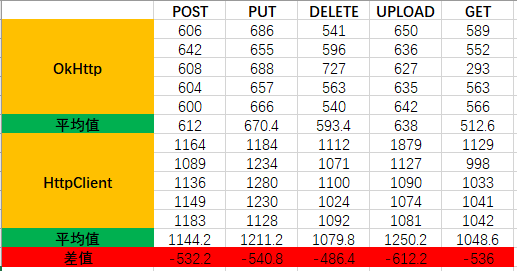
In singleton mode, HttpClient’s response speed is slightly faster, measured in milliseconds, with performance differences being minimal. In non-singleton mode, OkHttp performs better; HttpClient’s connection creation is time-consuming, as most resources are usually written in singleton mode, making the results from the first test more valuable.
Summary
OkHttp and HttpClient are comparable in performance and usage; choose based on actual business needs. Finally, here is the example code (https://github.com/TiantianUpup/http-call), feel free to fork and star. It’s been a while since I published an article.
——End——
Previous Popular Articles:
- How to Explain Spring Cloud Concepts in an Interesting Way
- MySQL 8.0 Latest Installation Tutorial
- A SQL Auto-Check Tool, No More Worries About SQL Errors
- Spring Boot + Redis Distributed Lock: Simulating Order Snatching
- IDEA Plugin Recommendation: EasyCode for One-Click Code Generation
- A Powerful Java Utility Library, GitHub Stars: 10.4k+
Did you gain something from this article? Liking and sharing is the greatest support.
See you tomorrow (。・ω・。)ノ♡