01Creating a Student Grade Management System with Python

Today, I will share how to create a simple student grade management system using Python. The content is for learning and communication purposes only.
 Creating a Student Grade Management System with Python
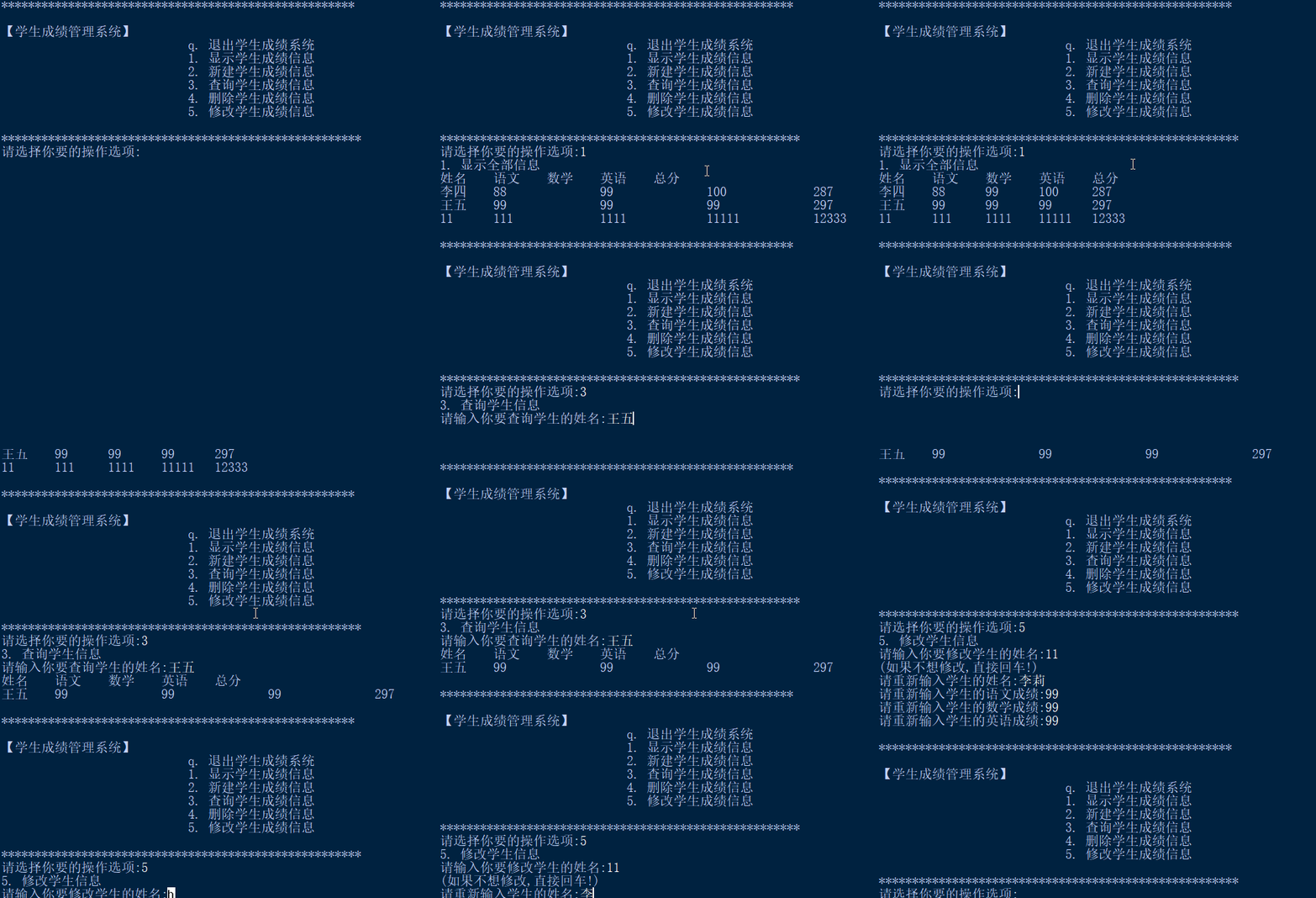
 Production Techniques
1. Define Variables
(1) Define interactive input variables
This is mainly used to display the operation interface of the student grade management system.
(2) Define student grade information variables
This is mainly used for storing and retrieving student grade information.
    s_info = """*****************************************************
【Student Grade Management System】                            q. Exit the student grade system                            1. Display student grade information                            2. Create new student grade information                                                        3. Query student grade information                            4. Delete student grade information                            5. Modify student grade information                            ******************************************************"""
    students=[]
2. Read Student Grade Information
This mainly involves reading student grade information from a TXT file and saving it into the student grade variable.
f=open("students.txt","r+") for st in f.readlines(): students.append(eval(st)) f.close()3. Loop to Wait for Operation Commands and Execute
This mainly involves looping to wait for input of student management system operation commands, executing display, create, query, delete, and modify operations on student grade information after receiving the command.
while True: print(s_info) handle = input('Please select your operation option:') if handle == 'q': print('q. Exit the system') break elif handle == '1': s_display(students) elif handle == '2': s_new(students) elif handle == '3': s_find(students) elif handle == '4': s_delect(students) elif handle == '5': s_modify(students) else: print('Please enter a valid operation option!')4. Write Operation Command Execution Functions
(1) Function to Display Student Grade Information
The main function is to display all student grade information.
def s_display(students): print('1. Display all information') print('Name\tChinese\tMath\tEnglish\tTotal') for stu in students: print(f'{stu["name"]}\t{stu["chinese"]}\t{stu["math"]}\t{stu["english"]}\t{stu["total"]}')(2) Function to Create New Student Grade Information
This mainly involves creating new student grade information and updating the file that saves student grade information.
def s_new(students): print('2. Create new student information') name = str(input('Please enter the student's name:')) chinese = int(input('Please enter the student's Chinese score:')) math = int(input('Please enter the student's Math score:')) english = int(input('Please enter the student's English score:')) total = chinese + math + english stu = {'name': name, 'chinese': chinese, 'math': math, 'english': english, 'total': total} students.append(stu) s_write_to_file(students)(3) Function to Query Student Grade Information
This mainly involves querying the grade information of a student with a given name.
def s_find(students): print('3. Query student information') name = input('Please enter the name of the student you want to query:') for stu in students: if name == stu['name']: print('Name\tChinese\tMath\tEnglish\tTotal') print(f'{stu["name"]}\t{stu["chinese"]}\t{stu["math"]}\t{stu["english"]}\t{stu["total"]}') break else: print('The student does not exist, please check if the name is entered correctly!') s_write_to_file(students)(4) Function to Delete Student Grade Information
This mainly involves deleting the grade information of a student with a given name and updating the file that saves student grade information.
def s_delect(students): print('4. Delete student information') name = input('Please enter the name of the student you want to delete:') for stu in students: if name == stu['name']: students.remove(stu) break else: print('The student does not exist, please check if the name is entered correctly!') s_write_to_file(students)(5) Function to Modify Student Grade Information
This mainly involves modifying the grade information of a student with a given name and updating the file that saves student grade information.
def s_modify(students): print('5. Modify student information') name = input('Please enter the name of the student you want to modify:') for stu in students: if name == stu['name']: print('(If you do not want to modify, just press enter!)') name = input('Please re-enter the student’s name:') chinese = input('Please re-enter the student’s Chinese score:') math = input('Please re-enter the student’s Math score:') english = input('Please re-enter the student’s English score:') if name: stu['name'] = str(name) if chinese: stu['chinese'] = int(chinese) if math: stu['math'] = int(math) if english: stu['english'] = int(english) stu['total'] = stu['chinese'] + stu['math'] + stu['english'] break else: print('The student does not exist, please check if the name is entered correctly!') s_write_to_file(students)5. Function to Save Student Grade Information
This mainly implements the saving and updating of student grade information.
def s_write_to_file(students): f=open("students.txt","r+") for s in students: f.write(str(s)+"\n") f.close()Complete Source Code
def s_write_to_file(students):        f=open("students.txt","r+")        for s  in students:            f.write(str(s)+"\n")        f.close()
def s_display(students):        print('1. Display all information')        print('Name\tChinese\tMath\tEnglish\tTotal')        for stu in students:            print(f'{stu["name"]}\t{stu["chinese"]}\t{stu["math"]}\t{stu["english"]}\t{stu["total"]}')def s_new(students):        print('2. Create new student information')        name = str(input('Please enter the student’s name:'))        chinese = int(input('Please enter the student’s Chinese score:'))        math = int(input('Please enter the student’s Math score:'))        english = int(input('Please enter the student’s English score:'))        total = chinese + math + english        stu = {'name': name, 'chinese': chinese, 'math': math, 'english': english, 'total': total}        students.append(stu)        s_write_to_file(students)        def s_find(students):        print('3. Query student information')        name = input('Please enter the name of the student you want to query:')        for stu in students:            if name == stu['name']:                print('Name\tChinese\tMath\tEnglish\tTotal')                print(f'{stu["name"]}\t{stu["chinese"]}\t{stu["math"]}\t{stu["english"]}\t{stu["total"]}')                break        else:            print('The student does not exist, please check if the name is entered correctly!')        s_write_to_file(students)def s_delect(students):        print('4. Delete student information')        name = input('Please enter the name of the student you want to delete:')        for stu in students:            if name == stu['name']:                students.remove(stu)                break        else:            print('The student does not exist, please check if the name is entered correctly!')        s_write_to_file(students)def s_modify(students):        print('5. Modify student information')        name = input('Please enter the name of the student you want to modify:')        for stu in students:            if name == stu['name']:                print('(If you do not want to modify, just press enter!)')                name = input('Please re-enter the student’s name:')                chinese = input('Please re-enter the student’s Chinese score:')                math = input('Please re-enter the student’s Math score:')                english = input('Please re-enter the student’s English score:')                if name:                    stu['name'] = str(name)                if chinese:                    stu['chinese'] = int(chinese)                if math:                    stu['math'] = int(math)                if english:                    stu['english'] = int(english)                stu['total'] = stu['chinese'] + stu['math'] + stu['english']                break        else:            print('The student does not exist, please check if the name is entered correctly!')        s_write_to_file(students)            if __name__=="__main__":    s_info = """*****************************************************
【Student Grade Management System】                            q. Exit the student grade system                            1. Display student grade information                            2. Create new student grade information                                                        3. Query student grade information                            4. Delete student grade information                            5. Modify student grade information                            ******************************************************"""
    students=[]    f=open("students.txt","r+")    for st in f.readlines():        students.append(eval(st))    f.close()    while True:        print(s_info)        handle = input('Please select your operation option:')        if handle == 'q':            print('q. Exit the system')            break        elif handle == '1':                        s_display(students)        elif handle == '2':            s_new(students)                    elif handle == '3':            s_find(students)               elif handle == '4':            s_delect(students)        elif handle == '5':            s_modify(students)                 else:            print('Please enter a valid operation option!')
Public Account: Practical Office Programming Skills
WeChat ID: Excel-Python
Welcome to leave a message!

 Scan to follow for more exciting contentPublic Account: Practical Office Programming Skills
 1.Python Word Cloud Analysis of “Qing Yu Nian”Drama Review2.Creating GIF Animations with Python in a Few Lines of Code3.Creating a Simple Calculator with Python4.Creating a QR Code Generator with Python5.Using Python to Control the Camera for Video Recording6.Using Python to Play with Video Playback7.Creating a Photo Reader with Python8.Implementing Text-to-Speech with Python9.Creating a Simple Clock with Python10.Implementing Handwritten Digit Recognition with Python11.Easy Image Text Recognition with Python12.Creating a Novel Word Frequency Analysis Chart with Python