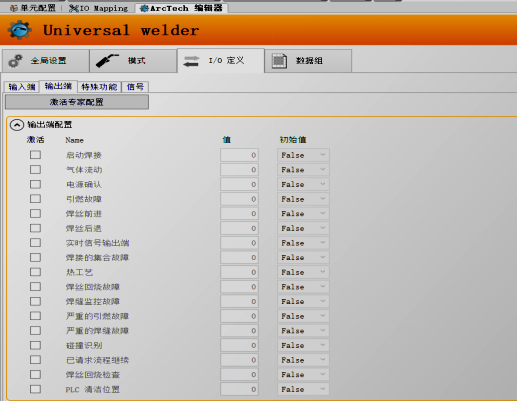
In previous articles, we mentioned that the robot and welding machine can be configured with the following signals.
Input Signals: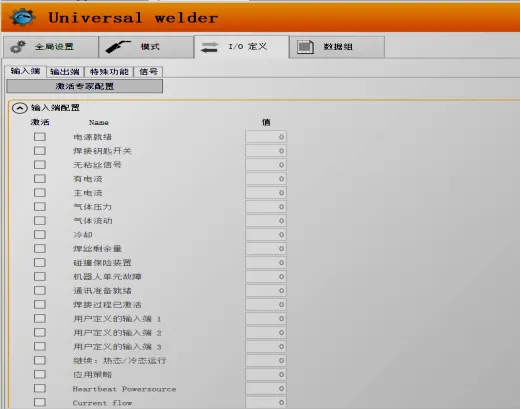 Output Signals:
 1.Function of Collision Prevention Signal:
When the robot is using automatic welding, the automatic welding gun configured for the robot is generally equipped with a collision prevention sensor (referred to as a collision sensor). This way, when the robot moves, if the welding gun collides with the workpiece or peripheral equipment, the collision sensor can stop the robot’s movement, preventing damage to the welding gun or robot due to severe impacts, thus providing a certain level of protection for the equipment. So how do we wire and configure the collision prevention signal?
2.Wiring Method:
① Connect to the dedicated collision prevention interface of the welding machine (not all welding machines come with a collision prevention interface; refer to the welding machine manual). According to the welding machine configuration manual, configure the relevant signals in the ArcTech editor.
② Connect to the Beckhoff IO module, and configure the relevant signals in the ArcTech editor. When a collision occurs with the welding gun, corresponding collision information will appear, and the robot will stop moving. At this point, the robot can be manually moved to a safe position. Both wiring methods are acceptable, but since some welding machines do not have a collision prevention interface, the second method is more common and simpler.
3.Collision Signal Configuration:In the arc welding package configuration, go to ArcTech editor → IO Definition → Input → Collision Safety Device.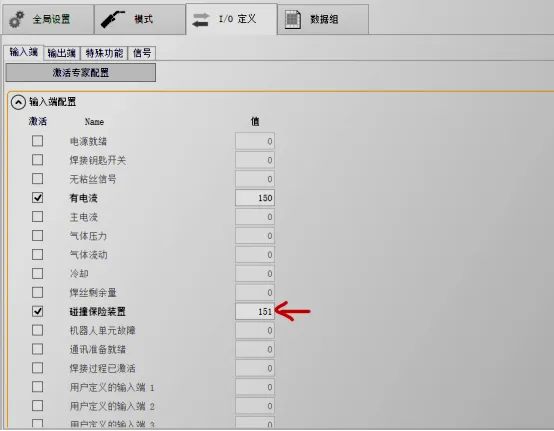 Enable collision monitoring:Go to ArcTech editor → Global Settings → Process Flow Settings → Monitoring.
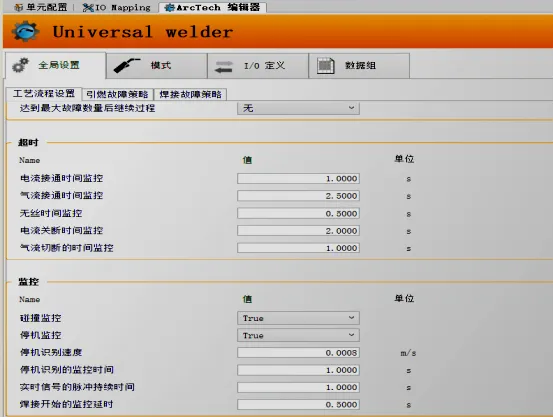 At this point, the configuration is complete.4.When our welding gun collides with peripheral equipment, the collision sensor will activate, and the following prompt will appear:“Collision safety device triggered”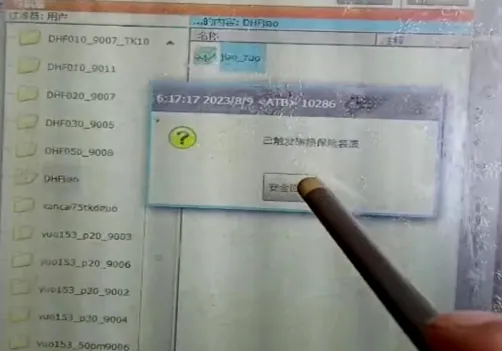
5.Releasing Collision Alarm:When a collision occurs while the robot is in automatic mode, switch the robot to manual mode → Click Safety Retreat → Confirm alarm information → Manually teach the speed down to5-10%, to prevent excessive speed from causing secondary damage to the collision sensor when moving the robot; move the robot to a safe position and check for collision conditions.
Additionally, if the collision signal line is connected to the Beckhoff IO module, associating it with the robot’s MoveEnable signal, etc., can also cause the robot to stop when a collision occurs. However, in practice, this is relatively inconvenient, and there is a lot of status information that appears when the collision prevention circuit is disconnected. Therefore, wiring and configuration can be adjusted according to the on-site situation.
Final Reminder:
Key Point!!!When our collision sensor experiences a severe collision and is damaged, it is possible to temporarily short-circuit the collision signal, but long-term use is not recommended. Otherwise, if the robot collides again without the protection of the collision sensor, it can cause serious damage to the robot. Therefore, when the collision sensor is damaged, it should be replaced promptly, and in the initial equipment configuration, a collision sensor should be purchased to protect the welding gun and robot.
