This article introduces how to generate library files on a Linux system and how to write header files to use the library functions.
1. Writing Library Files
As we know, in a C++ project, the file containing the main() function will generate an executable program upon compilation. On the other hand, the code that does not contain the main() function is generally called by other programs, so we can package them into something, which is a library.
A library is generally a collection of many programs and algorithms. For example, the OpenCV library contains many algorithms related to computer vision, and the Eigen library provides many algorithms for matrix algebra calculations.
Let’s demonstrate how to write a library using a simple C++ file.
Create a folder named cppSpace in the root directory, and within that folder, create a file named libHelloWorld.cpp:
// Library file without main() function#include <iostream>using namespace std;void printHello(){ cout << "Hello world!" << endl;}This library file is quite simple and only provides a printHello() function, which outputs a message when called.
According to the principles of CMake, we add the following instructions in the CMakeLists.txt file:
# The syntax format for this instruction: add_library( program_name source_file ) add_library( hello libHelloWorld.cpp )This command tells CMake that we want to compile this file into a library called “hello”. Next, we compile the project using CMake by entering the following in the terminal:
cd buildcmake ..make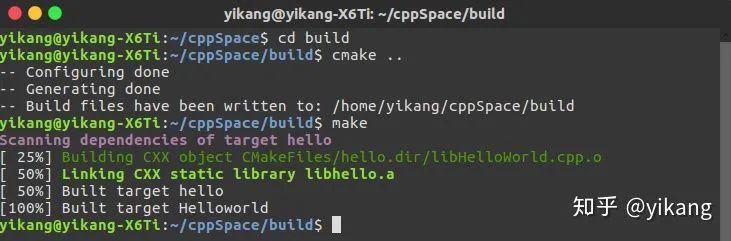
After running the above commands, a file named libhello.a is generated in the directory, which is our library. This library type is a static library, and a static library generates a copy each time it is called, which takes up more space. In contrast, a shared library only produces one copy during multiple calls, saving space. To generate a shared library, we add the following instruction in the CMakeLists.txt file:
add_library( hello_shared SHARED libHelloWorld.cpp )By compiling the project again with CMake, we will obtain the libhello_shared.so file, which is the shared library file.

If we only have these two formats of files, we do not know what the functions inside are or how to call them. To allow everyone to use these library functions, we need to write a header file that specifies what is available in these libraries. For users, as long as they declare this header file in their program, they can call this library.
2. Writing Header Files
A header file is an important directive at the beginning of a C++ program. Below, we will illustrate the writing and usage process of the header file for libhello.a.
In the cppSpace folder, create a new header file named libHelloWorld.h:
#ifndef LIBHELLOWORLD_H_#define LIBHELLOWORLD_H_// Macro definition to prevent redefinition errors due to multiple inclusionsvoid printHello(); // Declaration of included library functions#endifWe have written our header file libHelloWorld.h, and next, we will write an executable program useHello.cpp to call it:
#include "libHelloWorld.h" // Declare header fileint main(){ printHello(); return 0;}To successfully call this library function, we also need to link to the library file libhello.a during compilation, which requires adding the following instructions in the CMakeLists.txt file:
# Normally compile useHello.cpp fileadd_executable( useHello useHello.cpp )# Establish a link with the library file (Note! The name of the library file is added, not the header file name)target_link_libraries( useHello hello )Thus, the file useHello.cpp can use the library functions in the hello.a library.
In conclusion, we have introduced the process of writing and using library files and header files.