Recommended Reading
C Language Learning Guide: Have You Mastered These Core Knowledge Points?
C Language Functions: From Beginner to Proficiency, Understand It All in One Article
C Language Pointers: From Beginner to Proficiency, Understand It All in One Article
C Language Arrays: From Beginner to Proficiency, Understand It All in One Article
C Language Structures: From Beginner to Proficiency, Understand It All in One Article
C Language Dynamic Memory Management: From Beginner to Proficiency, Understand It All in One Article
C Language Chinese Community Source Code Git Repository: https://gitee.com/cyyzwsq/C-Coding.git
Main Content
Recommended Reading
aaa
C Language Chinese Community Source Code Git Repository: https://gitee.com/cyyzwsq/C-Coding.git
Main Content
1. Basic Concepts of Network Programming
The essence of network programming is to allow processes on different computers to exchange data over the network. It relies on two key systems:
1. Protocol Stack: TCP/IP Model
Computer networks achieve communication through layered protocols, with the TCP/IP four-layer model as the core in practical applications:
- Link Layer: Handles physical data transmission of hardware devices (e.g., network cards) (e.g., Ethernet frames).
- Network Layer: Responsible for routing data packets across networks (Core Protocol: IP protocol, defines packet format and addresses).
- Transport Layer: Provides end-to-end communication services (Core Protocols: TCP, UDP).
- Application Layer: Defines specific business rules (e.g., HTTP, FTP, implemented by developers).
The Socket interface mainly operates at the transport and network layers, abstracting the underlying hardware and routing details, allowing developers to directly locate target processes via “port + IP”.
2. Core Protocols: TCP and UDP
The two core protocols of the transport layer determine the differences in communication methods:
-
TCP (Transmission Control Protocol):
- Connection-oriented: A connection must be established through a “three-way handshake” before communication, and released after with a “four-way handshake”.
- Reliable transmission: Ensures data is not lost, not duplicated, and arrives in order through acknowledgment mechanisms, retransmission mechanisms, and flow control.
- Byte stream: Data is transmitted in a continuous byte stream (no boundaries).
- Applicable scenarios: File transfer, web access, etc., where reliable data is required.
-
UDP (User Datagram Protocol):
- Connectionless: Data is sent directly without establishing a connection.
- Unreliable transmission: Does not guarantee data delivery, may be lost or out of order.
- Datagram: Data is transmitted in independent “datagrams” (with boundaries).
- Applicable scenarios: Video calls, real-time games, etc., where latency is critical.
3. Socket
A Socket is an abstraction for network communication provided by the operating system, essentially a “file descriptor” (similar to a file handle), through which network data can be read and written.
- Each Socket is bound to a IP address + port number, uniquely identifying a process on the network (IP locates the computer, port locates the process).
- Classification: Based on transport layer protocols, divided into stream sockets (SOCK_STREAM, based on TCP) and datagram sockets (SOCK_DGRAM, based on UDP).
2. Core Preparatory Knowledge
Before writing code, two key technical points must be mastered: address structure and byte order conversion.
1. Network Address Structure
Sockets describe network addresses through structures, the most commonly used is the IPv4 address structure<span> sockaddr_in</span> (defined in<span> <netinet/in.h></span>):
struct sockaddr_in {
    sa_family_t     sin_family;   // Address family: must be AF_INET (IPv4)
    in_port_t       sin_port;     // Port number (network byte order)
    struct in_addr  sin_addr;     // IP address (network byte order)
    unsigned char   sin_zero[8];  // Padding field, must be 0 (compatible with sockaddr)
};

struct in_addr {
    in_addr_t s_addr;  // 32-bit IPv4 address (network byte order)
};
- Generic address structure
<span> sockaddr</span>(fixed length, used for uniform function parameters):
struct sockaddr {
    sa_family_t sa_family;  // Address family
    char        sa_data[14]; // Address data (including port + IP, variable length)
};
When using, it is necessary to cast<span> sockaddr_in*</span> to<span> sockaddr*</span> to pass to functions (such as<span> bind</span>,<span> connect</span>).
2. Byte Order Conversion
Data transmission in the network must use network byte order (big-endian), while the host may be either big-endian or little-endian (depending on the CPU), so conversion functions are needed:
<span> htons()</span>: Host byte order → Network byte order (16-bit, for port number).<span> htonl()</span>: Host byte order → Network byte order (32-bit, for IP address).<span> ntohs()</span>: Network byte order → Host byte order (16-bit).<span> ntohl()</span>: Network byte order → Host byte order (32-bit).
Example: Convert port number<span> 8080</span> to network byte order:
uint16_t port = htons(8080); // Important: Port must be converted, otherwise it may parse incorrectly
3. IP Address Conversion
Need to convert between “dotted-decimal string” (e.g.,<span> "192.168.1.1"</span>) and 32-bit integer (network byte order):
- Recommended to use functions compatible with IPv4/IPv6:
<span> inet_pton()</span>: String → Network byte order integer (presentation → network).<span> inet_ntop()</span>: Network byte order integer → String (network → presentation).
Example:
struct sockaddr_in addr;
// String IP → Network byte order
inet_pton(AF_INET, "127.0.0.1", &addr.sin_addr);
// Network byte order → String
char ip_str[INET_ADDRSTRLEN]; // INET_ADDRSTRLEN: Maximum length of IPv4 string (16)
inet_ntop(AF_INET, &addr.sin_addr, ip_str, INET_ADDRSTRLEN);
3. TCP Programming (Connection-Oriented)
TCP communication requires establishing a connection first (three-way handshake), then transmitting data, and finally releasing the connection (four-way handshake).
1. TCP Server Programming Steps
| Step | Function | Purpose |
|---|---|---|
| 1. Create socket | <span> int socket(int domain, int type, int protocol);</span> |
Create socket descriptor (file handle) |
| 2. Bind address | <span> int bind(int sockfd, const struct sockaddr* addr, socklen_t addrlen);</span> |
Bind socket to IP + port |
| 3. Listen for connections | <span> int listen(int sockfd, int backlog);</span> |
Change to passive listening state, waiting for client connections |
| 4. Accept connection | <span> int accept(int sockfd, struct sockaddr* addr, socklen_t* addrlen);</span> |
Block and wait to accept client connection, return new socket |
| 5. Send and receive data | <span> ssize_t recv(int sockfd, void* buf, size_t len, int flags);</span> / <span> ssize_t send(int sockfd, const void* buf, size_t len, int flags);</span> |
Exchange data with client |
| 6. Close connection | <span> int close(int fd);</span> |
Release resources |
Function Parameter Explanation:
<span> socket()</span>:<span> domain=AF_INET</span>(IPv4),<span> type=SOCK_STREAM</span>(TCP),<span> protocol=0</span>(default protocol).<span> bind()</span>:<span> addrlen</span>is the length of<span> sockaddr_in</span>(<span> sizeof(struct sockaddr_in)</span>).<span> listen()</span>:<span> backlog</span>is the maximum length of the waiting queue (exceeding this will reject new connections).<span> accept()</span>:<span> addr</span>is used to store the client address,<span> addrlen</span>must pass a pointer to the address length (input parameter is buffer size, output parameter is actual length).<span> recv()</span>/<span> send()</span>:<span> flags=0</span>is the default mode (blocking);<span> recv</span>returns the number of bytes received (0 indicates the other party closed, -1 indicates error);<span> send</span>returns the number of bytes sent (-1 indicates error).
2. TCP Client Programming Steps
| Step | Function | Purpose |
|---|---|---|
| 1. Create socket | <span> socket()</span> |
Same as server |
| 2. Connect to server | <span> int connect(int sockfd, const struct sockaddr* addr, socklen_t addrlen);</span> |
Establish TCP connection with server |
| 3. Send and receive data | <span> recv()</span>/<span> send()</span> |
Same as server |
| 4. Close connection | <span> close()</span> |
Same as server |
3. TCP Practical: Echo Server and Client
Server Code (tcp_server.c):
#include <stdio.h>
#include <stdlib.h>
#include <string.h>
#include <unistd.h>
#include <sys/socket.h>
#include <netinet/in.h>
#include <arpa/inet.h>

#define PORT 8080
#define BUF_SIZE 1024

int main() {
    // 1. Create TCP socket
    int listen_fd = socket(AF_INET, SOCK_STREAM, 0);
    if (listen_fd == -1) {
        perror("socket failed");
        exit(EXIT_FAILURE);
    }

    // 2. Bind address (IP + port)
    struct sockaddr_in serv_addr;
    memset(&serv_addr, 0, sizeof(serv_addr));
    serv_addr.sin_family = AF_INET;
    serv_addr.sin_addr.s_addr = INADDR_ANY; // Bind all local IPs
    serv_addr.sin_port = htons(PORT);       // Convert port to network byte order

    if (bind(listen_fd, (struct sockaddr*)&serv_addr, sizeof(serv_addr)) == -1) {
        perror("bind failed");
        close(listen_fd);
        exit(EXIT_FAILURE);
    }

    // 3. Listen for connections (waiting queue length is 5)
    if (listen(listen_fd, 5) == -1) {
        perror("listen failed");
        close(listen_fd);
        exit(EXIT_FAILURE);
    }
    printf("Server listening on port %d...\n", PORT);

    // 4. Accept client connection (loop to handle single client, actual need concurrency)
    struct sockaddr_in client_addr;
    socklen_t client_len = sizeof(client_addr);
    int conn_fd = accept(listen_fd, (struct sockaddr*)&client_addr, &client_len);
    if (conn_fd == -1) {
        perror("accept failed");
        close(listen_fd);
        exit(EXIT_FAILURE);
    }

    // Print client information
    char client_ip[INET_ADDRSTRLEN];
    inet_ntop(AF_INET, &client_addr.sin_addr, client_ip, INET_ADDRSTRLEN);
    printf("Accepted connection from %s:%d\n", client_ip, ntohs(client_addr.sin_port));

    // 5. Echo data (receive and return as is)
    char buf[BUF_SIZE];
    ssize_t n;
    while ((n = recv(conn_fd, buf, BUF_SIZE-1, 0)) > 0) {
        buf[n] = '\0'; // Ensure string ends
        printf("Received: %s", buf);
        send(conn_fd, buf, n, 0); // Echo
    }

    if (n == -1) perror("recv failed");
    printf("Client disconnected\n");

    // 6. Close connection
    close(conn_fd);
    close(listen_fd);
    return 0;
}
Client Code (tcp_client.c):
#include <stdio.h>
#include <stdlib.h>
#include <string.h>
#include <unistd.h>
#include <sys/socket.h>
#include <netinet/in.h>
#include <arpa/inet.h>

#define PORT 8080
#define BUF_SIZE 1024

int main() {
    // 1. Create TCP socket
    int sock_fd = socket(AF_INET, SOCK_STREAM, 0);
    if (sock_fd == -1) {
        perror("socket failed");
        exit(EXIT_FAILURE);
    }

    // 2. Connect to server
    struct sockaddr_in serv_addr;
    memset(&serv_addr, 0, sizeof(serv_addr));
    serv_addr.sin_family = AF_INET;
    serv_addr.sin_port = htons(PORT);
    // Convert server IP (local loopback address here)
    if (inet_pton(AF_INET, "127.0.0.1", &serv_addr.sin_addr) <= 0) {
        perror("invalid address");
        close(sock_fd);
        exit(EXIT_FAILURE);
    }

    if (connect(sock_fd, (struct sockaddr*)&serv_addr, sizeof(serv_addr)) == -1) {
        perror("connect failed");
        close(sock_fd);
        exit(EXIT_FAILURE);
    }
    printf("Connected to server\n");

    // 3. Send data and receive echo
    char buf[BUF_SIZE];
    while (1) {
        printf("Enter message (q to quit): ");
        fgets(buf, BUF_SIZE, stdin); // Input from keyboard
        if (buf[0] == 'q' && (buf[1] == '\n' || buf[1] == '\0')) break;

        send(sock_fd, buf, strlen(buf), 0);
        ssize_t n = recv(sock_fd, buf, BUF_SIZE-1, 0);
        if (n <= 0) {
            perror("recv failed");
            break;
        }
        buf[n] = '\0';
        printf("Echo: %s", buf);
    }

    // 4. Close connection
    close(sock_fd);
    return 0;
}
4. UDP Programming (Connectionless)
UDP does not require establishing a connection, directly sending “datagrams”, suitable for scenarios with high real-time requirements (e.g., video, games).
1. UDP Programming Steps (Server and Client)
The process for UDP servers and clients is simpler, with the core difference being that the address of the other party must be specified when sending and receiving data.
| Role | Steps (Core Functions) |
|---|---|
| Server | 1. Create socket (<span> socket(AF_INET, SOCK_DGRAM, 0)</span>) 2. Bind address (<span> bind()</span>) 3. Receive data (<span> recvfrom()</span>) 4. Send data (<span> sendto()</span>) 5. Close (<span> close()</span>) |
| Client | 1. Create socket 2. Directly <span> sendto()</span> to send data (must specify server address) 3. <span> recvfrom()</span> to receive data 4. Close |
2. Core Functions:
// Receive data (also get sender address)
ssize_t recvfrom(int sockfd, void* buf, size_t len, int flags,
                 struct sockaddr* src_addr, socklen_t* addrlen);

// Send data (must specify receiver address)
ssize_t sendto(int sockfd, const void* buf, size_t len, int flags,
               const struct sockaddr* dest_addr, socklen_t addrlen);
- Parameters are similar to
<span> recv</span>/<span> send</span>, with additional<span> src_addr</span>(receiver address) and<span> dest_addr</span>(sender target address).
3. UDP Practical: Echo Server and Client
Server Code (udp_server.c):
#include <stdio.h>
#include <stdlib.h>
#include <string.h>
#include <unistd.h>
#include <sys/socket.h>
#include <netinet/in.h>
#include <arpa/inet.h>

#define PORT 8080
#define BUF_SIZE 1024

int main() {
    // 1. Create UDP socket
    int sock_fd = socket(AF_INET, SOCK_DGRAM, 0);
    if (sock_fd == -1) {
        perror("socket failed");
        exit(EXIT_FAILURE);
    }

    // 2. Bind address
    struct sockaddr_in serv_addr;
    memset(&serv_addr, 0, sizeof(serv_addr));
    serv_addr.sin_family = AF_INET;
    serv_addr.sin_addr.s_addr = INADDR_ANY;
    serv_addr.sin_port = htons(PORT);

    if (bind(sock_fd, (struct sockaddr*)&serv_addr, sizeof(serv_addr)) == -1) {
        perror("bind failed");
        close(sock_fd);
        exit(EXIT_FAILURE);
    }
    printf("UDP server listening on port %d...\n", PORT);

    // 3. Receive and echo data
    char buf[BUF_SIZE];
    struct sockaddr_in client_addr;
    socklen_t client_len = sizeof(client_addr);

    while (1) {
        // Receive client data
        ssize_t n = recvfrom(sock_fd, buf, BUF_SIZE-1, 0,
                             (struct sockaddr*)&client_addr, &client_len);
        if (n == -1) {
            perror("recvfrom failed");
            continue;
        }
        buf[n] = '\0';

        // Print client information
        char client_ip[INET_ADDRSTRLEN];
        inet_ntop(AF_INET, &client_addr.sin_addr, client_ip, INET_ADDRSTRLEN);
        printf("Received from %s:%d: %s", client_ip, ntohs(client_addr.sin_port), buf);

        // Echo data
        sendto(sock_fd, buf, n, 0, (struct sockaddr*)&client_addr, client_len);
    }

    // 4. Close (actual need signal handling to exit)
    close(sock_fd);
    return 0;
}
Client Code (udp_client.c):
#include <stdio.h>
#include <stdlib.h>
#include <string.h>
#include <unistd.h>
#include <sys/socket.h>
#include <netinet/in.h>
#include <arpa/inet.h>

#define PORT 8080
#define BUF_SIZE 1024

int main() {
    // 1. Create UDP socket
    int sock_fd = socket(AF_INET, SOCK_DGRAM, 0);
    if (sock_fd == -1) {
        perror("socket failed");
        exit(EXIT_FAILURE);
    }

    // Server address
    struct sockaddr_in serv_addr;
    memset(&serv_addr, 0, sizeof(serv_addr));
    serv_addr.sin_family = AF_INET;
    serv_addr.sin_port = htons(PORT);
    inet_pton(AF_INET, "127.0.0.1", &serv_addr.sin_addr);
    socklen_t serv_len = sizeof(serv_addr);

    // 2. Send data and receive echo
    char buf[BUF_SIZE];
    while (1) {
        printf("Enter message (q to quit): ");
        fgets(buf, BUF_SIZE, stdin);
        if (buf[0] == 'q' && (buf[1] == '\n' || buf[1] == '\0')) break;

        // Send to server
        sendto(sock_fd, buf, strlen(buf), 0, (struct sockaddr*)&serv_addr, serv_len);

        // Receive echo
        ssize_t n = recvfrom(sock_fd, buf, BUF_SIZE-1, 0, NULL, NULL);
        if (n == -1) {
            perror("recvfrom failed");
            break;
        }
        buf[n] = '\0';
        printf("Echo: %s", buf);
    }

    // 3. Close
    close(sock_fd);
    return 0;
}
Example of C Language Network Programming on Windows
Using the Windows Sockets API (winsock2) to implement TCP and UDP communication. The code structure is similar to the Linux version, but note the following differences:
- Use
<span> WSAStartup()</span>to initialize the socket library - Use
<span> WSACleanup()</span>to clean up resources - Use
<span> closesocket()</span>instead of<span> close()</span> - Use
<span> WSAGetLastError()</span>to get error codes - Header files and library files are different (must link
<span> ws2_32.lib</span>)
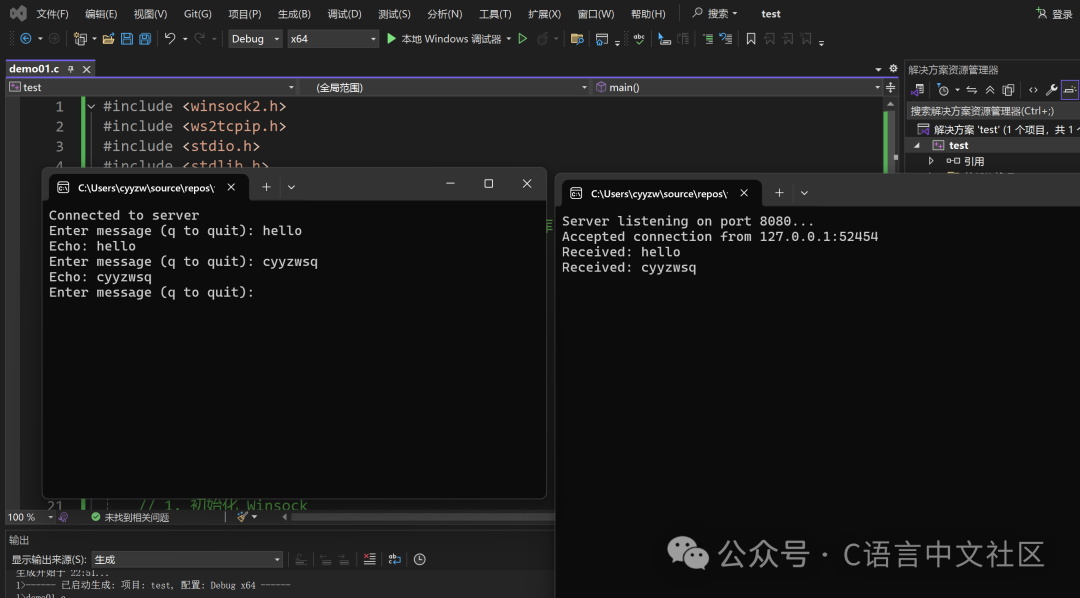
Windows TCP Echo Server and Client
Server Code (tcp_server_win.c):
#include <winsock2.h>
#include <ws2tcpip.h>
#include <stdio.h>
#include <stdlib.h>
#include <string.h>

#pragma comment(lib, "ws2_32.lib")  // Link winsock library

#define PORT 8080
#define BUF_SIZE 1024

int main() {
    WSADATA wsaData;
    SOCKET listenSocket = INVALID_SOCKET;
    SOCKET clientSocket = INVALID_SOCKET;
    struct sockaddr_in serverAddr, clientAddr;
    char recvBuf[BUF_SIZE];
    int iResult;
    int clientAddrLen = sizeof(clientAddr);

    // 1. Initialize Winsock
    iResult = WSAStartup(MAKEWORD(2, 2), &wsaData);
    if (iResult != 0) {
        printf("WSAStartup failed: %d\n", iResult);
        return 1;
    }

    // 2. Create listening socket
    listenSocket = socket(AF_INET, SOCK_STREAM, IPPROTO_TCP);
    if (listenSocket == INVALID_SOCKET) {
        printf("socket failed: %d\n", WSAGetLastError());
        WSACleanup();
        return 1;
    }

    // 3. Configure server address
    memset(&serverAddr, 0, sizeof(serverAddr));
    serverAddr.sin_family = AF_INET;
    serverAddr.sin_addr.s_addr = INADDR_ANY;
    serverAddr.sin_port = htons(PORT);

    // 4. Bind socket
    iResult = bind(listenSocket, (struct sockaddr*)&serverAddr, sizeof(serverAddr));
    if (iResult == SOCKET_ERROR) {
        printf("bind failed: %d\n", WSAGetLastError());
        closesocket(listenSocket);
        WSACleanup();
        return 1;
    }

    // 5. Listen for connections
    iResult = listen(listenSocket, 5);
    if (iResult == SOCKET_ERROR) {
        printf("listen failed: %d\n", WSAGetLastError());
        closesocket(listenSocket);
        WSACleanup();
        return 1;
    }

    printf("Server listening on port %d...\n", PORT);

    // 6. Accept client connection
    clientSocket = accept(listenSocket, (struct sockaddr*)&clientAddr, &clientAddrLen);
    if (clientSocket == INVALID_SOCKET) {
        printf("accept failed: %d\n", WSAGetLastError());
        closesocket(listenSocket);
        WSACleanup();
        return 1;
    }

    // Print client information
    char client_ip[INET_ADDRSTRLEN];
    inet_ntop(AF_INET, &clientAddr.sin_addr, client_ip, INET_ADDRSTRLEN);
    printf("Accepted connection from %s:%d\n", client_ip, ntohs(clientAddr.sin_port));

    // 7. Receive and echo data
    while (1) {
        iResult = recv(clientSocket, recvBuf, BUF_SIZE - 1, 0);
        if (iResult > 0) {
            recvBuf[iResult] = '\0';
            printf("Received: %s", recvBuf);
            iResult = send(clientSocket, recvBuf, iResult, 0);
            if (iResult == SOCKET_ERROR) {
                printf("send failed: %d\n", WSAGetLastError());
                break;
            }
        } else if (iResult == 0) {
            printf("Connection closed\n");
            break;
        } else {
            printf("recv failed: %d\n", WSAGetLastError());
            break;
        }
    }

    // 8. Clean up resources
    closesocket(clientSocket);
    closesocket(listenSocket);
    WSACleanup();

    return 0;
}
Client Code (tcp_client_win.c):
#include <winsock2.h>
#include <ws2tcpip.h>
#include <stdio.h>
#include <stdlib.h>
#include <string.h>

#pragma comment(lib, "ws2_32.lib")  // Link winsock library

#define PORT 8080
#define BUF_SIZE 1024

int main() {
    WSADATA wsaData;
    SOCKET connectSocket = INVALID_SOCKET;
    struct sockaddr_in serverAddr;
    char sendBuf[BUF_SIZE];
    char recvBuf[BUF_SIZE];
    int iResult;

    // 1. Initialize Winsock
    iResult = WSAStartup(MAKEWORD(2, 2), &wsaData);
    if (iResult != 0) {
        printf("WSAStartup failed: %d\n", iResult);
        return 1;
    }

    // 2. Create socket
    connectSocket = socket(AF_INET, SOCK_STREAM, IPPROTO_TCP);
    if (connectSocket == INVALID_SOCKET) {
        printf("socket failed: %d\n", WSAGetLastError());
        WSACleanup();
        return 1;
    }

    // 3. Configure server address
    memset(&serverAddr, 0, sizeof(serverAddr));
    serverAddr.sin_family = AF_INET;
    serverAddr.sin_port = htons(PORT);
    inet_pton(AF_INET, "127.0.0.1", &serverAddr.sin_addr);

    // 4. Connect to server
    iResult = connect(connectSocket, (struct sockaddr*)&serverAddr, sizeof(serverAddr));
    if (iResult == SOCKET_ERROR) {
        printf("connect failed: %d\n", WSAGetLastError());
        closesocket(connectSocket);
        WSACleanup();
        return 1;
    }

    printf("Connected to server\n");

    // 5. Send and receive data
    while (1) {
        printf("Enter message (q to quit): ");
        fgets(sendBuf, BUF_SIZE, stdin);
        if (sendBuf[0] == 'q' && (sendBuf[1] == '\n' || sendBuf[1] == '\0'))
            break;

        iResult = send(connectSocket, sendBuf, strlen(sendBuf), 0);
        if (iResult == SOCKET_ERROR) {
            printf("send failed: %d\n", WSAGetLastError());
            break;
        }

        iResult = recv(connectSocket, recvBuf, BUF_SIZE - 1, 0);
        if (iResult > 0) {
            recvBuf[iResult] = '\0';
            printf("Echo: %s", recvBuf);
        } else if (iResult == 0) {
            printf("Connection closed by server\n");
            break;
        } else {
            printf("recv failed: %d\n", WSAGetLastError());
            break;
        }
    }

    // 6. Clean up resources
    closesocket(connectSocket);
    WSACleanup();

    return 0;
}
Windows UDP Echo Server and Client
Server Code (udp_server_win.c):
#include <winsock2.h>
#include <ws2tcpip.h>
#include <stdio.h>
#include <stdlib.h>
#include <string.h>

#pragma comment(lib, "ws2_32.lib")  // Link winsock library

#define PORT 8080
#define BUF_SIZE 1024

int main() {
    WSADATA wsaData;
    SOCKET sock = INVALID_SOCKET;
    struct sockaddr_in serverAddr, clientAddr;
    char recvBuf[BUF_SIZE];
    int iResult;
    int clientAddrLen = sizeof(clientAddr);

    // 1. Initialize Winsock
    iResult = WSAStartup(MAKEWORD(2, 2), &wsaData);
    if (iResult != 0) {
        printf("WSAStartup failed: %d\n", iResult);
        return 1;
    }

    // 2. Create socket
    sock = socket(AF_INET, SOCK_DGRAM, IPPROTO_UDP);
    if (sock == INVALID_SOCKET) {
        printf("socket failed: %d\n", WSAGetLastError());
        WSACleanup();
        return 1;
    }

    // 3. Configure server address
    memset(&serverAddr, 0, sizeof(serverAddr));
    serverAddr.sin_family = AF_INET;
    serverAddr.sin_addr.s_addr = INADDR_ANY;
    serverAddr.sin_port = htons(PORT);

    // 4. Bind socket
    iResult = bind(sock, (struct sockaddr*)&serverAddr, sizeof(serverAddr));
    if (iResult == SOCKET_ERROR) {
        printf("bind failed: %d\n", WSAGetLastError());
        closesocket(sock);
        WSACleanup();
        return 1;
    }

    printf("UDP server listening on port %d...\n", PORT);

    // 5. Receive and echo data
    while (1) {
        iResult = recvfrom(sock, recvBuf, BUF_SIZE - 1, 0,
                          (struct sockaddr*)&clientAddr, &clientAddrLen);
        if (iResult > 0) {
            recvBuf[iResult] = '\0';

            // Print client information
            char client_ip[INET_ADDRSTRLEN];
            inet_ntop(AF_INET, &clientAddr.sin_addr, client_ip, INET_ADDRSTRLEN);
            printf("Received from %s:%d: %s",
                   client_ip, ntohs(clientAddr.sin_port), recvBuf);

            // Echo data
            iResult = sendto(sock, recvBuf, iResult, 0,
                            (struct sockaddr*)&clientAddr, clientAddrLen);
            if (iResult == SOCKET_ERROR) {
                printf("sendto failed: %d\n", WSAGetLastError());
            }
        } else {
            printf("recvfrom failed: %d\n", WSAGetLastError());
        }
    }

    // 6. Clean up resources
    closesocket(sock);
    WSACleanup();

    return 0;
}
Client Code (udp_client_win.c):
#include <winsock2.h>
#include <ws2tcpip.h>
#include <stdio.h>
#include <stdlib.h>
#include <string.h>

#pragma comment(lib, "ws2_32.lib")  // Link winsock library

#define PORT 8080
#define BUF_SIZE 1024

int main() {
    WSADATA wsaData;
    SOCKET sock = INVALID_SOCKET;
    struct sockaddr_in serverAddr;
    char sendBuf[BUF_SIZE];
    char recvBuf[BUF_SIZE];
    int iResult;
    int serverAddrLen = sizeof(serverAddr);

    // 1. Initialize Winsock
    iResult = WSAStartup(MAKEWORD(2, 2), &wsaData);
    if (iResult != 0) {
        printf("WSAStartup failed: %d\n", iResult);
        return 1;
    }

    // 2. Create socket
    sock = socket(AF_INET, SOCK_DGRAM, IPPROTO_UDP);
    if (sock == INVALID_SOCKET) {
        printf("socket failed: %d\n", WSAGetLastError());
        WSACleanup();
        return 1;
    }

    // 3. Configure server address
    memset(&serverAddr, 0, sizeof(serverAddr));
    serverAddr.sin_family = AF_INET;
    serverAddr.sin_port = htons(PORT);
    inet_pton(AF_INET, "127.0.0.1", &serverAddr.sin_addr);

    printf("UDP client ready\n");

    // 4. Send and receive data
    while (1) {
        printf("Enter message (q to quit): ");
        fgets(sendBuf, BUF_SIZE, stdin);
        if (sendBuf[0] == 'q' && (sendBuf[1] == '\n' || sendBuf[1] == '\0'))
            break;

        // Send data
        iResult = sendto(sock, sendBuf, strlen(sendBuf), 0,
                        (struct sockaddr*)&serverAddr, serverAddrLen);
        if (iResult == SOCKET_ERROR) {
            printf("sendto failed: %d\n", WSAGetLastError());
            continue;
        }

        // Receive response
        iResult = recvfrom(sock, recvBuf, BUF_SIZE - 1, 0, NULL, NULL);
        if (iResult > 0) {
            recvBuf[iResult] = '\0';
            printf("Echo: %s", recvBuf);
        } else {
            printf("recvfrom failed: %d\n", WSAGetLastError());
        }
    }

    // 5. Clean up resources
    closesocket(sock);
    WSACleanup();

    return 0;
}
Compilation and Running Instructions
-
Compilation Command (using MinGW or Visual Studio command line tools):
# Compile TCP Server gcc tcp_server_win.c -o tcp_server_win -lws2_32 # Compile TCP Client gcc tcp_client_win.c -o tcp_client_win -lws2_32 # Compile UDP Server gcc udp_server_win.c -o udp_server_win -lws2_32 # Compile UDP Client gcc udp_client_win.c -o udp_client_win -lws2_32 -
Running Steps:
- Start the server program (TCP/UDP) first
- Then start the client program (TCP/UDP)
- Input messages in the client, press enter to send, input
<span> q</span>to exit
Notes:
- Ensure the firewall allows the program to access the network
- If the port is occupied, you can modify the
<span> PORT</span>value in the code - Windows line endings are
<span> \r\n</span>, which may affect certain application scenarios (e.g., HTTP protocol)
5. Advanced Topics
1. Concurrent Processing (TCP Server)
A single TCP server can only handle one client by default, concurrency can be achieved through the following methods:
- Multi-process:
<span> fork()</span>child processes handle new connections (the parent process continues<span> accept</span>). - Multi-threading:
<span> pthread_create()</span>creates threads to handle connections. - IO Multiplexing:
<span> select()</span>/<span> poll()</span>/<span> epoll()</span>(Linux) monitors multiple sockets simultaneously, efficiently handling high concurrency.
2. IO Multiplexing (using<span> select()</span><span> as an example)</span>
<span> select()</span> can monitor multiple file descriptors (such as sockets) simultaneously, notifying the program when data is readable/writable:
fd_set readfds;          // Readable file descriptor set
FD_ZERO(&readfds);       // Initialize
FD_SET(listen_fd, &readfds); // Add listening socket
int max_fd = listen_fd;

while (1) {
    fd_set tmp = readfds; // Must reset each time (select modifies the set)
    // Block wait, timeout returns 0
    int activity = select(max_fd + 1, &tmp, NULL, NULL, NULL);
    if (activity == -1) { perror("select"); break; }

    // Check if listening socket has new connections
    if (FD_ISSET(listen_fd, &tmp)) {
        // accept new connection, add to readfds
    }

    // Check if connected sockets have data
    for (int i = 0; i <= max_fd; i++) {
        if (FD_ISSET(i, &tmp) && i != listen_fd) {
            // recv data and process
        }
    }
}
3. Error Handling and Debugging
- All Socket functions must check return values (-1 indicates error), use
<span> perror()</span>to print error messages. - Port occupation:
<span> bind</span>failure may be due to port being occupied, you can check the process and kill it using<span> sudo lsof -i :port_number</span>, or set the<span> SO_REUSEADDR</span>option to allow port reuse:int opt = 1; setsockopt(sock_fd, SOL_SOCKET, SO_REUSEADDR, &opt, sizeof(opt));
6. Conclusion
The core of C language network programming is the Socket interface, which must be mastered:
- The differences between TCP and UDP (connection vs. connectionless, reliable vs. efficient).
- Address structure (
<span> sockaddr_in</span>), byte order conversion (<span> htons</span>etc.), IP conversion (<span> inet_pton</span>). - Parameters and return values of core functions (especially error handling).
Through practical code exercises (such as echo servers), you can quickly master the basics; in-depth study of concurrency and IO multiplexing can handle high-complexity scenarios.
If you have any questions, feel free to communicate in the comments~ See you next time!
‧‧‧‧‧‧‧‧‧‧‧‧‧‧‧‧ END ‧‧‧‧‧‧‧‧‧‧‧‧‧‧‧‧
Follow my WeChat public account, reply "C Language" to receive 300G programming materials for free.
Click "Read the original text" for more sharing, welcome to share, collect, like, and look.