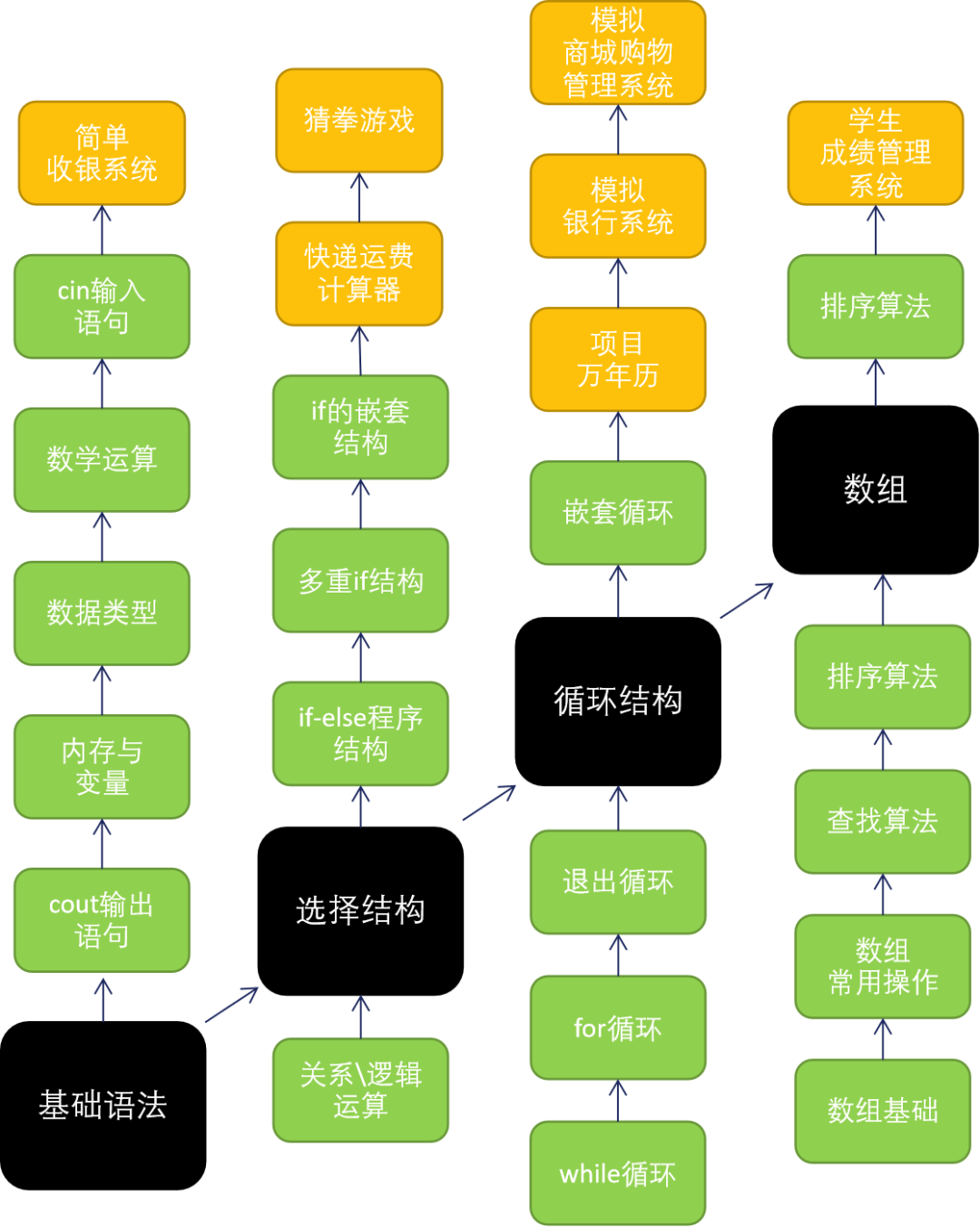
01Course OverviewKnowledge Framework
Applicable Age
Suitable for children in fifth grade and above; fourth graders should learn based on their ability to comprehend.
Course Design Philosophy
1. Focus on fundamentals, practice, and projects.
2. Stage-based practical projects can enhance children’s sense of achievement and interest.
Course Content
1. The black part in the knowledge framework represents the core knowledge, the blue part represents branches, and the yellow part represents results (project outcomes).
2. Projects included in the course: simple cash register system, rock-paper-scissors game, number guessing game, perpetual calendar, simulated banking system, simulated shopping management system, student grade management system.
Course Planning
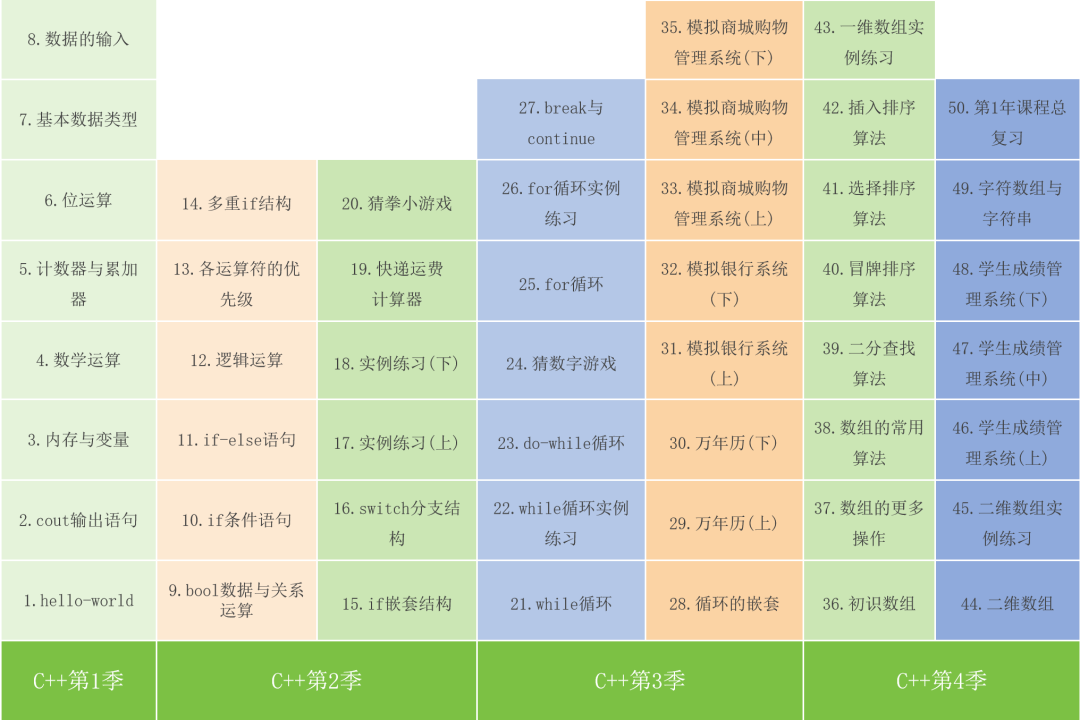
A total of 50 lessons, offline teaching can be planned for one year.
The following link is our video tutorial for reference only.
 Scan to Listen to the Course02Complete Course Directory
 03Course Objectives for Each Lesson
|
Serial Number |
Course Name |
Course Objectives |
|
1 |
Hello World |
1. Understand what programming is and why learn C++? 2. What can you do after completing this course? 3. Software tools preparation: Dev-C++ 4. Write your first program: Hello World |
|
2 |
cout Output Statement |
1. Briefly understand keyboard typing skills 2. Execute continuous output with cout statement 3. Format output using escape characters 4. Program comments and common compilation error prompts |
|
3 |
Memory and Variables |
1. Understand the three main parts of a program 2. Grasp the basic concepts of memory and variables 3. Master the naming rules for program variables 4. Learn to use variables to store data in programs |
|
4 |
Basic Mathematical Operations |
1. Basic mathematical operations 2. Compound operations 3. setw() to set field width |
|
5 |
Counters and Accumulators |
1. Design a counter program 2. Variable++ and ++variable 3. Design an accumulator program 4. Supplementary knowledge: constants |
|
6 |
Binary and Bit Operations |
1. Concept of number systems 2. Understand binary numbers 3. Bit operations in binary |
|
7 |
Basic Data Types |
1. Understand ASCII code and data units in computers 2. Common data types and variable types 3. Automatic conversion rules and precautions for data types |
|
8 |
Data Input |
1. Concept of input and output streams 2. Basic process of data input 3. Master the usage of cin statement |
|
9 |
bool Data and Relational Operations |
1. Understand bool type data 2. Learn to use common relational operators 3. Application of relational operators |
|
10 |
if Conditional Statement |
1. Selection program structure and its application scenarios 2. Usage of if conditional statements 3. Compare with sequential selection structures |
|
11 |
if-else Statement |
1. if-else program structure 2. Program generates random numbers 3. Ternary operator (?:) |
|
12 |
Logical Operations |
1. Usage of logical operations AND, OR, NOT 2. Solving problems with logical operations |
|
13 |
Operator Precedence |
1. Learn to master the precedence of commonly used operators 2. Learn to use () to determine precedence |
|
14 |
Multiple if Structures |
Learn the structure of multiple if statements |
|
15 |
Nested if Structures |
Learn the structure of nested if statements |
|
16 |
Switch Structure |
Switch multiple branch structure |
|
17 |
Instance Practice (Upper) |
Selection structure – instance practice |
|
18 |
Instance Practice (Lower) |
Selection structure – instance practice |
|
19 |
Freight Calculator |
Instance project – express freight calculator |
|
20 |
Rock-Paper-Scissors Game |
Instance project – rock-paper-scissors game |
|
21 |
while Loop |
1. Understand what a loop is? 2. Learn how to use while loops 3. Master the application scenarios of loop programs |
|
22 |
While Instance Practice |
1. Understand infinite loops? 2. Master the usage of while loops through instance practice |
|
23 |
do-while Loop |
1. Structure of do-while loops 2. Instance practice of do-while loops |
|
24 |
Number Guessing Game |
Design of the number guessing game program |
|
25 |
for Loop |
1. Learn the method of for loops 2. Master the application scenarios of for loops and while loops |
|
26 |
for Loop Instance Practice |
1. for loop instance practice |
|
27 |
break and continue |
1. How to use break 2. Learn how to use continue statements |
|
28 |
Nested Loops |
1. Understand the execution flow of nested loops 2. Learn to solve practical problems using nested loops |
|
29 |
Perpetual Calendar (Upper) |
Users can input any year and month, and the system will automatically print a calendar for that month, similar to the Windows system calendar. |
|
30 |
Perpetual Calendar (Lower) |
Users can input any year and month, and the system will automatically print a calendar for that month, similar to the Windows system calendar. |
|
31 |
Simulated Banking System (Upper) |
1. The bank has issued a card, including card number, password, and balance 2. System functions: deposit, withdrawal, check balance 3. The system will automatically lock after three consecutive failed logins |
|
32 |
Simulated Banking System (Lower) |
1. The bank has issued a card, including card number, password, and balance 2. System functions: deposit, withdrawal, check balance 3. The system will automatically lock after three consecutive failed logins |
|
33 |
Simulated Shopping Management System (Upper) |
Design and create a simulated shopping system Menu includes: product selection, merchant activities, personal center. |
|
34 |
Simulated Shopping Management System (Middle) |
Design and create a simulated shopping system Menu includes: product selection, merchant activities, personal center. |
|
35 |
Simulated Shopping Management System (Lower) |
Design and create a simulated shopping system Menu includes: product selection, merchant activities, personal center. |
|
36 |
Introduction to Arrays |
1. Understand arrays and create arrays 2. Access, modify, and traverse array elements 3. Sum and find the maximum value of array elements |
|
37 |
More Operations on Arrays |
1. Usage of functions for summing and finding maximum values in arrays 2. Learn to use the sort function 3. Precautions for using arrays |
|
38 |
Common Algorithms for Arrays |
1. Get the length of an array 2. Array copy algorithm 3. Array search algorithm 4. Array insertion algorithm |
|
39 |
Binary Search Algorithm |
1. Understand the principle of the binary search algorithm 2. Write a binary search algorithm program |
|
40 |
Bubble Sort Algorithm |
1. Concepts related to sorting algorithms 2. Understand the principles and processes of bubble sort 3. Write a bubble sort program |
|
41 |
Selection Sort Algorithm |
1. Understand the selection sort process 2. Proficiently master two selection sort algorithm programs |
|
42 |
Insertion Sort Algorithm |
1. Understand the insertion sort process 2. Proficiently master the insertion sort algorithm program |
|
43 |
One-Dimensional Array Practice |
One-dimensional array – instance practice |
|
44 |
Two-Dimensional Arrays |
1. Understand the application scenarios of two-dimensional arrays 2. Learn to use two-dimensional arrays to solve practical problems |
|
45 |
Two-Dimensional Array Practice |
Instance practice for two-dimensional arrays |
|
46 |
Student Grade Management System (Upper) |
Design a grade management system, including functions: grade entry, grade query, ranking by subject scores, ranking by total score |
|
47 |
Student Grade Management System (Middle) |
Design a grade management system, including functions: grade entry, grade query, ranking by subject scores, ranking by total score |
|
48 |
Student Grade Management System (Lower) |
Design a student grade management system, including functions: grade entry, grade query, ranking by subject scores, ranking by total score |
|
49 |
Character Array and Strings |
1. Definition and initialization of character arrays 2. Differences between character arrays and strings 3. Differences between characters and strings 4. Common methods for strings |
|
50 |
Course Summary |
Overall review of the first year’s course |
The complete set of resources included in the course are: PPT materials, source code files, carefully recorded videos, and all resources of this course will be available upon collaboration.
How to collaborate on the course? —> Learn about course collaboration details.